 NexCheck-筛号平台
Suppose you have a merged list: part from an event scan, part from a website form, and part from an old CRM export. The numbers come from several countries like Brazil, Mexico, and Argentina. Some have a +, some have a local leading 0, and the same person might appear twice. Now you need to pick a WhatsApp screening tool to find out which numbers have WhatsApp enabled and which are no longer in use.
Directly comparing feature lists across providers can be overwhelming. Judging by the following five questions in order will be faster:
- Can it correctly handle the country and number formats in your list?
- Are the fields it can check the ones you will actually use later? Are the meanings and boundaries of the fields clearly explained?
- How are results delivered: is web export enough, or do you need an API and Webhook to write back to your CRM?
- How is billing calculated? How will your list data be handled?
- Run a small sample and see if the results match what you already know.
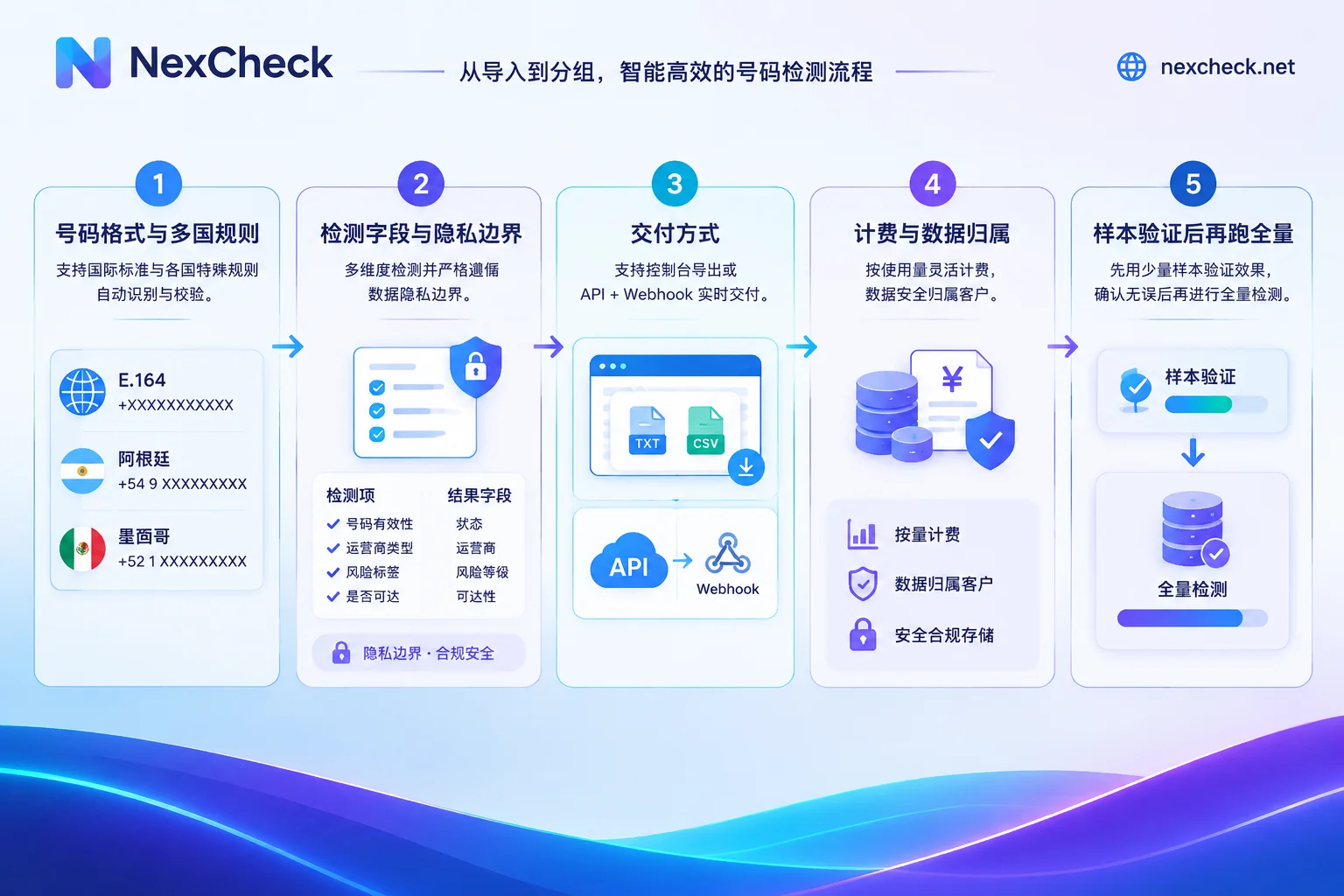
1. First Look at List Format and Multi-Country Number Rules
Inaccurate screening results often stem from issues before submission. WhatsApp recognizes numbers by international format, based on ITU-T E.164: country code plus national number, up to 15 digits total, and local trunk prefix 0 should be removed. For example, a local mobile number starting with 0 should have that 0 removed and the country code added when converting to international format.
Some countries have special formats. According to WhatsApp Help Center:
- Argentina (+54): Insert 9 between the country code and area code, and remove the 15 before the mobile number.
- Mexico (+52): In international format, keep the 1 after the country code.
So when choosing a tool, first check these points:
- Can it accept mixed formats? Some tools automatically normalize to E.164 according to country rules, while others require you to clean up first. Both can work, but you need to know how much preprocessing you'll do.
- Deduplication after normalization. The same number with spaces, +, or 0 in different forms can only be identified as duplicate after format normalization. With per-item billing, duplicate numbers are wasted money.
- How to run multi-country lists. When the list covers multiple countries, splitting by country makes troubleshooting easier: if one country has a high failure rate, you can go back and check that country's format rules.
For details on format conversion, see WhatsApp E.164 Format Conversion Rules.
2. Next, See What Fields Can Be Checked and Where the Boundaries Are
Different tools and platforms offer different check items. Common WhatsApp-related ones include: whether enabled or registered, recent activity, and whether banned. Some tools also provide basic number checks, such as empty numbers, device type, and high-risk numbers.
Two things to judge here.
Do the fields help you make decisions? If you just want to remove non-enabled numbers, basic enablement check is enough. If you want to segment and follow up with old customers, activity status is more informative. The more items, the more expensive and possibly slower, so choose based on actual use.
Does the tool clearly explain privacy boundaries? WhatsApp allows users to set profile photo, last seen, and About to "My Contacts" or "Nobody," and platform contact sync has encryption protection. Therefore, when such information is unavailable or blank, it's often due to the other party's privacy settings, not a problem with the number. Legitimate tools check platform-verifiable status attributes. If a tool claims to see any user's private data, be cautious: it may be non-compliant, and the results cannot be verified.
The "active" field also needs attention. WhatsApp does not publicly disclose how activity is determined, so different tools may define "active" differently. Read the field definitions in the documentation first, and don't directly compare "activity rates" between tools. For how to interpret each field, see How to Read WhatsApp Screening Results.
3. Delivery Method: Where the List Comes From and Where Results Go
If the list is one-time or occasional, such as post-event cleanup or quarterly cleaning: uploading txt or csv via console, exporting results grouped by valid and invalid, then importing back to spreadsheet or CRM is usually enough. Ensure the export file retains the original number column for easy reconciliation.
If the list is continuously generated, such as form registrations or daily new CRM contacts: you need to submit via REST API and receive results via Webhook. Batch checks are often asynchronous; after submission, wait for results to be pushed back, then write back to contact fields by number. When selecting, check if the API documentation clearly describes task status, failure retries, and callback data format. For integration process, see How to Integrate WhatsApp Screening API.
4. Billing and Data Ownership Must Be Clarified
- Billing: With per-item billing, check if the price list separates charges by check item, and whether basic enablement check and additional fields are billed separately. Also ask whether format errors and undetectable numbers are charged.
- Data: The list is your own data. Confirm that the tool provider only processes it within the scope of the detection task, does not retain it, and does not use it for other purposes. On the other hand, you are responsible for the legality of the list source and use; no tool can guarantee that for you.
5. Run a Sample Before Full Submission
Don't submit the full list right away. Extract a few hundred entries covering each country, preferably including some numbers you know are enabled and some you know are invalid. After running, check:
- Are format rules handled correctly, especially for countries with special formats like Argentina and Mexico?
- Do the grouped results match what you already know?
- Can the export file be directly reconciled with original records?
- Do actual charges match expectations?
Once sample results match, run the full list. If many numbers fail, generally check format first, then other steps. For troubleshooting order, see How to Troubleshoot WhatsApp Screening Failures.
Handling This List with NexCheck
Back to the multi-country list from the beginning. NexCheck detects number status in lists by platform. What items can be checked for WhatsApp (platform-available attributes like enablement, activity, ban, etc.) and the unit price for each are listed on the WhatsApp platform page. Check items and prices may change; refer to the page. The platform also provides basic number checks, such as empty numbers, device type, and high-risk numbers.
Lists can be uploaded as txt or csv in the console, with no limit per batch, and results are exported grouped by valid and invalid. To integrate with CRM, submit via REST API, and results are pushed back via Webhook, billed per item. Before splitting the list by country, you can check number formats for each country on the regional pages.




Comments(0)