 NexCheck-筛号平台
If a list runs slowly, don't rush to change providers. In most cases, four things slow down the entire batch: how many detection fields you select, whether you submit synchronously one by one or asynchronously in batches, how dirty the list is before upload, and the API-side concurrency and rate limits. The first three are entirely under your control; the fourth you can only work with, not bypass.
Below is the order of "locate first, then optimize"—you can follow it on your current list.
Start with a small sample to determine which layer is slow
Take 500 to 1,000 records from your list, do a basic cleaning first, then select only the lightest detection field—whether the number is registered and active on WhatsApp—submit once, and record the time from submission to receiving the complete result.
Then use the same sample, select the deep fields you actually want, and run a second time.
The difference between the two runs is the real cost of field depth on this list. If the first run with basic fields is already unreasonably slow, the problem is likely not the detection fields but the submission method or the list itself; continuing to add deep fields will only make it slower. This step costs few records but saves a lot of blind adjustments later.
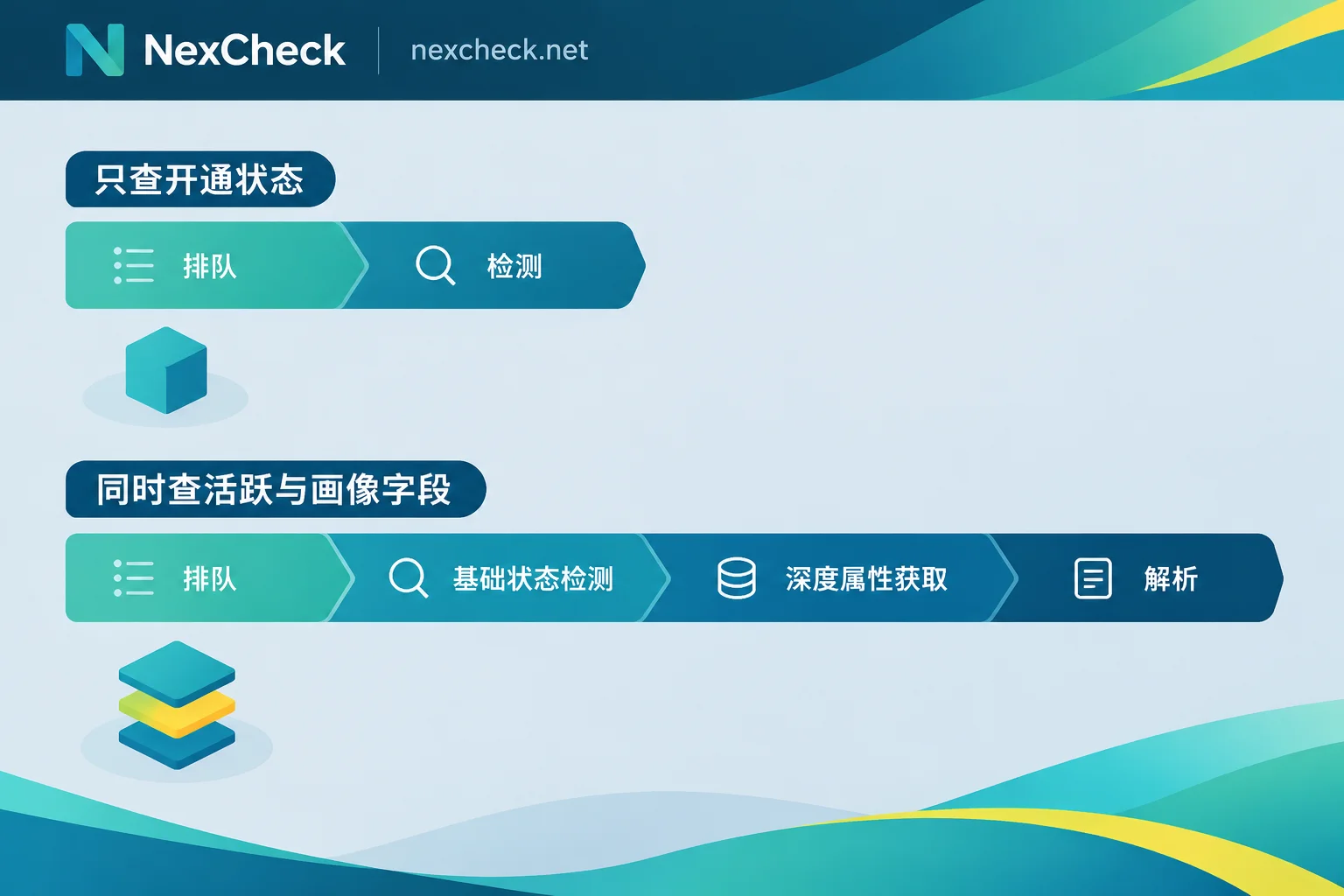
Detection field depth: the most overlooked source of time cost
Checking only whether a number is active is a lightweight status query with the shortest processing path per record. Once you also request avatar and signature status, last active time, or inferred attributes like gender and age range, more data retrieval and parsing steps are involved, and the processing time for the entire batch increases.
So for large lists, running in two rounds is usually faster than selecting everything at once:
- First round: run only activation status on the full list, and remove all inactive numbers as a group;
- Second round: run deep fields only on the valid group.
Deep detection runs on the remaining small portion, so total time is often shorter than a full deep scan, and per-record pricing is easier to control. Conversely, if the purpose of this list is just to determine "is this number on WhatsApp", then don't select activity and profile fields—waiting for fields you don't need is the most uneconomical kind of slowness.
Note that the detectable fields vary across platforms, and the meaning and availability of the same field differ. For what WhatsApp can return, refer to the current list on the platform page; don't apply experience from other platforms. For how to interpret the fields themselves and which can be written back to CRM, see How to Read WhatsApp Number Screening Results.
Submission method: synchronous one-by-one is the biggest hidden loss
Many first integrations are written like this: loop through the list, call the API one by one, wait for the response, then write the next. This feels fine for dozens of records, but with tens of thousands it is completely dragged down by network round trips and connection overhead—the actual time spent on detection may be only a small fraction, with the rest spent on repeated connection setup and waiting.
The more time-efficient approach is batch packaging + asynchronous receiving:
- Console method: upload a txt or csv file directly, submit the whole batch at once, and the task is queued in the background;
- API method: call an asynchronous API to submit the task, disconnect after getting the task ID, and receive results via Webhook when processing is complete.
Another benefit of async is avoiding timeout interruptions. Waiting for a large batch result over a long synchronous connection can easily disconnect midway and trigger a retry—the retry itself is another full wait, and the actual time may be longer than the first attempt. With asynchronous tasks and callbacks, this problem disappears.
If you are integrating detection into your own system, the integration order for submission, polling fallback, and Webhook write-back can be found in How to Integrate the WhatsApp Number Screening API.
Cleaning before upload determines how much useless work the engine does
List quality directly affects throughput. Numbers without country codes, numbers with illegal characters like parentheses, spaces, and hyphens, and a large number of duplicates all cause the detection engine to spend extra effort on preprocessing and even send invalid probes for numbers that are fundamentally invalid, wasting queue capacity.
Do at least these three things before uploading:
- Deduplicate: the same number appearing in different source tables is common; deduplication is pure gain—it shortens the queue and directly reduces per-record billing;
- Normalize format: convert uniformly to E.164 (
+plus country code plus subscriber number, without spaces or separators), complete country codes, and remove leading zeros that should be removed; - Remove obviously impossible records: pick out rows with clearly wrong digit counts, or entire test values or placeholders, and don't send them to detection.
Among these, the format step is most error-prone for several markets with special encoding habits, especially Argentina and Mexico; the rules can be handled according to WhatsApp E.164 Format Conversion Rules.
When it's time to process your current list: on the NexCheck WhatsApp platform page, you can first see the currently supported detection fields and then decide which to select in the first round; lists are uploaded via the console as txt/csv or submitted via REST API, with no limit per batch, and results are exported grouped by valid and invalid; tasks submitted via API receive Webhook callbacks when complete. The list is your own data and is processed only within the task scope; you must ensure compliance of source and purpose yourself.
Concurrency and batch size: adjustable, but with a hard ceiling
API rate limits and anti-abuse throttling are the fundamental reason why single-point concurrency cannot speed up indefinitely. Trying to rush with dozens of threads usually results not in speed but in being rate-limited or interrupted after triggering anti-abuse thresholds, and after retries it becomes slower overall.
A pragmatic approach: treat batch size and concurrency as a pair of parameters, start with conservative values, observe whether concentrated failures or obvious slowdowns occur, then gradually increase, find the position of stable throughput, and fix it there. Running steadily to completion saves more time than rushing and then queuing again.
One boundary to note: Meta has not publicly disclosed the specific rate limit thresholds and real-time anti-automation strategies for contact probing, and different providers have different internal scheduling and throttling methods. So a specific concurrency number circulating online may not hold for another provider; don't copy it as a universal configuration. Similarly, attempting to bypass limits with self-built probing scripts is unstable and brings compliance risks; it is not recommended as a speed-up method.
Multi-country lists: splitting is easier to manage than mixing
When cross-country lists are mixed in one batch, it is hard to tell whether a problem is due to format, region, or detection fields. Submitting in batches by country or region makes the processing order clearer and reconciliation easier when writing back results. The number format rules of different markets and the differences in local mainstream communication platforms can be compared by country on the Regional Solutions page.
Also note: the number ranges of different target countries objectively differ in access latency, but publicly comparable data is lacking. Don't directly attribute a slow country to service quality—first confirm whether the format and detection fields are consistent, then draw conclusions.
Which kinds of "slowness" are actually normal
- First large batch: the first run of hundreds of thousands of records naturally takes time; submitting an asynchronous task and doing something else is more sensible than watching a progress bar;
- Task queuing: queuing during peak submission periods is normal scheduling, not an error;
- Deep field batches: batches with activity and profile attributes are naturally slower than pure status queries—this is the cost of fields, not a fault.
The real thing to watch out for is another situation: normal speed but largely abnormal results, such as an entire list being judged invalid. That is usually a problem in formatting or submission; locating it according to Layered Troubleshooting Order for Number Screening Failures is far more useful than adjusting concurrency.
A reusable processing order
- Deduplicate, convert to E.164, remove obviously invalid rows;
- Split batches by country or region;
- Take a small sample and run basic and deep fields once each to confirm time composition;
- First full round: run only activation status, separate valid and invalid;
- Run required deep fields only on the valid group;
- Submit as asynchronous tasks, receive results via Webhook, and keep a polling fallback;
- Export by group and write back to the system, recording the batch size and concurrency as a starting point for next time.
Following this order, most "screening too slow" problems will disappear between step 1 and step 4. The remaining part truly limited by rate control is fastest when run steadily to completion.




Comments(0)