NexCheck-筛号平台
After submitting a batch of numbers, you find the invalid rate abnormally high, or the entire batch reports parsing errors—don't doubt the detection results first. In most cases, the problem lies in some layer before the numbers enter detection. Based on experience, failures and anomalies concentrate in four layers: file and encoding, number format, the type and account status of the number itself, and the misjudgment of treating "blank fields" as "detection failure." These four layers must be checked in order, because the conclusion of the next layer builds on a clean previous layer—if file encoding is wrong, even correct format rules are meaningless.
Step 1: First See Where Failures Concentrate, Then Decide What to Check
After getting results, don't look entry by entry. First do three grouped statistics:
- Invalid rate grouped by country code. If only numbers from one or two country codes fail en masse, it's almost certainly that the number format rules for that country weren't handled correctly. Jump to Step 3.
- Invalid rate grouped by list source. If numbers from a certain channel collectively have issues, usually the source file's encoding or column structure is problematic. Go to Step 2.
- Digit length distribution of failed entries. Pull out the digit lengths of failed numbers. If they cluster at certain lengths (e.g., all 10 digits, 11 digits), it indicates missing country code or extra local prefix. If lengths are extremely varied, it's likely a delimiter misalignment that cut a column wrong.
If invalid numbers are evenly scattered across all countries and batches with no obvious clustering, it's probably not a technical issue but that the list itself is old or from poor sources—in that case, format fixes won't help; you need to review data collection.
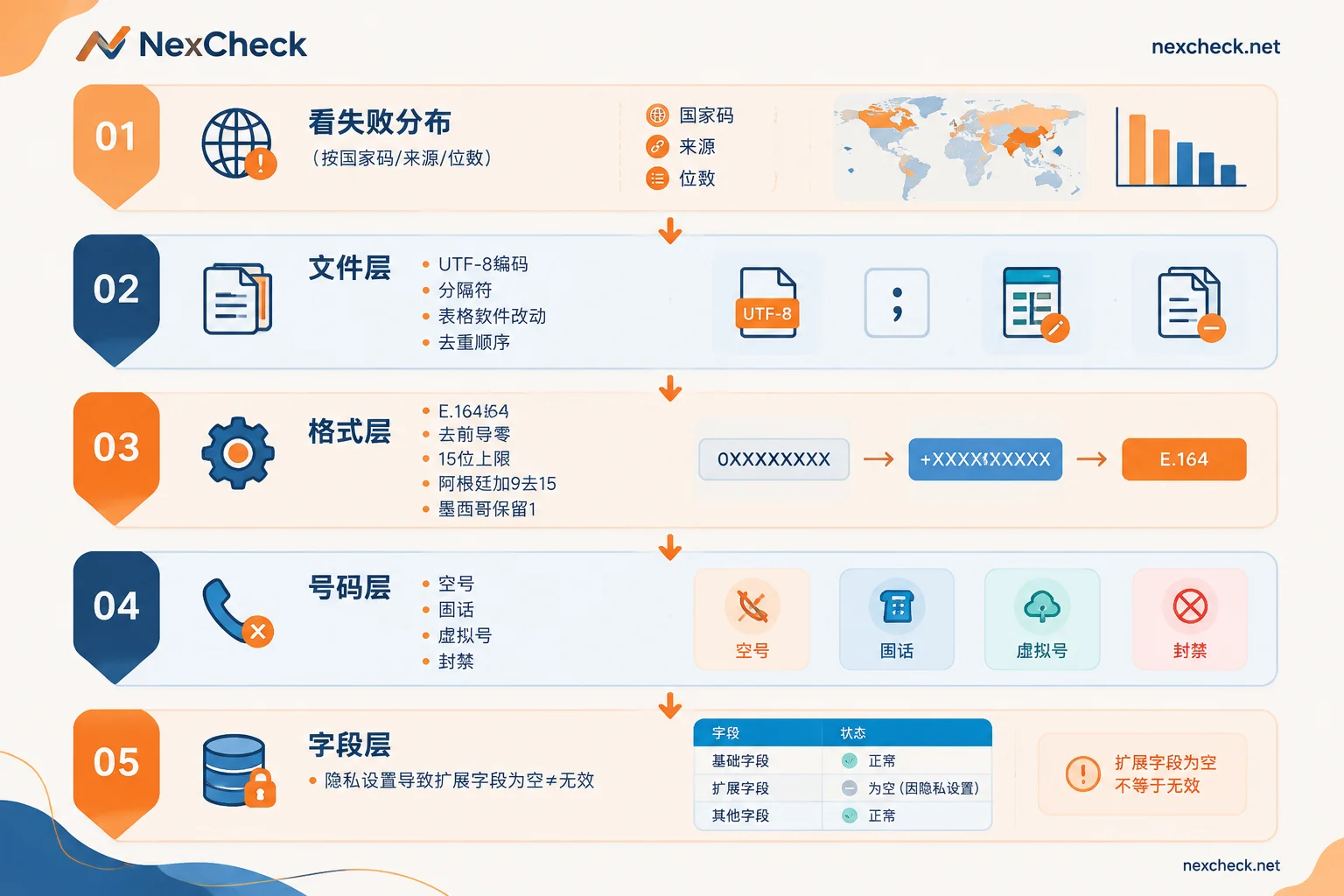
Step 2: File Layer—Encoding, Delimiters, and Numbers Altered by Spreadsheet Software
This layer is characterized by "whole batch errors" or "results completely mismatched."
Encoding. Uploaded txt or csv should be uniformly saved as UTF-8. Non-UTF-8 encoded files easily produce garbled characters during parsing, and number fields with garbled characters are directly judged as unparsable. If the list contains Chinese name columns or Arabic remark columns, encoding issues are more obvious.
Delimiters and column misalignment. In a csv, if a row's remark field contains a comma without quotes, all columns after that shift, and the number column may pick up address or time. Symptoms: individual rows' "numbers" have absurd lengths or contain letters. The check is simple—count all non-digit, non-plus characters in the number column; a normal list should have zero.
Invisible modifications to numbers by spreadsheet software. This is the most easily overlooked: opening a csv in a spreadsheet and saving it can convert long numbers to scientific notation, and leading + and 0 may be eaten as format symbols. The safe practice is to export csv directly from the source system, or force the number column to text when exporting; if you must use spreadsheet software, after processing, spot-check the beginning and end few rows to confirm the numbers are complete digit strings.
Duplicates. The same number appearing across channels is common. Deduplication must be done after standardization—+8613800138000, 0086 13800138000, 13800138000 are the same number, but deduplication tools won't recognize them before standardization. So the order is: clean → standardize → deduplicate → submit.
Step 3: Format Layer—E.164 and Special Rules for a Few Countries
This layer accounts for the largest share of failure causes. The detection system must first locate the country based on the country code to determine if the number exists and is activated on the platform; if it can't locate the country, the result can only be invalid.
WhatsApp's requirement for international numbers is the standard E.164 form: plus sign, country code, local number, with no separators in between. There are three key actions:
1. Remove local leading zeros. Many countries' domestic dialing formats have a leading 0, which must be removed when converting to international format. For example, UK number 07xxx xxxxxx; the correct form is +447xxx xxxxxx. Keeping that 0 will cause parsing failure.
2. Length and characters must comply. E.164 specifies a total length including country code of no more than 15 digits, and no spaces, hyphens, or parentheses. Common formats like (021) 555-1234 and +86-138 0013 8000 in lists must be cleaned to pure digit strings. Those exceeding 15 digits are basically extension or internal numbers concatenated in.
3. Handle a few countries with special conversion rules. These are the worst pitfalls:
- Argentina (+54): Must insert the digit
9between the country code and area code, and remove the domestic prefix15. The converted full number has the structure+54 9 XXX XXX XXXX, totaling 13 digits. Keeping15or missing9will cause valid numbers to be judged invalid. - Mexico (+52): After
+52, you need to keep the digit1.
If in the Step 1 grouped statistics the invalid rate for Argentina or Mexico is abnormally high, basically no need to check anything else—directly reconvert according to these two rules and rerun. For the complete conversion logic of this layer, refer to the per-country handling list in WhatsApp E.164 Format Conversion Rules.
Mixed multi-country lists must be split and run separately. If a list mixes numbers from several countries and many entries lack international country codes, you can't rely on rules to auto-fill—the same 10-digit string belongs to completely different countries. In this case, you can only split the list into multiple files by source country, add country codes according to each country's rules, and submit separately. Don't rush to submit before splitting, otherwise the invalid results you get are worthless.
Step 4: Number Layer—Empty Numbers, Landlines, Virtual Numbers, and Banned Accounts
The format is fine and the country can be located, but the result is still invalid or unavailable—then the problem is the number itself. There are four common types:
Empty and suspended numbers. Numbers already recycled or deactivated by the carrier—this is the most basic type, a telecom-level status unrelated to the platform.
Landlines. Personal WhatsApp was originally designed for mobile numbers and does not support regular landline registration (WhatsApp Business allows receiving verification codes via voice call on landlines, which is another path). If a list includes company switchboards or store landlines, these showing as not activated is a normal result, not a detection error.
Some virtual numbers and VoIP ranges. Virtual ranges that cannot receive verification codes have very low registration rates; detection results are usually not activated.
Banned accounts. Numbers that were once activated but banned by the platform due to violations, mass reports, or high-frequency abuse will show that they can no longer use WhatsApp. Such numbers are marked as banned or unavailable in deep detection—this is different from "never registered" and has different implications for list quality: a ban means the number was once an active user but now cannot be treated as a valid account.
There is also a category of accounts deactivated by the system due to long-term inactivity. The official specific silent period threshold is not public, so for the question "how long unused before recycling," don't infer list freshness based on some rumored number of days—rely on the actual status returned by detection.
Step 5: Don't Treat "Blank Fields" as Detection Failure
This layer is not a real failure, but it's frequently reported as one.
Typical scenario: Detection shows the number is activated, but avatar, last seen, and signature fields are all blank, so the team thinks detection "didn't find anything" and the results are unreliable. The actual reason is the user's own privacy settings—WhatsApp allows setting avatar, last seen, and about/signature to "Everyone," "My Contacts," "My Contacts Except," or "Nobody." When users restrict these to contacts only, queries from non-friends naturally can't get this extended information, but this does not affect the conclusion that "the number is activated on WhatsApp."
So the judgment logic must be separated:
- Activation status: This is the main field, used to decide if the number goes into the valid group.
- Extended fields like avatar, last seen, signature: These are bonus information available if possible. Being blank only means the user set privacy restrictions; it cannot be used to infer the account is invalid, let alone filter lists by "has avatar or not."
Write this rule into your team's result interpretation document to save a lot of unnecessary rechecks. For the specific meaning of each field and write-back suggestions, see How to Read WhatsApp Number Screening Results.
Before Rerunning, Do These Things Well
After troubleshooting the causes and preparing to resubmit, a few habits can save trouble:
- Keep the original number column. Put the cleaned standard number in a separate column, one-to-one with the original value. After results come back, write back to CRM using original values to avoid deviations from standardization polluting the main database.
- Test with a small sample first. Sample 100–200 entries per country and submit once to confirm format rules are handled correctly and the invalid rate falls within a reasonable range, then submit the full batch. This is much more cost-effective than running the whole batch and finding rule errors.
- Create separate tasks by country. One batch per country makes result statistics and subsequent rule adjustments clear, and issues affect only one batch.
- Do basic number detection first, then platform detection. If the list source is unknown or old, first run basic checks like empty numbers, device type, and high-risk ranges to remove obvious dead numbers, then send to platform status detection to save money. This layered approach is detailed further in Three-Layer Processing Order for International Number Detection.
Handle the List in Hand
For concrete operations: after cleaning and standardization, the list can be uploaded directly to the NexCheck console as txt or csv, or submitted via REST API with Webhook pushing results back to your system, and results exported grouped by valid and invalid, saving manual sorting.
Two things are worth confirming first to avoid most of the misjudgments above: first, what fields the platform can return—whether activated, registration time, active, banned, etc., vary by platform and are subject to change; refer to the current list on the WhatsApp platform page. Second, the number format for countries involved—if it's a cross-border list, first confirm each country's area code rules and splitting method according to National Number Formats and Major Platforms, then decide how many batches to run.
One final reminder: The list is your own data; you must ensure the legality of its source and use. This is especially important for cross-border lists—confirm with legal or compliance in advance.
Fix the troubleshooting order—first look at failure distribution, then file encoding, then format rules, and finally the numbers themselves and field meanings—most "screening failures" will be resolved in the first two layers. The remaining ones are list quality issues, which are a different matter.