NexCheck-筛号平台
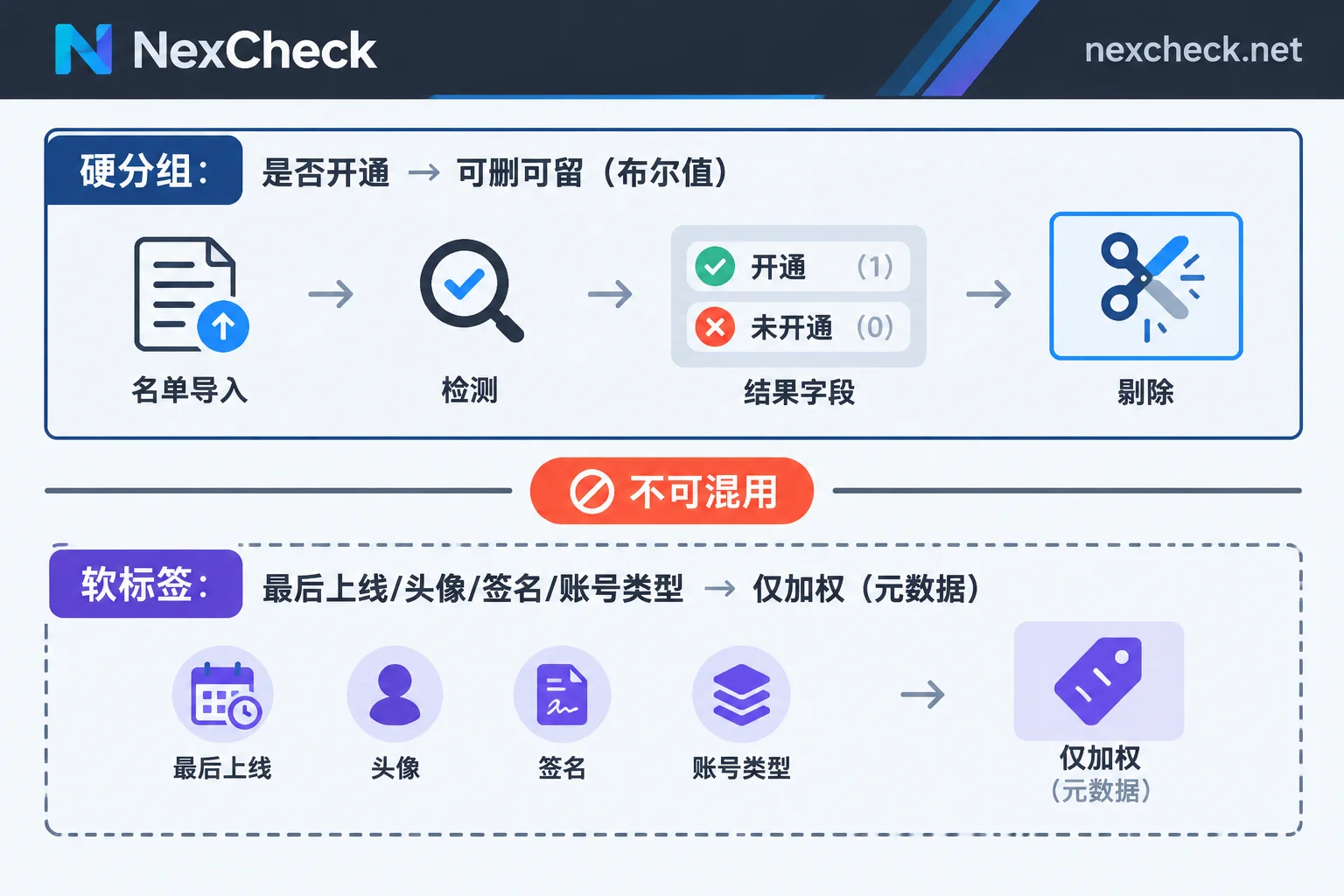
When a WhatsApp number check result is in front of you, remember one thing: In the entire table, the only field that can be used for the action of 'deletion' is 'whether the number is registered on WhatsApp'. The rest—last seen time, profile photo, about text, account type—are all controlled by the user's own privacy settings and can only serve as weighted tags, not as removal criteria. Many list quality incidents happen because 'cannot find' is mistaken for 'does not exist'.
Below, in the order you actually open the file: first how to layer, then what each field means and where its boundaries are, followed by the processing order and the design of write-back fields.
Step 1: Divide the results into two layers: hard grouping and soft tags
Hard grouping has only one dimension—whether the number is registered on WhatsApp. Most platforms return results directly grouped as 'valid/invalid' or export them to separate files, with field names varying by platform (may be called status, registered, is_valid, or the Chinese 'activated/not activated'). Refer to your platform's documentation, don't guess from the name. This layer is boolean and can be directly applied to the database.
Soft tags are ancillary attributes such as activity, profile completeness, and account type. They describe 'how much information this number has made public to strangers', not 'whether anyone is using this number'. This layer only accumulates as metadata for customer profiles and does not participate in number deletion.
Separate these two layers, and all subsequent judgments will not be confused.
Each field: meaning and boundaries
Whether registered (Registered / Status)
A 'not registered' return usually means this phone number has never activated WhatsApp, or the account has been completely deactivated. These numbers can be removed from working lists or archived separately to prevent subsequent systems from repeatedly making invalid calls to them.
Note that this status itself has a shelf life. Numbers can be recycled by carriers and reassigned, and users may newly register or cancel accounts, so 'registered' is a fact at the moment of the check, not a permanent attribute. Lists used periodically need to record the check time.
Last seen / Online status
This is the field most easily misread. In WhatsApp's privacy settings, 'Last seen and online' can be set by the user to be visible to Everyone, My Contacts, My Contacts Except..., or Nobody. If the user chooses any of the latter three, non-contacts cannot obtain this value.
In addition, not seeing the other party's last seen may be due to other reasons, such as both parties not having each other saved as contacts, or account-side visibility restrictions. In other words, a blank value has multiple causes but one result.
Correct usage: A recent timestamp → positive weight for 'recently active'; blank → record as 'unknown', draw no conclusions, and certainly do not remove based on it. If you write blank as 'inactive' into CRM, you are marking a batch of real users who value privacy as junk data.
Profile photo and About
Also governed by privacy rules, can be set to contacts-only or completely hidden. Numbers that return a profile photo URL or About text have high public exposure, usually real personal or business accounts, suitable for weighting when prioritizing.
The reverse is not true: no profile photo only means this account has hidden its info from strangers. In some markets and demographics, it is common not to expose profile photos to non-contacts. If your list is concentrated in such regions, sorting by 'no photo = low quality' will cause systematic misjudgment.
Account type (personal / WhatsApp Business)
Some check results can distinguish ordinary personal accounts from WhatsApp Business accounts. Business accounts often have public business profiles, categories, or service descriptions. In B2B scenarios, you can directly tag them as 'organization/merchant' in CRM for tiered management. For detailed processing, see How to do WhatsApp Business number detection.
The check items available vary by platform and may change. For the specific list and pricing, refer to the corresponding platform page.
If the invalid rate is absurdly high, look back at the list first
When the invalid rate is clearly abnormal, your first reaction should not be to doubt the check result, but to examine the number format before submission. The three most common issues: numbers not unified to E.164 international format, retaining local dialing leading zeros or national prefixes, and historical special codes like Argentina's 9 or Mexico's 1. Submitting these numbers and getting 'not registered' is normal—they were never recognizable numbers in the first place.
For specific format cleaning rules, see WhatsApp E.164 format conversion rules. For splitting multi-country mixed lists, see Three-layer processing order for international number detection.
Complete processing order
- Preprocessing: Unify to E.164, deduplicate, split by country code. Run multi-country lists separately so problems can be traced to specific markets.
- Basic detection (as needed): Attributes of the number itself, such as empty number, device type, high-risk number, to first filter out numbers that clearly should not enter platform detection.
- Platform detection: Submit for WhatsApp registration status and available attributes, retrieve results grouped by valid and invalid.
- Routing write-back: Write hard grouping to boolean fields, soft tags to metadata.
When it comes time to actually process the list at hand, NexCheck supports uploading txt or csv directly in the console, exporting grouped by valid and invalid, and also submitting via REST API with Webhook pushback of results; priced per item. For specific check items and unit prices, see the WhatsApp platform page. If the list spans multiple countries, first go to the regional pages to confirm number formats and local mainstream platforms, then decide which platform to screen this batch on.
Web console or API
The criterion is frequency, not list size:
- One-time, temporary lists → Console upload, export table, manual receipt of results is most convenient.
- Periodic runs, results need to be written back to systems → Use API submission + Webhook callback to eliminate manual handling and polling overhead. For integration details, see How to integrate WhatsApp number screening API. For trade-offs on callback methods, see Polling vs webhook callback for number detection.
How to design CRM write-back fields
It is recommended to have at least three types of fields, with the key being to distinguish 'confirmed no' from 'unknown':
whatsapp_registered: Boolean, allow null to indicate not checked. Do not use false to also mean 'not found'.whatsapp_checked_at: Check timestamp. Without this field, you cannot determine whether a record should be rerun.- Attribute fields (last seen, has profile photo, account type): When missing, always store null, not false or 0. Otherwise, half a year later no one will remember whether that 0 meant 'definitely not' or 'not obtained'.
A few conclusions not to step on
- No profile photo ≠ empty number, just hidden from strangers.
- No last seen time ≠ zombie number, mostly privacy settings.
- Registered ≠ the person recorded in the list is still using this number; numbers can change hands and be reassigned.
- Any status has a shelf life; long-term lists need a recheck cycle.
Distinguishing 'cannot infer' from 'confirmed no' is the most valuable discipline in this result. Use soft tags for prioritization, hard grouping for data cleaning, and do not mix the two.