 NexCheck-筛号平台
Suppose you have a contact list exported from CRM, tens of thousands of rows, with phone numbers written in various ways: some are +62 812-3456-7890, some are 0812 3456 7890, and some are just a string of digits with no country identifiable. The business team wants to know which numbers have Telegram accounts and which are still active.
It is recommended to process in this order:
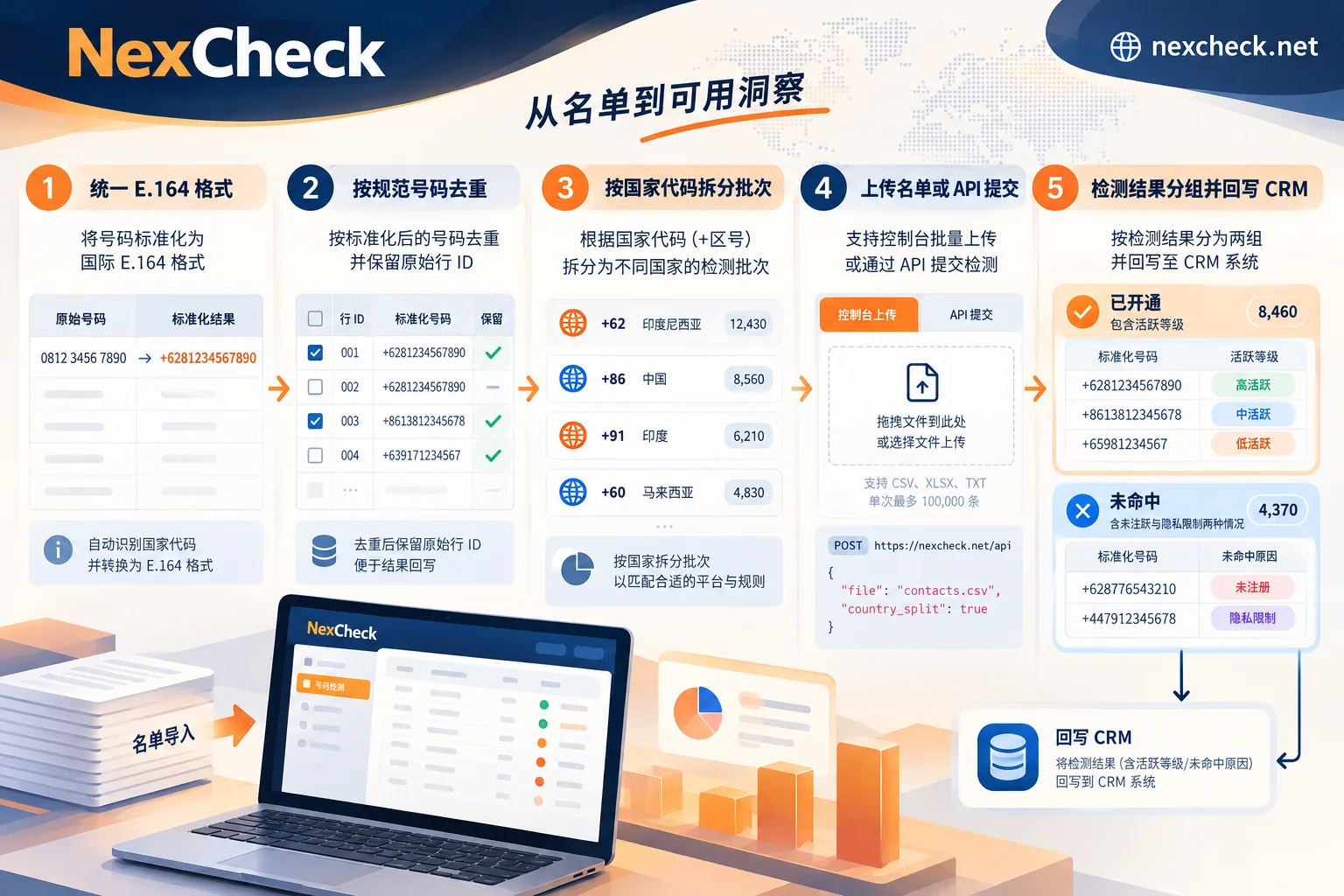
- Normalize phone numbers to E.164 international format, and put numbers whose country cannot be determined into a separate group;
- Deduplicate by the normalized number, while keeping the original row ID for later write-back;
- Split into batches by country;
- Select Telegram detection items and submit, either by uploading a file in the console or via API;
- When reading results, distinguish "not found" from "not registered", group by activity level, and write back to CRM.
Below, we explain step by step what to pay attention to at each step, and in which cases the result fields cannot be directly used as conclusions.
Step 1: Normalize to E.164 Format
E.164 is the phone number format defined by the International Telecommunication Union, structured as "country code + national number", usually written as pure digits starting with +, for example +6281234567890. The detection system matches accounts based on the complete international number. If the format is not unified, the same person may be treated as several numbers, or the entire row may fail to match.
When cleaning, focus on these types of issues:
- Extraneous characters: Remove all spaces, hyphens, parentheses, and periods.
- Local leading zeros: Many countries use a leading
0in local notation, which usually needs to be removed when converting to international format. For example, Indonesia's0812…should be written as+62812…. The rules for leading zeros and number length differ by country; do not apply one rule to all countries. - Numbers missing country information: If the number itself does not have a country code and the CRM has no country or region field, do not guess a default country to fill in. A wrongly filled number might exactly correspond to someone else's account, and the result is harder to detect than a direct error. Put such numbers in a separate group and process them after the source information is completed.
- Obvious format errors: Numbers with incorrect length, containing letters, or consisting of all the same digit should be removed at this step.
For multi-country lists, you can look up format rules by country. For number lengths and mainstream platforms by country, refer to the regional solution pages.
Step 2: Deduplicate by Normalized Number, Keep Original Row IDs
Deduplication should be done after format normalization. +62 812-3456-7890 and 0812 3456 7890 are two rows in the original data, but after conversion they are actually the same number.
When deduplicating, do not simply delete duplicate rows. It is recommended to do this:
- Add a "normalized number" column; all detection uses this column;
- Keep the original row IDs; one normalized number can correspond to multiple original rows;
- After detection is complete, map the results back to all corresponding original rows by normalized number.
This way each number only needs to be detected once, and every record in the CRM can get the result. When pricing is per item, deduplication can also directly reduce costs.
Step 3: Split Batches by Country, Then Decide Whether to Run Basic Detection First
For multi-country lists, it is recommended to split into several batches by country code. This has two benefits: when problems occur, it is easier to pinpoint the specific country's format rules; and different markets have very different registration rates, so separate statistics are needed to see clearly.
If the list is old or from mixed sources, you can first run a round of basic number detection to filter out invalid numbers, high-risk numbers, etc., and then perform Telegram detection on the remaining numbers. If the list is relatively new and from a clear source, this step can be skipped.
Step 4: Select Detection Items and Submit
What Fields Can Be Checked
The core of Telegram detection is registration status, that is, whether this number has a corresponding Telegram account. On top of that, attributes such as activity may also be obtained. Different platforms have different available fields. For Telegram's currently supported detection items and unit prices, refer to the Telegram platform page. The field list may change, so it is not recommended to hard-code based on old documentation.
You can refer to these scenarios when selecting detection items:
- If you only need to know whether this person can be found on Telegram: registration detection is enough;
- If you need to segment existing users into dormant and active: add activity-related detection items;
- If you need to do profile layering: check what other attributes are available on the platform page. Note that attribute fields only have values for accounts whose information is publicly available.
Console or API
In NexCheck, both methods yield the same results; the difference is how you handle them afterward:
- Console upload: Suitable for operations or marketing teams handling a list temporarily. Upload a txt or csv file, export results grouped by valid and invalid, and manually import back to CRM.
- REST API + Webhook: Suitable for regular detection, or when detection results need to automatically enter CRM. After asynchronously submitting a task, results are pushed back via Webhook, and the program writes them back to corresponding records by normalized number. For integration details, see How to Integrate Telegram Number Screening API.
There is no upper limit on the number per batch, but it is still recommended to keep the batches split by country for easier reconciliation. The list is your own data and is processed only within the scope of the detection task. You are responsible for confirming whether the source and use of the list are legal.
Step 5: Read Results, First Understand the Impact of Privacy Settings
The most easily misunderstood aspect of Telegram number detection is that user privacy settings directly affect results.
"Not Found" Does Not Mean "No Telegram"
In Telegram's privacy settings, there is an option "Who can find me by my number" (Privacy and Security > Phone Number > Who can find me by my number). If a user sets it to "My Contacts", non-contacts cannot find this account by phone number, and the detection system usually cannot match it either.
So "not found" includes at least two cases:
- This number has indeed not registered on Telegram;
- It has registered, but the user restricts finding by phone number.
These two cases cannot be distinguished from detection results. When writing back to CRM, it is recommended to mark such numbers as "Telegram not found", not as "non-Telegram user", and do not delete the record because of this. Whether the number itself is usable depends on the basic detection results.
This is a setting chosen by Telegram users themselves. Detection services will not bypass it, and it is not recommended to write scripts to probe such accounts.
Activity Is Graded, Not an Exact Time
Many users hide their specific last seen time, in which case Telegram only shows a vague level. The four levels roughly correspond to the following time ranges:
| Display Status | Rough Meaning | How to Interpret for Operations |
|---|---|---|
| Last seen recently | Within 1 second to two or three days | Active user |
| Last seen within a week | Two or three days to 7 days | Recently active |
| Last seen within a month | 7 days to 30 days | Low-frequency use |
| Last seen a long time ago | More than one month | Dormant, need to combine with other information |
Note three points when using this field:
- The boundaries between levels are fuzzy; "two or three days" is not an exact cutoff, so do not convert levels into specific days for further segmentation.
- "A long time ago" may also appear when an account is blocked or deactivated, in addition to indicating long-term inactivity; it cannot be directly taken as "deleted".
- Activity reflects the status at the time of detection. When writing back, record the detection date at the same time. If you use this data months later, it is best to re-detect.
Recommended Fields to Keep When Writing Back to CRM
Write-back is not just about tagging a record as "valid" or "invalid". It is recommended to write back at least these columns:
- Normalized number (E.164)
- Telegram detection result: Registered / Not found
- Activity level (if available)
- Detection date
- Batch number or task ID
Numbers with format errors or missing country information should be marked separately with another status, such as "format pending completion", and not mixed with "not found". This way, the next cleaning can directly identify which rows need data completion and which only need re-detection.
Before You Start
If you follow the order above, most of the work is done before submission: format normalization, deduplication, and batching by country. After that, confirm what fields Telegram can check and how each is priced; these can be found on the Telegram platform page. Once confirmed, you can upload the first batch of numbers in the console, or integrate the API according to the documentation.




Comments(0)