 NexCheck-筛号平台
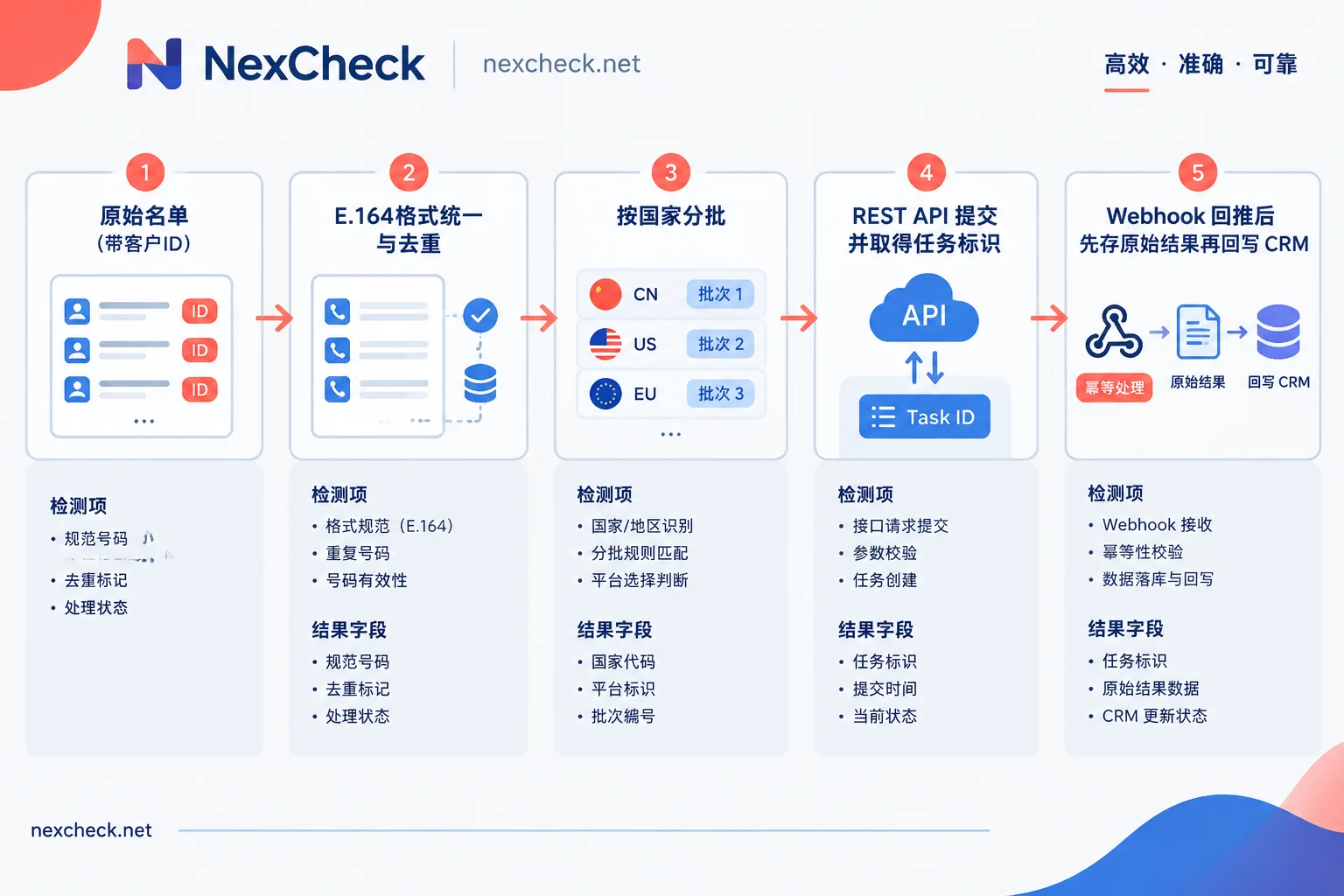
Suppose you have a list of customer phone numbers exported from your CRM and want to use an API to batch-determine which numbers have Telegram accounts and how recently they were active. You can follow this sequence: first unify all numbers into E.164 format and remove duplicates, then split them into batches by country, submit tasks via the screening platform's REST API, wait for results pushed back through a Webhook, and finally write them back to the CRM grouped as "valid" and "invalid". Telegram does not provide a public API for batch-querying phone numbers, and the entire integration approach is designed around this fact.
Why You Cannot Directly Use Telegram's Official API
Telegram's Bot API cannot look up users by phone number; bots can only interact with users who actively engage with them. Underlying the MTProto protocol is a method called contacts.importContacts, which imports numbers in international format into an account's contact list and returns matched users. This method is intended for syncing an account's own contacts, not as a bulk query service.
Telegram imposes rate limits on this method; importing too many numbers returns FLOOD_WAIT, and in severe cases the account gets restricted. The exact thresholds are adjusted dynamically, and Telegram does not publish fixed numbers. So writing a script with your own account to batch-query numbers yields unstable results and risks account bans. Data teams and developers typically integrate a dedicated screening API, leaving themselves only the tasks of preparing lists and handling results.
Step 1: Prepare the List into a Submittable Format
Take a customer table with numbers from multiple countries as an example. Process it in this order before submission:
- Keep the original record ID. Each number should carry its CRM customer ID or row number so you can map back to the original record during write-back.
- Unify to E.164 format: plus sign + country code + local number. Remove spaces, hyphens, parentheses, and leading zeros used for local dialing. For example, Indonesian numbers start with +62, Vietnamese numbers start with +84. For numbers missing a country code, use the customer's country field to fill it in; if you cannot determine it, set those aside separately—do not guess.
- Deduplicate after format unification. The same number might appear as both "0812…" and "+62812…". If you deduplicate before unifying formats, you will miss duplicates. When merging duplicates, record which customer IDs they correspond to.
- Split batches by country. Number lengths and numbering plan rules differ by country. Running them separately makes it easier to compare anomaly rates across batches and identify which market's data has issues if problems arise.
- Do not submit numbers with invalid formats. Numbers with obviously wrong digit counts or non-existent number ranges should be marked as "format invalid" first. This saves screening costs and prevents mixing them with numbers that are "invalid after screening".
For number formats by country and commonly used local platforms, see the regional pages.
Step 2: Submit Tasks and Receive Callbacks
Batch screening is generally asynchronous: after submitting a batch of numbers, you get a task identifier. When results are ready, the platform pushes them to your provided address via Webhook, so you do not need to poll repeatedly.
There are a few things easy to overlook during integration:
- Save the task identifier along with batch information. Record "batch, country, task identifier, submission time, number count" in your own database so you can match which batch a callback belongs to when it arrives.
- Make the Webhook receiver idempotent. Network retries may push the same result more than once. Use task identifier plus number as a unique key, and skip or overwrite duplicates without inserting them again.
- Store raw results first, then do business processing. After receiving a callback, save the raw response first, then update the CRM asynchronously. If the write-back logic fails, you can rerun it using the stored data without re-screening.
- Validate the flow with a small batch first. Before running the full large list, run a complete flow with a few dozen numbers to confirm the callback address receives data, fields parse correctly, and write-back works.
Step 3: Understand the Result Fields
Common return items for Telegram number screening include:
- Whether it is registered: whether the number matches a Telegram account.
- Last active status: may be an exact time or just a vague range.
- User ID, username, nickname, avatar: the account's public profile. For accounts without a username set, an empty username field is normal.
- Abnormal flags: for example, account restricted or flagged as scam, impersonation, etc.
Different services return slightly different fields. Refer to the screening items documentation of the platform you use.
When reading results, note two limitations caused by privacy settings:
"Not registered" does not necessarily mean there is no account. If a user has set "Who can find me by my phone number" to "My Contacts" under "Privacy and Security", and the screening party is not in their contacts, the number cannot be matched and the result shows as not registered. So this group accurately means "cannot be found by phone number".
Activity status may only be given as a range. When a user hides their last seen time, the returned value is one of these categories:
- Recently: active recently, generally within seconds to two or three days
- Last week: within 7 days
- Last month: within 30 days
- Long ago: a long time ago, or possibly the account has been deleted or banned
Do not convert these ranges into specific dates and write them into the CRM. Save the range values directly.
Step 4: Group and Write Back to CRM
After grouping results into valid and invalid, it is recommended to distinguish them with a status field in the CRM rather than deleting invalid numbers directly:
| Screening result | Recommended group | Handling in CRM |
|---|---|---|
| Registered, Recently / Last week | Valid | Write registration status and activity range |
| Registered, Last month | Valid (low activity) | Mark separately; business decides how to use |
| Registered, Long ago | Per business rules | Can be grouped as invalid, or marked for review |
| Not matched | Invalid | Mark "Telegram not matched"; keep the number |
| With abnormal flags | Usually invalid | Record the flag type |
| Format invalid (not submitted) | Invalid | Label separately from screening results |
When writing back, also record the screening date. Registration and activity status change over time, so results from three months ago should not be used as current status. For lists that need long-term maintenance, you can periodically re-screen the valid group.
For a complete example of how to choose fields and perform write-back, see How to Use a Telegram Number Screening Platform; for more details on online status and privacy restrictions, see How to Do Telegram Number Screening.
Choosing Screening Items and Estimating Costs
Screening is generally billed per record; the more items checked, the higher the unit price, so clarify your purpose before choosing. If you only need to remove numbers that are not registered, checking registration status is enough; to judge activity level or complete public profile data, add the corresponding screening items. Deduplicating and filtering formats before submission is the most direct way to control costs.
When using NexCheck to process such lists, you can upload txt or csv files in the console or submit via REST API. There is no limit on batch size. After screening completes, results are pushed via Webhook and can be exported grouped as valid and invalid, making it easy to write back according to the table above. For which items Telegram can currently check and their unit prices, refer to the Telegram platform page and price list; API documentation and registration entry are under "Screening Tools" in the official website navigation.
Finally, the lists submitted for screening should be your own customer or contact data, and both source and purpose must be legal and compliant. The screening platform only processes this data within the scope of the task.




Comments(0)