 NexCheck-筛号平台
Suppose you have a lead list with thousands of rows from exhibition registrations and website forms: mostly Japanese and Taiwanese numbers, mixed with a few hundred Thai numbers, written in various formats—some with +81, some starting with 090, some with hyphens, and some full-width digits entered in Japanese forms. The next step is to decide: who is worth putting into the LINE channel follow-up pool.
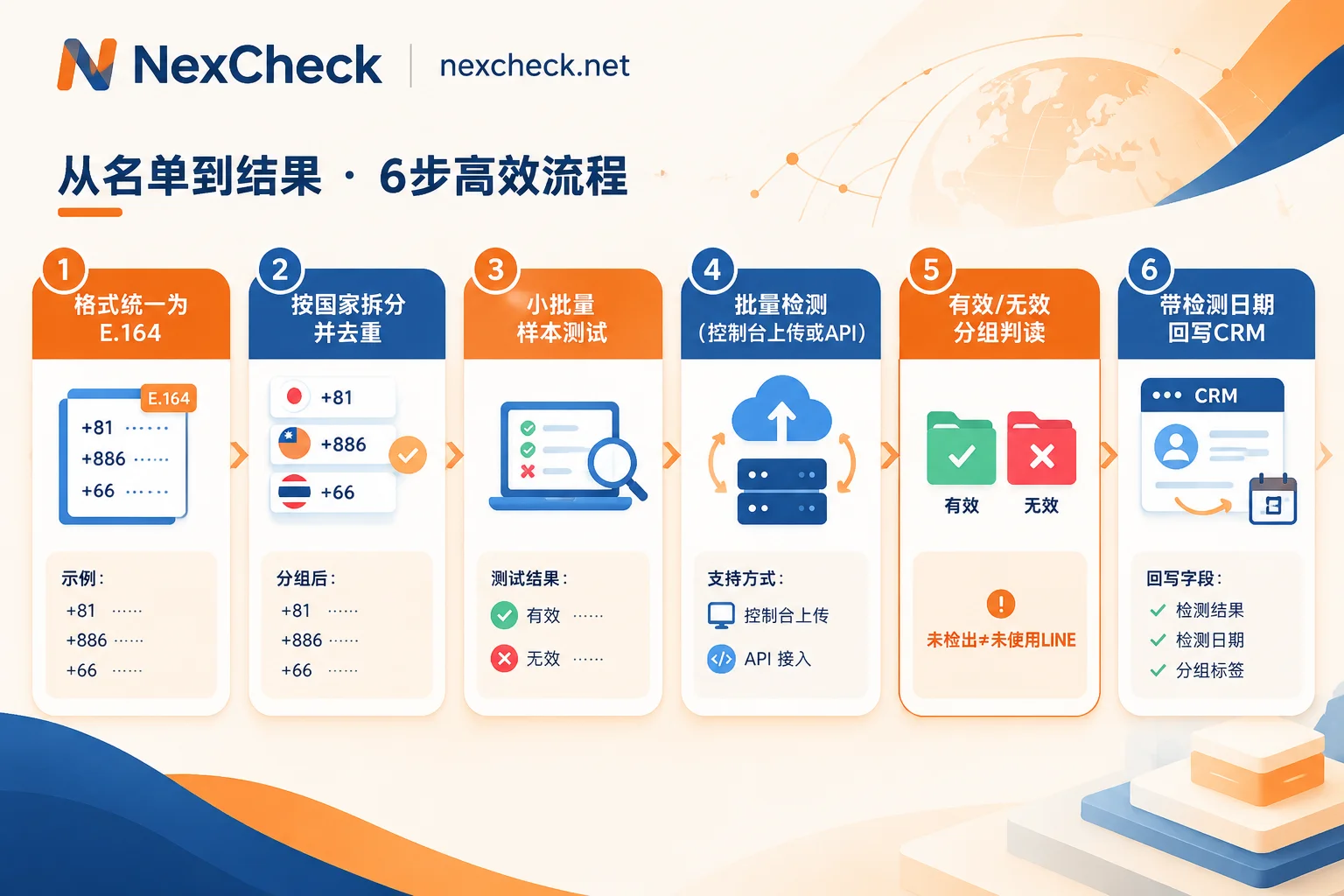
Here is the processing order: standardize to international format → split by country and deduplicate → run small sample tests → run official bulk checks → interpret results by valid/invalid groups → write back to CRM with detection timestamps. If the first two steps are not done well, the later results will be distorted, and you will pay extra for duplicate and incorrectly formatted numbers.
Before you start: understand the two boundaries of LINE phone number search
First, regions. According to LINE's official documentation, the phone number friend search feature has regional restrictions, mainly covering LINE's core markets such as Japan, Taiwan, Thailand, South Korea, and Hong Kong. If a large portion of your list comes from other countries, even if those people use LINE, the detection results may not be ideal; those numbers are better screened on local mainstream platforms.
Second, users' privacy settings. LINE has a "Allow friend requests" toggle (labeled "友だちへの追加を許可" in the Japanese interface). If a user turns it off, even if the number is indeed linked to LINE, it may not be found via phone number.
This means: a "not detected" result does not equal "this person doesn't use LINE". Currently, there is no public data on the proportion of users in each market who have turned off this toggle, so we recommend running samples first to calibrate expectations with actual results. For more details on privacy restrictions, see LINE Number Detection: List Format Preparation, Activation Status Interpretation, and Privacy Restrictions.
Step 1: Standardize numbers to E.164 international format
E.164 is the number format defined by the International Telecommunication Union: country code + local number (without the domestic long-distance prefix 0), with a maximum total length of 15 digits. The conversion methods for LINE's main markets are as follows:
| Region | Common local format | Country code | Converted |
|---|---|---|---|
| Japan | 090-1234-5678 | 81 | +819012345678 |
| Taiwan | 0912-345-678 | 886 | +886912345678 |
| Thailand | 081-234-5678 | 66 | +66812345678 |
| South Korea | 010-1234-5678 | 82 | +821012345678 |
| Hong Kong | 9123 4567 | 852 | +85291234567 |
Hong Kong numbers do not have a leading 0, so just add the country code. Whether to keep the "+" sign when uploading depends on the template requirements of the tool you use; the key is to use only one format throughout the list.
Several types of issues that are easy to miss during cleaning:
- Full-width digits and symbols: Full-width characters like "090-1234" are common in Japanese and Traditional Chinese forms. Convert them to half-width first before processing.
- Country code and leading 0 both present: For example, +81090…, 886 09…, you need to remove the extra 0 after the country code.
- Excel dropping leading 0 or converting to scientific notation: Set the number column to text format when importing, and check for rows with abnormal lengths before processing.
- Multiple numbers in one cell: Split into multiple rows, or pick them out separately for manual handling first.
It is recommended to keep the original number column and store the converted results in a separate column for future reconciliation.
Step 2: Split by country and deduplicate after conversion
Deduplication must be done after format conversion. 090-1234-5678 and +819012345678 are the same number; you cannot tell before conversion, but you can merge them after conversion.
For mixed multi-country lists, it is recommended to split into separate batches by country code for three reasons: number rules differ by country, and separating them makes it easier to spot format issues; LINE coverage varies by market, and a mixed validity rate is not meaningful; numbers that do not belong to LINE's main markets can be set aside for detection on other platforms. Number formats and local mainstream platforms for each country can be found on the regional solutions page.
If the list is old and you suspect many disconnected numbers, you can also run a basic number check (disconnected, device type, high-risk numbers, etc.) first to decide which numbers to send for LINE detection. Whether it is cost-effective depends on the age of the list and the unit price of the two types of checks.
Step 3: Run a small sample for each country first
Randomly select a few hundred entries per country and run them first, focusing on three things:
- Proportion of format errors—if high, there are still omissions in step 1; fixing the rules now is easier than remediating later.
- Rough ratio of valid to invalid—used to estimate the yield of the entire list and decide whether it is worth running the full list.
- Differences between sources—for example, if the validity rate of exhibition lists and form lists differs significantly, they can be scheduled separately.
Step 4: Submit for bulk detection—web console or API
There are two ways to process this list on NexCheck:
- Console upload: Upload the cleaned txt or csv, select the LINE check item, and export grouped by valid and invalid after completion. Suitable for operations staff handling one-time or monthly updated lists.
- REST API submission: Developers submit numbers asynchronously, and after the task is completed, results are pushed back via Webhook and written directly to CRM. Suitable for automatic detection after form submission or scenarios requiring periodic status refresh.
There is no upper limit on the number per batch; pricing is per item. What exactly can be checked for LINE and the unit price of each item may be adjusted by the platform; refer to the current listing on the LINE detection page.
How to read the results: handle valid and invalid groups separately
Valid group means the number has activated LINE. Depending on the selected check items, the results may include attributes such as avatar, profile status, activity or risk indicators. Check items vary by platform; do not directly apply the field meanings of other platforms to LINE. For business purposes, records with "activated and normal status" can be used as a high-priority contact pool, then further segmented by other attributes.
Invalid group is not recommended to be deleted entirely, because it usually contains several cases:
- Format error: Correct in step 1 and resubmit.
- Disconnected number: Can be cleaned from the list or marked as inactive.
- Not activated or not detected: Some of these may be real users who have enabled privacy restrictions. It is recommended to keep them in CRM and mark them, possibly check on other platforms, or recheck at a later stage.
CRM write-back: use international format numbers as matching keys
When writing back, it is recommended to use the E.164 format number as the matching key instead of the original number column; otherwise, different representations of the same person will be treated as multiple records. You can add these fields:
line_status: Activated / Not detected / Disconnected / Format errorline_checked_at: Detection dateline_check_batch: Batch number, for tracing which task the result came from- Attribute fields: Create fields one by one according to the actual purchased check items; do not cram them into a single remarks column
Account status can change over time, so the detection date is important. When a list is reactivated after being idle for a while, filter out older records by date and recheck them first. If there are manually maintained fields in CRM (such as sales remarks like "friend added"), set the write-back rules to not overwrite these fields.
About list sources
Bulk number screening processes your own customer and contact data. You need to confirm whether the source and purpose of the list are legal; the detection platform only processes the list within the scope of the task and will not bypass users' privacy settings—this is also why "not detected" cannot be further subdivided.




Comments(0)