 NexCheck-筛号平台
The core question LINE number detection answers is: does this mobile number in the list have LINE activated? After running a customer list, numbers are split into two groups: "valid" means activated, and "invalid" means not activated, empty, or abnormal. When the platform can provide other attributes, they will be included in the results.
How useful the results are largely depends on the processing before and after detection: whether number formats are standardized, whether duplicates are removed, whether different countries are separated, and whether results can be accurately mapped back to original customer records. The recommended order is: format standardization → deduplication and anomaly marking → batching by country → select detection items and submit → interpret results → write back to CRM. The following explains each step.
First, look at a typical list
Suppose you exported a contact list from your CRM, with customers in Japan, Taiwan, and Thailand. These are markets with the highest concentration of LINE users, and the following situations are common:
- Local formats:
090-1234-5678,0912 345 678 - Area codes included but formats vary:
+81 90 1234 5678,8190-1234-5678,(+66)81-234-5678 - The same customer left a number twice, or two customers share one number
- Area code and number stored in separate columns, with some rows missing the area code
If such a list is uploaded directly, numbers with incorrect formats will fall into the invalid group. They appear as "not activated" but are actually not correctly recognized. So the first step is to organize the list, and detection comes later.
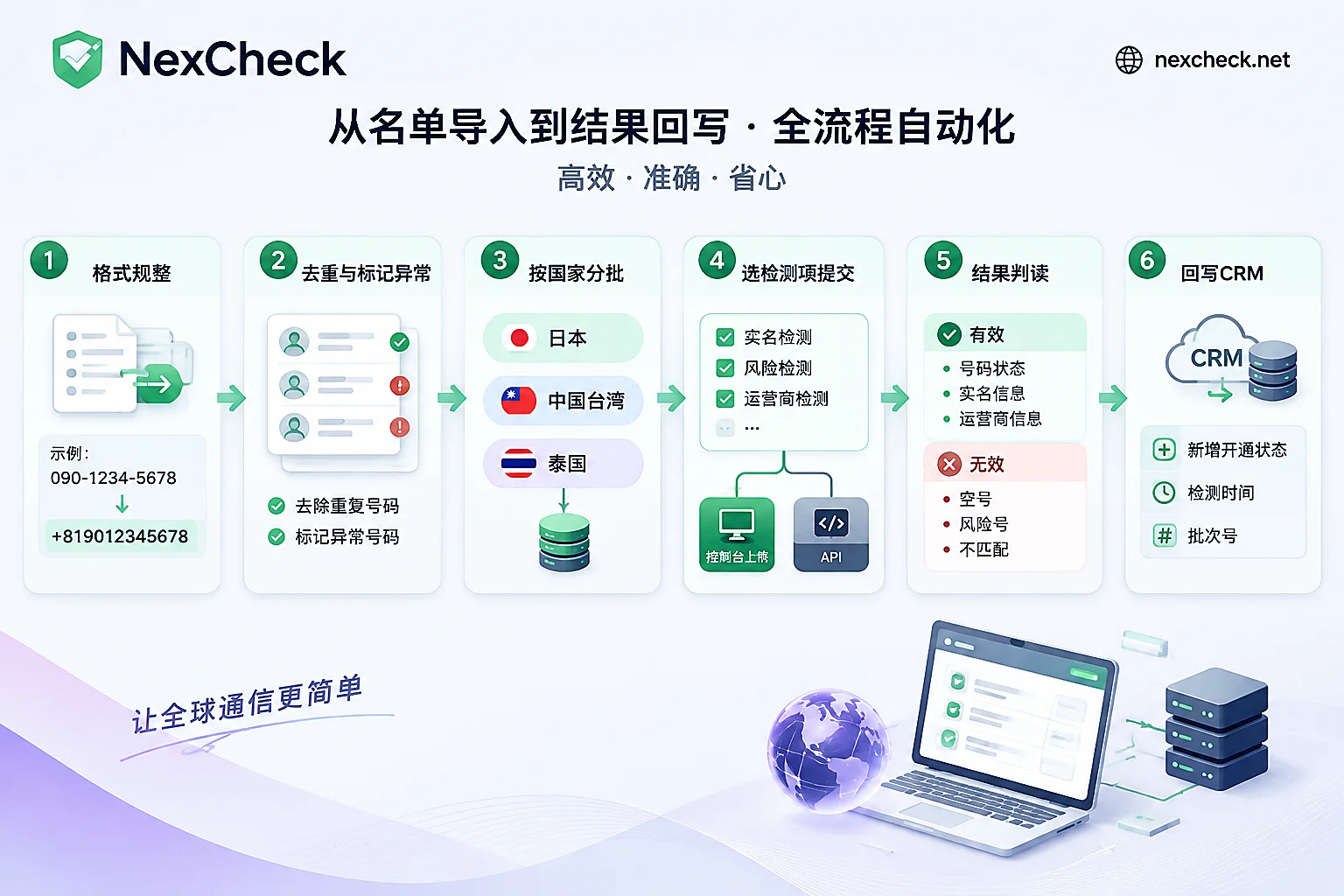
Step 1: Standardize to E.164 format
E.164 format is "+country code + local number without leading 0", with no spaces, hyphens, or parentheses. For the main LINE markets, the formats are as follows:
| Region | Country code | Local format example | After standardization |
|---|---|---|---|
| Japan | +81 | 090-1234-5678 | +819012345678 |
| Taiwan | +886 | 0912-345-678 | +886912345678 |
| Thailand | +66 | 081-234-5678 | +66812345678 |
When organizing, note a few points:
- First remove spaces, hyphens, parentheses, dots, and other symbols, then determine the prefix.
- Remove the leading 0 from the local number before adding the country code.
+8109012345678is a common mistake of "country code plus leading 0". - For rows with an empty area code column, do not guess based on the country of most rows. Only fill in the country if it can be determined from the customer's address or source channel; if not, put them in a separate group.
- Keep the original number column and add a new column for the standardized number. Both will be needed later for write-back and troubleshooting.
This standardization method is platform-independent. For more details on handling leading zeros and multi-country lists, refer to How to Write Telegram Number Format. The E.164 rules there also apply to LINE lists.
Step 2: Deduplicate and mark abnormal numbers separately
- Deduplicate based on standardized numbers, not original numbers.
090-1234-5678and+81 90 1234 5678are the same number. - When deduplicating, keep the mapping between the number and all customer IDs. A mobile number is usually bound to only one LINE account at a time. When two customers share a number, the detection result only indicates that the number has LINE activated; it cannot determine which customer is using it.
- Mark numbers with abnormal formats separately. Numbers with obviously wrong digit counts, containing letters, or with country codes outside the target markets do not need to be submitted. Do not delete them directly; keep them for later verification of the source.
Step 3: Batch multi-country lists by country
It is recommended to split into several batches by country or region and submit them separately, for three reasons:
- Each batch's results directly correspond to one market, making follow-up work easier to arrange.
- If the invalid ratio for a certain country is abnormal, it is easier to judge whether the problem is with the format or source of that batch.
- Different markets may require different detection items, and running them separately allows individual selection.
For number formats and mainstream platforms by country and region, see the NexCheck regional solutions page.
Step 4: Select detection items and submit
The core item for LINE detection is open status. Attributes such as registration time, activity, and ban status vary by platform. For which detection items LINE currently supports and their unit prices, refer to the NexCheck LINE platform page and the console price list. Detection items and prices may be adjusted; do not assume LINE results based on fields from other platforms.
When the list comes from mixed sources, you can first run a basic number detection (empty, device type, high-risk numbers, etc.) to filter out obviously invalid numbers, then run LINE open status detection on the remaining numbers. Whether this step is worth adding depends on list quality and the unit prices of the two detections. Services are billed per number, so you can calculate the cost with a small sample batch first.
There are two submission methods:
- Console upload: Save standardized numbers as a txt or csv file and upload. No batch size limit. Suitable for one-time cleanup of old lists or when the list size is not fixed.
- REST API submission: Your system submits tasks, and results are pushed back via Webhook after detection. Suitable for integrating detection into your CRM, such as automatically detecting new leads upon entry.
When using the API, here are a few suggestions. Include your own batch number when submitting, and save the mapping between tasks and batches. The Webhook processing logic should perform idempotent updates based on "number + batch" so that retries or duplicate receptions do not corrupt the data. For specific API parameters, refer to the site documentation.
How to read the results
The valid group means the number had LINE activated at the time of detection; the invalid group means not activated, empty, or abnormal. The following situations can easily cause misinterpretation.
Not searchable manually does not mean not activated. LINE users can turn off "Allow others to add me as a friend" in Settings > Friends. After turning it off, even if the number is registered with LINE, others cannot find the account by searching the mobile number in the client. In markets like Japan, there are also age-related restrictions: users under 18 or who have not completed carrier age verification cannot be found by phone number or LINE ID. Therefore, if team members manually search a few numbers on their phones to "verify" detection results, not finding them does not mean the result is wrong. Detection provides open status; whether the client can find it is a separate layer of information, and the two should not be conflated. For questions about the meaning of specific fields, refer to the platform page. These privacy settings are the user's own choice; do not attempt to bypass them.
Virtual number ranges may have a higher invalid ratio. LINE registration generally requires a regular mobile carrier number to receive verification, and has more restrictions on VoIP and other virtual numbers (such as Japan's 050 IP phone range). If the list contains many such numbers, a larger invalid group may be due to this, not necessarily a problem with detection or formatting.
Results reflect the status at the time of detection. Numbers may be deactivated or reassigned to someone else. The longer since detection, the more the results need re-verification, so record the detection time when writing back.
Handle the invalid group in layers. Numbers with abnormal formats can be corrected and re-run; empty numbers can be marked as inactive in the list; numbers that are normal but simply not activated on LINE only indicate that this channel is not applicable—the number may still be a valid contact for the customer, so do not delete it.
Write back to CRM
- Associate results with customer IDs, not just number string matching. The mapping kept in Step 2 is used here.
- Add new fields instead of overwriting existing ones. For example, add "LINE open status", "detection time", "batch number", and other attributes returned by the platform.
- Keep the original number unchanged, and write the standardized number back as the standard number field for direct use in the next detection.
- When one number maps to multiple customers, write the same result to all associated customers and add a flag for manual confirmation.
The list used for detection should be customer or contact data you obtained legally, with clear source and purpose. NexCheck processes the list only within the task scope, and the data remains owned by the customer.
Next steps
It is recommended to first take a small batch from the organized list and run it according to the detection items listed on the LINE platform page to confirm that the field meanings and write-back process are correct, then submit the full list. For more approaches to result layering and CRM write-back, see How to Do LINE Number Filtering. Account registration and API documentation are under "Number Filtering Tools" in the official website navigation.




Comments(0)