 NexCheck-筛号平台
Suppose you have a customer list exported from your CRM, with numbers from Japan, Taiwan, and Thailand, written in messy formats: some with +81, some starting with 090, some with hyphens and spaces in between. Now you need to find out which of these numbers have activated LINE.
Process in this order:
- Local cleanup: Deduplicate, remove spaces, hyphens, parentheses, and other characters, and convert all numbers to E.164 format with international country code.
- Split by country: Separate numbers from Japan, Taiwan, and Thailand into different batches.
- Basic number check: First identify invalid numbers, high-risk numbers, and other basic issues.
- LINE activation check: Group results into "valid (activated)" and "invalid (not registered or abnormal)".
- Export and write back: Export via CSV/TXT, or receive results via Webhook, then write back to CRM using the original record ID.
Below is a step-by-step explanation of what to pay attention to at each step.
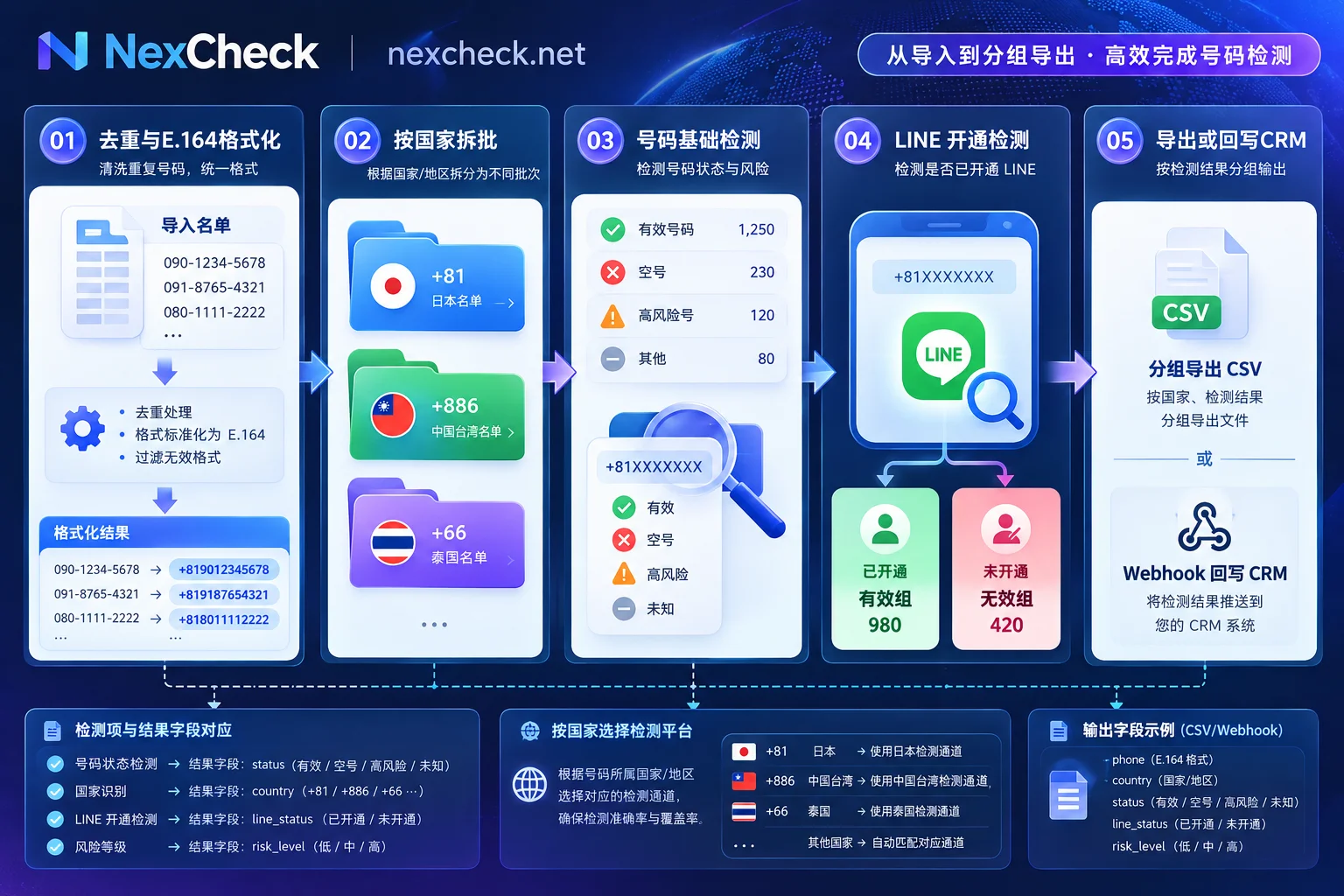
Step 1: Unify numbers to E.164, then split by country
When registering a LINE account, a phone number must be bound and verified via SMS or phone call verification code, so the "number" used for checking must match the number recorded on LINE's servers. Local formats, extra symbols, and missing country codes in the list can all cause the same person's number to fail matching.
The E.164 format is: + plus country code, then the number without the local leading 0, with no spaces or symbols in between. Taking three major LINE markets as examples:
| Format in list | Country | E.164 format |
|---|---|---|
| 090-1234-5678 | Japan | +819012345678 |
| 0912 345 678 | Taiwan | +886912345678 |
| 081-234-5678 | Thailand | +66812345678 |
Common mistakes during cleanup:
- Added country code but didn't remove leading 0, e.g., +8109012345678. This is the most common error in cross-country lists.
- No country information in the number. If your CRM has a "Country/Region" field, use that to add the country code; don't guess based on number length.
- Deduplicate after format unification. "090-1234-5678" and "+81 90 1234 5678" are the same number after unification; deduplicating before unification will miss such duplicates.
- Keep the original number. Add a separate column in the table for the E.164 number; the original value is still needed for write-back and troubleshooting.
After format unification, split into different batches by country. Number lengths and number range rules differ by country; mixing them together makes it hard to determine the cause if problems arise; after splitting by country, results for each batch are easier to compare. For more details on handling leading 0s and organizing multi-country lists, this article explains it more thoroughly: How to solve WhatsApp number format errors. The format rules there are not only for WhatsApp; they also apply to LINE lists.
Step 2: Do basic check first, then LINE activation check
Issues like invalid numbers are platform-independent: if a number itself is deactivated, checking LINE is meaningless. First do a round of basic number checks to mark invalid numbers and high-risk numbers separately, then the remaining numbers go into LINE activation check. This makes results easier to interpret; when charging per item, the number of records entering LINE check will also be fewer.
When using NexCheck, you can upload txt or csv files on the console, or submit via REST API, with no batch size limit. Which fields LINE can check and the price for each item will be adjusted according to the platform's price list. Before submitting, check the current check items and unit prices on the LINE check page to decide which check items to select for this batch. The list is your own data; the platform only processes it within the scope of this task; you are responsible for ensuring the legality of the source and purpose of the list.
Step 3: Things to distinguish when reading results
"Activated" does not mean "can be added as friend via phone number"
LINE users can turn off "Allow others to add me" in "Settings > Friends". After turning it off, others cannot find them by entering their phone number, nor can they automatically add them as friends. Whether someone has registered LINE and whether they allow others to find them by phone number are two different things.
So, if a colleague searches a number in LINE on their phone and can't find it, that doesn't mean the number hasn't activated LINE. Conversely, if the check result shows activated, it doesn't mean the number allows adding via phone number. When writing to CRM, record "LINE activation status" only as activation status; don't confuse it with "addable".
The number corresponds to the currently bound account
A phone number corresponds to only one account on LINE. If the same number is re-registered on another device, the previously bound old account will become invalid or be transferred. This leads to two situations:
- The customer changed to a new number; the old number in your list may show "not activated", but the customer is still using LINE, just with a different number.
- The number was reclaimed by the carrier and reassigned to someone else; the check result may show "activated", but it no longer corresponds to the customer in your CRM.
LINE has not fully disclosed details on handling virtual number ranges and reassigned numbers. If a record's basic check shows risk and LINE check shows activated, it's best to combine both results rather than directly treating it as a "high-quality customer number". If the list is old, you can also refer to the time the customer last updated their contact information.
The "invalid" group should be layered; don't delete all at once
The invalid group usually contains several types of numbers: those judged invalid by basic check, those that are normal but haven't activated LINE, and those with risk flags. Follow-up actions differ for these types. For example, numbers without LINE may still be valid on other platforms. When writing back, record by reason separately; it's more useful than just marking "invalid".
Don't use manual client searches or scripts instead of checking
Some people might ask colleagues to search numbers one by one in LINE, or write scripts to simulate searches. This doesn't work for two reasons:
- After users turn off "Allow others to add me", the number simply cannot be found; search results cannot distinguish between "not registered" and "not allowed to be found".
- Searching numbers or IDs consecutively on a regular client in a short time, especially entering unregistered numbers repeatedly, will trigger LINE's restrictions, showing "You've exceeded the number of search attempts" and the account will be locked for a period.
Batch lists should be handled by specialized tools, processed in batches.
Web console or API
- Web console: Suitable for one-time or occasional list cleaning, such as organizing a batch of leads after an event, or quarterly cleaning of old customers. Upload txt/csv, download the result file grouped by valid/invalid.
- REST API + Webhook: Suitable for scenarios where checking needs to be integrated into CRM or lead entry processes. When new numbers enter the system, automatically submit for checking; results are pushed back via Webhook, no polling needed. For development integration, see the documentation under "Screening Tools" in the website navigation.
When using the API, note: include your own record ID when submitting; match returned results by this ID, not by number. The same number may correspond to multiple records in CRM.
Step 4: Which fields to keep when writing back to CRM
It is recommended to write back at least the following fields, without overwriting original data:
- Original record ID, original number
- E.164 number, country
- Basic check results (invalid, high-risk, etc.)
- LINE activation status, and results of other check items selected for this batch
- Check date, batch number
The check date is important. A number's activation status can change: users may change numbers or cancel accounts, and numbers may be reassigned. The result in CRM only represents the status on a certain day; in the next cleaning, you can select older records by check date for re-checking.
Next step
If the list has been organized as described above, you can first check the currently supported check items and unit prices on the LINE check page, then register on the console and upload your first batch. If you're not sure about the number format for a country before splitting batches, or unsure whether LINE is mainly used in that market, you can first look at the Regional Solutions page.




Comments(0)