 NexCheck-筛号平台
For teams doing overseas advertising and private domain operations, they often have a batch of customer lists collected from independent site orders, exhibition forms, B2B inquiries, or historical activities. As advertising platforms impose increasingly strict restrictions on segmented audience tags, more and more teams rely on first-party data to build Facebook Custom Audiences or perform CRM customer segmentation.
However, directly uploading raw tables into the system often encounters two thorny issues:
- Low match rate: Many customers fill in work emails or backup phone numbers when submitting forms, while they use personal emails or frequently used numbers to register on social media. Coupled with a large number of format errors and empty numbers, the effective audience pool after matching is significantly reduced.
- Missing fields make segmentation difficult: The list only contains cold numbers or emails. The operations team does not know whether the person has actually activated Facebook, nor do they have the corresponding UID or basic gender profile, making it difficult to prepare differentiated content by audience.
Before putting the list into business processes, conducting a round of standardized Facebook number detection (along with supporting email and UID detection) to remove invalid data and fill in usable fields is a more cost-effective data pre-processing action. This article, in conjunction with the NexCheck Facebook detection solution, breaks down the queryable fields, privacy boundaries, and practical cleaning order.
I. What Can Facebook Detection Actually Check?
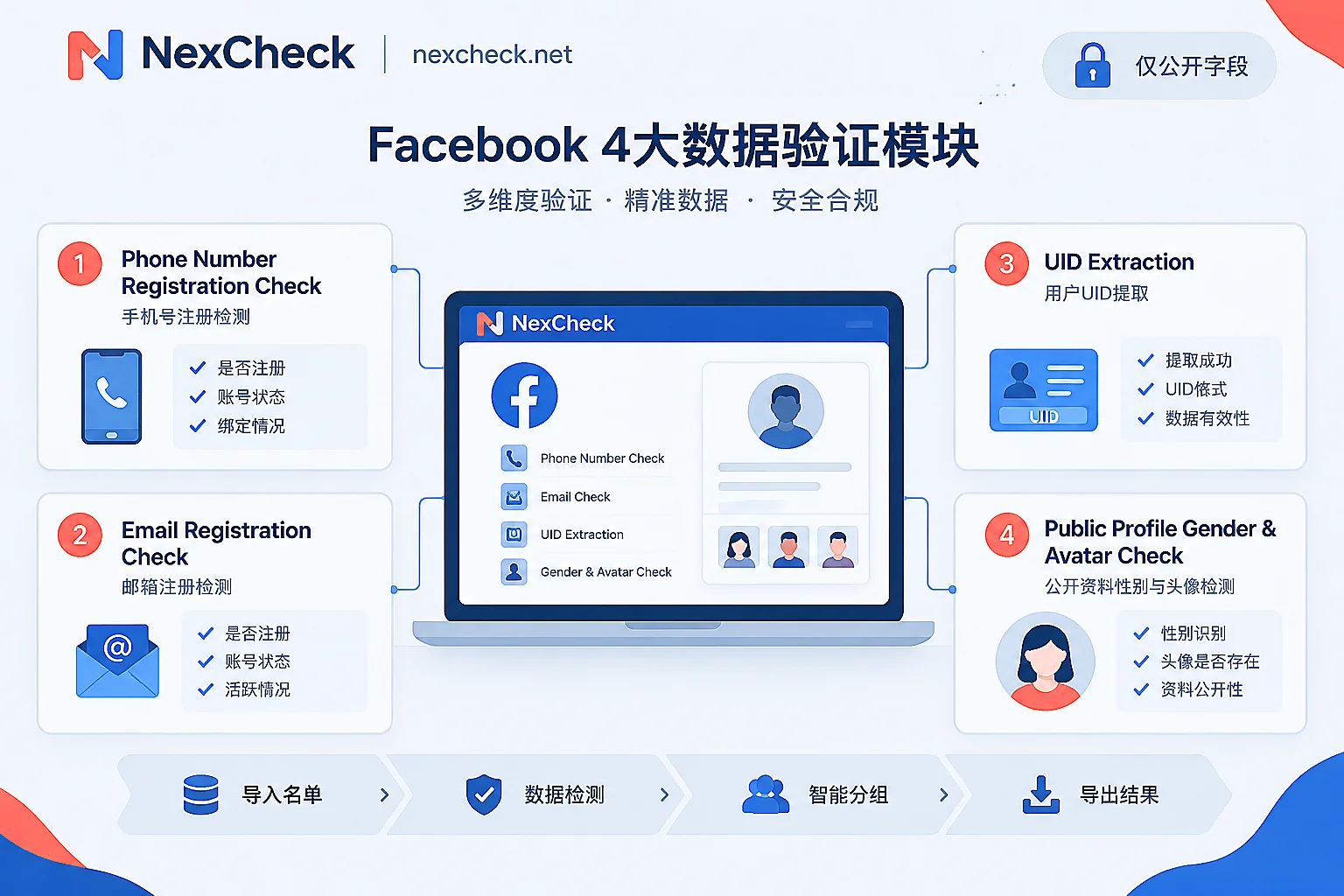
Many promotions package social platform number screening as "omnipotent," but in actual production environments, compliant and stable detection tools have clear field boundaries. In NexCheck's supported platforms overview, Facebook belongs to the social media section and mainly provides the following four types of detection capabilities:
- Number activation detection: Checks whether the uploaded mobile phone numbers have registered and activated Facebook accounts in batches.
- Email activation detection: Checks whether the email addresses in the customer list are bound to/activated Facebook accounts. This is very practical for teams that only have B2B inquiry emails or independent site registration emails.
- UID detection: Identifies and returns the Facebook unique user identifier (UID) associated with the target. Even if the user changes their display nickname later, the UID remains a stable underlying identifier.
- UID profile gender and avatar detection: Reads the gender and avatar information on the user's profile based on the UID, assisting the operations team in audience profiling and grouping.
Privacy and Data Boundaries You Must Know
When planning CRM field write-back, the data team must be clear about two things:
- Public field limitation: Facebook's "UID profile gender and avatar" detection only reads fields that the user has set as public. If the user hides gender in their privacy settings or does not make the relevant profile information public, the detection result will not include that field.
- Timeliness and objectivity: All detection results only reflect the platform status at the moment of query. It answers "whether this number/email currently has an activated account and what public information is available," but cannot judge the true identity, purchase intention, or commercial value of the number holder for the business team.
II. Why Recommend "Number + Email" Dual-Dimension Screening?
When organizing existing leads, many marketing teams are accustomed to screening only mobile numbers or keeping only emails. However, in cross-border business scenarios, a single identifier can easily miss high-value customers:
- Europe, America, and B2B scenarios: Users generally use corporate emails (e.g.,
[email protected]) for business communication, but prefer personal Gmail, Yahoo emails, or private mobile numbers when registering for Facebook. If the form collects both mobile number and email, performing activation detection on each can cross-validate which one is their real contact point on social platforms. - Southeast Asia and Latin America scenarios: Local users are highly dependent on mobile numbers to register for various social apps, but there are also situations where one person has multiple SIM cards and prepaid cards are frequently changed. If a mobile number is not activated on Facebook, a secondary screening with the accompanying email can often recover some valid leads.
If your business is not limited to a single platform, you can also use the "Continue Detection" function in the console to seamlessly transfer the screened list to platforms such as Instagram, WhatsApp, or Telegram to complete multi-channel contact points.
III. Four-Step Standard Order for Facebook List Batch Cleaning
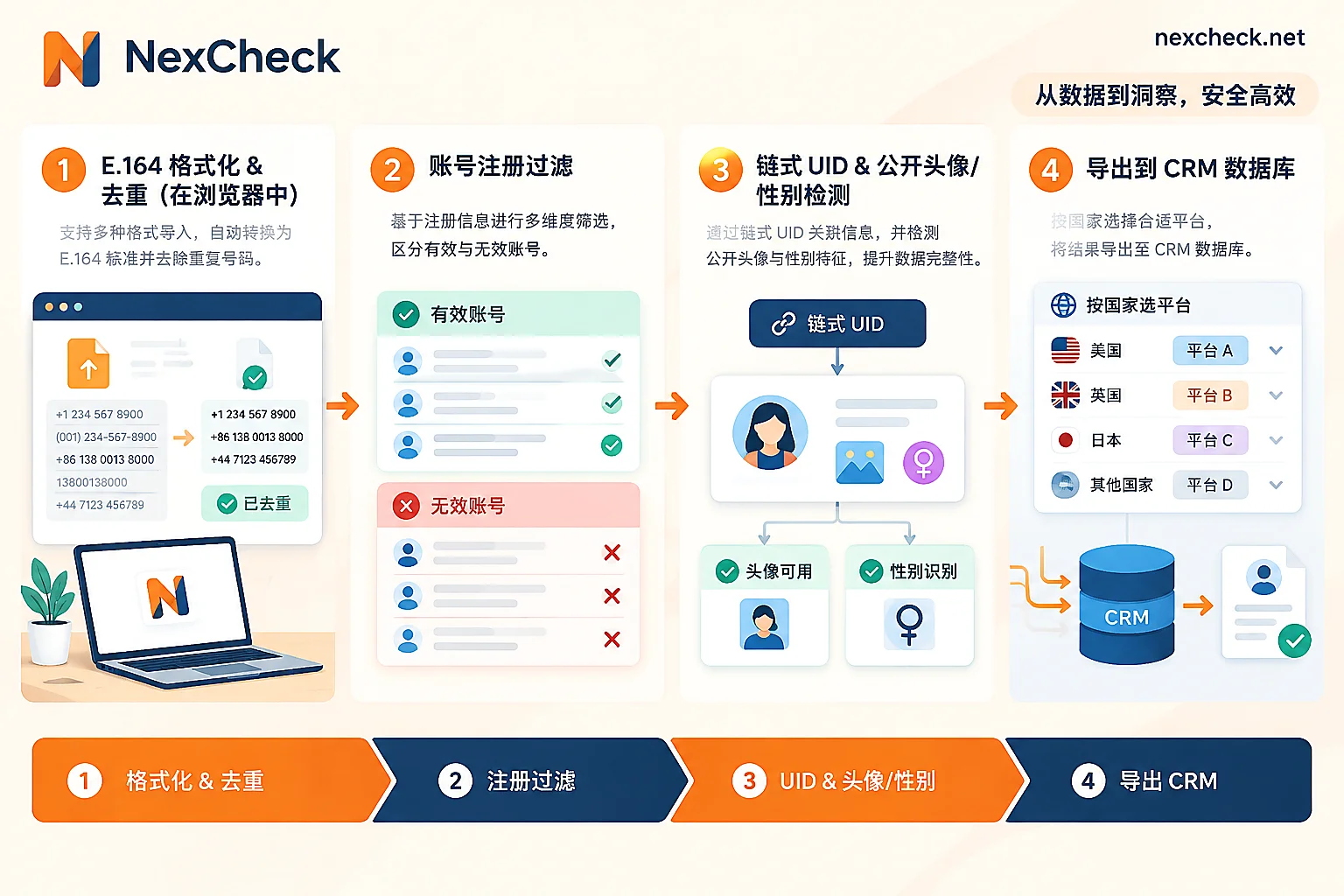
To avoid wasting budget due to format errors or duplicate data, it is recommended that operations and data teams follow these four steps for batch detection.
Step 1: Local Format Standardization and Mandatory Deduplication
Before uploading any number file, the worst thing is to directly throw raw tables mixed with spaces, hyphens, parentheses, or missing country codes into the detection channel. Also note: NexCheck console does not automatically deduplicate after file upload; duplicate numbers or emails will still be charged.
If you are not familiar with the format rules for numbers from multiple countries, you can refer to our previously compiled WhatsApp E.164 format conversion rules and WhatsApp number deduplication method; the underlying logic is fully applicable. The easiest way is to directly open the NexCheck number cleaning tool:
- Browser-local processing: Data is cleaned locally in the browser without directly creating paid detection tasks.
- Standardization and deduplication: Automatically recognizes common separators, adds the country code according to the default country you select, converts to standard E.164 format, and removes duplicates with one click, directly reporting the number of valid, invalid, and duplicate entries.
- Pitfall reminder: When adding country codes, be sure to confirm the "default country" is selected correctly; if you select a UK list with the US default area code, it will generate numbers that are legally formatted but completely wrong in attribution. If you are unsure about the number range rules of the target market, you can first check the regional solutions.
Step 2: Optional Underlying Empty Number Filtering
If the number list at hand is old (e.g., a dormant database from two or three years ago), directly running platform-specific detection may not be cost-effective. You can first combine the "empty number and on/off" screening in basic number detection to filter out dead numbers that have been cancelled or disconnected, and only retain normally connected numbers for the next step.
Step 3: Create Facebook Activation Detection Task
After opening the quick start guide to understand the console specifications, you can upload the organized file:
- File preparation: Supports CSV, TXT, or XLSX formats. Please place the target values to be detected (E.164 format mobile numbers or standard format emails) in the first column of the table, one per row.
- Select project and region: On the console entry corresponding to the Facebook detection page, select "Number Activation" or "Email Activation"; for number-based projects, select the corresponding country or region as required.
- Check quantity range: Note that each detection project has its own minimum and maximum row limits, and file size and column count must also comply with console limits. The platform uses a prepaid model, charging per item when creating tasks; if a task fails due to system reasons, it will be automatically fully refunded.
Step 4: Connect UID and Profile Public Attribute Detection
After the first round of activation detection is completed, the system returns results grouped by "valid (activated)" and "invalid (not activated)". At this point, do not rush to run deep attributes on the entire original table:
- On the task results page, directly click "Continue Detection" to use the valid results from the first round as input and create a new "UID" or "UID profile gender and avatar" task (new tasks will be charged separately according to the selected project).
- This funnel-style approach of "first screen activation, then check attributes" ensures that every bit of your budget is spent on accounts that actually exist.
IV. How to Write Detection Results Back to CRM and Business Systems?
After the task is completed, you can preview and download the result file in the console. Note that the platform does not promise a fixed retention period for task results, and the task center cannot be used as a long-term archive storage; it is recommended to export and write back to your own CRM or data warehouse immediately after detection.
When writing back data, it is recommended to establish tags according to the following three-tier logic (you can refer to the field management approach in WhatsApp number screening result interpretation and CRM write-back order):
| Detection result tier | Recommended CRM tag | Suggested subsequent business action |
|---|---|---|
| Number/email activated + public gender/avatar read | FB_Valid_Enriched | Core high-match audience; can be grouped by gender tag and imported into Custom Audiences to match corresponding ad creatives and language copy. |
| Number/email activated + gender/avatar empty | FB_Valid_Private | Account is real and valid, only profile not public due to user privacy settings; normally include in full audience package or general campaign pool. |
| Neither number nor email activated | FB_Invalid | Remove from Facebook delivery package to avoid lowering overall match rate; use "Continue Detection" to screen LINE, Zalo, or Viber to find other contact points. |
How Can Developers Integrate via API Automation?
If you are a development team and want to automatically complete the above verification when CRM leads are entered or users submit forms, NexCheck provides a RESTful API that supports batch submission, real-time queries, and asynchronous result push via Webhook.
For interface security and version management reasons, the public user manual does not include specific API endpoint addresses, parameter definitions, and authentication documentation. Teams that need to integrate the API should first complete account registration and directly contact official customer service for technical integration support.
V. Data Compliance and Security Statement
When processing customer mobile number and email lists, data security is the core bottom line for all enterprises. When using NexCheck for batch screening:
- Data ownership belongs to the customer: The list you submit is entirely your own data. The platform processes data only within the necessary scope for executing detection tasks, never sells it, and will not use customer lists to build number databases for external sale.
- Autonomous control: You can view, export, or delete your task data at any time in the console (see Privacy Policy).
- Legal and compliant premise: As the data controller, the customer must ensure that the collection sources and business purposes of the submitted numbers and emails are legal and compliant, and must not submit third-party lists that they have no right to process.
Conclusion
Whether to improve the matching efficiency of advertising Custom Audiences or to supplement social profiles for existing CRM leads, Facebook number detection should not be just a simple file run, but a complete data engineering process of "local format cleaning and deduplication → activation status filtering → UID and public attribute supplementation → CRM layered write-back."
If you have a batch of overseas customer lists waiting to be processed, why not do a standardized cleaning in the above order right now:
- Free account registration and view real-time price list in the console: Register with NexCheck now
- Free format standardization and deduplication in the browser before uploading: Open number cleaning tool
- Consult on large-batch detection solutions or obtain API integration documents: Contact official Telegram customer service @nextipkf




Comments(0)