 NexCheck-筛号平台
In global marketing, private domain operations, and international CRM data governance, many teams habitually take raw customer lead lists and feed them directly into SMS gateways, outbound calling systems, or batch number screening platforms. The results are often: tasks interrupted by errors, the same number charged multiple times, a large portion of the budget consumed on disconnected or canceled numbers, and even channel risk controls triggered by reaching high-risk complaint numbers.
True phone number cleaning is not just "removing spaces" or "checking registration." It is a progressive funnel from local format normalization, basic verification at the telecom layer, to platform-level status segmentation and CRM status write-back. If you skip the preliminary steps and directly initiate paid detection, you will not only increase data cleaning costs but also contaminate your existing customer database.
This article moves beyond the limitations of a single social app and outlines a four-layer standard phone number cleaning process for operations, marketing, and data teams managing multi-channel contact lists, balancing cost control and compliance risk management.
Why Can't Lists Be Uploaded Directly for Detection? Three Common Cost and Compliance Pitfalls
When processing trade show sign-in sheets, ad landing page forms, or historically accumulated CRM export files, unprocessed lists typically have three hidden traps:
1. Format Chaos and Same Number in Different Forms Leading to Duplicate Charges
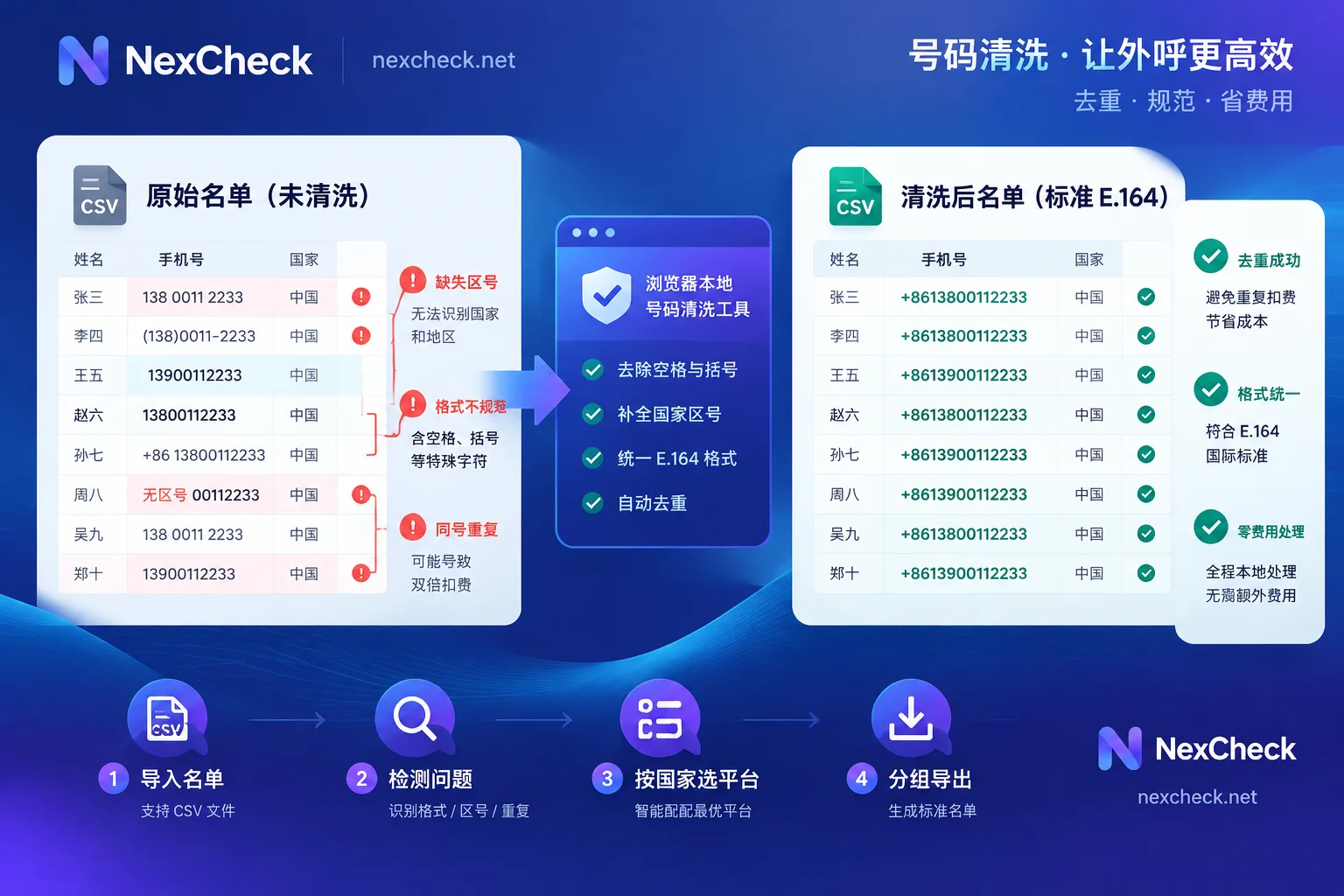
Numbers collected from different channels are written in vastly different ways: some include parentheses and hyphens (e.g., (415) 555-0123), some contain spaces or the international dialing prefix 00, and some simply omit the country code. More commonly, the "same number in different forms"—the same mobile number appears three times in the table in local format and with country code. Since the NexCheck console does not automatically deduplicate after file upload, all duplicate values are charged as usual, if you don't unify the format and deduplicate first, your company will pay double or even multiple times the detection cost for redundant data.
2. Local Numbering Plan Changes and Country Attribution Mismatches
Cross-border lists often mix multiple country number segments or retain historical old formats. For example, Vietnam completed its transition from 11-digit to 10-digit numbers in 2018. If the list still contains old 11-digit Vietnamese numbers, direct Zalo number filtering will yield no results. Similarly, countries like Argentina and Mexico have special leading-zero handling rules when concatenating international area codes (see WhatsApp International Area Code Format and Special Rules for details). If the format is not aligned, subsequent API calls will only return invalid.
3. Disconnected and High-Risk Complaint Numbers Mixed into the Outreach Pool
Even if the number format is correct, it may be in a long-term powered-off, suspended due to arrears, or canceled state in the carrier network. Additionally, in strictly regulated regions like North America, if the list contains high-frequency complaint numbers or high-risk number segments, rashly initiating marketing outreach can easily trigger compliance risks.
Layer 1 Cleaning: Browser-Local E.164 Standardization and Preliminary Deduplication (Zero Cost)
The first step of phone number cleaning should be done locally. The goal is to turn messy strings into the internationally accepted E.164 standard format (i.e., + followed by country code and national significant number, without any spaces, parentheses, or hyphens), and thoroughly remove duplicates before submitting paid tasks.
To help teams save time writing complex regular expressions or struggling with Excel formulas, NexCheck provides an out-of-the-box Phone Number Cleaning Tool. This tool has the following features:
- Runs locally in the browser, no detection fees: All format parsing and deduplication calculations are done locally in the browser, without creating paid detection tasks on the server, balancing processing speed and list privacy.
- Automatically recognizes separators and completes country codes: The tool automatically strips hyphens, parentheses, and spaces, fills in missing country codes based on the set default country, and uniformly converts to standard E.164 format.
- Preliminary deduplication and cleaning report: After normalization to a unified format, deduplication is performed (avoiding missed duplicates due to different formats), and the tool directly reports the number of valid, invalid, and duplicate entries.
Operational Pitfall Warning: When using the phone number cleaning tool to complete country codes, be sure to confirm that the actual country of the list matches the selected "default country." If the default country is selected incorrectly, the tool will generate E.164 numbers that appear format-valid, but the country attribution will be wrong, which will cause subsequent platform detection submissions by country to be completely inaccurate. For tables mixing multiple countries, it is recommended to first split by country (refer to Telegram Multi-Country List Organization Order), then perform local cleaning table by table.
Layer 2 Cleaning: Basic Number Detection and Telecom-Layer Risk Interception
After the list has been locally converted to clean, deduplicated E.164 format, it does not mean all numbers are worth immediately running full social or financial platform detection. For cold lists from complex sources and long storage times, it is recommended to first perform a check at the telecom底层 using Basic Number Detection.
NexCheck's basic detection matrix covers multiple dimensions from network status to terminal attributes:
- Disconnected and on/off status: Directly identify the real status on the carrier side, strip out canceled and disconnected numbers in advance, and avoid wasting subsequent marketing budget on dead numbers no one receives.
- Carrier identification, number type, and T-card format: Identify the carrier and number type, and screen out virtual number segments or specific card types.
- US carrier and US high-risk/complaint number screening: For North American business teams, before entering outbound call or SMS sequences, specifically filter out US high-risk and complaint numbers, reducing the probability of channel blocking and compliance complaints from the source.
- Device environment segmentation (Apple/Android devices, device model, iOS blue badge, RCS system type): If the business relies on a specific system ecosystem, you can identify terminal attributes via Apple/Android Segmentation, iOS Blue Badge Detection (Note: iOS blue badge only answers whether it is on the Apple side, not specific model, system version, or Apple account), or RCS Number Filtering.
In addition, for business scenarios that currently only have number sources and no platform-specific detection items (for example, target customers are mainly active on Cash App, OKX, Coinbase, or Discord), although platform registration status cannot be directly checked, this layer of basic detection can still filter out disconnected numbers, verify on/off status and device type, and ensure the communication usability of the number sources stored.
Layer 3 Cleaning: Progressive Layered Screening of Cross-Platform Registration, Activity, and Profile
After local deduplication and underlying disconnected number filtering, what remains is a high-value pool of real numbers. At this point, you can enter the application layer and verify the status of numbers on major platforms according to business goals. Channel focus varies greatly by country and industry. Teams can first consult Regional Solutions (e.g., Vietnam Regional Solution etc., to understand local number formats, major carriers, local realities, and recommended screening order), or check the detection items and price list for the five major platform categories in the Supported Platforms Overview.
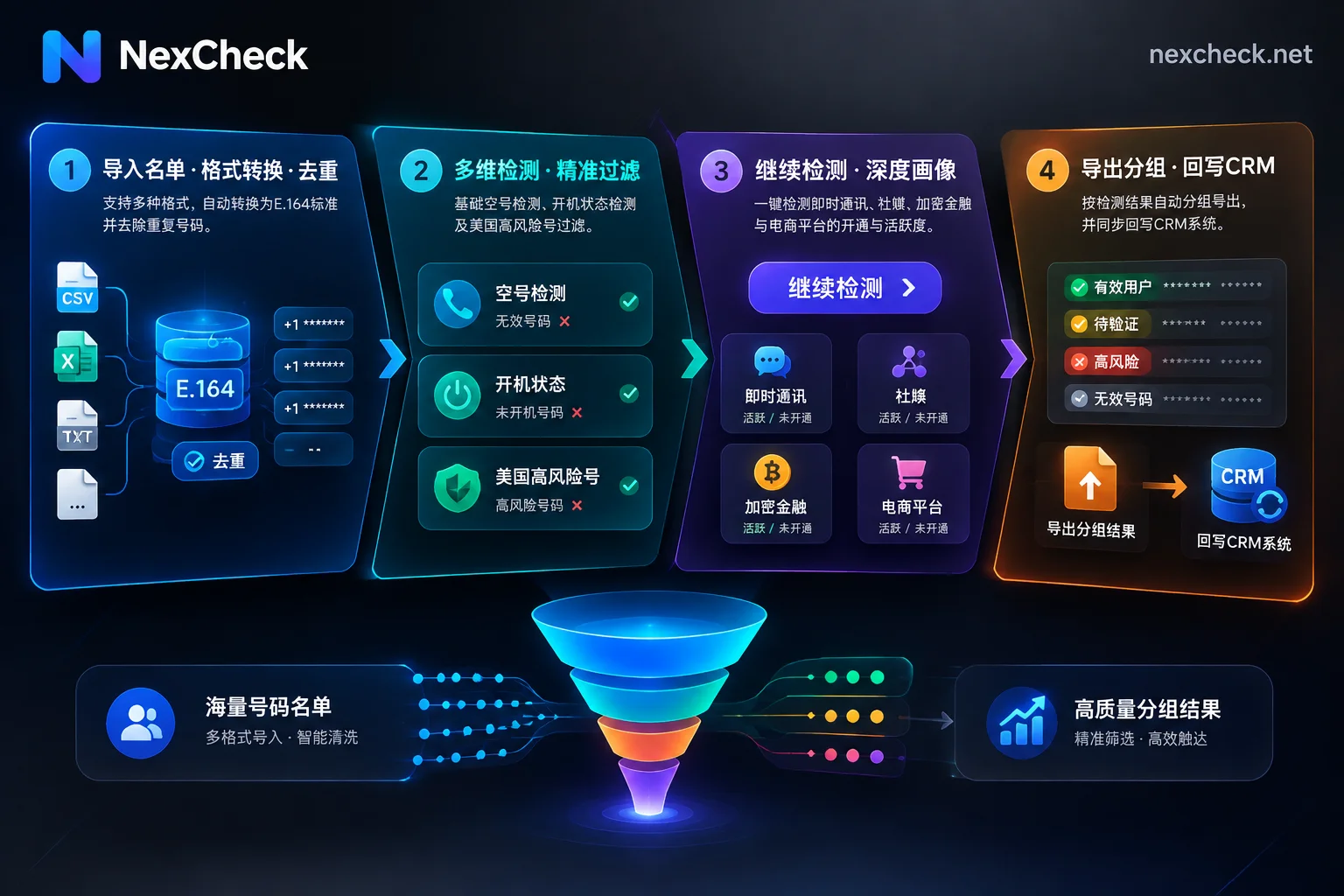
To maximize cost savings, application-layer cleaning should follow the progressive principle of "first screen low-cost registration, then check deep activity and profile":
1. Instant Messaging and Social Media: From Registration to Activity and Ban Exclusion
- WhatsApp: First use the fast channel or SVIP channel for registration detection to remove unregistered and banned accounts; for confirmed registered numbers, optionally add four-dimensional ecosystem activity, real-time online, zombie account and ad account identification, or read registration time and gender/age (see WhatsApp Number Filtering Page for details).
- Telegram: Supports checking registration by number, 3/7/15-day activity tiers, and gender; if the list only has
@用户名, you can also directly upload for username detection and username gender/age detection (see Telegram Number Filtering Page for details). - LINE, Zalo, and Viber: LINE Number Filtering requires separate registration screening submissions by region (Taiwan, Japan, Thailand, South Korea, Hong Kong, US), and activity detection must be preceded by registration screening; Zalo Number Filtering offers both ultra-fast and stable channels; Viber Number Filtering not only checks registration and activity intervals but also can check "account age" (i.e., how long the account has been registered, specifically used to remove newly registered marketing accounts; it is not the user's biological age; for practical details, refer to Viber List Cleaning Order).
- Mainstream Social Media: Such as Facebook (supports number registration, email registration, and UID profile public gender/avatar reading; see Facebook Number Detection Guide for details), Instagram, TikTok, Twitter/X, Snapchat, Moj, and LinkedIn Registration Screening which only supports US and India numbers.
2. Crypto Finance, E-commerce Logistics, and Office/Local Life: Verify Vertical Audience Coverage
For cross-border e-commerce or Web3 finance teams, list cleaning often includes both phone number and email fields:
- Crypto and Financial Platforms: Binance, KuCoin, CoinW, HTX all support phone number registration and email detection (Binance also supports transfer channel detection to see if a recipient can be found on Binance Pay by number, and the query process does not log into Binance or send verification codes to the number); MEXC, Vantage, Paytm, MoniePoint support number registration screening; while Robinhood and Nasdaq specifically provide email detection.
- E-commerce, Logistics, and Office/Local Life: Covers account registration screening for 15 platforms including Amazon, Temu, Shopee, Coupang, Flipkart, DHL, Microsoft Teams, Airbnb, etc.
3. Clever Use of Console "Continue Detection" to Chain the Funnel
When performing the above multi-step screenings, operators do not need to download files locally and re-upload each time. After uploading CSV, TXT, or XLSX files according to the Quick Start Manual (put target values in the first column, select the corresponding country or region, and note that the number of file rows must fall within the minimum and maximum quantity range specified for the selected project), the system returns results grouped by "valid" and "invalid."
At this point, click "Continue Detection" on the task results page to directly use the valid results (or all processed data) from the previous round as input for the next detection item (e.g., after running LINE registration detection, directly click "Continue Detection" on valid numbers to initiate LINE activity detection). Each continue detection creates a new independent task and is billed per item; if a task fails, the prepaid balance is automatically fully refunded.
Layer 4 Cleaning: Result Interpretation, Export and Archiving, and CRM Automated Write-Back
After completing batch detection, the final step of phone number cleaning is to sync clean status tags back to business systems (such as CRM or customer data platforms) to achieve closed-loop management of list assets.
1. Rational Understanding of Result Timeliness and Privacy Boundaries
Before writing data back to CRM, data teams need to clarify three objective boundaries:
- Status timeliness: Detection results only reflect the platform status at the moment of query, do not determine the true identity, purchase intent, or commercial value of the number holder, and do not guarantee absolute correctness of individual results.
- User privacy limitations: Fields like WhatsApp avatar, signature, and last seen time, and Facebook UID profile gender/avatar, are subject to user privacy settings; fields set as private cannot be read. Telegram profile pages themselves do not have gender or age fields; the usability of related results depends entirely on the user's public name and avatar.
- Timely export and archiving: NexCheck Task Center does not guarantee result retention days and cannot be used as a long-term archive database. After task completion, be sure to preview and download the result files from the console promptly for proper storage.
2. CRM Field Write-Back and API Real-Time Cleaning Integration
When writing the exported valid/invalid grouped lists back to CRM, it is recommended not to physically delete invalid customer records from the original table, but to add independent fields such as "E.164 Standard Number," "Platform Registration Status," "Activity Tier," and "Last Cleaning Timestamp." This prevents salespeople from re-importing the same abandoned numbers and retains historical compliance records.
If enterprises want to automatically complete number verification at the moment of website form submission or lead entry, rather than manually importing tables each time, NexCheck provides a RESTful API that supports batch submission, real-time queries, and Webhook result pushback. Since the public user manual does not include API documentation (API addresses, parameters, authentication, and callback formats are not publicly listed), development teams with system integration needs can first register for a free NexCheck account, then contact official customer service on Telegram (@nextipkf) for dedicated API integration support.
Data Security and Compliance Statement
In enterprise-level data cleaning processes, data sovereignty and privacy compliance cannot be ignored. According to NexCheck's Privacy Policy, customer-submitted lists are entirely the customer's own data assets. The platform processes data only within the necessary scope of executing detection tasks, never sells customer lists, and does not use customer lists to build number databases for external sale; customers can view, export, and proactively delete task data in the console at any time. At the same time, as data controllers, customers must ensure that the collection sources and subsequent uses of submitted numbers are legal and compliant, and must not submit numbers they have no right to process.
Summary: Establish a Standardized Phone Number Cleaning Pipeline Now
The key to turning "dirty lists" into high-conversion private domain and outbound calling assets is to adhere to the cleaning order:
- First open the free Phone Number Cleaning Tool to complete E.164 conversion and deduplication locally in the browser, plugging the duplicate billing loophole;
- Consult the Supported Platforms Overview and Regional Solutions, and combine basic disconnected number detection with the console "Continue Detection" function to screen in layers: "registration → activity → profile";
- Download results promptly and write back to CRM, so that every marketing outreach is built on a foundation of real, active numbers.
Go now to NexCheck Console Registration Experience, or open the Official User Manual to view detailed operation guides and start an efficient, transparent batch phone number cleaning workflow.




Comments(0)