 NexCheck-筛号平台
Suppose you export a contact list from your CRM with tens of thousands of rows from three or four countries. The number formats are all over the place: some have a "+", some start with "00", some are local-only, and there are spaces, parentheses, and dashes mixed in. The same customer may appear two or three times. Now you need to figure out which of these numbers have Telegram accounts and what attributes those accounts can reveal.
We recommend handling it in this order:
- Clean the formats: normalize every number to international format with a country code (E.164).
- Deduplicate: after formats are unified, deduplicate by the normalized number.
- Split by country: organize each country into its own file or batch.
- Decide whether to run a basic check first: older lists can be filtered for dead numbers and high-risk numbers first.
- Choose Telegram detection options: only select the fields your business will actually use.
- Submit the task: upload via the console or submit through the API.
- Read results and write back: group by valid and invalid, include the detection date, and write back to CRM.
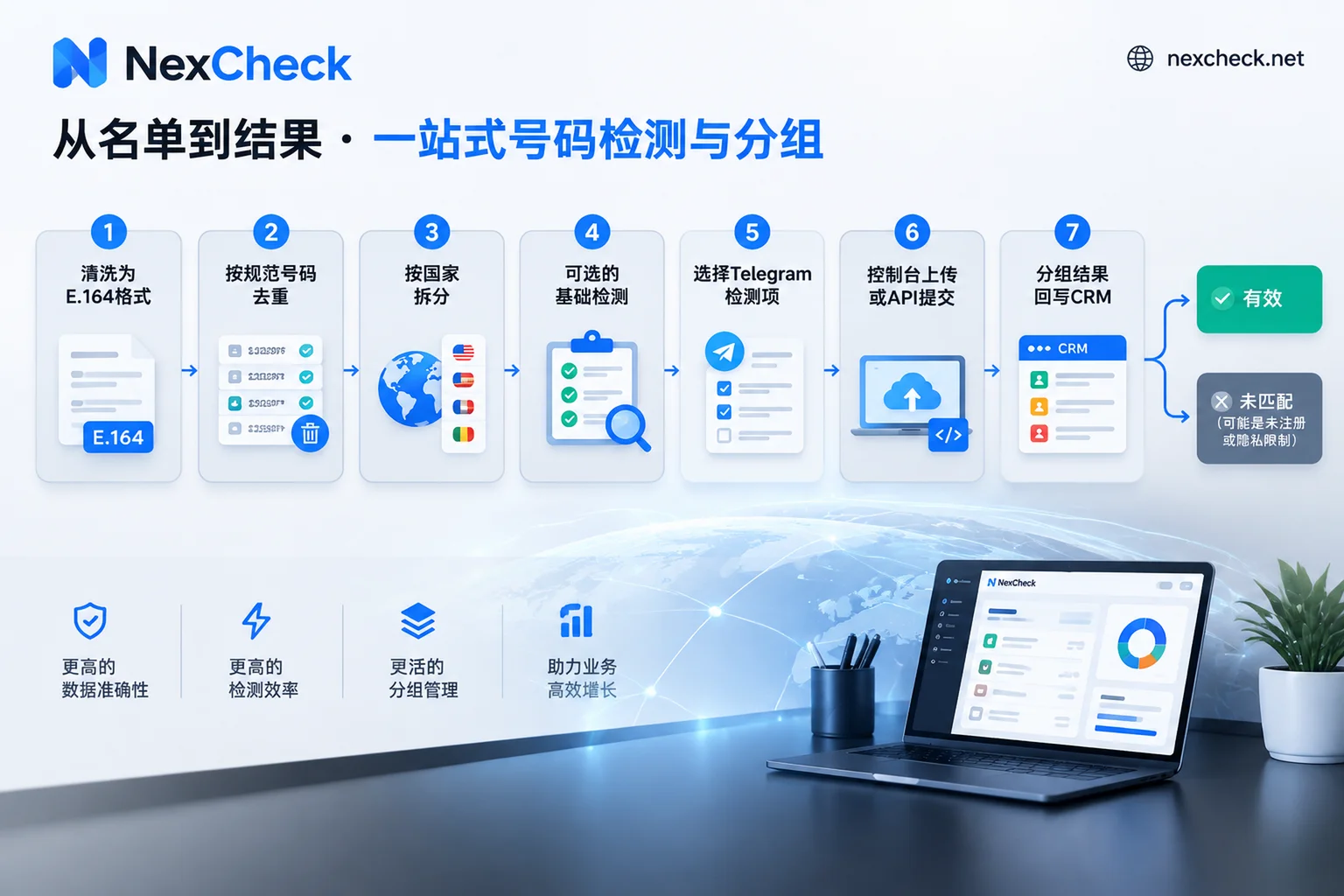
The following sections walk through each step and where misjudgments tend to happen.
Step 1: Normalize to E.164 format
Telegram identifies contacts through international phone number format with a country code. If a number is missing its country code or is incorrectly formatted, it cannot be matched correctly, and in the results it will be mixed together with numbers that genuinely have no account, making it hard to tell them apart later.
When cleaning, you need to handle these things:
- Remove formatting symbols: delete spaces, dashes, parentheses, and dots, keeping only digits and the leading "+".
- Unify the international prefix: for numbers starting with "00", replace "00" with "+".
- Complete the country code: for rows with only a local number, add the country code based on the CRM's country or region field. If a row has neither a country code nor a country field, put it in a separate pending-confirmation list; do not guess.
- Handle local leading zeros: many countries add a "0" for local dialing, which must be removed when converting to international format. A few countries are exceptions; consult each country's number format documentation for specifics.
- Check the length: flag numbers that are clearly too long or too short instead of submitting them directly.
One more important point: keep the customer ID from the original row. The cleaned number is only used as the detection key; when writing back to CRM, you need the customer ID to map results back to the original record.
If you want to learn more about international format and common leading-zero mistakes, see Number Format Errors and E.164 Normalization Order. That article uses WhatsApp as an example, but E.164 formatting itself is common across platforms.
Step 2: Deduplicate after unifying formats
Deduplication must come after format cleaning. "138 0013 8000", "+86 138-0013-8000", and "008613800138000" look different but are actually the same number. If you deduplicate before unifying formats, these duplicates will be missed.
After deduplication, one number may correspond to multiple customer IDs in CRM, for example if the same person registered twice at different times. The detection only needs to run once, but you must keep a "number → multiple customer IDs" mapping table and sync the results to all related records during write-back.
Step 3: Process multiple countries separately
We do not recommend submitting multiple countries mixed in one batch, for three reasons:
- Number lengths and leading-zero rules differ by country, so processing separately makes format issues easier to spot.
- Telegram's popularity varies greatly across markets, so mixing them makes the registration rate statistics meaningless.
- If results look abnormal, for example a country has almost no matches, processing separately lets you quickly determine whether it is a format problem or simply that few people in that market use Telegram.
For number formats and mainstream local platforms by country, see the regional pages. If you find that the mainstream platform in a market is not actually Telegram, consider using a different platform check for that part of the list.
Step 4: Basic check first, or go straight to Telegram detection?
NexCheck offers basic number checks that can identify dead numbers, device types, and high-risk numbers, which is a separate layer from platform detection.
- Older lists with mixed sources (for example, years of accumulated trade show lists or historical export data): run a basic check first, remove dead numbers, then run Telegram detection. Since pricing is per record, this reduces the number of clearly invalid numbers you check.
- Newer lists with a single source (for example, recently registered users): you can go straight to Telegram detection.
Step 5: Choose Telegram detection options
Platform detection can return information including whether the number is registered, registration time, activity status, ban status, gender and age, and other available attributes. However, each platform supports different detection options. Which fields Telegram currently supports and the unit price of each are based on the price list on the Telegram platform page; these details change as platform rules are adjusted.
When choosing detection options, first think clearly about how the results will be used:
- If you only need to know whether to keep the number: registration status is enough.
- If you need to segment registered accounts: add activity-related fields.
- Only include a field when it will actually feed into subsequent grouping or decision rules.
Step 6: Console upload or API submission
Both methods check the same content; the difference is in the workflow.
Console upload is suitable for one-off or irregular lists. Organize the cleaned numbers into a txt or csv file and upload it. There is no batch limit, and after detection you can download results grouped by valid and invalid.
REST API is suitable for scenarios that need system integration, such as automatically sending new CRM leads for checking every day, or periodic re-checks. Because submission is asynchronous, we recommend configuring a Webhook so results are pushed to your endpoint when detection completes instead of polling repeatedly. For API integration details, see Telegram Number Screening API Integration and CRM Write-Back.
To register an account and view API documentation, go through "Screening Tools" in the site navigation.
Step 7: Read the results, especially the "invalid" group
The results are divided into two groups: valid and invalid. The meaning of the valid group is relatively clear: the number can be matched to a Telegram account, along with the attribute fields you selected.
The invalid group must be interpreted carefully. Telegram's privacy settings include an option for "Who can find me by my number." If a user sets it to "My Contacts," then even if the number has registered with Telegram, a stranger looking it up by number will not get the corresponding account. This is a visibility boundary determined by platform rules, and no compliant detection method can cross it.
So the invalid group actually contains two types of numbers:
- Numbers that genuinely have not registered with Telegram;
- Numbers that have registered but have set it so strangers cannot find them by number.
When writing back to CRM, we recommend marking these as "unmatched" rather than "unregistered," and not deleting the customer record because of it. The number may be valid on other platforms, or it may be a customer your sales team has already reached through another channel.
Activity-related fields work similarly: what can be returned depends on what the platform currently allows to be shown and the user's own settings. These fields are suitable for rough segmentation, not as precise facts.
Why we do not recommend running it yourself with a personal account
Some teams consider importing contacts in bulk with a personal Telegram account, or writing their own script to call an interface and determine whether numbers are registered. Telegram's servers impose rate limits and anti-abuse mechanisms on contact imports and stranger number lookups. Bulk calls will trigger rate-limit waits, and in severe cases account functions may be restricted. Even setting those risks aside, the visibility boundary of privacy settings still exists, so running it yourself will not yield more results.
A few details for CRM write-back
- Link by customer ID: write back according to the mapping table kept in Step 2. When one number corresponds to multiple customer IDs, update every record.
- Store fields separately: registration status, activity status, etc. should each occupy their own field. Do not merge them into one block of text, so filtering remains easy.
- Record the detection date: account status changes, so including the date lets you judge whether results are outdated. Important lists can be re-checked periodically, submitting only new numbers and numbers older than a certain threshold.
- Keep unmatched records: just mark them as "unmatched"; do not delete them.
List source and scope of use
The list is the customer's own data, and NexCheck only processes it within the scope of the detection task. Whether the list source and intended use are legal must be confirmed by the list holder.
If the list has already been cleaned according to the steps above, the next step is to check the Telegram platform page for currently supported detection options and unit prices, then decide which fields to select for this batch.




Comments(0)