 NexCheck-筛号平台
Many teams assume social account registration detection only has two answers: “yes” or “no.” But in reality, due to platform privacy settings, risk control mechanisms, and account status, the proper output is three tiers: registered, unregistered, and unknown. Here, “unregistered” strictly means “not hit in this probe,” not “the number definitely has no account.”
Bottom Line: The Reasonable Output is Three Tiers
What can social account registration detection actually check? Simply put, it checks “whether this number can be found under current privacy settings,” not the platform’s internal registration ledger. Taking Telegram as an example, the official Bot API does not offer a public endpoint to directly check phone number registration status. Bulk detection relies on the Core API protocol or contact import probing (Telegram official docs). Therefore, forcing results into just “registered/unregistered” will inevitably lump three different causes into one value: design-level false negatives from users hiding their phone numbers, risk-control false negatives from high-frequency probing triggering rate limits, and status-level uncertainty from temporary account unreachability. These three causes demand different handling in your CRM, so you must use three tiers to capture them.
Protocol Boundaries First: What Phone Number Reverse Lookup Can and Cannot Do
Before performing any social account registration detection, accept a protocol fact: the Telegram Bot API does not expose phone number reverse lookup. So-called “registration detection” actually works indirectly through Core API contact import or auth-type protocol queries. The two paths differ in return semantics: contact import probing returns whether the corresponding user object appears in the import results, while the latter returns a protocol-level judgment on the number—but neither equals the platform’s registration ledger. For a complete walkthrough of the probing process, see Number Registration Status Detection. This is why detection results are inherently uncertain: they are influenced by the target user’s privacy settings, current network state, platform risk control policies, and more. Understanding this gives us a common foundation for discussing false negatives.
False Negative Source #1 (Design Layer): What Happens When “Find Me By Phone” Is Turned Off
When a user disables “Find Me By Phone” in Telegram’s privacy settings, the detection side returns “not found.” This is the platform working as intended per user preference—not a tool flaw, and there is no compliant workaround. Bellingcat’s open-source investigation tools also confirm this (related docs).
This type of false negative cannot be eliminated by switching tools or increasing budget; it can only be absorbed through result tiering and review. So, when you see “detection shows unregistered but the person actually has an account,” don’t immediately suspect data quality—the person likely just turned off phone number search.
False Negative Source #2 (Risk Control Layer): Return Values Under Rate Limiting ≠ True Status
Will bulk querying Telegram phone numbers get you limited? Yes. High-frequency probing triggers platform rate penalties. When the queue gets rate-limited, times out, or is degraded, the returned “not found” only reflects the probe link status, not the true registration status. Engineering-wise, you need three things: use async queues and throttling to control pacing; distinguish between “protocol clear denial” and “link anomaly” returns; and don’t mark anomalous batches as final—flag them for rerun.
Note: don’t obsess over specific “safe QPS” numbers, because platform rules change and different accounts have different thresholds. The key is to build automatic recognition and retry mechanisms.
False Negative Source #3 (Status Layer): Temporary Unreachability and Unaccepted Terms of Service
Using the WhatsApp Cloud API as a comparison makes the status-layer uncertainty clearer. Meta’s official docs note that when a target number is unregistered or hasn’t accepted the latest Terms of Service, the system returns error 131026 (Message Undeliverable). Meanwhile, sending high-frequency messages to the same recipient in a short time triggers 131056 (Pair Rate Limit Hit) throttling (Meta error code docs).
This shows that “registration status” and “deliverability this time” are two separate fields. The same error code can correspond to entirely different causes, so you can’t infer “no account” from it. For instance, 131026 could mean unregistered or not accepting terms; 131056 is a rate-limit issue. If you lump both into “unregistered,” you’ll mistakenly delete many real users. Telegram and WhatsApp return semantics aren’t universal; for cross-platform comparison, see Multi-Platform Number Detection.
Defining the Three Tiers: How to Use Registered / Unregistered / Unknown in CRM
A responsible detection platform should mark uncertain states separately and retain probe time and retry counts in the results, rather than forcibly merging them into “unregistered.” Based on this principle, the three tiers map to CRM actions as follows:
| Status | Definition | CRM Action |
|---|---|---|
| Registered | This probe hit | Eligible for next-step verification (e.g., sending a verification code) |
| Unregistered | This probe missed, with no anomaly signal | Lower priority but keep; schedule periodic recheck |
| Unknown | Link anomaly, rate limit, or privacy shield | Do not delete; store separately; schedule rerun |
“Unknown” must be stored separately—don’t merge it into “unregistered” for prettier reports. Otherwise, a batch anomaly from risk control will turn into a batch of “unregistered,” causing follow-up operations to go completely off track.
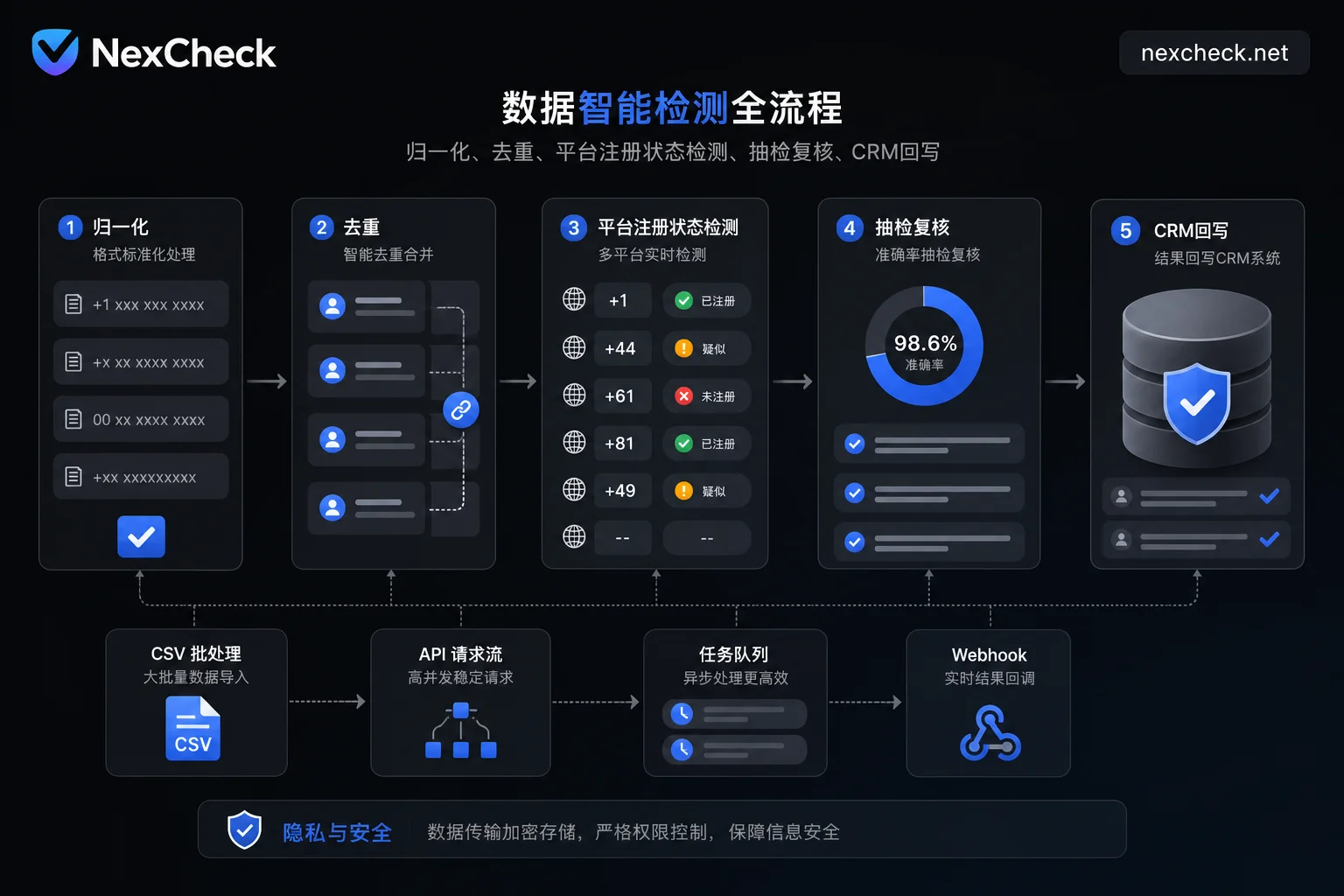
In practice, platforms like NexCheck, which offer web-based batch screening across 100+ platforms and RESTful APIs (batch submission, real-time queries, webhook callbacks), fit well in step three of the “normalize—dedupe—platform registration status check—spot-check review—CRM write-back” pipeline. A unified multi-platform interface reduces field misalignment from multiple tools and format conversions. Of course, results are still subject to each platform’s privacy settings and risk control boundaries—no absolute accuracy is promised.
How to Spot-Check: Sampling Ratio, Manual Confirmation, and Verdict on Two-Round Discrepancies
How to spot-check social account registration detection accuracy? Here’s a practical method: use stratified sampling by batch. Sample “unregistered” and “unknown” tiers more heavily than “registered,” since these are where misjudgments are more likely. The ratios below are empirical starting points based on misjudgment risk; no official platform documentation provides standard spot-check criteria, so adjust based on your own first few batches’ consistency rates. The specific operation:
| Batch Status | Suggested Sampling Ratio | Confirmation Method |
|---|---|---|
| Registered | 5% | Re-confirm with an independent tool |
| Unregistered | 20% | Manual recheck at a different time or path |
| Unknown | 30% | Rerun after waiting, then manual spot-check |
Record results each round and calculate batch consistency rate. If results are inconsistent across two consecutive rounds, mark as “unknown” rather than taking the later result. Consistency rate should be a long-term monitoring metric, not a one-time acceptance number. If you use an API with webhook callbacks like NexCheck, you can feed each batch’s consistency rate directly into a monitoring dashboard instead of manual aggregation. If consistency falls below expectations, trace back to whether it’s a design-layer, risk-control-layer, or status-layer issue.
Separate Registration Status, Account Activity, and User Consent: Detected ≠ Reachable
Are “registered” and “account active” the same thing? No. Detection results only prove “the number has left traces on the platform”—not that the account is active, and certainly not that the user consents to receiving your messages. Valid number format, carrier reachability (the first two layers fall under Phone Number Validity Detection), platform registration, account activity, and user consent are five entirely different concepts.
On the WhatsApp side, even if a number is registered, delivery might fail if the user hasn’t accepted the latest terms (131026). On the Telegram side, registration status doesn’t mean the other party wants to be found by you. So, detection results should only be used for cleaning already-consented contact data—not as a basis for outreach permission. Treating “registered” as a “marketable list” can easily cross platform compliance lines.
Troubleshooting Order When Results Don’t Match Actual Outreach
When detection results don’t align with actual outreach, don’t rush to modify your lists. Follow this order:
| Step | Check Item | Basis for Judgment | Next Action |
|---|---|---|---|
| 1 | Number normalization and country code | Is it E.164 formatted? | Correct number and retest |
| 2 | Rate limit or anomaly window | Check logs and error codes | Wait for cooldown and rerun |
| 3 | Is the return a protocol denial or link anomaly | Compare 131026 vs. 131056 | For former, change time; for latter, adjust frequency control |
| 4 | Registration status vs. Sending-side issue | Registration detection vs. delivery receipt | For former, check privacy settings; for latter, check throttling strategy |
This sequence helps you quickly identify whether the issue is on the data side or the link side.
In real business, start with a small batch of 200–500 already-consented numbers from your own list, run it through a test, store results in three tiers, and spot-check the “unregistered” tier. Only after confirming the consistency rate is acceptable should you consider integrating the API for full-scale cleaning. This is more meaningful than obsessing over “100% accuracy” claims.
FAQ
How to check if a phone number is registered on Telegram?
There is no official public API. You can only infer indirectly through Core API contact detection or third-party tools, and results are affected by the other party’s privacy settings—a “not found” return doesn’t necessarily mean not registered.
If Telegram can’t find a phone number, does that mean it’s not registered?
Not necessarily. The person may have disabled “Find Me By Phone,” or the query was rate-limited, leading to a miss. Mark it as “unknown” and retry at a different time.
After turning off “Find Me By Phone,” can you still be detected?
No, and no compliant tool can bypass it. It’s a platform design to protect user privacy; only spot-check reviews and staggered reruns can reduce the impact of misjudgments.
Detection shows unregistered but the person actually has an account—what’s going on?
Most likely a design-layer false negative—the person’s privacy settings block phone number search—or a rate-limit anomaly. Classify such records as “unknown” and periodically recheck them.
Will bulk querying Telegram phone numbers get you limited?
Yes. High-frequency probing can trigger rate penalties, leading to unreliable returns. You must use async queues and throttling, and distinguish between “protocol denial” and “link anomaly.” Don’t finalize anomalous batches.
How do you spot-check social account registration detection accuracy?
Use stratified sampling, with extra focus on “unregistered” and “unknown” tiers. Cross-validate with independent tools and track batch consistency rates. Records with two consecutive inconsistent rounds should be marked “unknown,” not the later result.
Is a registered number the same as an active account?
No. Registration only means the number has left traces on the platform. Account activity, deliverability, and user consent are different concepts. Detection results can’t replace consent; they can only be used for cleaning already-consented data.



Comments(0)