 NexCheck-筛号平台
Many people assume that running a list of phone numbers through a detection tool will yield a single "valid/invalid" conclusion. However, multi-platform number detection actually produces a status matrix: the same number might appear as registered on WhatsApp, be untraceable on Telegram, and show an invalid User ID on LINE.
This matrix is not arbitrary but is determined by each platform's application-level identification standards. It answers not just "Can this number be used?" but "On which platforms does this number have a registration identifier, on which platforms is it not found, and on which platforms does it need further confirmation?"
Based on rate limiting and error code facts from official Telegram, LINE, and WhatsApp documentation, this article addresses four questions: What exactly does each platform detect, why do results differ, what are the costs of skipping pre-detection, and how to design and store the result matrix.
Key Takeaway: Multi-platform detection outputs a status matrix, not a valid/invalid verdict
After cross-platform detection, a list of numbers should yield a matrix with one status column per platform, not a single boolean value. This is necessary because the detectable entities differ across platforms, and a single conclusion would obscure critical differences.
Pre-detection is also essential due to official constraints: Telegram limits non-paid broadcast to 1 message per second per chat and roughly 30 messages per second globally (Telegram Bots FAQ, June 2025); LINE explicitly prohibits mass messaging to nonexistent or invalid User IDs (LINE Messaging API Developer Guide, August 2024); Meta WhatsApp Cloud API triggers pairing rate limits when sending high-frequency messages to a single recipient, returning 429 with error code 131056 (Meta Error Codes Documentation, 2025-2026). Skipping pre-detection and mass-messaging unregistered numbers will quickly hit these rate limits, leading to channel restrictions or risk-control downgrades.
Different platforms use different identifiers: phone numbers, User IDs, and msisdn
The complexity of "multi-platform number detection" arises because each platform uses a different identifier:
| Platform | Detection Subject | Identifier Format | Notes |
|---|---|---|---|
| E.164 phone number | e.g., 8613800138000 | Mobile number is the subject; detects if it's registered on WhatsApp | |
| Telegram | chat/user dimension | User ID or phone number | Detects if a phone number is bound to a Telegram account |
| LINE | User ID | Assigned by LINE | Detects if a User ID exists and is valid |
| Viber | msisdn | Standard E.164 | This article follows the common practice of Viber Business Messages using msisdn as identifier and requiring international standard format; specific validation behavior is subject to Viber official developer documentation, as no original values are cited here |
For Zalo, public developer documentation does not fully disclose rate limit values for third-party number registration detection endpoints, often relying on local ecosystem partner gateways. Therefore, this article does not provide Zalo's criteria or rate limit conclusions.
Understanding this table clarifies why the same list yields different detectable entities per platform: WhatsApp and Telegram rely on phone numbers, LINE uses User IDs, and Viber recommends submitting msisdn in international E.164 format.
Why the same number is registered on WhatsApp but not found on LINE: application-level statuses are not inherited
Many teams ask, "Why do WhatsApp and LINE number detection results differ?" The root cause is that four status levels are not equivalent:
- Format valid: The number complies with E.164 international standard.
- Carrier active: The number is allocated to a carrier and currently usable (HLR query result).
- Platform registered: The number has an account on a particular application layer; see phone registration status detection.
- Account active: The account has recent usage.
Application-layer registration statuses are not inherited across platforms; this is the fundamental reason for inconsistent multi-platform detection results.
Costs of skipping pre-detection: What Telegram retry_after, LINE 429, and WhatsApp 131056 penalize
Each platform's rate limits and error codes penalize different behaviors:
| Platform | Official Rate Limit/Error | Penalized Behavior | Official Source |
|---|---|---|---|
| Telegram | ~30 messages/sec global, 1 msg/sec per chat, 20 msgs/min per group; 429 with retry_after when exceeded | Sending frequency | Telegram Bots FAQ (June 2025) |
| LINE | Messaging API explicitly prohibits spamming invalid User IDs; 429 Too Many Requests on exceeding limits | Invalid calls: sending to nonexistent or invalid User IDs | LINE Developer Guide (August 2024) |
| High-frequency sending to a single recipient triggers pairing rate limit, error 131056; throughput default 80 mps, upgradeable to 1000 mps; errors can be returned synchronously via Graph or asynchronously via webhook | Repeated contact to the same number | Meta Error Codes Documentation (2025-2026) |
As shown, Telegram's 429 penalizes "sending too fast," LINE's 429 penalizes "sending to invalid IDs," and WhatsApp's 131056 penalizes "repeated messaging to the same person." For WhatsApp's bulk pre-detection, refer to WhatsApp number screening platform. Without pre-detection, you can't tell which mechanism is blocking you.
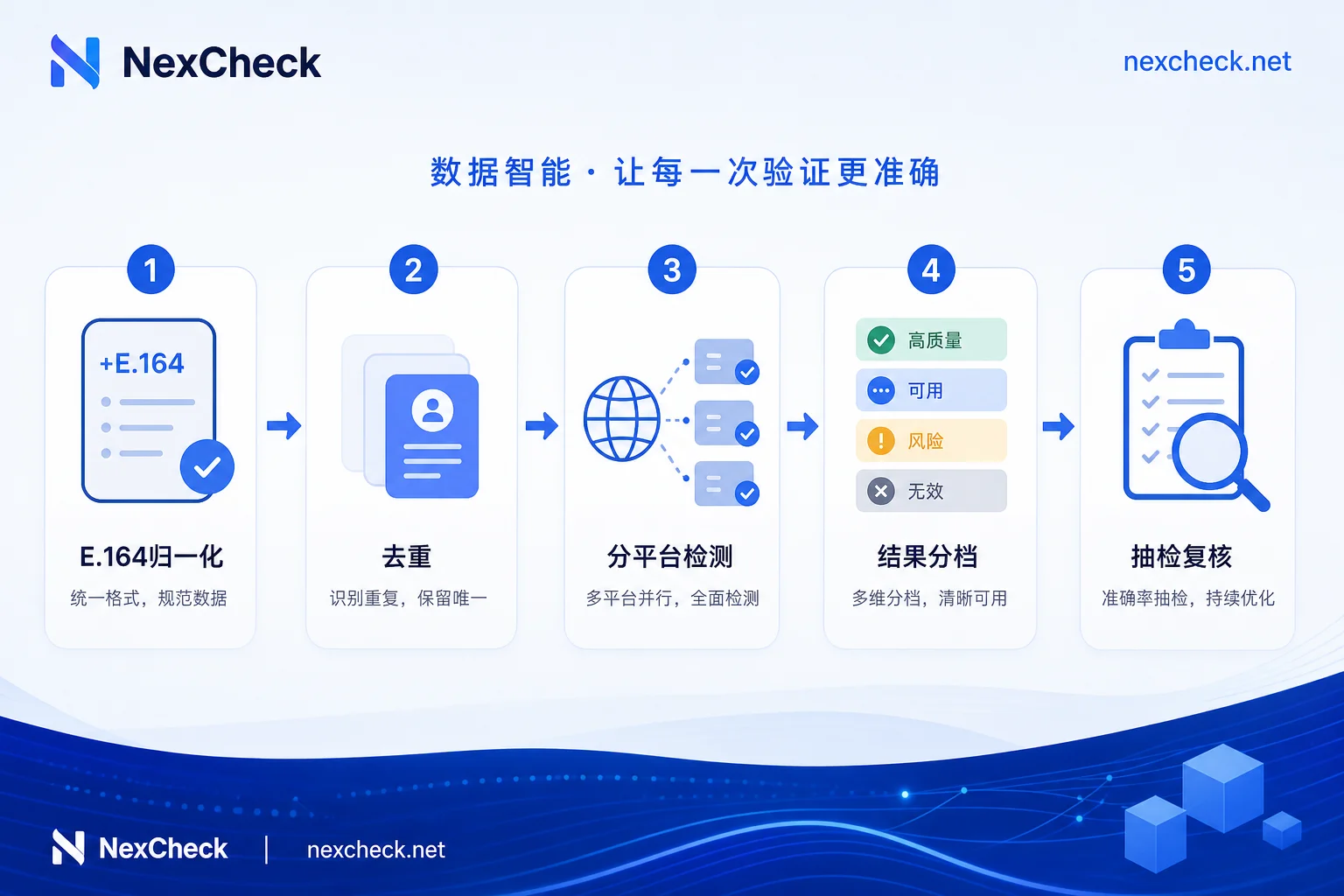
Cross-platform cleaning order: E.164 normalization → deduplication → per-platform detection → result categorization → sample verification
For a list of numbers, follow these five steps in order; the order cannot be reversed:
- E.164 normalization: Convert numbers to international format (+country code + number), removing spaces, parentheses, leading zeros, etc. This is a prerequisite for all platform detections. For Viber, it's recommended to submit in international standard format; see phone number validity detection.
- Deduplication: After normalization, deduplicate by country code + number to avoid wasting quotas on repeated detections.
- Per-platform detection: Call each platform's detection API (e.g., WhatsApp, Telegram, LINE, Viber). This step can be parallelized, but be mindful of each platform's rate limits.
- Result categorization: Classify results for each platform into four categories: "registered," "not found," "unknown," and "request failed." "Unknown" means account status is unclear (e.g., privacy settings); "request failed" means the result wasn't obtained due to network or rate limiting.
- Sample verification: Extract 5%-10% of samples for manual or secondary detection to verify freshness, as registration status changes over time.
Designing the result matrix and feeding back to CRM: one status column per platform + detection timestamp
The scattered results from per-platform detection must be stored as a clear matrix table. Recommended fields:
| Field Name | Example | Description |
|---|---|---|
| normalized_number | 8613800138000 | E.164 normalized number |
| country_code | CN | Country code |
| whatsapp_status | registered / not_found / unknown / failed | WhatsApp detection result |
| telegram_status | registered / not_found / unknown / failed | Telegram detection result |
| line_status | registered / not_found / unknown / failed | For LINE, registered means User ID exists and is valid |
| viber_status | registered / not_found / unknown / failed | Viber msisdn status |
| checked_at | 2026-07-15 10:30:00 UTC | Detection timestamp for freshness |
| task_id | batch_20260715 | Task identifier for this detection run |
| fail_reason | rate_limit / timeout / parse_error | Reason for request failure |
It's crucial to preserve "unknown" and "failed" statuses—they are not negative results but data that needs retry or manual confirmation. Always record detection timestamps, as registration status changes (e.g., user deactivates, number porting); a "registered" status from a week ago may be outdated.
During the step from per-platform detection to storage, different tools output different field names and status values, causing alignment issues during merging. NexCheck covers batch detection for WhatsApp, Telegram, LINE, Viber, Zalo, etc., outputting multi-platform statuses in a unified structure and offering RESTful API for batch submission, real-time query, and webhook callbacks. It fits well in the per-platform detection step, reducing format conversion and manual merging costs. However, note that detection results only reflect platform-side registration status, not immediate reachability, nor do they replace opt-in authorization or sending-side rate limiting.
Two things to confirm before outreach: opt-in consent and per-contact rate control on the sending side
The detection process above helps you filter "registered" numbers, but it doesn't mean you can send freely.
First, marketing outreach still requires user opt-in consent. A platform registration doesn't imply consent to receive marketing messages; unauthorized mass messaging leads to high complaint rates and permanent account bans.
Second, the sending engine must implement per-contact rate control and backoff retry per platform. Even if a number is registered, Telegram's per-chat limit remains 1 msg/sec; WhatsApp still triggers 131056 pairing limit for high-frequency messaging to the same recipient. Reading Telegram's retry_after parameter and applying exponential backoff with idempotent reconciliation for 429 and 131056 is mandatory on the sending side.
Troubleshooting order when detection and actual sending differ
When detection shows "registered" but actual sending fails, check in this order:
- Verify number normalization consistency.
- Check if the detection timestamp is outdated.
- Distinguish between synchronous Graph errors and asynchronous webhook callbacks.
- Confirm whether you've hit pairing or global rate limits.
- Sample manual verification.
- Determine if it's an "unknown" status.
FAQ
How to check if a number is registered on Telegram?
Telegram detection targets the chat/user registration identifier, not the phone number itself. Due to user privacy settings, some accounts may only return "unknown" even if registered. See the cleaning pipeline in Section 5 (normalization → deduplication → per-platform detection → result categorization).
Why do WhatsApp and LINE detection results differ?
The platforms use different identifiers: WhatsApp uses phone numbers, while LINE uses User IDs. A phone number registered on WhatsApp may not have a corresponding LINE User ID, hence different results. This reflects that app-layer registration statuses are not inherited.
What causes LINE Messaging API 429 Too Many Requests?
429 indicates request frequency exceeds limits, or you sent messages to invalid User IDs. LINE explicitly prohibits spamming nonexistent or invalid User IDs, so on 429, check if target User IDs are valid and reduce sending frequency.
How to handle Telegram Bot API retry_after?
retry_after is the wait time in seconds when Telegram returns 429. Correct practice: upon receiving retry_after, pause the next send for that chat, wait at least the specified seconds before retrying. Also adhere to per-chat 1 msg/sec and global ~30 msg/sec limits to control overall pace.
Does Viber's msisdn have to be in E.164 format?
Viber Business Messages uses msisdn as the recipient identifier, and industry practice is to submit in international (E.164) format; this article does not cite Viber official documentation, so validation rules and failure responses are subject to Viber's official developer docs. Therefore, before batch detection, unify numbers to international format, e.g., Chinese numbers as 8613800138000, not 13800138000.
What's the difference between multi-platform detection and carrier lookup?
Carrier lookup (HLR) answers "Is the number allocated and active on the network?" (communication-layer status); multi-platform detection answers "Is the number registered on a specific social app?" (application-layer status). They cannot replace each other: an active number may not be registered on WhatsApp, and a number registered on LINE might be disconnected.
Start with a small sample of 200–500 numbers and run through "normalization → deduplication → per-platform detection → sample verification" using NexCheck or your existing detection channel. Confirm that the status column formats and data freshness meet expectations, then decide whether to integrate the full list into an automated pipeline.



Comments(0)