 NexCheck-筛号平台
When you have a list of customer or lead numbers and need to determine which are usable, which are invalid, or which have accounts on a specific social platform, a number screening platform can help. It checks each number against the submitted list and returns categorized results.
Number screening platforms mainly do two things: carrier-level basic checks (whether the number itself is active, device type) and platform-level account checks (whether an account exists on a specific social or communication app, and its activity status). Choosing the right check type, preparing the list correctly, and selecting the appropriate submission method can avoid many wasteful operations.
Boundaries of the Two Check Types
Carrier-level basic checks rely on carrier signaling or number databases and can return information such as:
- Line Type: mobile, landline, fixedVoip, or nonFixedVoip. This field can directly filter out landlines and VoIP numbers if your business only accepts mobile numbers.
- Line Status: Active (in service), Inactive (unassigned, deactivated, or empty), Unreachable (powered off or out of network), or Reachable (device online and reachable). Numbers with Inactive status can be directly removed; Unreachable numbers may be kept or removed based on your business tolerance.
Carrier-level checks do not require the target number to be registered on any application. They are suitable for initial screening or for filtering empty numbers and identifying device types.
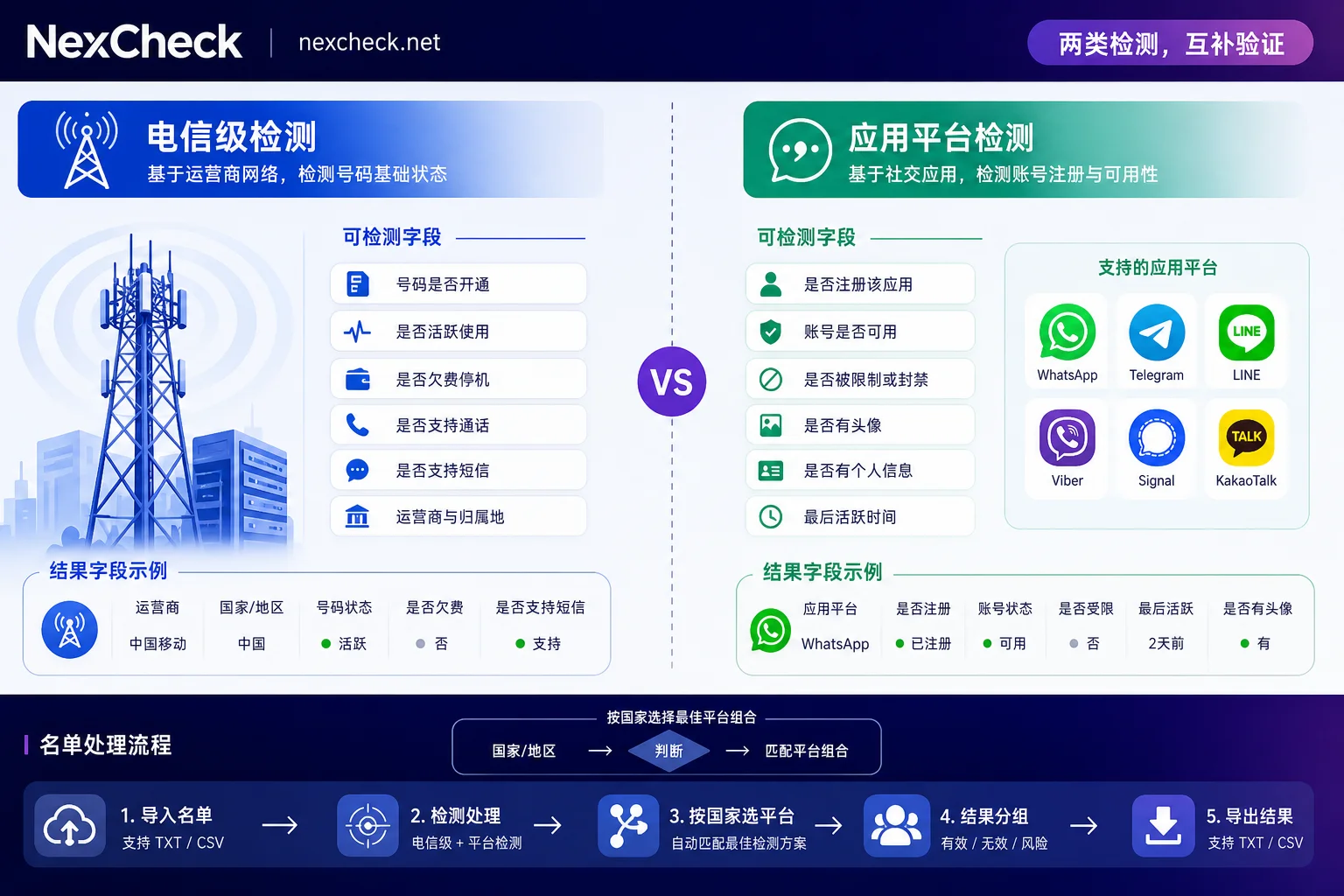
Platform account checks query whether the target number has a registered account on a specific application (e.g., WhatsApp, Telegram). The returned information depends on the platform's open interface capabilities:
- Whether an account exists
- Registration time, last active time
- Whether the account is banned
- Public profile fields (gender, age, avatar, etc., varying significantly by platform)
A prerequisite for platform checks is that the number must be registered on the target platform. The available fields and visibility rules vary significantly across platforms; WhatsApp's account status is relatively stable, while Telegram has lower hit rates due to privacy settings and protocol restrictions. Before choosing a platform check, first confirm which fields can be retrieved from the target platform (see https://nexcheck.net/platforms/).
When to use which check: If you only need to filter empty numbers or identify device types, carrier-level checks are enough. If you need to reach out to users on a specific social platform, you must first confirm they have an account using a platform check. You can also combine them: first use carrier-level checks to remove invalid numbers, then run platform checks on the remaining numbers.
List Preparation
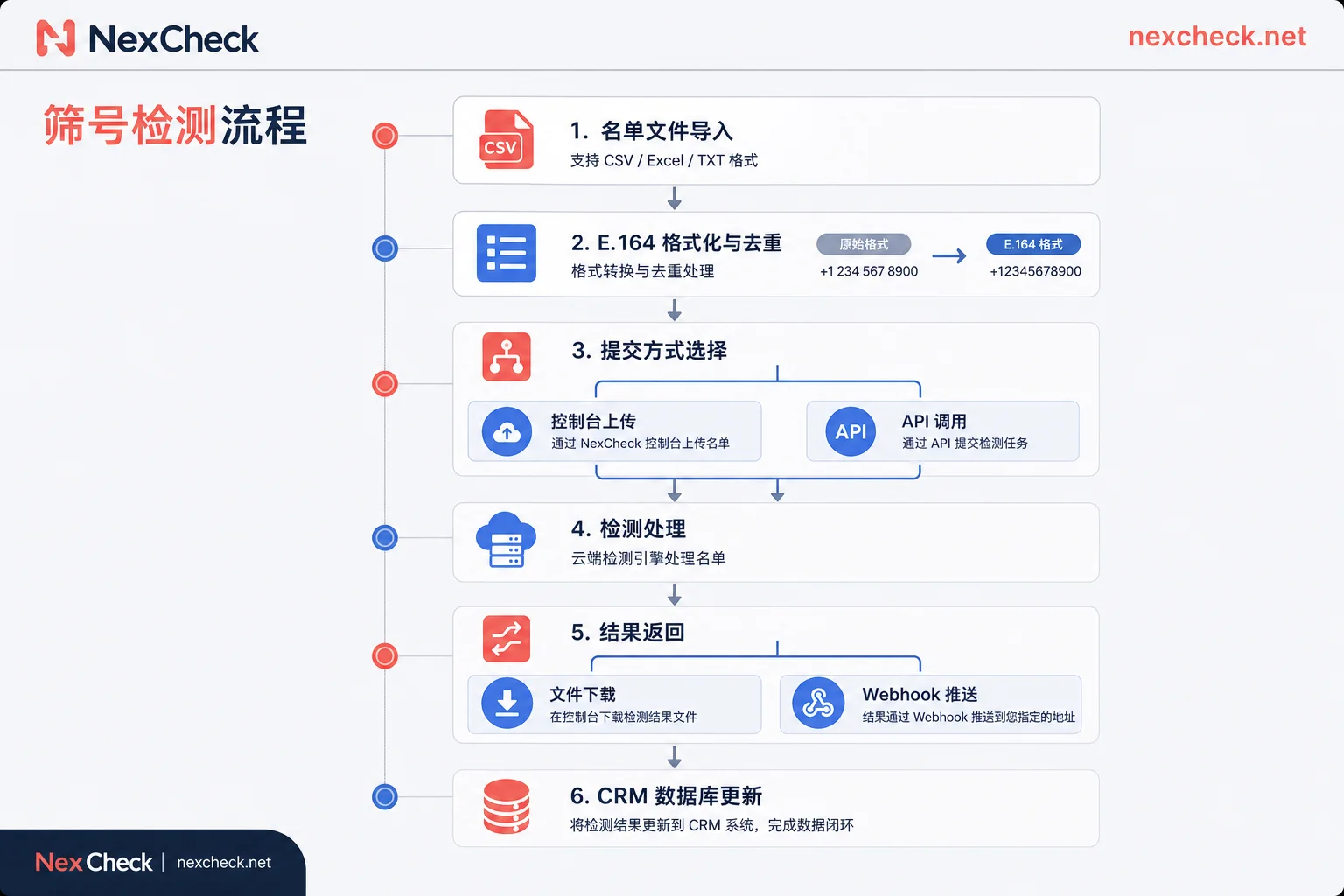
Before submission, unify the list to E.164 format. This is the international standard for phone numbers defined by the International Telecommunication Union (ITU-T): it starts with +, followed by the country code (1–3 digits), then the national significant number, with a maximum length of 15 digits in pure digits, no parentheses, spaces, hyphens, or leading zeros.
Examples of incorrect formats:
(86) 138-1234-56780086 13812345678138 1234 5678
Correct format: +8613812345678
If your list contains numbers from multiple countries, irregular formats can cause:
- Deduplication to fail (the same number appears as different records due to format variations)
- Routing errors (the platform cannot identify the country code)
- Duplicate billing (the same number submitted multiple times)
For specific rewriting rules and tools, refer to the E.164 normalization method before screening international numbers (see https://nexcheck.net/blog/22.html).
After formatting, deduplicate. If the list comes from multiple channels or has been merged multiple times, duplicate numbers will waste screening credits. When deduplicating:
- Only deduplicate on the full number (including country code)
- Retain the most recent customer label or remark field
- Record the count difference before and after deduplication to assess data quality
Choosing a Submission Method
Screening platforms generally offer two integration methods:
Console upload: Suitable for one-off or low-frequency tasks. Prepare a TXT or CSV file with one number per line or one record per line (number + customer ID, etc.), upload, wait for processing to complete, then download grouped results. Pros: simple operation, no technical integration required. Cons: not automated; results need to be manually imported to CRM.
REST API + Webhook: Suitable for internal system integration or high-frequency batch tasks. Submit the list via API, and after processing, the platform pushes results to a specified address via Webhook. Your system receives the result and automatically writes status tags back to the database or CRM. This method enables full automation but requires development resources for API integration.
Selection criteria:
- Low frequency, small volume, no technical resources: console upload
- Regular list cleaning, CRM/database integration: API + Webhook
- Very large batches (hundreds of thousands or more): API is more stable; console upload may have file size or timeout limits
For specific steps on API integration, refer to how to integrate a batch number screening API (see https://nexcheck.net/blog/14.html).
Result Handling and Write-Back
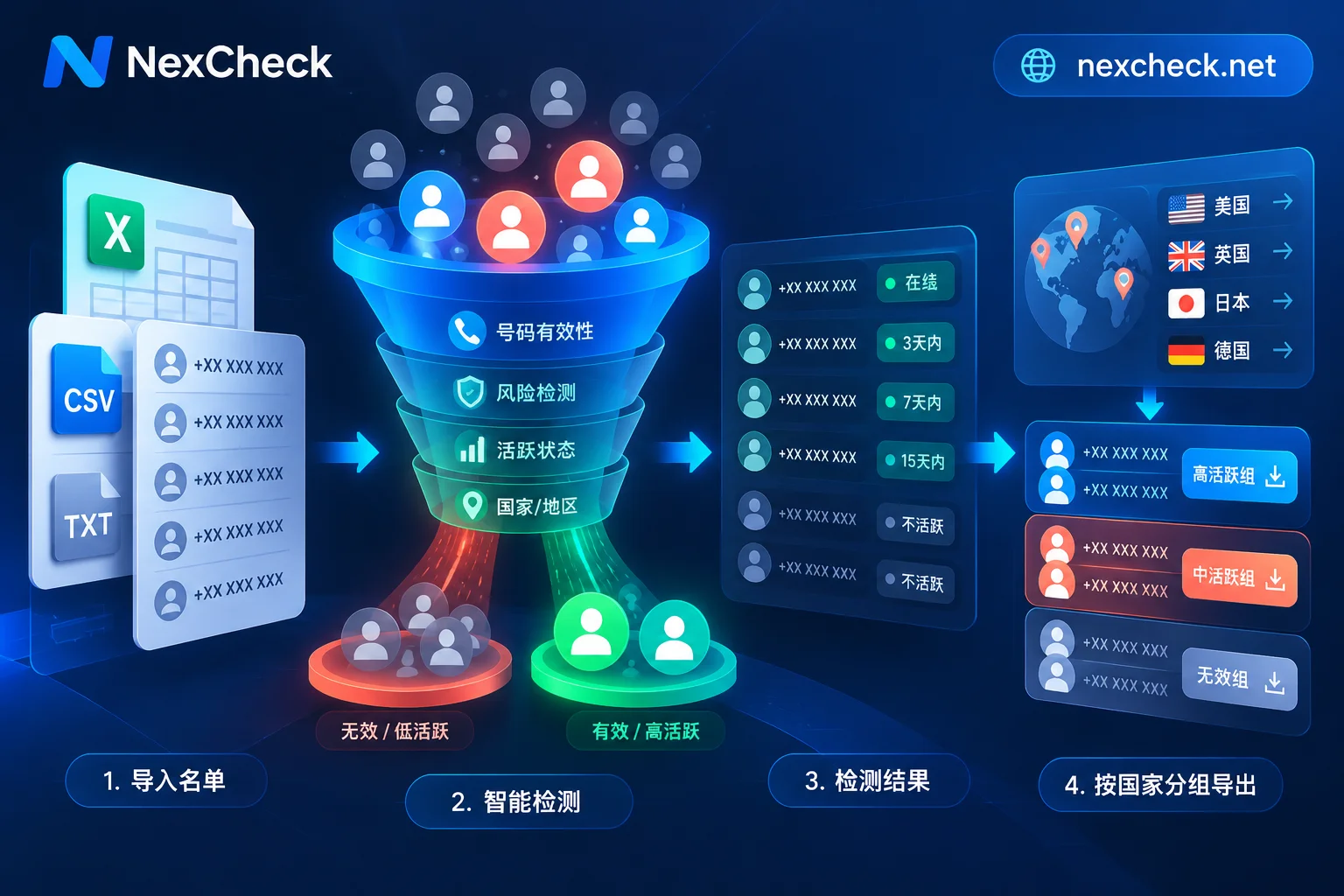
After screening, the platform returns results grouped by valid and invalid. However, in real business, "valid" and "invalid" are only the coarsest categories. A more useful approach is to store results across multiple dimensions:
- Detection status: successful / API timeout / number format error
- Number usability: Active / Inactive / Unreachable
- Platform registration: registered / not registered / unable to confirm
- Risk tags: high-risk number ranges / VoIP numbers / recently banned
- Timestamp: screening time, used to assess data freshness later
The combination of these fields supports more refined filtering strategies. For example:
- Numbers that are Active and registered but not recently active can be given lower outreach priority
- Unreachable numbers are not permanently invalid; they can be retained and re-screened after a period
- VoIP numbers may need special handling in certain compliance scenarios
For detailed field design considerations, see don't just look at valid/invalid in batch number verification (see https://nexcheck.net/blog/34.html).
If using Webhook result push, here is the handling logic after receiving results:
- Verify the callback signature (to prevent forged requests)
- Parse the result JSON and extract status fields
- Match local records by original number or task ID
- Update status labels in the database or CRM
- Trigger downstream business logic (e.g., automatically assign to different marketing flows)
Criteria for Choosing a Platform
If your goal is a specific social platform (e.g., WhatsApp), the detection capabilities and data boundaries are defined by the platform itself. Differences across platforms include:
- Check item differences: WhatsApp can check registration status and some public profile data; Telegram has low hit rates due to privacy settings; LINE, Viber, and other platforms have different visible fields.
- Frequency control and rate limiting: Platforms impose rate limits on probing behavior, so screening services need to implement throttling and backoff at the interface level. If the service provider's rate limiting strategy is unreasonable, it can lead to high failure rates or long processing times.
- Data freshness: Social platform account statuses change (deactivation, bans, privacy setting adjustments). Screening results are typically valid for several weeks to months; you should re-run periodically based on business rhythm.
For international business, consider number geography. On some platforms, penetration in certain countries or regions is low, making screening less meaningful. First check the distribution of major platforms by country (see https://nexcheck.net/regions/) before deciding which platforms to screen.
If you need to screen multiple platforms simultaneously, refer to the status matrix and rate limit comparison for multi-platform number screening (see https://nexcheck.net/blog/10.html).
Path from List to Usable Data
The complete workflow:
- Collect the list: Gather numbers from CRM, ad campaigns, offline events, etc.
- Format normalization: Convert to E.164, remove duplicates
- Choose check types: Decide on carrier-level, platform-level, or a combination based on business goals
- Submit for screening: Use console upload or API calls; for large batches, use Webhook for result push
- Process results: Store results with multi-dimensional status fields, not just a binary valid/invalid split
- Write back and apply: Update CRM labels, trigger subsequent marketing or customer service flows
- Periodic re-screening: Re-screen existing numbers based on data freshness and business changes
For teams requiring API integration, NexCheck offers per-number billing screening services, supporting both console upload and REST API, with results pushed via Webhook. Specific check items and pricing for each platform can be viewed on the platform capabilities page (see https://nexcheck.net/platforms/). List data is processed within the scope of the task and is not retained.
The core value of a number screening platform is that it lets you focus on usable data instead of wasting effort on the entire list. With proper formatting, correct check type selection, and well-designed result fields, your subsequent marketing and customer outreach efficiency can improve.



Comments(0)