 NexCheck-筛号平台
Suppose you have a merged list: part from a website form, part from event registrations, and part from an old CRM export. Some numbers have a +, some have a leading 0, and there are duplicates. Now you need to determine which numbers have Telegram accounts and write the results back to CRM for later segmentation.
There are many screening tools on the market. Before comparing feature lists, run through these five questions:
- Fields: Besides "registered or not," what else can it return? Is activity an exact time or a range?
- Boundaries: Does it separate "not found" from "confirmed not registered"? Does it explain Telegram's privacy limitations?
- Implementation: Does it require you to provide your own Telegram account Session or Tdata?
- Delivery format: Can operations staff upload files and export by group? Can developers submit via API and receive results via Webhook?
- Billing: What is the counting basis? Where can you find unit price and detection items?
Once a tool can answer all five clearly, test it with a small batch from your own list. Below, we explain what to look for in each area.
1. Fields: Understand What You Can Get and What Each Field Means
Telegram detection results depend on the data structure returned by the platform's interface. Common fields include:
- Registration status (account existence): Whether this number can be matched to a Telegram account.
- Public username and profile photo: Only available if the user has set them; empty does not mean the account is invalid.
- Account status: For example, Deactivated, or flagged as Fake or Scam. These numbers usually need separate labeling in CRM and should not be mixed with normal accounts.
- Activity: This is the most easily misinterpreted field.
Telegram has privacy tiers for "last seen." At the protocol level, most returns are ranges, not exact timestamps. Common ones include:
- Active recently (Recently)
- Active within 7 days (LastWeek)
- Active within 30 days (LastMonth)
- Empty status, or a specific offline time when the user allows it
So, if a tool claims it can return an exact last seen time for every number, ask where the data comes from. A qualified tool will present these ranges as they are, and you decide how to segment for business purposes—for example, treating numbers active within 7 days as a priority follow-up group.
Also, different platforms vary greatly in what fields they can check. Attributes like gender and age may be available on some platforms but not necessarily on Telegram. When choosing a tool, look at the detection items listed on its Telegram page; do not infer from its capabilities on other platforms.
2. Privacy Boundaries: "Not Found" Does Not Equal "Not Registered"
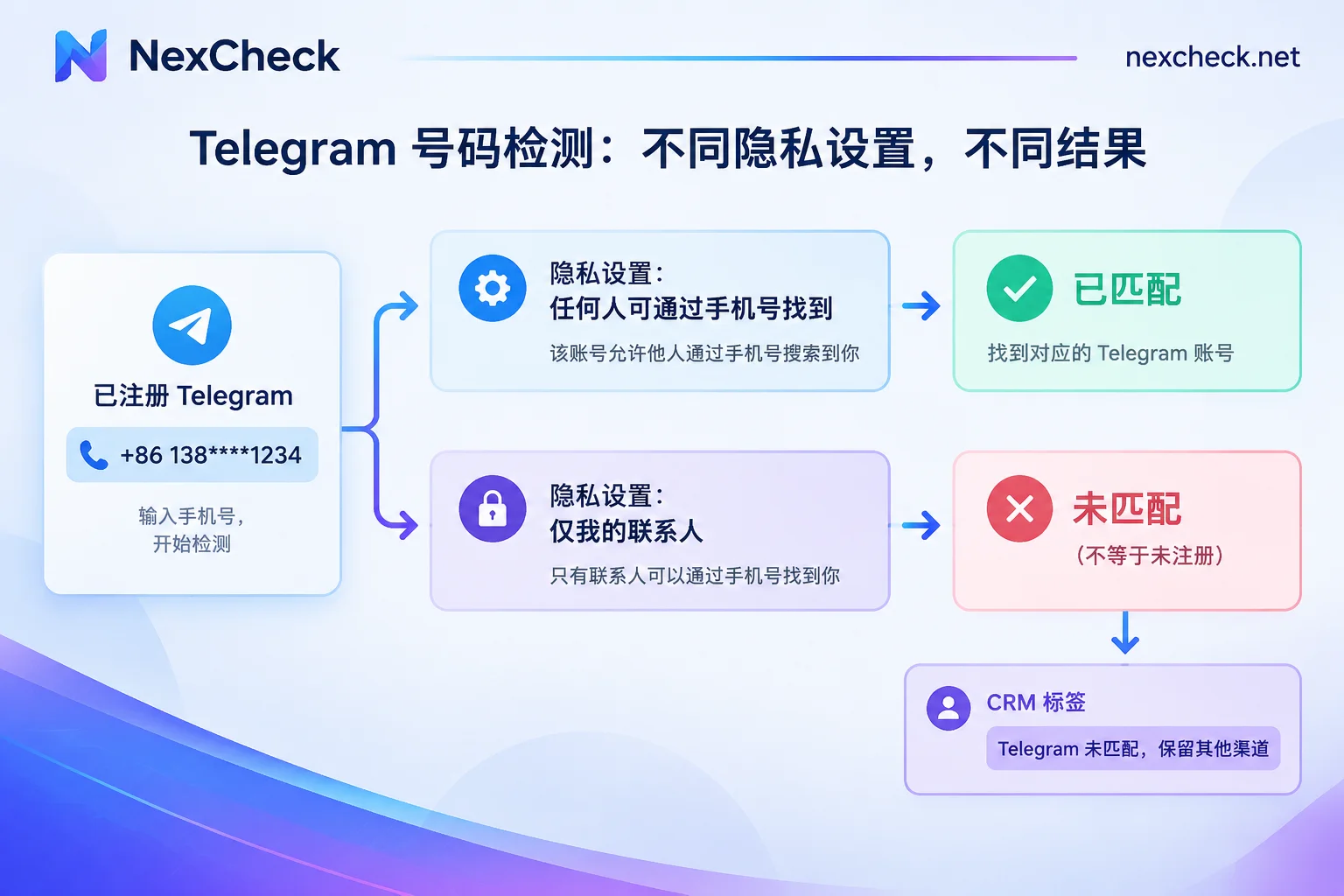
Telegram allows users to set "Who can find me by my phone number" to "My Contacts." When enabled, if the querying party is not in the other person's contacts, even if the number is indeed registered on Telegram, no account will be matched.
This is a privacy rule of the platform itself. Any compliant tool will encounter this boundary; it has nothing to do with the tool's quality. When evaluating, note two things:
- Does the tool explain this boundary? Claims of "100% identification of all registered numbers" contradict platform rules.
- How to use the results. For unmatched numbers, it is advisable to mark them as "Telegram not matched" in CRM rather than deleting them as invalid. They may still be valid phone numbers, and fields for other channels like email and phone should be retained.
For other causes of match failures, such as format errors, account bans, rate limits, and troubleshooting order, see Troubleshooting Order for Telegram Number Screening Failures.
3. Implementation: Do Not Let the Tool Use Your Business Account
Some low-quality tools or scripts circulating online require you to mount a personal or company Telegram account (upload Session or Tdata) and then import the entire list into contacts for batch comparison. This approach has two direct risks:
- It easily triggers Telegram's FloodWait rate limiting, causing the query to stall midway;
- In severe cases, the mounted account may be banned, and that account could be the very business account your team uses daily.
A safer approach is to use a platform with an independent detection pipeline: you only submit the list numbers, the platform returns detection results, and your account is not involved in the query. When selecting, you can ask directly: "Do I need to provide my account login information?" If the answer is yes, reconsider. Similarly, writing your own script for contact comparison is not recommended.
4. Delivery Format: Console for Operations, API for Developers
The same list often needs to be handled by two types of people.
Operations and marketing colleagues need:
- Direct upload of txt or csv in the web console;
- Automatic deduplication;
- Export grouped by "valid / invalid" and by different activity ranges, ready to import into CRM or hand off downstream.
Developers integrating detection into CRM or data pipelines need:
- A standard REST API submission endpoint;
- Asynchronous processing with Webhook callbacks for results, to avoid requests hanging on large lists;
- Stable result field structure for mapping "registered or not," "activity range," and "account status" to custom CRM fields.
If your team has both scenarios, choose a tool that supports both entry points. For integration steps, see How to Integrate the Telegram Number Screening API.
5. Prepare the List Before Submission
Regardless of the tool, list quality directly affects results and cost. Recommended order:
- Normalize to E.164 format: Include + and country code, remove local leading 0, spaces, and hyphens.
- Deduplicate after normalization: If you deduplicate before standardizing format,
+86 138…and0086138…will be treated as two entries. - Perform basic number validation: First remove invalid and malformed numbers, and flag high-risk numbers, so you do not pay for Telegram detection on clearly invalid numbers.
- Group by country: For mixed-country lists, submitting by country makes it easier to verify results and spot format errors in an entire country's batch.
Taking NexCheck as an example, you could process the list this way: first use basic number validation to filter out invalid and malformed numbers, then organize the remaining numbers by country into txt or csv, upload in the console, and select Telegram detection; when integrating with systems, submit via REST API and receive results via Webhook. Results are returned grouped by valid and invalid, priced per item, with no limit per batch. Telegram's currently available detection items and unit prices may change; refer to the Telegram platform page for the latest. For number format differences in multi-country lists, check the regional solutions page first.
One more point: The list is your own data. You are responsible for confirming that its source and use are legal. The detection platform only processes the list within the scope of the task.
6. Billing: Clarify How "One Item" Is Counted
Per-item pricing or monthly subscription depends on whether your batches are regular. Teams with sporadic lists usually find per-item pricing more flexible. Teams with a fixed monthly volume can compare whether a subscription is more cost-effective.
More important than unit price is the counting basis:
- Is it based on submitted items or actually completed detections?
- Are duplicate or malformed numbers billed?
- Are different detection items priced separately?
These should be clearly stated in the price list or documentation. If they are vague, focus on verifying the bill during your trial run.
7. Validate with a Small-Batch Trial
Do not submit the entire list the first time. Extract a few hundred entries from your own list, covering major countries and sources, run a trial, and then check:
- Whether the exported file fields match the documentation and can be directly imported into CRM;
- Whether unmatched numbers are categorized separately and not mixed with "format errors";
- Whether activity is presented as ranges and their meanings are explained;
- Whether the actual charged count matches the number you submitted.
Once these all align, submit the full list. If the detection items on the Telegram page cover exactly the fields you need, you can register a console account via the "Screening Tools" navigation on the official website, or check the API integration guide in the site documentation, and start with this trial batch.




Comments(0)