 NexCheck-筛号平台
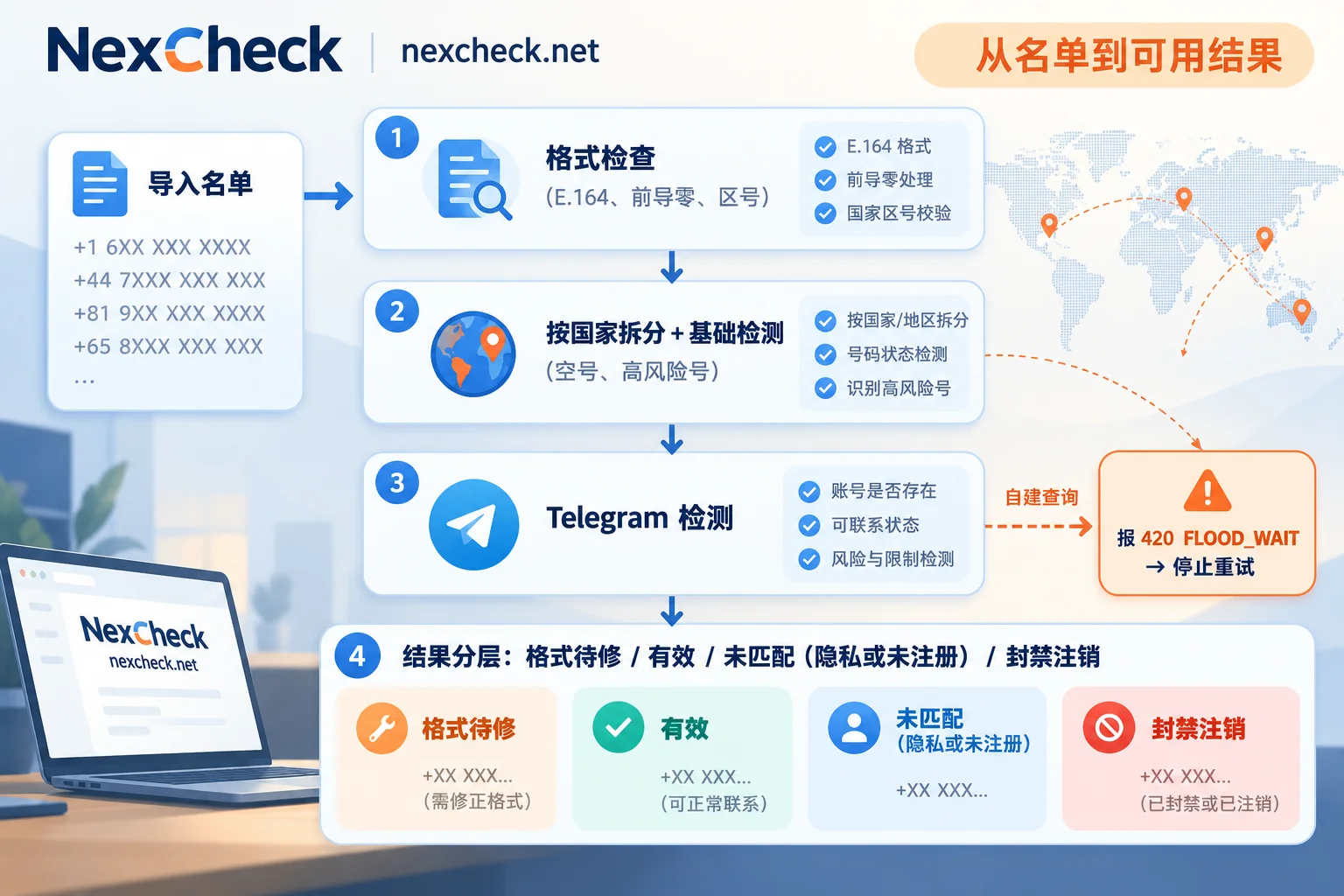
After running a customer list through Telegram screening, the results may show a large block of "not registered," many rows flagged as format errors, or a task that stopped midway. In most cases the screening itself isn't broken—the problem usually lies in one of four areas:
- Non-standard number formats: missing international country code, local leading zeros, embedded symbols, or incorrect digit count.
- User privacy settings: users have restricted who can find them by phone number on Telegram, so even registered accounts won't match.
- Accounts associated with the numbers have been banned or deleted.
- Rate limits: batch queries using your own account or scripts trigger Telegram's FLOOD_WAIT limit, interrupting the task.
In addition, mixing numbers from multiple countries in one file and failing to filter out invalid numbers beforehand will make each of these problems worse. When troubleshooting, first identify which layer the failure occurs at, then address it specifically—don't just rerun the entire list.
First, identify which type of "failure" you're dealing with
"Screening failure" in practice usually refers to three situations, each with different causes:
- Task didn't finish or was interrupted midway: Common when querying with your own account or script, mostly caused by rate limits.
- Many rows flagged as invalid format or unrecognizable: The problem is in the list itself, which can be fixed and resubmitted.
- Format is fine, but a large proportion returns not registered or unmatched: This category needs to be broken down. Some are genuinely unregistered, some are blocked by privacy settings, and some are banned or deleted.
First, count in the results: what proportion are format errors, and what proportion are unmatched. If format errors dominate, start from step one. If formats are basically clean but many are unmatched, go directly to the privacy and ban sections below.
Step 1: Check format—the most common problem, and the easiest to fix
Telegram relies on accurate country codes and number ranges to identify numbers. When a number isn't in international standard format (E.164, i.e., "+country code + national number" with no symbols in between), it will be flagged as invalid or unrecognizable at the entry validation stage, never even reaching account matching.
Common formats in lists and how to fix them:
- Local leading zero: UK mobile numbers are often written as
07700 900123; the correct format removes the leading 0 and adds 44, becoming+447700900123. Many countries have this 0 in local notation, and it should be uniformly removed during normalization. - Missing international country code: For example, a 10-digit US number without
+1. Looking at a 10-digit number alone, it's hard to tell which country it belongs to, and guessing the country code will cause mass mis-matches. The correct approach is to go back to the list source and add the country code based on the customer's country column. - Spaces, parentheses, dashes: Formats like
(415) 555-0123should be cleaned to+14155550123. - Digit count exceeds the country's number range specification: Usually a data entry error or two numbers stuck together; flag these rows for manual review rather than submitting them directly.
If the list has been opened and saved in spreadsheet software, also check two more things: whether leading zeros were automatically dropped, and whether long numbers were converted to scientific notation. Storing the number column as text format avoids both problems.
Deduplicate after format normalization. In the original list, 07700900123 and +44 7700 900123 look like two entries, but after normalization they're actually the same number. For the complete cleaning sequence, see How to Clean a Telegram Customer List.
Step 2: Split multi-country lists and filter invalid numbers first
Cross-border business lists often mix numbers from different countries in one file, along with long-invalid numbers. Submitting directly like this means a high proportion of dirty data, slower screening, and more noise in the results. When problems arise, you also can't tell which country's format caused the error.
A more reliable sequence is:
- Split into multiple files by country or region, and check the format of each file separately. For number formats and major platforms by country, see the Regional Solutions page by country.
- Run a round of basic number screening first to filter out invalid and high-risk numbers, then run Telegram screening. This way, "invalid" in the Telegram results will basically only reflect platform-level reasons.
- Then submit for Telegram screening.
When using NexCheck, you can upload the prepared txt or csv file in the console; to integrate with your own CRM, submit via REST API and receive results back through Webhook when screening completes. Results are returned grouped by valid and invalid, priced per record. The available Telegram checks and unit prices may change; refer to the current list on the Telegram platform page.
Step 3: Format is fine but widespread "unmatched"—consider privacy settings first
Telegram's "Privacy and Security" includes a setting: Who can find me by my phone number. If a user sets this to "My Contacts Only," then as long as the querying party isn't in that user's contacts, the account cannot be found by phone number.
So a number that's clearly registered on Telegram may still show as unmatched or not registered in screening results. This is a platform privacy rule; any screening method that relies on phone number lookup is subject to this limitation, and it shouldn't be circumvented.
When handling lists, remember one thing: "Unmatched" means "this person cannot currently be confirmed on Telegram via phone number," not "this person doesn't use Telegram." The more privacy-conscious the user base, the higher this proportion may be. For a detailed explanation of matching logic and privacy restrictions, see How to Check if a Telegram Number Is Registered.
Numbers whose accounts are banned or deleted
Some numbers belong to legitimate carrier ranges and are correctly formatted, but the associated account status is abnormal:
- The account was flagged by Telegram's risk control for sending spam, or for registering with a temporary virtual number or SMS-receiving platform, and the number shows "Phone number is banned."
- The account was inactive for a long time and was deleted by the system.
These numbers can't be matched to a valid active account, so returning invalid is a normal result. The older the list and the more diverse the sources, the higher the proportion of such numbers typically is. If the invalid rate for a batch is noticeably higher than usual, go back and check the data source and collection time.
Task interruption, FLOOD_WAIT errors: self-service batch queries triggering rate limits
If your team previously used its own Telegram account or scripts for batch queries, and the task stopped midway with errors, it's most likely a rate limit trigger. Telegram enforces strict call frequency and quota limits on contact import and contact matching interfaces (contacts.importContacts). When queries are too frequent, the server returns 420-type FLOOD_WAIT errors and requires a wait period ranging from tens of seconds to several hours.
Don't retry repeatedly at this point. Continuing to request during the cooldown may escalate to restrictions like PEER_FLOOD, and the account may be restricted or even banned. If the query account is a work account used for business, the loss is even greater. This type of interruption shows that "batch querying lists with a personal account" is inherently unsuitable, regardless of list quality. For large lists that need periodic re-checks, it's better to use a dedicated screening service.
Symptom and handling reference
| What you see | Possible cause | What to do first |
|---|---|---|
| Many rows flagged as invalid format, unrecognizable | Missing country code, leading zeros, symbols, wrong digit count | Normalize to E.164, deduplicate, then resubmit |
| Numbers from one country are almost all invalid | That country's country code or leading zero was handled incorrectly | Spot-check several original and converted numbers for that country |
| Formats are clean but unmatched proportion is high | User privacy settings, plus genuinely unregistered | Mark as "Telegram unmatched," keep the customer record |
| Invalid rate for old lists is noticeably higher | Accounts banned, deleted after long inactivity | Check data source and collection time, consider basic screening first |
| Self-built query stops midway with 420 error | FLOOD_WAIT rate limit | Stop retrying immediately, switch to a screening service |
Writing results back to CRM: don't treat "unmatched" as grounds for deletion
When writing screening results back to CRM, it's recommended to record at least three fields rather than just one "valid/invalid":
- Format status: Determined during pre-submission cleaning. Rows with format issues should be corrected and re-screened; they don't enter Telegram results.
- Telegram screening result: Valid or invalid. If the result can distinguish specific reasons, record them separately.
- Screening date: Account status changes, so re-checks can be done after some time.
Once format issues are handled before submission, the remaining invalid group mainly reflects platform-level reasons: not registered, blocked by privacy settings, banned, or deleted. It's difficult to distinguish these individually from the results. So for customers marked "Telegram unmatched," the better approach is to keep the record, tag it, check other platforms as business needs require, and not delete the entire batch.
Once the list is organized and split by country, go to the Telegram platform page to confirm the current checks and unit prices, then decide whether to use console upload or API integration.




Comments(0)