 NexCheck-筛号平台
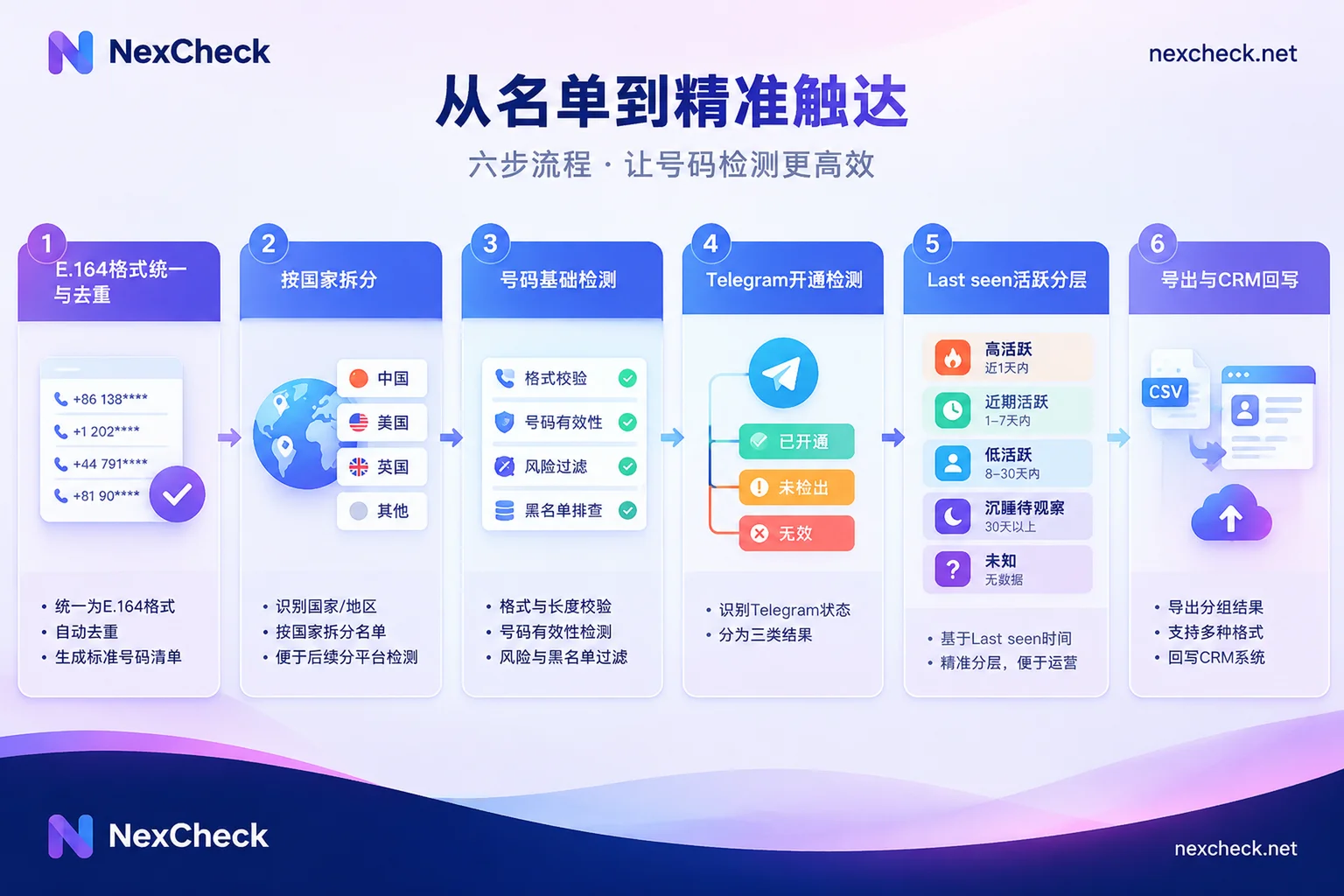
If you have a list of customer phone numbers and want to filter out customers who have activated Telegram and are still using it, you can process them in this order:
- Unify numbers into E.164 international format, then deduplicate by the normalized number.
- Split into multiple files by country code.
- Run basic number checks to remove clearly invalid numbers such as empty lines.
- Run Telegram activation checks.
- Segment by Last seen activity ranges.
- Export grouped with customer IDs, or write back to CRM.
If you reverse the order—for example, running platform checks directly on the raw list—two common problems arise: the same number is treated as multiple entries and checked and billed separately because of different writing styles; and numbers with incomplete formats return no result and are misjudged as "not registered on Telegram."
First, understand the list you have
Here is an example of a common list: a CSV exported from CRM with three columns—customer ID, name, and phone number—where numbers come from several countries and are written inconsistently:
138 0013 8000: spaces in the middle, no country code+44 7700-900123: has country code, with hyphens in between0044 7700 900123: uses 00 instead of +07700 900123: UK local format, with leading 0
The last three could be the same number. If you don't process them first, they will be submitted as three separate entries, and two of them may return no result due to format issues.
Before you start, confirm one thing: this list is your own customer data, and its source and use are lawful. The cleaning process only reads the status of numbers on the platform and groups them; it does not change the numbers themselves, and you should not attempt to bypass the platform's privacy settings.
Step 1: Unify to E.164, then deduplicate
E.164 format is +国家代码+号码, with no separators, for example +447700900123. The specific steps are:
- Remove spaces, hyphens, parentheses, dots, and other symbols.
- Replace the international prefix
00at the beginning with+. - Add the country code to local formats. Many countries require removing the leading 0 for domestic long-distance, but rules vary by country—do not apply the same rule to all numbers.
- Numbers whose country cannot be determined (for example, no country code and no region information in customer records) should be placed in a separate "pending confirmation" file. Do not guess the country code.
After unifying formats, deduplicate based on the normalized number, not the original string. Note one thing: one number may correspond to multiple customer records in CRM, such as the same person registered twice. Before deduplication, create a mapping table recording "normalized number → customer ID list." Checks only run on deduplicated numbers, and when writing back, distribute results to each record according to the mapping table.
Checks are usually priced per entry, so doing this step cleanly can directly reduce the number of paid checks.
Step 2: Split by country
After deduplication, split files by country code and submit each country separately. This has three benefits:
- Number lengths and format rules differ by country, so separate processing makes format anomalies easier to spot.
- When reviewing results, you can compare activation and activity rates by market.
- Customers in some markets may not primarily use Telegram, so after splitting you can choose checking platforms for different markets.
You can find number formats and mainstream local platforms for a country on NexCheck's region pages.
Step 3: Basic number checks
Basic checks target the number itself and return results such as empty lines, device type, and high-risk numbers. It is a different layer of judgment from Telegram checks: the former checks whether the number is still usable, while the latter checks whether the number has a corresponding Telegram account.
Whether to run basic checks first depends on how old the list is:
- If the list is old, such as leads accumulated several years ago, the proportion of empty lines may be high. Run basic checks first so subsequent platform checks only run on potentially valid numbers.
- If the list is relatively new, such as recently collected via forms, you can run platform checks directly.
To determine which approach saves more, calculate using the unit prices of both check types in the price list and your estimated empty-line proportion.
Step 4: Telegram activation checks and what "not found" means
This step determines whether each number has a corresponding Telegram account. In NexCheck, you can upload the organized txt or csv in the console with no batch size limit, then select the Telegram check. Results are returned grouped as valid and invalid. For which fields Telegram can check and the price of each, refer to the current list on the Telegram platform page. Check items and unit prices change, so don't apply another platform's field list.
The most error-prone part when interpreting results is "not found."
Telegram allows users to set "Who can see my phone number" to "Nobody" and "Who can find me by my phone number" to "My Contacts" in "Privacy and Security." With these settings, people not in the user's contacts cannot find the account by phone number. This is the platform's own privacy mechanism, and any external check by phone number is affected by it.
Therefore, activation check results should be divided into three categories, not a simple "yes/no":
- Activated: an account can be matched; proceed to activity tiering.
- Not found: the user may indeed not be registered, or may have enabled the above privacy restrictions. It is recommended to tag separately and not delete directly from CRM.
- Invalid number: basic check determined it as an empty line, or the format cannot be recognized.
For more details on matching principles and privacy restrictions, see How to check if a Telegram number is registered.
Step 5: Segment by Last seen ranges
For activated numbers, the next step is to determine activity. Telegram's "Last seen" time can be hidden by the user. When hidden, the platform does not show an exact time, only one of four fuzzy states:
| Displayed status | Official time range | Suggested tier label |
|---|---|---|
| Last seen recently | From 1 second to within 2–3 days | High activity |
| Last seen within a week | From 2–3 days to within 7 days | Recently active |
| Last seen within a month | From 6–7 days to within 30 days | Low activity |
| Last seen a long time ago | More than one month | Dormant / To watch |
When using these tiers, note the following:
- Adjacent tiers overlap. The official ranges themselves overlap (for example, 6–7 days could fall into week or month), so tiers only indicate approximate activity and cannot be converted into exact days.
- "A long time ago" does not necessarily mean inactive. According to Telegram's explanation, someone blocked by the user also sees this status. So it is recommended to mark this tier as "Dormant / To watch" rather than definitely invalid.
- Activity status may not be available. Due to privacy settings, some activated numbers may have no activity information. Mark them separately as "Activity unknown" and do not merge them into dormant.
- Activity status is a snapshot at the time of checking. It changes over time, so always include the check date when writing back.
Whether Telegram checks can return activity-related fields also depends on the check items listed on the platform page.
Step 6: Export and write back to CRM
After checks are complete, first use the mapping table from Step 1 to restore results to each customer record. When writing back to CRM, it is recommended to write at least these fields:
- Normalized number (E.164)
- Telegram status: Activated / Not found / Invalid
- Activity tier: High activity / Recently active / Low activity / Dormant to watch / Unknown
- Check date
For "Not found" and "Dormant" records, just keep the tags; deletion is not recommended. Privacy settings and account status change, and these records may have different results on the next check.
The choice between web console and API mainly depends on whether the list is one-time or continuously generated:
- One-time or irregular lists (such as post-event organization or historical list review): upload txt/csv in the console, export grouped by valid and invalid, then import into CRM.
- Continuously incoming lists (such as new registrations daily) or scenarios requiring automatic CRM sync: submit via REST API, receive check results via Webhook, and let the program write back tags by customer ID. For asynchronous submission and write-back details, see How to integrate the Telegram number filtering API; interface details are subject to the site's documentation.
Pre-start checklist
Before handing the list to the checking service, review it against this checklist:
- Are all numbers in E.164 format, and have numbers with undetermined countries been set aside separately?
- Have you deduplicated by normalized number and kept the mapping from number to customer IDs?
- Have files been split by country?
- Have you confirmed Telegram's current check items and unit prices on the platform page?
- In result classification, are "Not found," "Dormant to watch," and "Activity unknown" distinguished from truly invalid numbers?
Once these items are handled, go to the official website's "number filtering tool," register, enter the console, and submit your first batch.




Comments(0)