 NexCheck-筛号平台
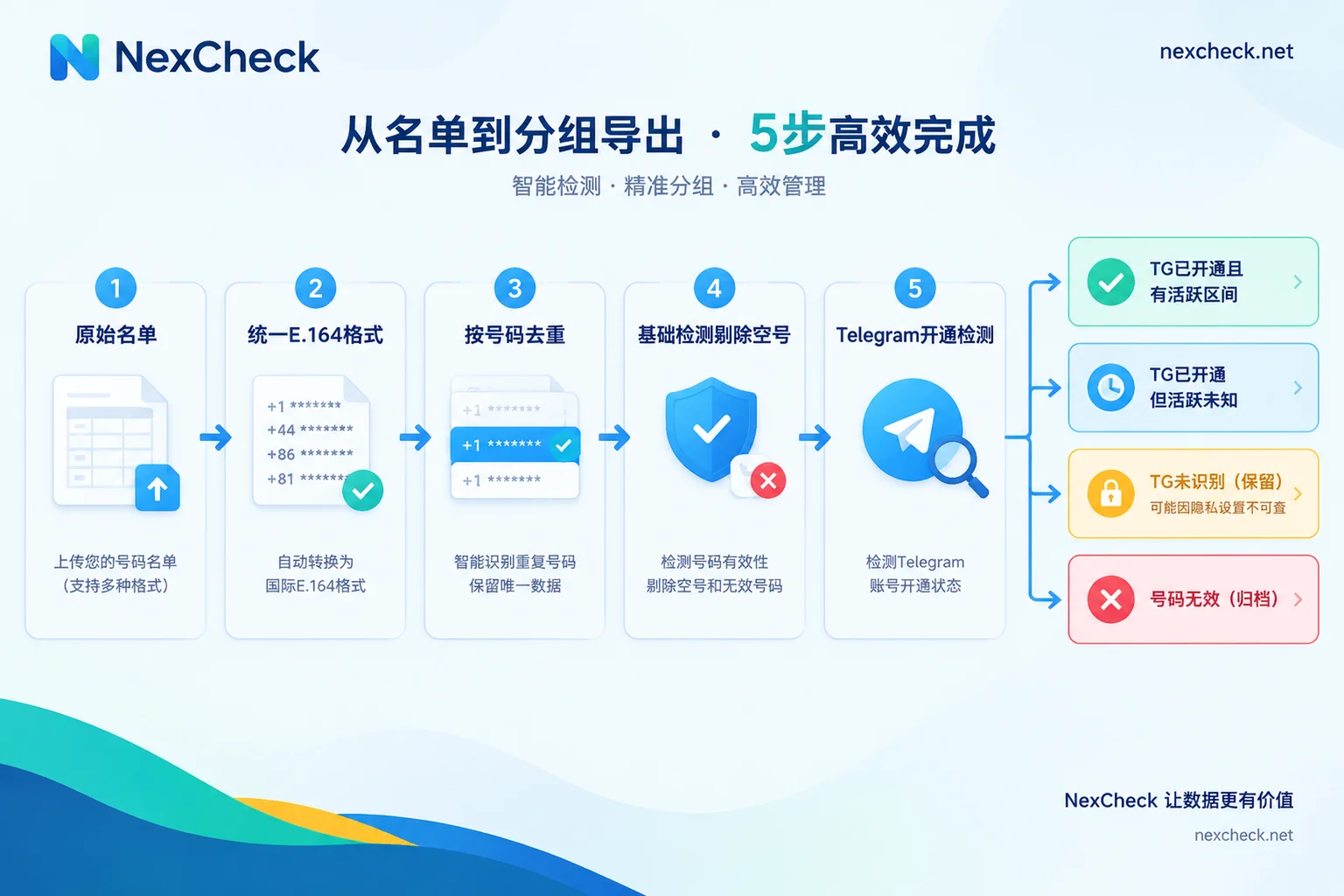
You have a list of customer phone numbers and want to know which ones have Telegram. That's what Telegram number filtering is. The processing order is: normalize format → deduplicate → basic validation to remove empty numbers → Telegram registration check → tiered write-back to CRM.
The last step is where mistakes happen most. "Invalid" in the results doesn't always mean "no Telegram" — some of those numbers are already registered, but the owner's privacy settings prevent them from being matched. If you treat both cases the same and delete them, you'll lose real users.
Before you start, check which columns the list has
Open the file first and confirm the list contains at least these columns:
- Number column
- Country or region column: without this, format normalization later will be very difficult
- CRM record ID or customer ID
- Source field (optional): useful later for troubleshooting list quality by channel
Customer ID matters most. Detection services return results by number, and when writing back to CRM you need this ID to map results to the original records. This is especially important when the same number appears under multiple records.
Step 1: Normalize to a format with country code
Telegram uses phone numbers as the underlying account identifier, so checks require the full number with country calling code. Lists commonly contain many formats: local format with leading 0, spaces, dashes, or parentheses in between, some with +86 and some without. All of these must first be converted to a unified E.164 format — "+ country code + number" — while removing the local trunk prefix, spaces, and symbols.
In practice, note three things:
- Don't guess local numbers without country information. The same digits may be valid numbers in different countries. If you guess the country code wrong, you'll be checking someone else. Put these numbers in a separate group and go back to the source to fill in country information.
- For multi-country lists, it's best to run them split by country. Number lengths and prefix rules differ by country; splitting makes problems easier to locate and lets you view results by market. Number formats for each country can be found on the NexCheck regional page.
- Format details can follow existing rules. For leading zeros, mobile number prefixes in certain countries, and similar issues, see How to fix WhatsApp number format errors. E.164 format is common across platforms.
Step 2: Deduplicate by the normalized numbers
Deduplication should come after format normalization. 0138... and +86 138... look different in raw text, but after formatting they display as the same number.
When deduplicating, keep each number and all its corresponding CRM IDs. This way each number is checked only once, and the result can be written back to every related record.
Step 3: Run basic number validation first
If the list comes from mixed sources and has accumulated over a long time, it's advisable to run basic number validation first to pick out empty and high-risk numbers. Pricing is per record, so this step can reduce Telegram check costs spent on obviously invalid numbers. If the list is very new and from clean sources, you can skip it depending on the situation.
Step 4: What Telegram checks return
Commonly available information falls into three categories:
- Whether registered: whether this number can be matched to a Telegram account.
Activity status: depends on the other party's "Last Seen" privacy setting.
- When they make it public, you may see online or a specific last-seen time.
- When they hide it, you usually only get vague ranges like "last seen recently," "within a week," or "within a month," or nothing at all.
- Public profile: the nickname, username, etc. that the other party has made public.
Results are returned in two groups: the valid group contains registered and identifiable numbers; the rest go into the invalid group. Specific field names and available check options may change, so refer to the Telegram platform page.
The invalid group doesn't mean no Telegram
Telegram's "Privacy and Security > Phone Number" settings have two items:
- Who can see my phone number
- Who can find me by my phone number
The second item's options are "Everybody" and "My Contacts." If the other party selected "My Contacts" and the querying party isn't in their contacts, no compliant detection method can match that account.
So the invalid group contains at least two types of numbers:
- Numbers that truly haven't registered on Telegram;
- Numbers that are registered but only allow contacts to find them by phone number.
From the outside, these two types cannot be reliably distinguished, and you shouldn't try to bypass the other party's privacy settings. When writing back to CRM, you can record them in tiers as follows:
| Detection result | Actual meaning | How to record in CRM |
|---|---|---|
| Valid, with activity info | Registered, and the other party has made last-seen status public | Telegram registered, record activity range |
| Valid, no activity info | Registered, but the other party has hidden last-seen status | Telegram registered, activity unknown |
| Invalid | Not registered, or cannot be found due to privacy settings | Telegram unrecognized, keep record |
| Basic validation shows empty number | The number itself is unusable | Number invalid, can be archived |
There are three points to note about this table:
- "Activity unknown" and "inactive" are two different things. Hiding last-seen time is a very common setting. Treating these people as silent users will underestimate the quality of the list.
- Records marked "Telegram unrecognized" are not recommended for direct deletion. The number itself may be perfectly valid, just not findable on this platform. Rechecking after some time, or referring to results from other platforms, is safer than deleting outright.
- Include the detection date when writing back. The activity range only reflects the state at the time of detection. With the date, you can decide later whether to recheck.
Why we don't recommend writing your own script for bulk matching
Some teams consider calling the Telegram API directly to do their own number matching. Telegram servers have anti-abuse rate limits: high-frequency contact imports for matching will trigger FLOOD_WAIT errors, with cooldowns ranging from tens of seconds to over a day. Repeated triggers can also lead to account bans. The official limits aren't public and are judged dynamically in real time. If a team needs to process lists regularly, the cost of maintaining this script and the account risk are usually not worth it.
Console or API
When processing this list in NexCheck, choose based on how the list is used:
- One-off or occasional lists: use the console. Upload txt or csv, select the Telegram check options, export in two groups (valid and invalid) after running, then import into CRM using the tiering rules above. For CSV preparation and upload details, see How to do Telegram CSV number screening.
- CRM continuously receives new numbers: use the API. Submit numbers via REST API, get results pushed back via Webhook, and update records by customer ID on the receiving end. Keep the mapping between submission batches and CRM IDs on your side so results can be matched when they arrive. For API integration details, see How to integrate the Telegram number screening API.
Pricing is per record; unit prices for each check option are subject to the platform price list. The list is your own data, and the platform processes it only within the task scope. You are responsible for ensuring the source and use of the list are legal.
Pre-submission checklist
- All numbers have been converted to a format with country code, and numbers missing country information are listed separately
- After deduplication, the mapping between numbers and CRM IDs is preserved
- Lists from mixed sources have been through basic validation first
- The invalid group is recorded as "Telegram unrecognized" and not directly deleted
- "Activity unknown" and "inactive" are recorded separately
- Each result includes the detection date
If these items are done, the filtered results can be used long-term in CRM, and next time you review you'll know which group to start with.




Comments(0)