 NexCheck-筛号平台
Telegram recognizes numbers in international format, which is the ITU-T E.164 notation: country code first, followed by the number with the domestic dialing prefix removed, keeping only digits (may start with +), with the entire string not exceeding 15 digits. For example, a UK mobile number 07123 456789 becomes +447123456789, or the plain digits 447123456789.
In Telegram's developer documentation, the Gateway verification API, auth.sendCode, and TDLib's setAuthenticationPhoneNumber all require numbers in international format; the official FAQ example for direct number links t.me/+123456789 also uses this format. If numbers in your list are still in local format, they may not be recognized correctly, and subsequent detection results will also be skewed.
Composition of a Standard Number
The structure can be remembered as: [+][国家代码][国内号码]. Specific requirements:
- Keep only digits; the leading + is optional. Remove all display separators such as spaces, hyphens, parentheses, dots, and slashes.
- The country code must not be omitted. China is 86, the UK is 44, Indonesia is 62, and the US and Canada are 1.
- Remove the domestic long-distance prefix. Many countries' local mobile numbers start with 0 (UK 07, Indonesia 08, etc.). This 0 is only used for domestic dialing and must be deleted when converting to international format.
- Do not keep the international prefix. Numbers exported from local systems often carry 00 or 011 (the international prefix for North America), which should be replaced with + or removed.
- Length must not exceed 15 digits (excluding +).
Below are several common formats found in lists and their cleaned results:
| Original Format | Issue | After Cleaning |
|---|---|---|
| 07123 456789 (UK) | Local format, leading 0, no country code | 447123456789 |
| +44 (0)7123-456789 | The 0 in parentheses is a local dialing hint | 447123456789 |
| 0044 7123 456789 | 00 international prefix + spaces | 447123456789 |
| 0812-3456-7890 (Indonesia) | Leading 0 + hyphens | 6281234567890 |
| 0086 138 0013 8000 | 00 international prefix + spaces | 8613800138000 |
| 011 1 415 555 0123 | 011 is the North American international prefix | 14155550123 |
| 1.38001E+10 | Excel scientific notation, last digits already lost | Cannot be restored, re-export from source |
Organization Order for Multi-Country Lists
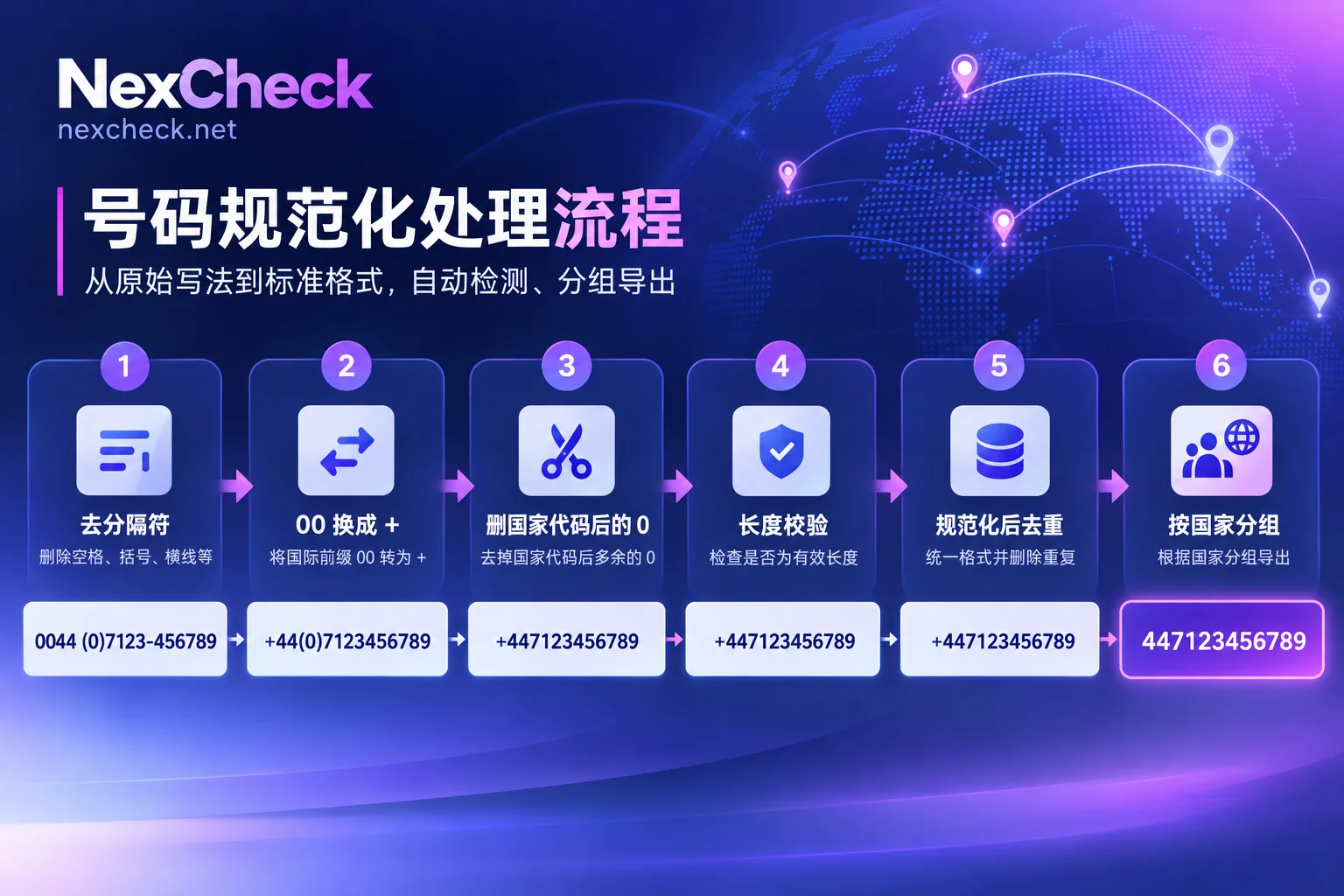
Take a common list as an example: the marketing team merges contacts from an exhibition registration form, a CRM export, and a customer service system, mixing local numbers starting with +44, 0044, 08, as well as numbers with spaces and hyphens. It is recommended to process in the following order.
1. Keep the original column and create a separate normalized column. Do not directly modify the original numbers. Later, when writing detection results back to the CRM, you rely on the correspondence between customer IDs and original numbers.
2. First set the number column to text format. Excel will drop leading 0s and +, and long numbers will become scientific notation. Once displayed as 1.38001E+10, the last digits are already lost, and you can only re-export from the source system, so this step should be done when opening the file.
3. Determine which country each number belongs to. Base this on the country/region field in the list, source channel, or the country selected by the user in the form, not on what the number looks like. Local numbers with neither an international prefix nor any country clue should be placed in a separate group; do not guess and add a country code before filling in the information: adding the wrong country code may happen to form a valid number in another country's format, and the detection results will mislead subsequent judgments.
4. Remove separators, keeping only digits and the leading +.
5. Handle 00 / 011 first, then handle a single leading 0. Reversing the order causes errors: if you delete a 0 first, 0044 becomes 044, and then it is impossible to tell whether it is an international prefix or a local number.
6. Remove the domestic prefix by country and add the country code. Local mobile numbers in the UK, Germany, Indonesia, Pakistan, Thailand, Australia, and other countries usually start with 0; delete this 0 and then add the country code. Also watch for formats like +44 (0)7… where a 0 follows the country code; that 0 must also be deleted. Rules differ by country, so process per country and do not indiscriminately delete 0s from the entire column.
7. Verify length. Anything over 15 digits (excluding +) is definitely problematic; those clearly shorter than the mobile number length for that country should be flagged separately for manual verification.
8. Deduplicate after normalization. The same number may appear in three formats: 07123…, +44 7123…, and 0044 7123…. Deduplication before normalization will not catch them. Which duplicate to keep (most recently updated, has transaction records) depends on your CRM's master record rules.
9. Group and export by country code. One file per country, or include a country column in the file. Separate detection facilitates reconciliation and makes it easier to view results by market.
With + or Plain Digits
E.164 itself is a string of digits; + is a symbol used in writing to indicate "this is international format." The Telegram API requires international format; when handing the list to a detection tool or entering it into a system, follow the other party's import instructions, and use one consistent format within the same file.
If the file will go through Excel or CSV, the plain digit format is less likely to be mishandled by software; when using the + format, be sure to confirm that the column is in text format.
After Correct Formatting, Several Types of Numbers Still Need Separate Attention
Special number ranges. For example, anonymous numbers starting with +888 (Fragment range) and some VoIP ranges. Telegram does not publicly disclose complete number validation rules; the registration and status visibility of such ranges may be adjusted by the platform's server side. It is recommended to mark them separately in the list and not interpret them together with the results for ordinary mobile numbers.
Correct format does not equal registered. Formatting only ensures that the number can be recognized correctly; whether the number has Telegram enabled must be confirmed by detection. If after cleaning, detection still finds many numbers missing, you can refer to Troubleshooting Order for Telegram Number Filtering Failures to eliminate factors other than format one by one.
After the List Is Organized
After normalizing, deduplicating, and grouping by country according to the above steps, the file can be directly used as detection input. Upload txt or csv in the NexCheck console, or submit via REST API; results are returned grouped by valid and invalid. If you need to integrate into a CRM, you can use Webhooks to push results back to your system. Detection is priced per item; problematic numbers mostly only yield invalid results, so cleaning them before submission can reduce payment for these entries.
For which fields Telegram can check and the unit price of each detection item, refer to the instructions on the NexCheck Telegram Platform Page. When the list involves multiple countries and you are unsure about the local format of a country's numbers, you can first check the corresponding country's number format in the Regional Pages. The list must be customer or contact data that you own, and the source and purpose must be legal.
If you also want to layer detection results by activity and write them back to the CRM, you can continue reading The Complete Process for Telegram Customer List Cleaning.




Comments(0)