 NexCheck-筛号平台
Suppose you have a customer list of several thousand numbers and want to know which ones have Telegram. Batch detection can do this, but first you need to understand what the result actually means. It determines whether this number can be matched to a Telegram account via phone number, which is not the same as confirming whether the number is registered.
- A matched number can basically be confirmed as registered.
- An unmatched number may indeed be unregistered, or the owner may have tightened their privacy settings.
When processing a list with this in mind, the order is: standardize to E.164 format, then deduplicate, then group by country, then submit for detection, and finally write back to CRM as "matched/unmatched".
How Telegram determines if a number is registered
Telegram's account system is built on phone numbers. The official interface determines whether a number has a corresponding account using contact import (contacts.importContacts): it submits numbers in international format with country code as contacts, and the platform looks them up among registered users. A successful match returns the corresponding user object and basic attributes; if no match is found, nothing is returned.
Saving a number in your phone's contacts and then checking if the person appears in Telegram uses the same matching. You can manually check a single number this way, and the result is subject to the same limitations described below. When numbers run into the hundreds or thousands, manual checking is not practical.
No match does not mean not registered
Telegram allows users to change "Who can find me by my phone number" from "Everybody" to "My Contacts". After this change, if the querying party is not in the other person's contacts, even if the number is indeed registered on Telegram, the interface will not return that account.
The impact of this limitation on list processing is as follows:
- Matched group: Can be treated as "has Telegram".
- Unmatched group: Contains both genuinely unregistered numbers and registered numbers with privacy restrictions. From the detection result alone, these two cannot be distinguished.
Therefore, when writing back to CRM, it is recommended to mark the unmatched group as "Telegram unmatched" with the detection date, not as "confirmed unregistered". If you later delete contacts or adjust customer segmentation based on this field, the two labels lead to different decisions. This is Telegram's privacy design, and any detection that performs matching in the normal way cannot avoid it, nor should one try to bypass it.
Why you should not use your own account for batch testing
Some people think of using a regular account to import the list into contacts in batches and check the results. Telegram has strict rate limits and risk controls for frequent contact imports by regular accounts: it is easy to trigger rate-limiting errors like FLOOD_WAIT, and there is a quota on the number of contacts imported. Continuous high-frequency operations may cause the account to be rate-limited for a long time or even banned. The official thresholds are not public, and they depend on the account's own situation, making them hard to plan for in advance.
Manual checking is fine for up to a few dozen numbers. For formal customer lists, it is safer to hand them to a dedicated detection service, and your own account does not have to take the risk.
Processing order for a list
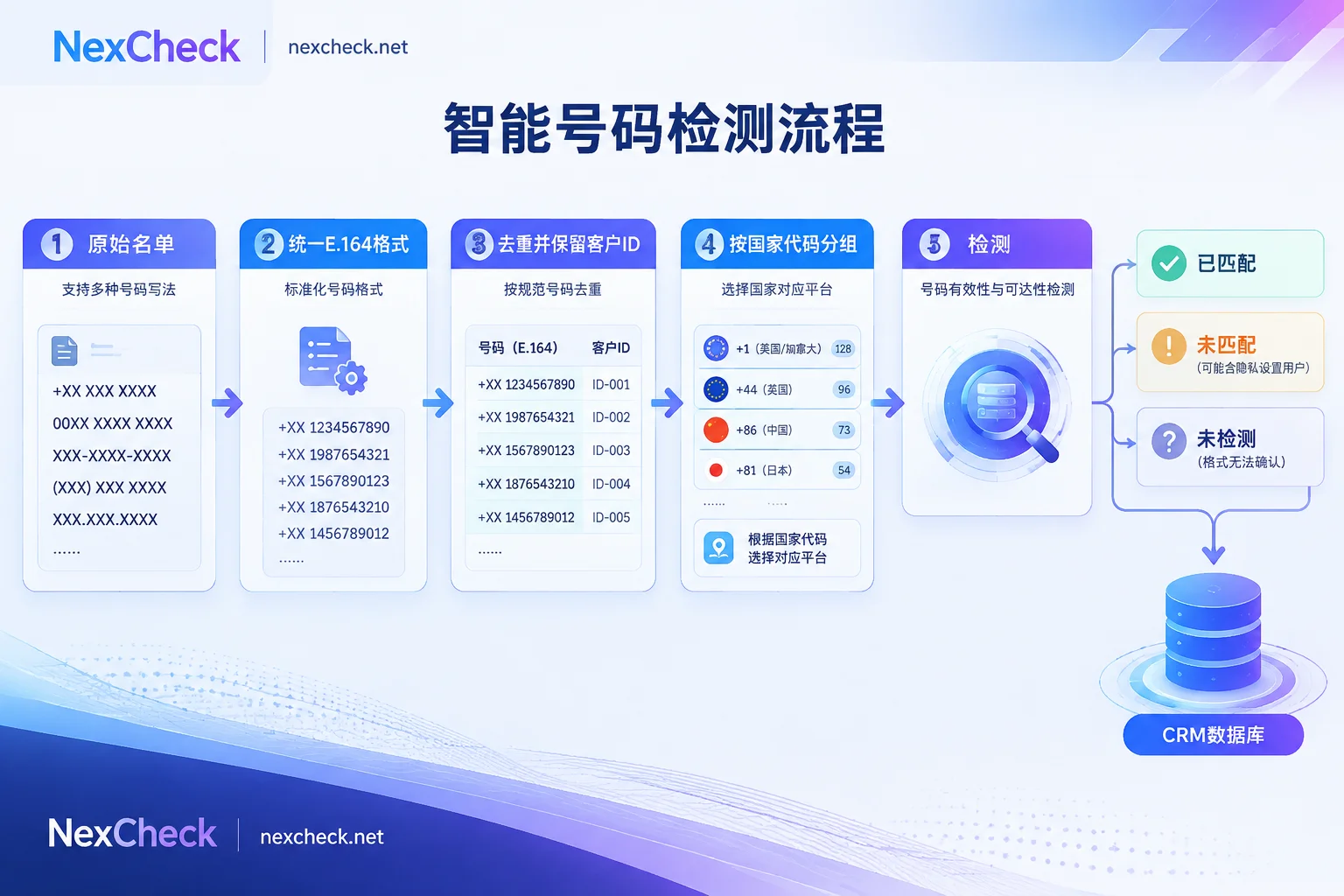
Take a list merged from multiple channels as an example. Two common situations occur:
- "138 0013 8000", "+86 13800138000", and "0086-13800138000" are actually the same number.
- There is also a batch of numbers like "(415) 555-0132" without a country code.
1. Standardize to E.164 format
E.164 format is "+country code + number", removing spaces, hyphens, parentheses, and extra leading zeros, for example +8613800138000, +14155550132. Telegram's matching requires numbers in international format. Missing country code or retaining local notation will cause numbers to fail parsing or matching, and they end up mixed into the "unmatched" group, making the results look worse than they are.
Do not guess numbers without a country code. If the country can be determined from customer address, source channel, or site language, add the country code. Those that cannot be determined should be put in a separate group and not detected this time. For details on leading zeros, phone number lengths, and other specifics by country, refer to How to handle number format errors.
2. Standardize format first, then deduplicate
Deduplication must come after format standardization. The three notations above appear as three rows in the raw table; only after standardizing the format can you see they are the same number. If the order is reversed, duplicate numbers will not be fully removed, leading to duplicate charges, and the same number may appear with two statuses during write-back.
When deduplicating, keep the customer ID column. It is common for one number to correspond to multiple customer records, such as several contacts at the same company all leaving the main line number. During detection, each number is run only once, and during write-back, it is mapped back to each record by ID.
3. Group multi-country lists by country code
For cross-border lists, it is recommended to split by country code and detect separately for two reasons:
- Number format issues differ by country. After grouping, it is easier to spot format errors in an entire batch for a country. For example, an unusually high unmatched rate in a country is often due to unhandled leading zeros.
- Telegram usage varies by market. Mixing all countries together to look at the overall ratio is not very informative.
If you are not sure how to write numbers for a country or which platforms are mainstream locally, you can check the NexCheck region page.
4. Submit for detection
The cleaned list can be uploaded to the NexCheck console, supporting txt or csv, with no limit per batch, and results exported grouped by valid and invalid. For automatic CRM integration, you can submit via REST API, and results are pushed back via Webhook after detection. Fees are calculated per number.
Besides registration status, what other attributes Telegram can check and the unit price for each may change; refer to the current list on the Telegram detection page. The list is your own customer data, and the source and purpose must be legal. The platform only processes this data within the scope of the detection task.
If the list has mixed sources and many invalid numbers, you can first run a basic number detection (invalid, device type, high-risk numbers, etc.), remove invalid numbers, and then run Telegram detection on the remaining numbers. Whether this saves money depends on the unit prices of the two detections and the proportion of invalid numbers in the list; you can try a small batch first to calculate.
Another benefit of doing basic detection first: the unmatched group can be further divided into "invalid number" and "number normal but Telegram unmatched". Registered users with privacy restrictions can only be in the latter category.
5. Write back to CRM
When writing back, it is recommended to create at least these fields:
- Telegram status: matched, unmatched, not detected. "Not detected" is specifically for marking numbers whose format could not be determined in step 1, to avoid mixing with "unmatched".
- Detection date: Users register, deregister, change numbers, and change privacy settings, so status changes. Lists used long-term need periodic re-checks, and the date determines whether this result is still usable.
- Number status: If basic detection was done, record results such as invalid or normal.
- Other attributes: Create columns based on the fields actually returned on the platform page, not a bunch of fields that may not be obtainable.
Web console or API
- Web console: For one-time organization or occasional list cleaning, uploading via the console is the easiest.
- API: If the list continuously comes in from forms or CRM and you need automatic status labeling, use API plus Webhook. For integration details, see Telegram number filtering API integration.
To learn what fields Telegram detection can check and what each field means, continue reading Telegram number detection.




Comments(0)