 NexCheck-筛号平台
The correct way to clean a WhatsApp contact list is to produce a usable list that can be sent in batches according to your current messaging limit tier, rather than merely determining if a number is active or not. Operations colleagues imported 30,000 historical customer numbers into the CRM, planning to run a campaign via WhatsApp Business Platform next week—but no one dared to hit send. Below is a five-step approach, with inputs, outputs, and acceptance criteria for each step.
Meta's official documentation (updated May-June 2026) shows that messaging limits are now calculated per Business Portfolio and that automatic scaling is strictly tied to your Quality Rating. In other words, cleaning your list isn't just to save on messaging costs; it's to avoid high error rates that could tank your rating and block limit increases.
First, the conclusion: The output is a usable list that can be sent in batches according to your limit tier
The final output of WhatsApp contact list cleaning is not just a "clean number table" but a sending list with status categories that can be split into batches according to your current limit. Meta has consolidated messaging limits under the Business Portfolio and tied them to Quality Rating, so cleaning must happen before sending.
The full process can be summarized in five steps: Reverse-engineer cleaning scale from limits → Normalize format and deduplicate → Check registration status → Categorize results → Spot-check and pilot test. Each step has clear inputs and outputs, detailed below.
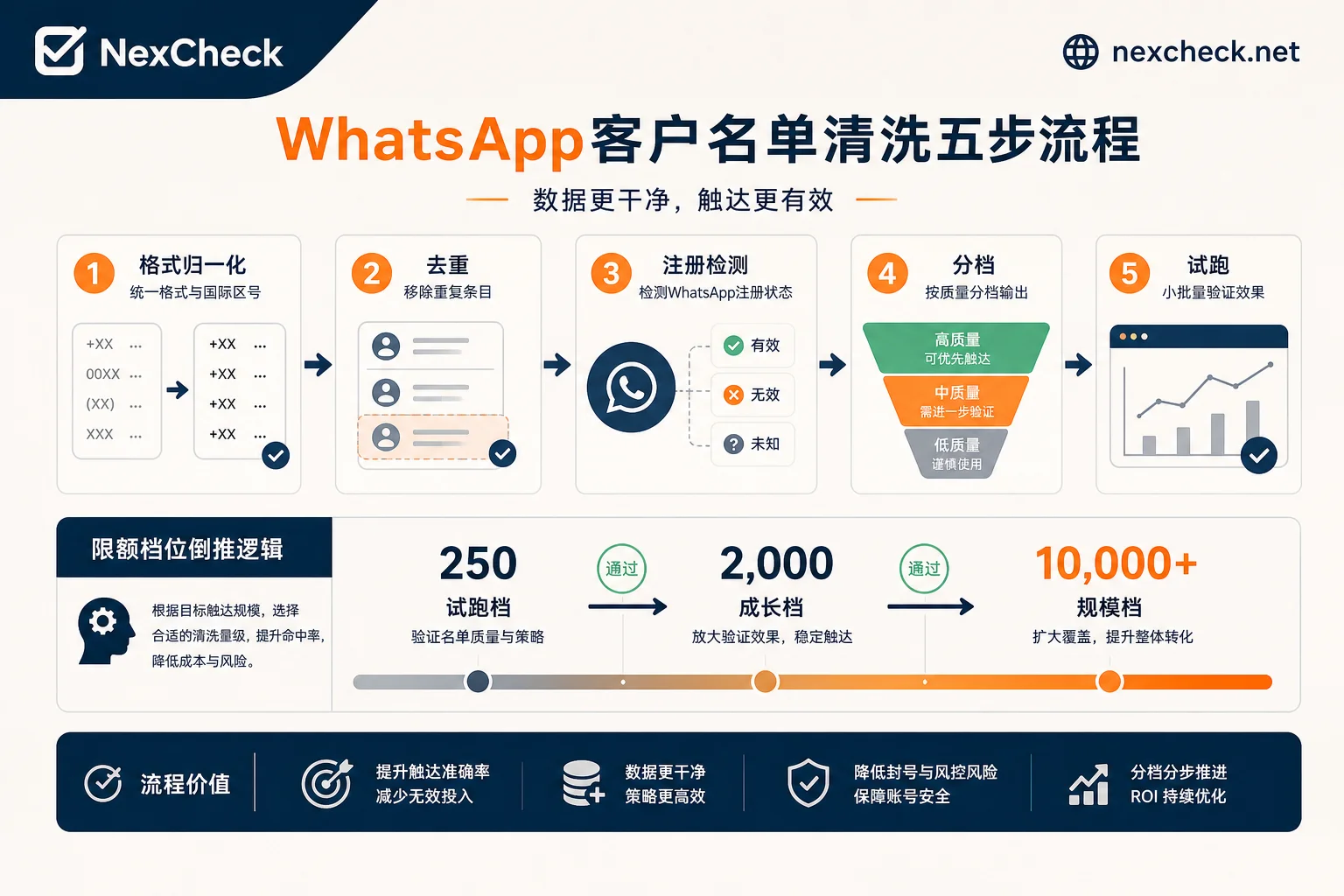
Step 1: Determine how many to clean this round: Reverse-engineer cleaning scale from Portfolio limit tier
Don't rush to clean; first determine "how much to clean." Meta's official docs show that WhatsApp Business Platform messaging limits are calculated per Business Portfolio, with tiers of 250 → 2,000 → 10,000 → 100,000 → Unlimited. Note that this tier is shared across the entire Portfolio, not per phone number.
If your current tier is 2,000 messages/day, the goal for this cleaning round isn't to clean all 30,000 numbers but to prioritize cleaning 2,000 numbers most likely to be valid, processing the rest in subsequent batches.
Additionally, the old field messaging_limit_tier has been deprecated. The new field is whatsapp_business_manager_messaging_limit. If you can't find the old field in API responses, use the new one to read your current limit.
| Current Limit Tier | This Round Cleaning Target | Cleaning Depth Recommendation |
|---|---|---|
| 250 | 250 | Spot-check only |
| 2,000 | 2,000 | Prioritize recently active numbers |
| 10,000 | 10,000 | Full cleaning, focus on deduplication |
| 100,000 | 100,000 | Batch cleaning, control batch size |
| Unlimited | Per campaign goal | Deep cleaning, retain all three tiers |
Step 2: Format normalization and deduplication for WhatsApp contact list cleaning
Before calling any detection API, two fundamental tasks must be completed: E.164 format normalization and cross-channel deduplication.
E.164 is the international number standard, with country code and no spaces or hyphens. If number formats are inconsistent, detection results will be contaminated and statistics distorted. For specific normalization rules, refer to E.164 normalization before screening overseas numbers.
Deduplication must be done across channels, not just within the same file, but also merging with existing numbers in the CRM to avoid repeatedly contacting the same person.
Step 3: The most error-prone step in WhatsApp contact list cleaning: Platform registration status detection
This is the core of the entire cleaning process and the easiest to get wrong. Meta's official Cloud API does not provide a number registration pre-check endpoint. Testing lists by sending messages directly consumes template quotas and can frequently trigger error 131026, threatening your Quality Rating.
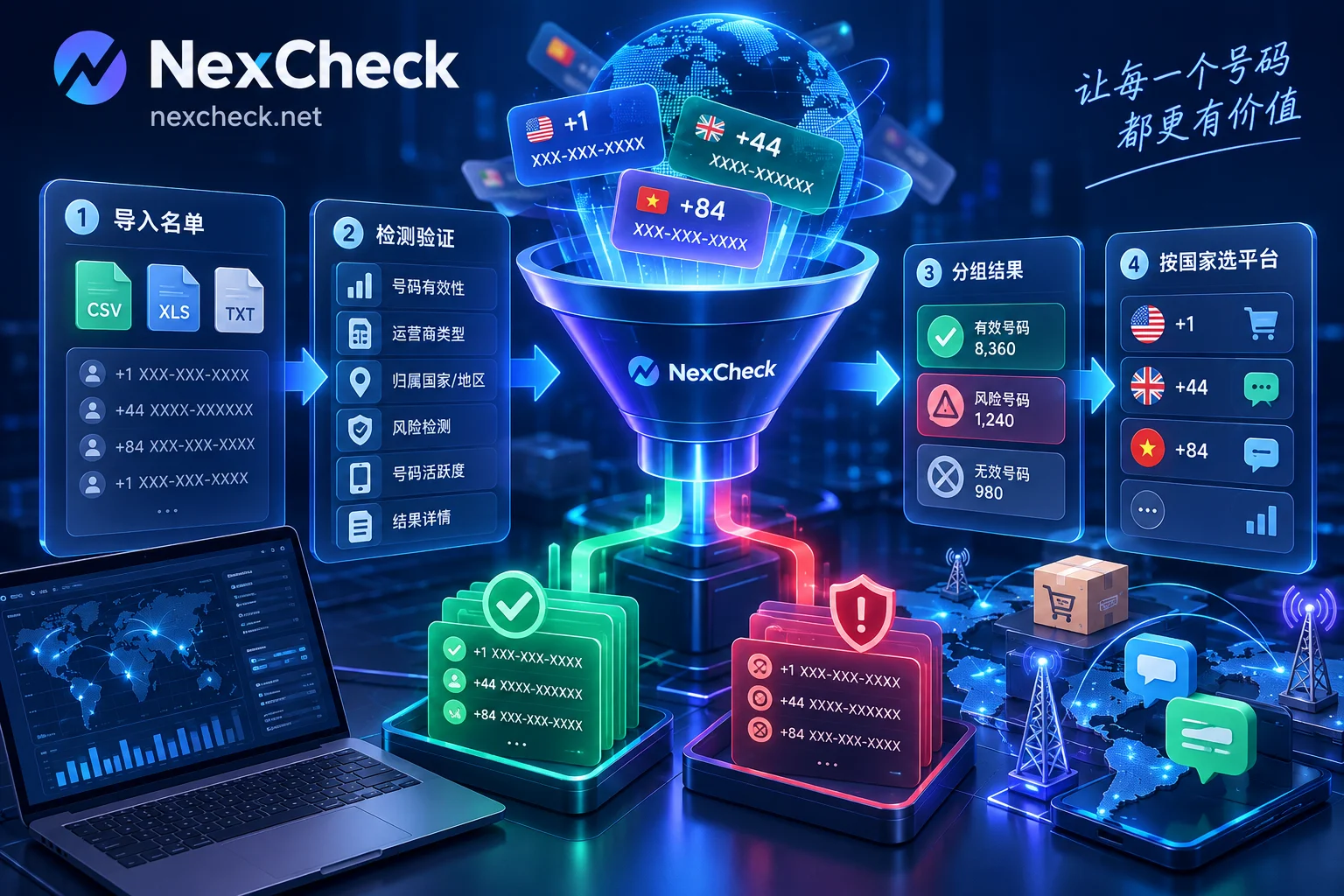
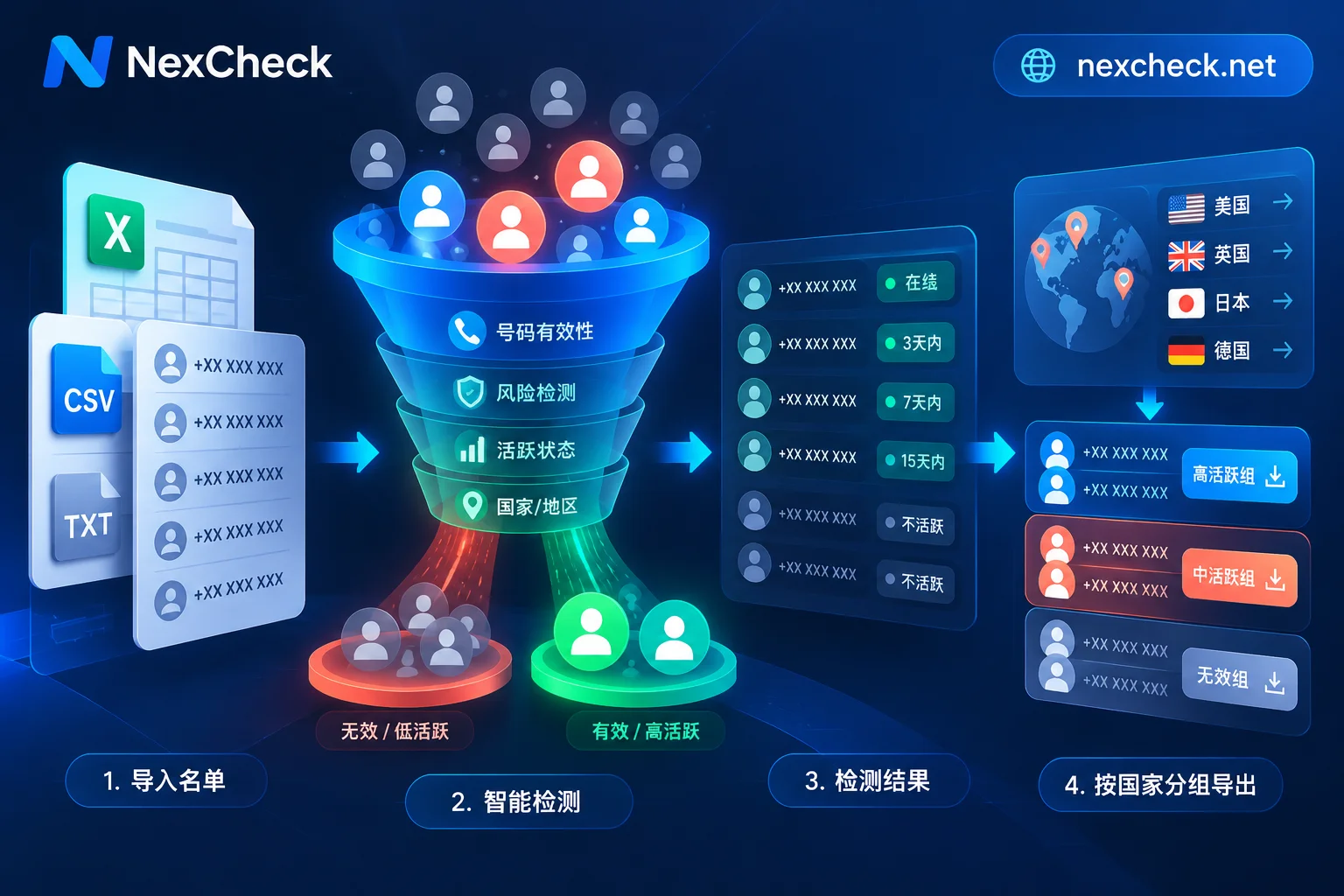
A better approach is to use an independent batch number screening service before sending, such as NexCheck, which offers both web-based CSV upload and RESTful APIs (batch submission, real-time queries, webhook callbacks). Results can be categorized into registered/unregistered/unknown and written back to the CRM, allowing you to split the first sending batch according to your current limit tier.
In practice, if your list is small (a few thousand or fewer), upload CSV via the web interface—results in seconds. If the list is larger (tens of thousands or more), it's recommended to use the API for asynchronous batch queries, receiving results via webhooks, then splitting batches after data is stored. For specific batching criteria, refer to How to batch WhatsApp number screening. When writing back, mark each number with the status field, where values can be registered, unregistered, unknown, and record the detection time.
Here it's crucial to distinguish five concepts: valid number format, carrier reachability, platform registration, account activity, and user consent. Format validity doesn't equal carrier reachability, platform registration doesn't equal account activity, and account activity doesn't equal consent to receive marketing. Cleaning can handle the controllable aspects of the first four; user consent (opt-in) is a compliance red line that can't be circumvented by cleaning.
Step 4: Categorize results: How to use registered/unregistered/unknown
Detection results should not be a simple boolean. Due to platform privacy settings, a miss doesn't mean unregistered. For example, according to Telegram's official docs, the contacts.resolvePhone method is constrained by user privacy settings (inputPrivacyKeyAddedByPhone). When users restrict this, even if the number is registered, the API may return a miss or PHONE_NOT_OCCUPIED.
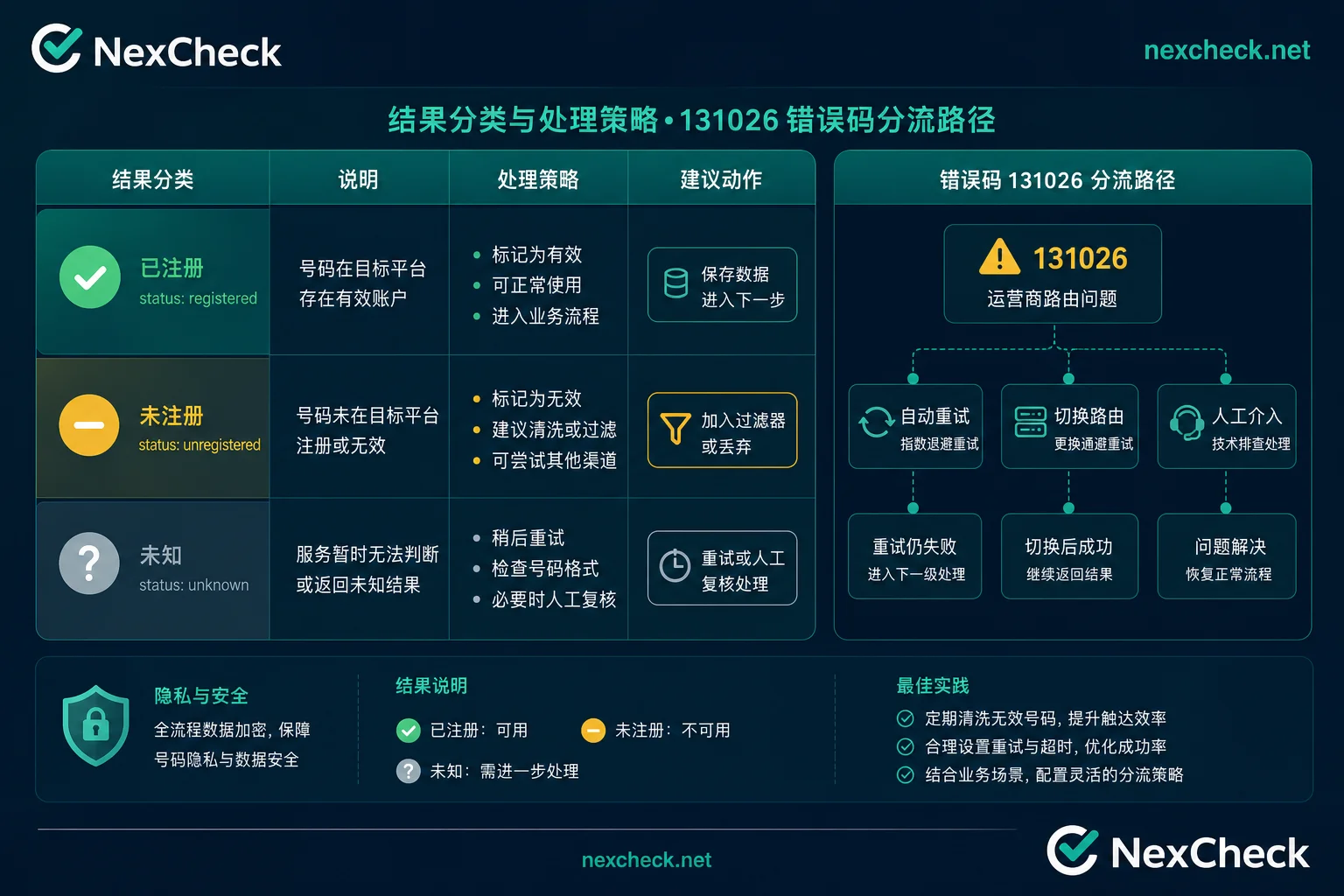
Therefore, professional practice retains three tiers of results:
| Result Tier | Meaning | Handling Strategy |
|---|---|---|
| Registered | Platform confirms registration and reachability | Enter sending queue, use first |
| Unregistered | Platform explicitly unregistered | Remove from sending list, can retest after a silent period |
| Unknown | Privacy-restricted or timeout | Lower priority, keep in CRM, prioritize recheck next cycle |
For specific categorization criteria, refer to Three-tier results of social account registration detection. The "unknown" tier is a buffer for false negatives and should not be deleted. These numbers may be high-value users who just have privacy protections. Keep them in the CRM, marked as unknown, and prioritize rechecking next cycle. The three-tier results can be written back to the CRM's status field via NexCheck API callbacks.
Step 5: Spot-check and pilot run: How much to send first and which metrics to watch before scaling
After cleaning, it's not recommended to send the entire list at once. The following ratios are operational experience thresholds; Meta's official docs do not specify exact numbers, so teams can adjust based on historical data. First, spot-check a small batch, e.g., randomly sample 5% (or at least 50 numbers) from the "registered" tier, combined with your current limit tier to determine the initial batch size.
The initial sending batch should not exceed 20% of your current limit. Then observe three metrics: delivery rate, 131026 trigger rate, and any change in Quality Rating color. If the 131026 trigger rate exceeds 5%, or the rating drops from High (GREEN) to Medium (YELLOW), immediately narrow the batch and re-examine the list instead of continuing to scale.
What does 131026 actually indicate? One error code, multiple causes
131026 is a bucket error, meaning Meta groups multiple reasons into one error code. Besides "recipient not registered on WhatsApp," it also includes recipient blocking the sender, not agreeing to latest privacy terms, or outdated client versions. The sending side cannot precisely distinguish the exact reason from this code alone.
Therefore, 131026 is a risk signal, not a cleaning conclusion. When encountering 131026, don't immediately classify the number as "dead" and delete it. Instead, divert based on business context:
| Scenario | Possible Cause | Handling Suggestion |
|---|---|---|
| Many 131026 errors in first send of new list | List not cleaned or low registration rate | Stop sending, re-screen and clean |
| Occasional 131026 in old list sends | Some users deactivated or blocked | Remove the number, continue monitoring |
| 131026 increases after frequency spike | Temporary limit due to over-sending | Reduce frequency, wait for recovery |
| Same number repeatedly returns 131026 | Possibly blocked or permanently deactivated | Move to silent list, do not retry |
Causal chain between cleaning actions and quality rating: Which skipped step shows up first
Each cleaning step has associated risks: skipping format normalization leads to dirty numbers that distort detection results and increase error rates during sending; skipping deduplication causes repeated contact with the same user, leading to complaints; skipping registration detection and sending directly triggers frequent 131026, causing the rating to drop from High (GREEN) to Medium (YELLOW) first.
Quality Rating is divided into High (GREEN), Medium (YELLOW), and Low (RED). Meta's automatic scaling requires the rating to be at Medium (YELLOW) or High (GREEN). If the rating drops to Low (RED), automatic limit upgrades are blocked (whether further sending restrictions apply is subject to Meta's official notifications). WhatsApp contact list cleaning can reduce controllable risks, but opt-in authorization and template compliance cannot be skipped.
WhatsApp contact list cleaning checklist: Inputs, outputs, and acceptance criteria for five steps
Below is a complete table of inputs, outputs, and acceptance criteria for each of the five steps.
| Step | Input | Output | Acceptance Criteria |
|---|---|---|---|
| 1. Reverse-engineer from limit | Current limit tier, total list size | Target cleaning size for this round | Target ≤ current limit |
| 2. Format & deduplicate | Raw number list | Normalized, deduplicated list | No duplicates, E.164 format |
| 3. Registration status detection | Deduplicated list | Three-tier status flags | Unknown percentage recorded |
| 4. Categorize results | Detection results | Registered/unregistered/unknown categories | Registered tier ready for immediate sending |
| 5. Spot-check & pilot | Subset of registered tier | Pilot data (delivery rate, 131026 rate) | 131026 rate <5% (experience threshold), rating not degraded |
Recommended recheck cadence: if campaigns are frequent (weekly), spot-check before each campaign; if the list source is old (over 1 year), full re-test; if the previous round's "unknown" percentage exceeds 20%, prioritize rechecking the "unknown" tier. See How often to re-run batch screening results for more on cadence.
FAQ
Should I screen numbers before bulk sending?
Yes. Screening first avoids high-frequency 131026 errors, protects your Quality Rating, and thus maintains or improves messaging limits. Sending without screening can waste quota, or worse, cause your rating to drop from green to yellow or even red, blocking limit increases.
How do I find numbers in my customer list that are not registered on WhatsApp?
Use an independent batch detection service to probe registration status before sending. Note that results are three-tier; the unregistered tier is definitely unregistered, while the unknown tier may be false negatives due to privacy settings. Don't delete them outright.
My WhatsApp is limited to 250 messages per day. How can I increase it?
To increase the daily limit, maintain a Quality Rating of High (GREEN) or Medium (YELLOW) and continue steady sending. Meta automatically scales based on business performance, gradually increasing from 250 to 2,000, 10,000, etc. The premise is avoiding high error rates and user complaints.
My WhatsApp quality rating turned yellow. What should I do?
First, check the 131026 trigger rate and user complaint rate. If it's a list issue, immediately stop bulk sending, re-clean the list, especially removing unregistered and "unknown" numbers. Also reduce sending frequency and wait for the rating to recover.
How often should I clean old customer lists?
It depends on the list source year and activity frequency. For lists older than 1 year, do a full re-test; if campaigns are weekly, spot-check before each; if the previous round's unknown percentage exceeds 20%, prioritize rechecking the unknown tier.
Is WhatsApp error 131026 the same as a dead number?
Not entirely. 131026 is an aggregate error with multiple possible causes, such as unregistered, blocked, not agreed to privacy terms, or outdated client version. Don't treat it as a dead number; judge based on other dimensions.
I can't find the messaging_limit_tier field anymore. What should I do?
This field has been deprecated by Meta. Use whatsapp_business_manager_messaging_limit instead. Update your API call code to read the limit from the new field.


Comments(0)