 NexCheck-筛号平台
When you have a customer list with thousands of rows and import it into a system or submit it for validation, a batch of numbers gets flagged as "format error." The cause of such errors is usually very consistent: the numbers are not written in full international format.
WhatsApp recognizes numbers in international format, which is the ITU E.164 standard: country code + area code + local number. The number must not contain the leading 0 used for local dialing, nor international exit prefixes like 00 or 011. For storage, it is recommended to unify to "+ followed by digits only," for example a UK mobile number written as +447700900123. Spaces can be added for display, but when storing, deduplicating, and submitting to APIs, this plain-digit version should be used.
The same number is written differently in different scenarios
Many cases of "the format looks correct but it still errors" happen when the format from one scenario is used in another:
- Phone contacts: Full international format starting with
+, such as+1 408 XXX XXXX,+351 21 XXX XXXX. Spaces in between are recognized. - wa.me link (Click to Chat): Only plain-digit international format is allowed; remove
+, leading 0, hyphens, and parentheses. The correct format ishttps://wa.me/1XXXXXXXXXX; writinghttps://wa.me/+1...or including hyphens will fail. - Meta official APIs (Cloud API, Business Management API): Parameters are strictly validated against E.164. If the number is non-standard or contains illegal characters, the API returns 400 Bad Request with
Invalid parameter: phone_number must be in E.164 format.
Therefore, it is best to store only one canonical value in your list (+ plus digits). When generating links, remove +; when displaying, add spaces. Do not work backwards from the display format.
The most common incorrect formats in lists
Using UK and US numbers as examples, the following covers most sources of import errors:
| Original format | Issue | Normalized |
|---|---|---|
07700 900123 (UK) | Missing country code, has local leading 0 | +447700900123 |
+44 07700 900123 | Country code added but 0 not removed | +447700900123 |
0044 7700 900123 | Uses 00 exit prefix instead of + | +447700900123 |
011 1 408 555 0123 | Has US exit prefix 011 | +14085550123 |
(408) 555-0123 | Missing country code, contains parentheses and hyphens | +14085550123 (first confirm it is a US or Canada number) |
4.47701E+11 | Excel converted the number to scientific notation | Trailing digits are lost; must retrieve from original data |
The second row is the most common: the country code is added but the leading 0 remains. The WhatsApp Help Center specifically lists this as a typical reason why contacts cannot be recognized.
The last row is not a problem with the number itself, but it is very common in spreadsheet lists. When opening a CSV in Excel, long numbers are treated as numbers: the leading + and 0 are swallowed, and numbers longer than 15 digits lose precision. Before processing the list, set the number column to text format, or process the original file directly in a text editor.
Argentina and Mexico: even in international format, it is still wrong
These two countries have additional rules in WhatsApp that generic conversion methods do not handle.
Argentina (+54): Insert the digit 9 between the country code and area code, and remove the prefix 15 commonly used for local mobile numbers. For Buenos Aires (area code 11), the local format 011 15 2345 6789 should be written as +54 9 11 2345 6789. Including the country code, this totals 13 digits, which can be used as a validation check.
Mexico (+52): The WhatsApp Help Center specifies adding the digit 1 after +52, i.e., +52 1 XXX XXX XXXX, and the same applies to Nextel numbers. In actual lists, the same Mexican number may appear with or without the 1, and some external systems also handle it without the 1. It is recommended to unify to one format according to the requirements of the system or validation tool you are integrating with, and then deduplicate. Otherwise, the same person will appear as two records.
Brazil (+55): The historical format of the ninth digit for mobile numbers is inconsistent, and public information does not provide a unified explanation. It is recommended to group Brazilian numbers separately, do not add or remove digits on your own, and rely on validation results.
Normalization order for multi-country lists
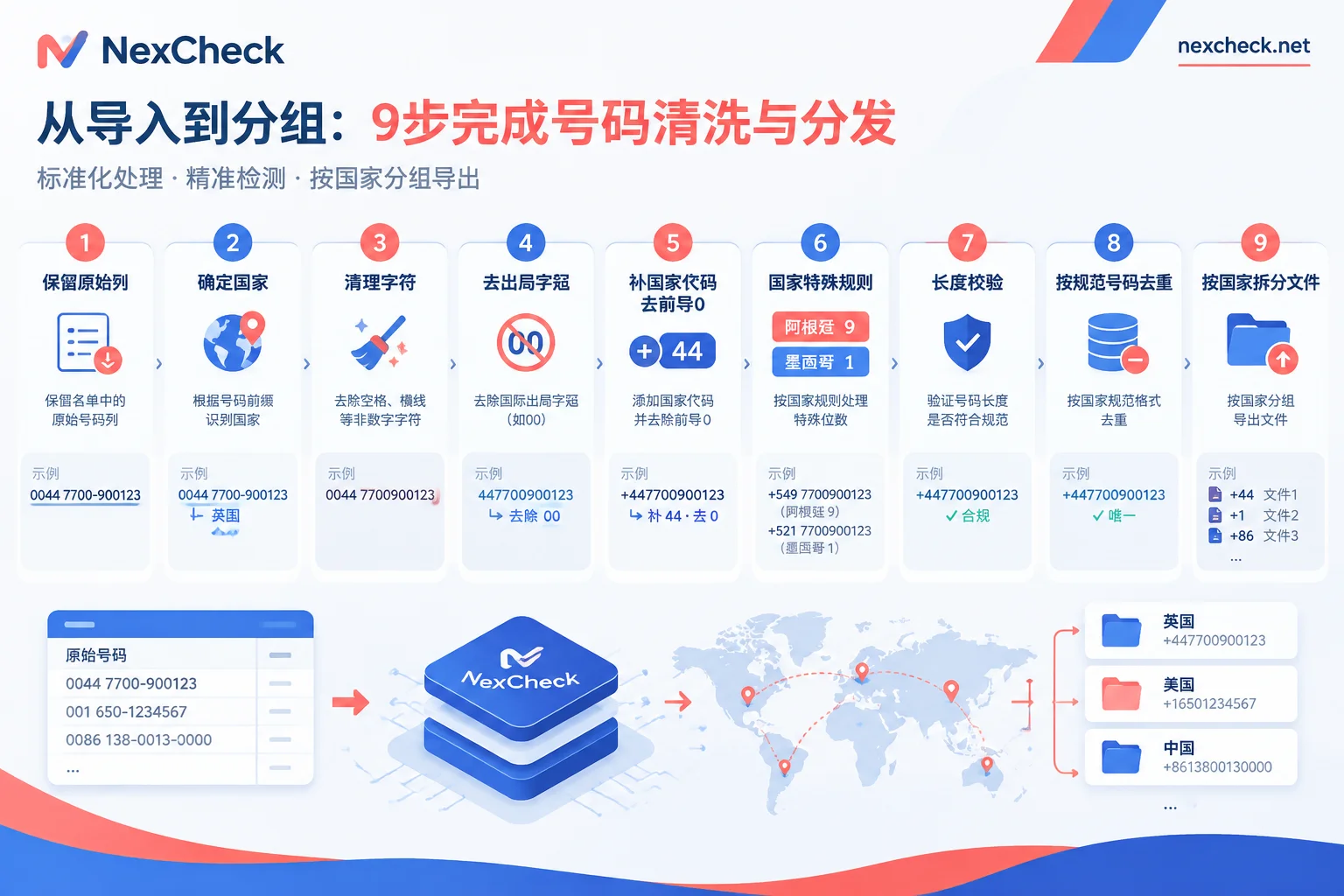
When a list involves multiple countries, processing in the following order minimizes rework:
- Keep the original column and add a normalized column. Do not overwrite the original value, so you can trace back if issues arise and compare when writing back to CRM.
- First determine which country each row belongs to. Use the country field, entry channel, or form country option; do not guess based solely on the number prefix. For example, a local number starting with
07can appear in different countries. Local numbers without country information should be placed in a separate "to be confirmed" group. - Clean characters. Keep only digits and a leading
+; remove spaces, parentheses, hyphens, dots, as well as full-width digits, invisible characters, and other miscellaneous items. - Remove exit prefixes. Replace leading
00,011with+. - Add country code, remove domestic prefix 0. There is an exception: the 0 in Italian landline numbers is part of the number itself and must not be removed. For batch processing, libraries like libphonenumber can parse by country, but they output according to generic telecom rules, and the result may not match WhatsApp's format.
- Apply country-specific rules. For Argentina, add 9, remove 15; for Mexico, unify the 1 according to the chosen format. Also check the output from step 5 against these rules at this step.
- Validate length. E.164 numbers are at most 15 digits excluding
+; then check against each country's mobile number length. Do not force-correct numbers that are too short or too long; place them in "manual review." - Deduplicate by normalized number. Always deduplicate after normalization.
07700900123and+44 7700 900123are two records before normalization and will only merge into one afterward. For details, see How to Deduplicate WhatsApp Numbers. - Split files by country. One file per country makes subsequent validation, exception checking, and write-back clearer.
For country code and leading 0 conversion details, refer to WhatsApp E.164 Format Conversion Rules.
Correct format does not mean the number is usable
Format validation only means the number is written correctly; it does not mean the number has WhatsApp activated. There are several types of numbers that cannot be used on WhatsApp even if the format is perfectly standard:
- VoIP virtual numbers, toll-free numbers, premium rate numbers, and universal access numbers (UAN) are not supported by WhatsApp;
- Landlines can only register WhatsApp Business App via voice verification code; personal WhatsApp does not support binding to landlines.
Therefore, after normalization, you also need to validate number status. If the error occurs during validation rather than import, you can locate it layer by layer following the order in How to Troubleshoot WhatsApp Filtering Failures.
After normalization, submit the list for validation
Once the list is split by country, you can upload txt or csv files on the NexCheck console, or submit via REST API, with results pushed back via Webhook. Results are grouped by valid and invalid, making it easy to write back to the original list. WhatsApp can detect status fields such as whether the number is activated and active; basic number validation can separately filter out empty numbers, device types, and high-risk numbers. For specific validation items and pricing, refer to the WhatsApp Platform Page. When the list includes many countries and you are unsure about the number format for a particular country, you can first check the corresponding country's description on the Regional Page.
The list is your own data; before submitting, please confirm that the source and purpose are legal.




Comments(0)