 NexCheck-筛号平台
The number lists customer service teams have on hand are usually accumulated over years: caller numbers exported from ticketing systems, after-sales registration forms, in-store leads, and data migrated from old CRMs. To import them into a WhatsApp customer service channel or CRM, the cleaning needs to achieve very specific results: every number is in a unified format, there are no duplicates, you know whether it has WhatsApp activated, and the results can be written back to the corresponding customer records.
Recommended processing order:
- Back up the original table, keeping the customer ID and original number in each row;
- Convert numbers to E.164 international format by country, handling special encodings such as Argentina and Mexico separately;
- Deduplicate by the converted number;
- Check WhatsApp activation status in batches by country;
- Interpret the fields and write back to the CRM in groups: activated, not activated, and pending verification.
The order should preferably not be reversed. If you deduplicate before standardizing formats, the same customer's 07911123456 and +44 7911 123456 will be treated as two numbers; if you check before standardizing formats, some numbers that are actually activated will be judged invalid due to formatting issues.
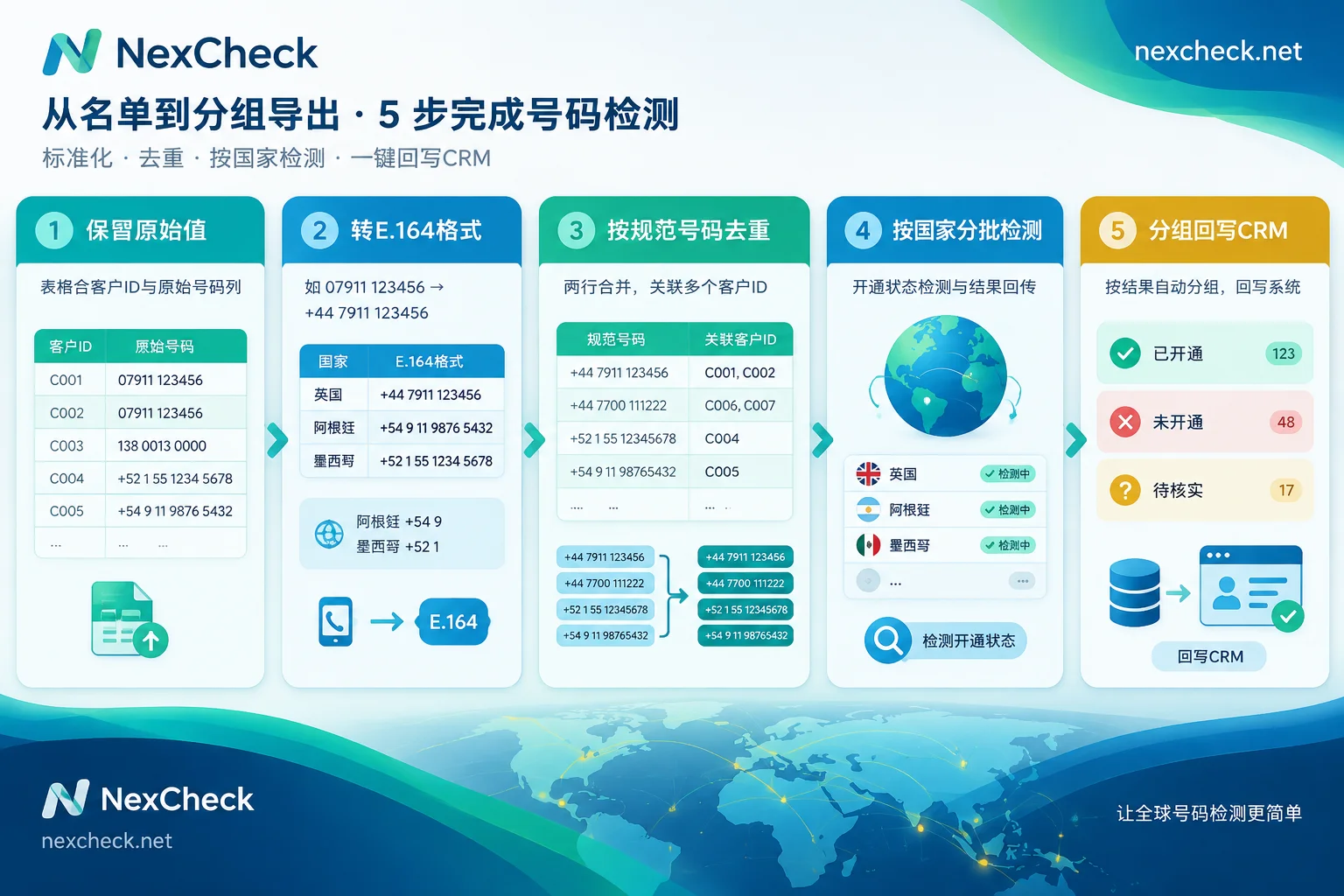
Step 1: Keep Original Values Before Cleaning
First, make sure the table has two columns that remain unchanged: customer ID and original number. All subsequent conversions should be written into new columns. This way, when check results are written back, they can be matched by customer ID; if a number conversion goes wrong, you can return to the original value and reprocess.
Common problems in customer service lists include:
- Local leading 0 or long-distance prefix with no country code;
- Mixed spaces, hyphens, parentheses, or extension markers such as "ext." or "转";
- Two numbers in one cell, such as a mobile and a landline written together;
- Duplicated or incorrect country codes, for example
+86 86 138….
Extensions should be split into a separate column, and two numbers should be split into two rows or two columns, not directly concatenated into the number.
Step 2: Convert to E.164 Format, Handling Special Countries Separately
WhatsApp recognizes numbers by full international format: plus sign, country code, area code, and local number, with the leading 0 and long-distance prefix used for local dialing removed. If you keep the leading 0 or local dialing prefix, the number may fail to be recognized. For example, a UK number 07911 123456 should be written as +44 7911 123456.
When adding country codes, prioritize existing clues in the list: the customer's region, source store or business line, and billing address. If the number itself has no country code and there are no other clues in the table, do not uniformly add the main business country's code; put it in the "pending verification" group first.
The WhatsApp Help Center provides additional rules for two countries:
- Argentina (+54): Add 9 between the country code and area code, and remove the 15 before the local mobile number. The final result is 13 digits, in the form
+54 9 XXX XXX XXXX. - Mexico (+52): Keep the 1 after the country code, in the form
+52 1 XXX XXX XXXX.
If the checking tool or customer service system you use has its own input requirements for these two countries, follow their documentation.
For multi-country lists, it is recommended to first split them into multiple files by country, verify the conversion rules country by country, and then submit them for checking separately. If you are unsure about the number length and prefix for a country, you can check the corresponding country's number format on the NexCheck regional solutions page. For complete conversion rules, refer to WhatsApp E.164 format conversion rules.
Step 3: Deduplicate by Canonical Number
Deduplication should be done after format standardization, comparing by E.164 number rather than by the original string.
It is common in customer service data for one number to correspond to multiple customer IDs, such as family members sharing a number or a company's main line. In this case, do not directly delete duplicate rows; instead, preserve the relationship of "one number corresponding to multiple customer IDs": run the check only once and write the result back to all associated records. This avoids duplicate billing and does not lose customers. For specific methods, see How to deduplicate WhatsApp numbers.
Step 4: Check WhatsApp Activation Status
It is not recommended to wait for the customer service system to report errors before handling them. Discussions in the Meta developer community mention that the contacts endpoint of the WhatsApp Business API, which could once confirm numbers in bulk, has been deprecated; messages sent to unregistered numbers will directly report errors, with template messages returning 1013 (User is not valid) and session messages returning 470 via Webhook. For customer service teams, importing unclean numbers means tickets are assigned to agents but cannot be contacted, and it also brings retry and troubleshooting burdens.
A more reliable approach is to check separately before import. Taking NexCheck as an example: upload the cleaned file by country to the console (txt or csv), or submit it via REST API, and the results are returned grouped into valid and invalid; those using the API can receive results via Webhook. Which fields WhatsApp can check and how each is priced are subject to the WhatsApp platform page. Check items and unit prices may be adjusted, and different platforms can check different items.
How to choose fields: Customer service assignment usually only requires activation status. If you want to filter out invalid and high-risk numbers as well, you can add basic number checks. Checks are priced per item, so choose items according to your purpose; you do not have to select all at once.
Console or API: For one-time cleaning of historical lists, uploading via the console is the easiest; for new customers continuously entering the CRM and needing checks at the time of entry, submitting via API and pushing back via Webhook is more suitable. For integration steps, see How to integrate the WhatsApp bulk verification API.
Step 5: When Reading Fields, Distinguish "Not Activated" from "Cannot See"
To determine whether a number is usable, activation status should be the main basis. Profile pictures, About text, and last seen time are controlled by user privacy settings, and users can set them to be visible only to contacts or to no one.
Therefore, it is normal for an activated number to have an empty profile picture, no About text, and no visible last seen time. It cannot be used to determine that it is not activated, nor is it suitable for concluding that the customer is "inactive" and lowering their priority. For the meaning and boundaries of each field, refer to How to interpret WhatsApp number filtering results.
Step 6: Write Back to CRM in Groups
It is recommended to add these columns to the customer record: E.164 number, WhatsApp status, check time, and batch number. Then group by result:
- Activated: Can be assigned to the WhatsApp customer service channel;
- Not activated: The number itself may still be valid; keep it in the CRM, and customer service continues to use the original channels such as phone and email. Do not delete it;
- Format pending verification: Numbers missing a country code or with an incorrect number of digits should be manually completed or confirmed the next time the customer calls;
- Basic check judged as invalid: Mark them and pause assignment.
Activation status can change; customers may change numbers or newly register for WhatsApp. After writing the check time into the CRM, important lists can be rechecked periodically to decide whether the old results are still usable.
One final reminder: this list is your own customer data, and the source and purpose must be legal. Checks are only used to verify the data quality of your own list.




Comments(0)