 NexCheck-筛号平台
When expanding cross-border e-commerce, local life services, fintech, or B2B businesses in Vietnam, Zalo is essentially an infrastructure that almost every operations and marketing team cannot avoid. Public market research data shows that Vietnam's internet penetration rate has exceeded 84%, while Zalo has more than 78 million monthly active users in Vietnam, with a penetration rate of over 80% of smartphone users. Locally, whether for daily contact with friends and family, government notifications, or brand customer service and private-domain interaction, Zalo's actual open rate and trust level are often higher than those of other cross-border communication tools.
However, when companies sort out business cards collected at exhibitions, historical order phone numbers, and advertising lead sheets to prepare for customer status inventory, they often encounter two thorny problems: first, after the list is imported, no results can be found, and the invalid ratio is abnormally high; second, it is unclear how to combine detection items such as registration, activity, and gender/age, resulting in excessive detection budget being spent on unnecessary invalid numbers.
Zalo number screening cannot be done by simply throwing the original spreadsheet into the system. The most reliable and cost-effective approach is to strictly follow the four-step processing order: "local 10-digit number cleaning → registration detection → activity range and attribute layering → CRM tag write-back."
1. Why Can't Vietnamese Lists Return Results? First Check the "11-Digit Legacy Number" Trap
Many overseas teams, when troubleshooting the reasons for screening failures, only focus on whether the country code +84 has been added, while ignoring a large-scale number reform in Vietnam's telecommunications history. If you have a batch of B2B old customer lists or historical order databases accumulated over several years, they are very likely mixed with a large number of unrecognizable old-format numbers.
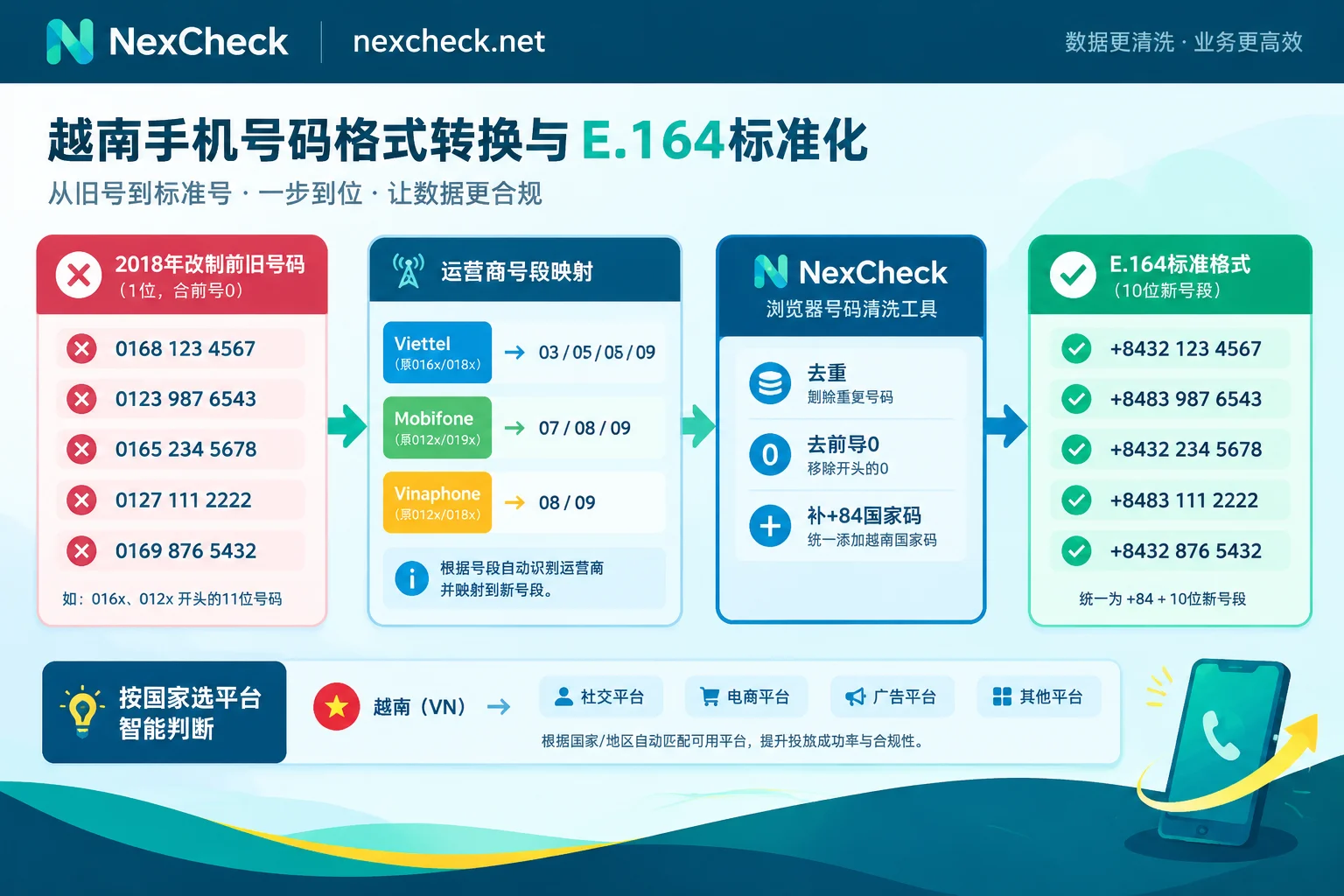
According to Decision No. 798 issued by the Vietnamese Ministry of Information and Communications (MIC), Vietnam converted all 11-digit mobile phone numbers of nationwide mobile operators to 10-digit format between September 2018 and June 2019 (calculated in the local format with leading 0). The prefix mapping rules for major operators are as follows:
- Viettel (Vietnam Military Telecommunications): The original 11-digit number ranges starting with
0162to0169were uniformly converted to 10-digit number ranges starting with032to039. - VinaPhone: The original
0123,0124,0125,0127, and0129number ranges were converted to083,084,085,081, and082, respectively. - MobiFone: The original
0120,0121,0122,0126, and0128number ranges were converted to070,079,077,076, and078, respectively. - Vietnamobile and Gmobile (Gtel): The original
0186and0188were converted to056and058; the original0199was converted to059.
In NexCheck's Zalo number screening rules, it is clearly required that: Vietnamese numbers must be in the 10-digit format after the 2018 reform (9 valid digits after removing the leading 0, and 11 digits in total after adding country code 84). Old 11-digit format numbers cannot return results.
Local Cleaning Order Before Batch Tasks
Because the console does not automatically deduplicate after uploading a file to create a batch task, and duplicate values are still billed normally, before formally submitting paid detection, be sure to complete the following cleaning steps (for more general specifications for cross-country lists, you can also refer to our detailed breakdowns on How to Solve WhatsApp Number Format Errors: E.164 Standard Writing, Common Errors, and Multi-Country List Standardization Order and How to Deduplicate WhatsApp Numbers: First Standardize to E.164 Format, Then Deduplicate by Standardized Numbers):
- Replace historical 11-digit legacy number ranges: First check in the local spreadsheet whether there are old numbers starting with
+8416x,+8412x,016x, or012x, and batch-replace them with the corresponding new number range prefixes according to the Vietnamese operator rules above. - Use a browser-side tool to convert to E.164 and deduplicate: Open the free number cleaning tool provided by NexCheck. This tool runs directly locally in your browser and does not create a paid detection task. Paste the list into it. The default country is Vietnam. The tool will automatically recognize separators, remove the local leading
0, add the+84country code to convert to standard E.164 format (for example,+84912345678or+84321234567), complete deduplication at the same time, and clearly report the number of valid, invalid, and duplicate entries. - Check the default country setting: If your list contains numbers from neighboring countries such as Thailand and Indonesia in addition to Vietnamese customers, do not add the default Vietnam country code to all of them indiscriminately; otherwise, you will get dead numbers whose format appears compliant but whose country attribution is completely wrong. For cross-regional business, it is recommended to first check the regional solutions (such as the Vietnam regional number screening solution) to understand the local number structure and major platforms before organizing in batches.
2. What Does Zalo Number Screening Check? Four Core Detection Dimensions and the Difference Between Dual Channels
When the list has all been organized into clean, deduplicated Vietnamese 10-digit new format (standard E.164), you can go to the Zalo number screening page to select specific detection items. NexCheck provides progressively deeper detection capabilities for Zalo and distinguishes between "Fast" and "Stable" channels for core items.
1. Account Registration Detection (Fast Channel / Stable Channel)
This is the first funnel in every number screening process. A simple carrier empty-number check can only indicate whether the SIM card has been suspended; it cannot indicate whether the owner has registered and bound Zalo. Account registration detection directly determines whether the numbers in the list are currently registered with Zalo accounts and returns the results grouped as "valid (registered)" and "invalid (not registered)."
- Fast channel: Focuses on high concurrency and processing speed, suitable for scenarios with a large batch of cold lists that need to quickly remove unregistered dead numbers in a short time.
- Stable channel: Deeply optimized for coverage and result stability, suitable for detailed inventory of high-value customer assets.
2. Activity Range Detection
A number being registered with Zalo does not mean the user is still using it recently. Some numbers may be silent numbers registered years ago and then abandoned. Through activity range detection, operations teams can distinguish recently active primary numbers from long-dormant numbers based on the returned time-tiered results, thereby reasonably prioritizing business follow-up.
3. Gender and Age Detection (Fast Channel / Stable Channel with Nickname)
In cross-border e-commerce (such as beauty and skincare, maternal and baby products, men's clothing and accessories, 3C digital products) or local life services, basic demographic attributes directly determine the direction of marketing copy and service scripts. Zalo's gender and age detection also provides two channels:
- Fast channel: Quickly returns the gender and age group attributes corresponding to the target number, suitable for purely demographic label-based audience segmentation.
- Stable channel (additionally returns nickname): In addition to returning gender and age fields, the stable channel also returns the user's Zalo nickname. For teams that need to import lists into CRM and assign them to sales or customer service for one-on-one follow-up, obtaining the nickname means they can verify how to address the customer when establishing contact or creating a profile, greatly reducing awkwardness.
(Note: The specific speed, coverage, and real-time unit price of each channel are subject to the console price list and the supported platforms overview.)
3. How to Combine for Maximum Budget Savings? Batch Tasks and the "Continue Detection" Progressive Method
Many marketers new to batch number screening easily make a mistake: after receiving 50,000 unverified raw leads, they directly submit all of them to the most expensive "gender and age" or "activity range" detection. If 40% of this list has not registered Zalo at all, then the high-tier detection fees consumed by these 40% invalid numbers are wasted.
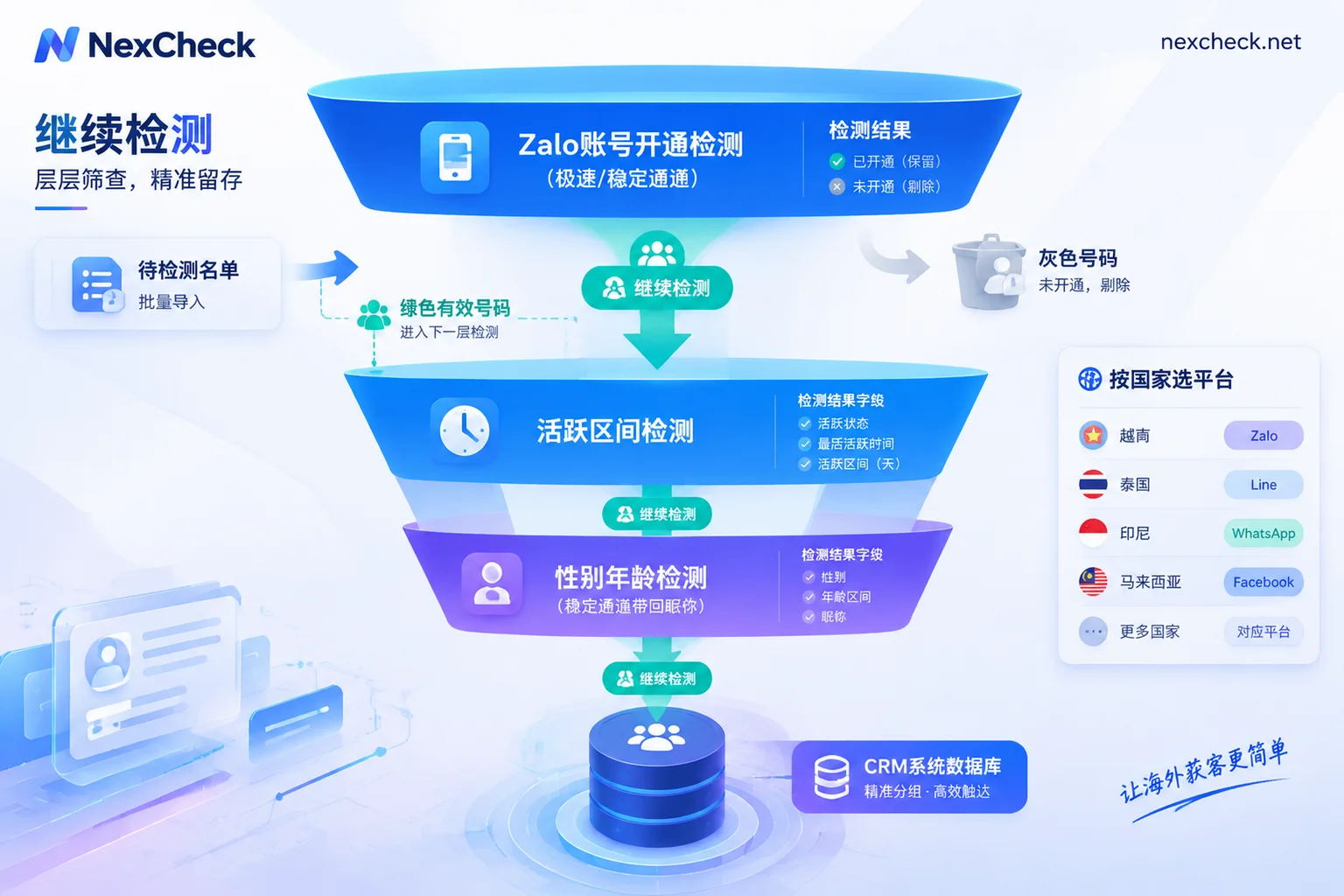
In the NexCheck console, the most cost-effective approach is to use the "Continue Detection" function for funnel-style progressive screening. You can follow the standard steps in the Quick Start Guide:
- Upload files according to specifications: Prepare a CSV, TXT, or XLSX file, ensuring one number per line and placed in the first column. Select the Vietnam region when uploading, and confirm that the file size, number of rows, and number of columns meet the system limits, and that the total number of rows falls within the minimum and maximum quantity range of the selected detection item.
- Run "Account Registration" in the first layer: First run the entire list through account registration detection. The platform uses a prepaid mechanism and deducts fees per item when creating a task (if a task fails, it will automatically be fully refunded).
- One-click transfer to "Continue Detection": After registration detection is completed, preview the results in the console first. At this point, there is no need to download the valid list locally and re-upload it after reorganizing—directly use the "Continue Detection" function in the task list to use the "valid (registered)" numbers that passed the first round of screening as the input source for the next detection item (the system will create a new task for you and bill separately based on the actual number of valid entries).
- Add "Activity Range" or "Gender and Age" in the second layer: Only for numbers confirmed to be registered with Zalo, continue to initiate activity range detection or gender and age detection (stable channel with nickname). In this way, every bit of budget is spent on real Zalo users.
If your Vietnam business has a full-channel layout, the same batch of real mobile numbers that has already been verified can also be used through this process to horizontally check their account registration status on WhatsApp, Telegram, Facebook, TikTok, or Vietnam's mainstream e-commerce platform Shopee, and even combine with basic number detection to check power-on status and iOS/Android device segmentation, piecing together a complete cross-platform customer profile in CRM.
4. Result Interpretation, Capability Boundaries, and Compliant CRM Write-Back
After receiving the grouped result file, when the data team writes it back to the enterprise's internal CRM system, they still need to clarify the technical and compliance boundaries of the number screening tool (for general field design for writing screening results back to CRM, you can also read How to Do LINE Batch Number Screening: Number Format Cleaning, Country-Specific Detection, Result Interpretation, and CRM Write-Back):
- Export and archive promptly; do not treat the task center as cloud storage: Detection results support online preview and download, but the platform does not promise a retention period for results, and the task center in the console cannot be used as a long-term data archive. After a task is completed, please export CSV/XLSX as soon as possible and synchronize it to your own database.
- Objectively understand result timeliness and field boundaries: Number screening results only reflect the platform status at the moment of query, do not guarantee that a single result is absolutely correct, and cannot determine for you the true identity, purchase intention, or commercial value of the number holder; at the same time, affected by platform mechanisms and user settings, profile fields that users have set as private cannot be read.
- Automated integration and division of responsibilities: For R&D teams that need to embed Zalo number screening into their own CRM, ERP, or lead onboarding pipeline, NexCheck provides a RESTful API supporting batch submission, real-time queries, and Webhook callbacks (the public user manual does not directly display API documentation; teams that need the API address, parameters, and authentication specifications can first register a free account and contact official Telegram customer service @nextipkf for integration consultation). In addition, please note that NexCheck focuses on number and email detection and screening, and does not provide services such as bulk messaging, customer outreach and follow-up, SMS verification code reception, or account purchases.
- Data privacy and compliance commitments: Lists submitted by customers belong to the customers themselves. NexCheck processes them only within the scope of executing detection tasks, never sells customer lists, and does not use customer lists to build a number database for external sale; customers can view, export, and delete task data in the console at any time. At the same time, as data controllers, customers must strictly comply with the privacy policy and local regulations, ensure that the source and purpose of numbers are legal, and must not submit numbers they do not have the right to process.
Conclusion
In the Vietnam market, high-quality private-domain operations and customer management start with clean underlying data. First replace the legacy 11-digit numbers from before the 2018 reform in historical lists with new 10-digit numbers, convert them to standard E.164 format with a free cleaning tool and deduplicate, then use NexCheck Zalo number screening to progressively screen by "registration → activity range → gender/age and nickname." This not only directly cuts the resource waste caused by invalid lists, but also enables your sales and customer service teams to work efficiently with precise customer assets carrying real status and forms of address. Go to register for the NexCheck console now and start your Vietnam customer list standardization and cleaning process.




Comments(0)