 NexCheck-筛号平台
Suppose you have a list of 20,000 phone numbers, merged from exhibition registrations, website forms, and an old CRM export. A marketing colleague reports that "many WhatsApp numbers don't work." If you simply delete all numbers that "don't work," you'll mistakenly remove some still-useful contacts. If you send the entire batch for detection as-is, you'll pay for a large number of obviously incorrect numbers.
Here's the processing order: Locally fix numbers to E.164 format, split by country and deduplicate, then perform WhatsApp status detection, finally tag and write back to CRM by invalid reason, and regularly recheck. The following explains step by step in this order.
First Understand Which Layer the "Invalid" Occurs At
Invalid numbers in a list can be divided into three layers, each with different discovery stages and handling methods:
| Layer | Typical Symptoms | Detected At | Handling |
|---|---|---|---|
| Format invalid | Wrong digit count, retained leading 0, missing country code, mixed letters or symbols | Local cleaning | Fix what can be fixed, return unfixable ones to the data source |
| Communication layer invalid | Empty number, disconnected, unallocated number range | Basic number detection | Mark as invalid number, no longer a usable contact |
| WhatsApp platform layer invalid | Number is valid and in service, but not registered on WhatsApp, or account banned | WhatsApp status detection | Mark as WhatsApp unavailable, the number itself can be retained |
The practical significance of layering is twofold:
- Unregistered does not mean the number is dead. Such numbers may be normal mobile numbers, just not registered on WhatsApp. Deleting the entire record means other channel owners lose a usable record.
- Format-error numbers should not be sent for detection. Sending them for detection only yields a useless "invalid" result and consumes detection quota.
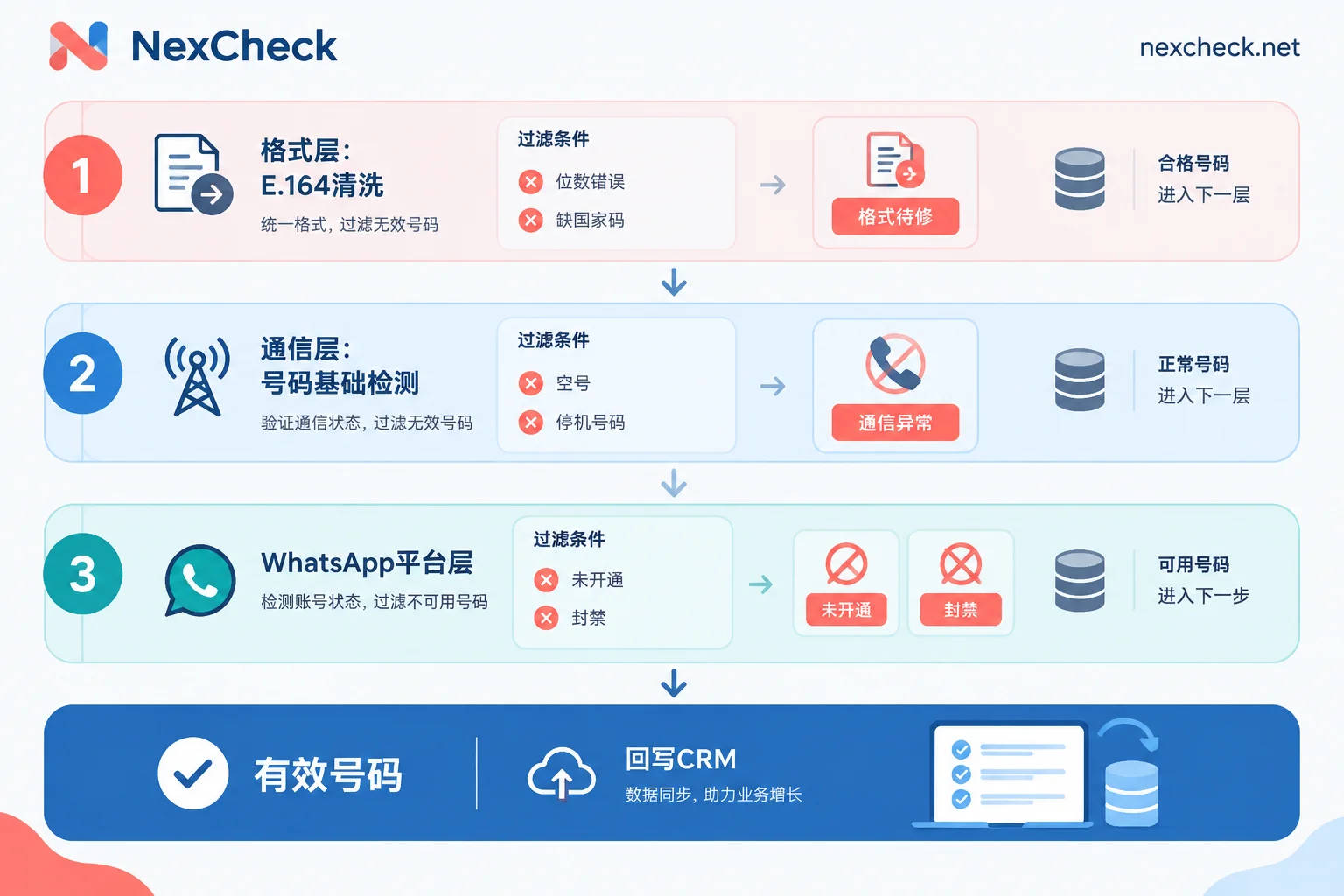
Step 1: Correct Format Locally
WhatsApp requires numbers in international E.164 format: starting with a plus sign and country code, followed by the complete national number. Follow this order when cleaning:
- Remove formatting symbols: spaces, parentheses, dashes, dots, and invisible characters copied in.
- Remove prefixes: delete leading international dialing prefix 00, and domestic long-distance prefix 0.
- Add country code: uniformly write as "+country code + national number". When the form lacks a country field, determine the country based on source channel or address; do not guess if uncertain.
- Handle special countries: According to WhatsApp Help Center, Argentina (+54) requires a 9 between the country code and area code, and removal of the 15 in the local number; Mexico (+52) requires retaining 1 after the country code. National numbering rules may change with local adjustments; before batch processing, sample-check current rules. For complete rules, refer to WhatsApp E.164 Format Conversion Rules.
Numbers with obviously wrong digit counts or undetermined countries go into the "Format pending" group and are not sent for detection this round. Also keep a column of original numbers for later traceback and correction.
Step 2: Split by Country, Then Deduplicate by Normalized Number
For a list mixing multiple countries, it's advisable to first split into separate files by country. The reason is that different countries have different prefix rules: a number starting with 0 may need the 0 removed in one country, but may require additional handling in another. After splitting, each file only needs one set of rules, making errors easier to locate. For number formats and mainstream platforms in each country, see Regional Pages.
Deduplication should be done after format unification, based on the normalized E.164 number. For example, "+86 138…", "0086138…", "138… (country field: China)" are three entries in the original list, but after normalization they are the same number. When deduplicating, retain the mapping of "which CRM record IDs correspond to the normalized number," otherwise write-back will only update one record. For specific methods, refer to How to Deduplicate WhatsApp Numbers.
Step 3: Detect WhatsApp Status and Group by Valid and Invalid
After format correction and deduplication, the remaining numbers are worth sending for detection. On NexCheck, you can perform WhatsApp status detection on your own list, including whether registered, registration time, activity, ban status, etc.; you can also add basic number detection to identify communication-layer issues like empty numbers. Results are automatically grouped and returned as valid and invalid. Different platforms have different detection items; for exactly which fields WhatsApp can check and the unit price, refer to the WhatsApp Platform Page and the price list.
Choose fields based on purpose:
- Only want to exclude invalid numbers: registration status, ban status, and basic number status are usually sufficient.
- Also want to tier valid numbers: consider adding registration time, activity, etc. Detection is priced per record, so select fields as needed.
Submission method depends on the list source:
- One-time existing list: Upload txt or csv files on the console, no batch limit, export by group after detection.
- Continuously incoming new leads (e.g., website forms): Submit via REST API, results pushed back to your system via Webhook. For integration details, see How to Integrate WhatsApp Batch Verification API.
The list is your own data; source and purpose must be legal and compliant; detection only processes this data within the task scope.
Step 4: Handle by Invalid Reason Separately
After getting results, do not merge all "invalid" into one group and delete, but handle by reason separately:
- Format pending: Return to data source, add country code or check digit count. After fixing, send as next batch for detection.
- Empty number, disconnected: Mark as "invalid number", remove from active contact pool and archive. It's not recommended to physically delete the customer record, for traceability.
- Not registered on WhatsApp: Only mark "unregistered" in the WhatsApp status field, keep the number field. Whether other channels use this number is up to the respective team per their rules.
- Banned: Mark as "WhatsApp banned" and archive, no longer a usable WhatsApp asset.
- Detection failed or missing attributes: Mark as "unknown/to be rechecked", do not include in invalid group. Some attributes may be unavailable due to account settings; missing itself does not mean the number is invalid. For field meanings and boundaries, refer to How to Read WhatsApp Number Screening Results.
Recommended Fields to Retain When Writing Back to CRM
Write-back is not just updating a "valid/invalid" switch. It's recommended to retain at least the following fields:
- Original number (not overwritten)
- Normalized number (E.164)
- Country/Region
- WhatsApp status: valid, unregistered, banned, unknown
- Basic number status: normal, empty, disconnected, etc.
- Detection time and detection batch
Detection time is most easily omitted but most critical. Status only represents the situation at the moment of detection; without a timestamp, after half a year you cannot judge whether the result is still trustworthy.
Regular Recheck, Not Just One-Time Cleaning
The list naturally ages: some disconnect, change numbers, originally unregistered numbers may later register on WhatsApp, and account status may change. Two practical approaches:
- Detect when new numbers enter the database: Suitable for teams with continuous lead inflow and API integration.
- Recheck existing list before reactivation: Also rerun records whose detection time exceeds your business cycle.
For recheck, you can select only the "valid" and "unknown" groups, and the "unregistered" group needed recently. Records confirmed as empty numbers generally do not need repeated detection unless there is new information.
After splitting by country and deciding which fields to check in the above order, you can first verify detection items and unit price on the WhatsApp Platform Page, then register via the "Number Screening Tool" in the website navigation and upload your first batch of normalized numbers.




Comments(0)