 NexCheck-筛号平台
Suppose you receive a WhatsApp contact list merged from exhibition registration forms, website forms, and an old CRM export, totaling over ten thousand rows. After using Excel's "Remove Duplicates," only a few hundred rows are removed. But when you spot-check by name, you find the same customer still appears three or four times, each time with a different number format.
The reason is that Excel only removes rows with completely identical characters. You must first convert each number into a unified canonical format, then deduplicate using that canonical number to find truly duplicate records. If you reverse the order, duplicate rows remain in the list, and later per-item verification will charge multiple times for the same number.
Why numbers that look different are actually the same
Take a UK mobile number as an example. The list might contain all of the following formats:
+44 7946 0123450044-7946-01234507946 012345(07946) 012 345447946012345
These five numbers look different, but they point to the same number. The differences mainly come from three categories:
- Symbols: spaces, hyphens, parentheses, dots.
- International prefixes: written as
+, as the international prefix00, or with no prefix at all. - Local dialing habits: written using only the local dialing method, with a domestic leading 0 (trunk prefix), and no country code.
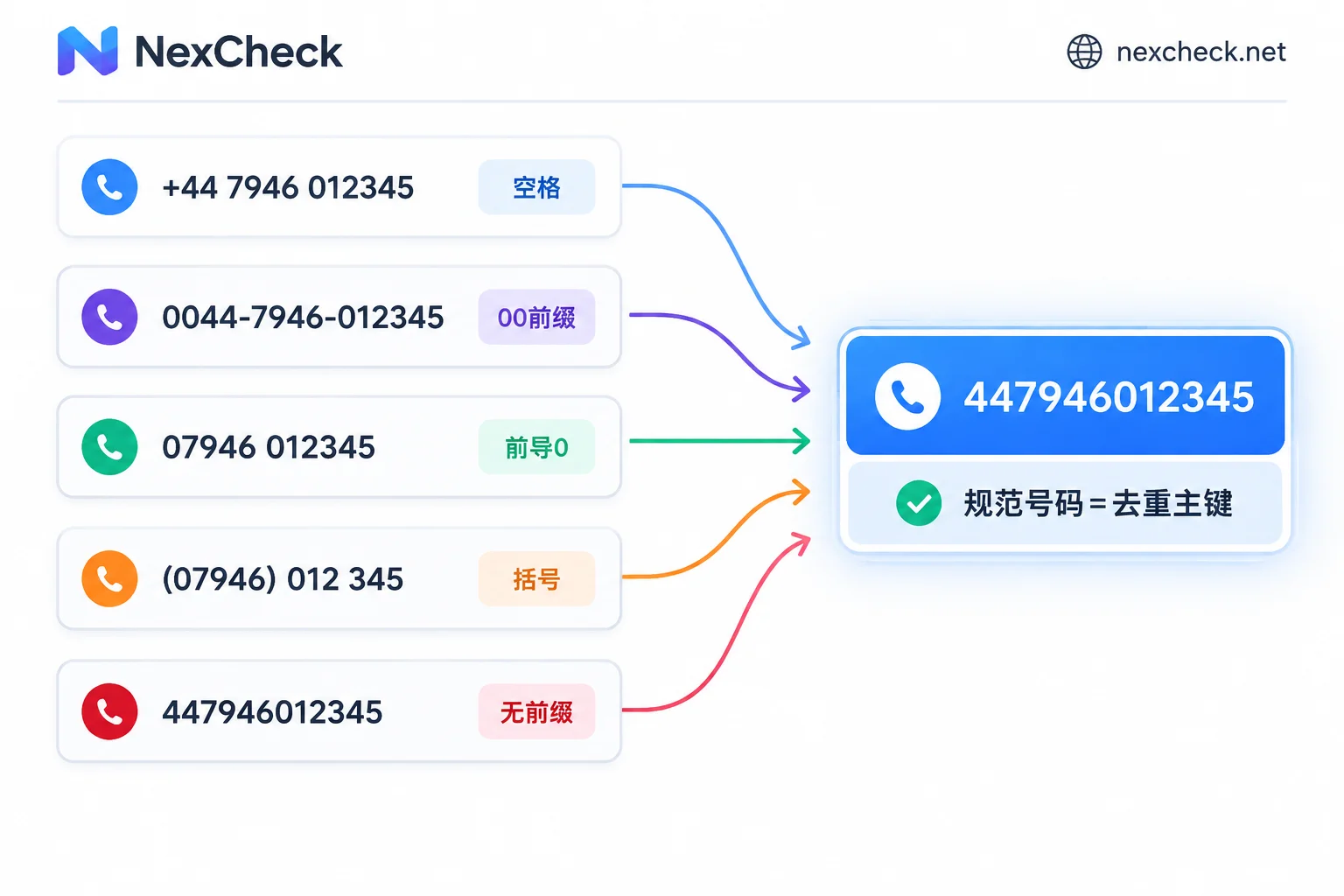
The E.164 format recommended by the International Telecommunication Union is: + followed by the country code, then the subscriber number including the area code, with a total length not exceeding 15 digits. When converting to international format, remove the domestic leading 0 after the country code. For example, the UK 07946... becomes +447946..., and the German 0151... becomes +49151.... When storing and comparing numbers in systems, generally keep the E.164 format with the +, or keep only pure digits (e.g., 447946012345). Choose only one format for a list and keep it consistent throughout.
Order of operations: normalize first, then deduplicate
Step 1: Keep the original column, add a canonical number column
Do not directly modify the original number column. Create a new column, for example named phone_norm, and write all subsequent cleaning operations into this column. The original format will be useful later for troubleshooting and is also needed when writing verification results back to the CRM.
Before opening a CSV file in Excel, set the number column to "Text" format, or use "Data → From Text/CSV" to manually specify the column as text. Otherwise, long numbers may become scientific notation like 4.47946E+11, and leading zeros will be removed. When reading with pandas, also add dtype=str.
Step 2: Clean symbols
Remove all non-digit characters such as spaces, hyphens, parentheses, and dots, keeping only the leading +. First check for the following two situations:
- Multiple numbers in one cell, e.g.,
07946012345 / 07700900123. Split into multiple rows first, then continue cleaning. - Number followed by an extension or note, e.g.,
ext 12,(微信同号). Remove this part first, otherwise the extension digits will be concatenated into the number.
Step 3: Unify international prefixes
- Starts with
+: remove the+, and the remainder starts with the country code. - Starts with
00: remove the00, which has the same effect as+. - In some regions, the international prefix is not
00; for example, North America uses011. If the list mainly comes from these regions, handle them separately.
Step 4: Add country code to local numbers and remove leading 0
This step is the most error-prone. For a number starting with 0, you must first know which country it belongs to in order to correctly add the country code. The basis can be a country field in the list, the collection channel (e.g., an exhibition in a certain country), or the customer's address. Do not guess the country based on number length. Put numbers with uncertain countries in a separate group and temporarily exclude them from deduplication and verification.
After determining the country, process according to that country's rules. In most countries, mobile numbers need the leading 0 removed before adding the country code. But this rule does not apply to all numbers. For example, Italian landlines still keep the 0 in international format. Mobile numbers in countries like Argentina and Mexico have additional coding rules. For multi-country lists, check the WhatsApp E.164 format conversion rules for each country.
If you are processing a single-country list, you can refer to the simplified logic below. It only applies to countries where "local numbers have a leading 0, remove the 0 and add the country code":
import re

def normalize(raw, cc):  # cc 如英国为 '44'
    s = re.sub(r'[^\d+]', '', str(raw))
    if s.startswith('+'):
        return s[1:]
    if s.startswith('00'):
        return s[2:]
    if s.startswith('0'):
        return cc + s[1:]
    return None  # 不带任何前缀:可能已含国家代码,也可能缺失,交给人工确认
The last case, numbers that do not start with +, 00, or 0, is harder to determine. 447946012345 already includes the country code, while 7946012345 lacks it. It is recommended to mark them separately and merge them back into the list after confirmation.
Step 5: Validate length
Filter out numbers that exceed 15 digits after normalization, as well as obviously too-short numbers. These are usually caused by concatenation errors, missing digits, or extra digits. Flag them and set them aside; do not mix them into the list to be verified.
Step 6: Deduplicate by canonical number and keep a mapping table
Use phone_norm as the unique key for deduplication. When encountering duplicate records, decide which one to keep:
- Keep the most recently updated record, suitable for CRM export data.
- Keep the most complete record, e.g., the one with name, company, and country.
- If tags from different sources are valuable, merge them into the retained record.
There are also two situations that should not be directly merged as duplicates. The first is the same person registered two different numbers; these are two numbers and should be verified separately. The second is the same number corresponding to different contacts, such as a family or company sharing one number. In this case, the number only needs to be verified once, but whether to merge contact records depends on business rules.
When deduplicating, also save a mapping table: 原始记录ID → phone_norm. Verification results will only correspond to the deduplicated numbers. With this table, you can write results back to every original record, including duplicate rows that were merged.
Submit the deduplicated list for verification
After completing the above steps, you will have a list with one canonical number per row. Multi-country lists can be split into several files by country code to facilitate checking formats and results separately. For number formats and common platforms by country, see the regional pages.
On NexCheck, you can submit lists in two ways. One is to upload a txt or csv file on the console, and the other is to submit via REST API, with no limit per batch. The system returns results based on WhatsApp platform verification items, including whether the number is registered, registration time, active status, and other obtainable attributes, and exports grouped by valid and invalid. Results can also be pushed back to your system via Webhook. Verification is priced per item, so each extra duplicate row in the list incurs an additional verification fee. When uploading a list with duplicate numbers, please refer to the official website for whether the platform automatically merges or waives duplicate rows. The safest approach is to deduplicate locally before submitting. Specific WhatsApp verification items and unit prices may change; refer to the price list on the WhatsApp platform page. The list is your own data, and its source and purpose must be legal.
After receiving the results, use the mapping table from Step 6 to write the status fields back to the original records. For the meaning of each field and the write-back order, continue reading How to interpret WhatsApp number filtering results.




Comments(0)