 NexCheck-筛号平台
WhatsApp CSV screening file preparation has one standard: the phone number column must be stored as plain text in E.164 format, the file must use UTF-8 encoding, be comma-separated, retain the original ID primary key, and results should be stored in three tiers: registered/unregistered/unknown. After upload, if a large number of numbers are judged invalid or rejected by the gateway, the problem often lies not with the numbers themselves but with how the file was saved. The core approach: store the number column as plain text in E.164 format, use UTF-8 encoding, comma separation, retain the original ID primary key, and log results in three tiers (registered/unregistered/unknown).
First, the Conclusion: What a Ready-to-Queue WhatsApp CSV Screening File Looks Like
A WhatsApp CSV screening file ready for the detection queue has stable column headers, clear data types, and a clear primary key. Current mainstream bulk screening APIs commonly use an asynchronous task + webhook callback + three-tier status output architecture, as seen in Whapi.Cloud and CheckNumber.AI documentation in 2026. This means the uploaded file must be as strict as an interface contract. The minimal usable table structure is as follows:
| Column | Example | Requirement |
|---|---|---|
| id | 1001 | Original record ID, unique; if not written back, can use row number |
| phone | +8613800138000 | E.164 format, plain text, with + sign |
| batch_id | 20260901_A | Batch number for task alignment |
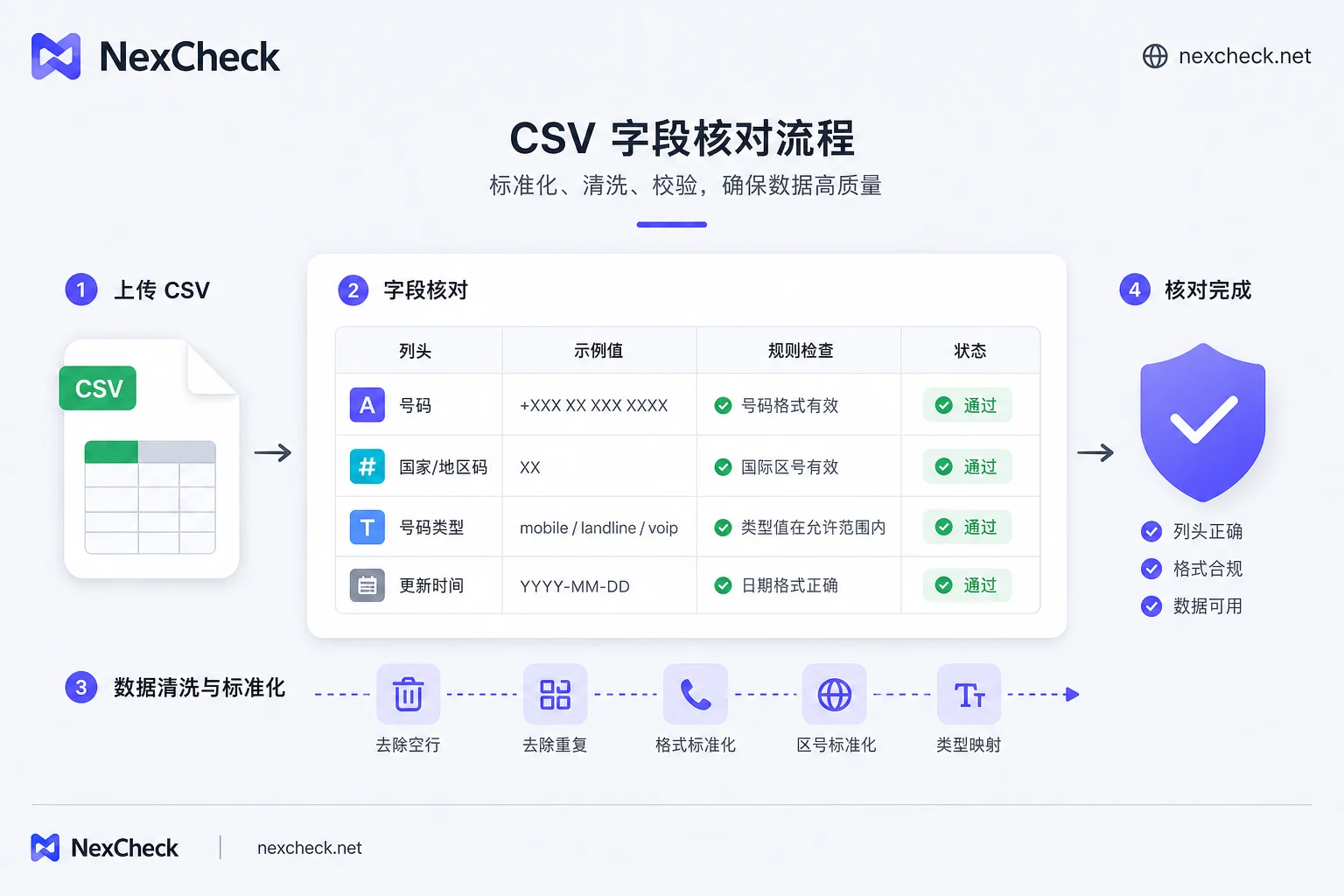
Checkpoint 1: Number Column: Plain Text, E.164 Format, and 15-Digit Limit
According to ITU-T E.164, the global unified number format is +country code, purely numeric with a total length not exceeding 15 digits, and country codes do not start with 0. The number column should be set to text format to avoid Excel conversions. Note that format compliance does not guarantee platform registration; E.164 only ensures the number can be routed internationally, not that the number has WhatsApp activated. For number cleaning rules, see E.164 Normalization Before Screening Overseas Numbers.
Checkpoint 2: Leading Zeros and Country Codes: Where Spreadsheet Software Corrupts Numbers
When Excel opens a CSV, it eats the leading zeros of 08xxxxxxx, converts numbers longer than 11 digits to scientific notation, and even treats cells starting with + as formulas. Recovery approach: do not double-click to open; use the import wizard to specify text columns; first add the country code, then remove the local trunk prefix 0. Rationale: country codes do not start with 0, so a leading 0 in the local number is a trunk prefix and should be removed.
Checkpoint 3: Encoding and Delimiters: What Encoding Prevents Garbled Text in Screening CSV Files
Screening CSV files should use UTF-8 encoding to avoid garbled text. UTF-8 with BOM is better recognized in Windows Notepad and Excel, but some APIs may treat the BOM as part of the column name; verify with the interface documentation. The delimiter is usually a comma; if fields contain commas, they need to be escaped with double quotes; some European regions use semicolons, so check. Self-check method: open the file in a text editor, verify the first line displays column headers correctly, and count the columns to ensure they match the header.
Checkpoint 4: Column Headers and Primary Key: Why Original ID, Batch Number, and Timestamp Are Necessary
Column headers should be stable, avoiding Chinese characters and spaces. The original CRM record ID must be retained as the write-back primary key, because numbers themselves may be duplicates or changed, so they cannot serve as unique keys. Include batch number and submission timestamp to align tasks during asynchronous callback write-back and to later determine if results require re-checking by time.
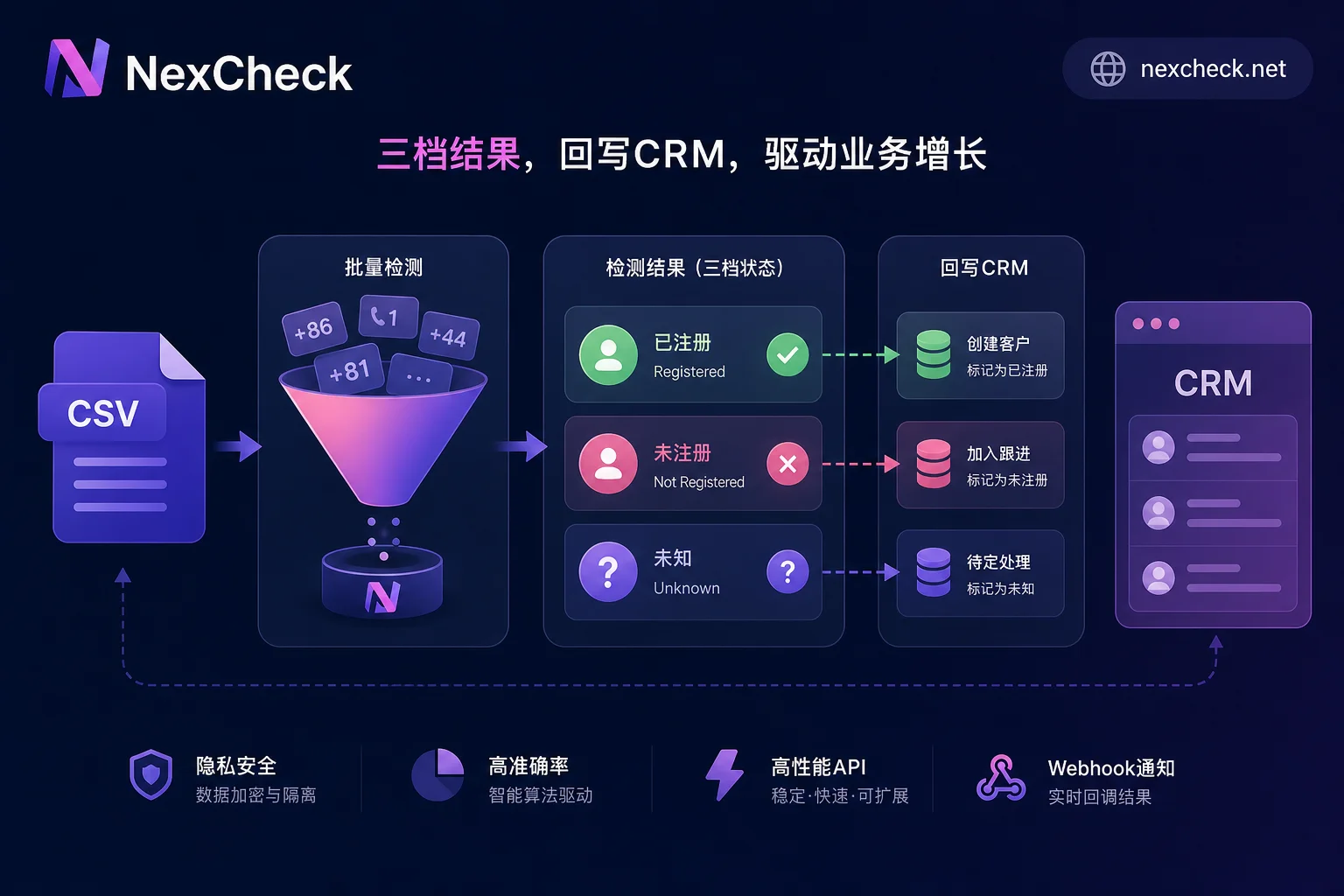
Checkpoint 5: Maximum Numbers per CSV File: Split Batches According to Queue Throughput
The number of records in a file should not be determined by the total list size, but by detection queue throughput, retry costs, and result retrieval rhythm. Large file failures incur high costs for full retransmission; it is recommended to split into batches that can be run and re-run independently, and reserve positions for failed batch resubmission. Most platforms set dynamic rate limits on single-file record counts, not public fixed values, so rely on actual responses. For example, LINE Messaging API sets different rate limit tiers from 60 requests/hour to 2000 requests/second for different endpoints, returning HTTP 429 when exceeded, requiring retry with backoff for batch submissions. For batching strategies, see How to Batch WhatsApp Number Checks.
Checkpoint 6: Reading Result Files: Three-Tier Status Column, Not a Boolean Value
Results must distinguish among registered/unregistered/unknown. The unknown tier includes privacy settings, rate limits, timeouts, etc. Merging unknown into unregistered causes list shrinkage and misjudgment. In Telegram's official API documentation, unregistered and user privacy restrictions return the same PHONE_NOT_OCCUPIED error, so they cannot be distinguished by a single lookup. For interpretation and sampling methods of the three tiers, see Three-Tier Results and Sampling Recheck for Social Account Registration Detection.
Pre-Upload One-Page Checklist: Input, Output, and Acceptance Criteria
The table below can be printed as an acceptance standard before uploading your WhatsApp CSV screening file.
| Check Item | Standard | Acceptance Method |
|---|---|---|
| Encoding | UTF-8 (or UTF-8 BOM, depending on API) | Open in text editor, no garbled text |
| Delimiter | Comma (or API-specified) | First line columns count correctly |
| Column Headers | English, no spaces | Custom field names match API docs |
| Number Format | E.164, +country code + national number | Spot check manually |
| Primary Key | Original ID unique | No duplicate IDs |
| Record Count | Split by batch | Each batch re-runnable |
| Result Column | Three tiers | Output includes status and reason |
Before uploading, spot-check 10 rows in a text editor to verify the number column is plain text E.164, column count matches headers, and primary keys are unique. Note this step only validates format, not platform registration status.
After Running: Sampling Recheck, CRM Write-Back, and Unknown-Tier Recheck Scheduling
After WhatsApp CSV screening, the result landing process is as follows: sample per batch, write back status and detection time using the original ID, schedule re-checks for unknown tiers, and incrementally re-run historical results that decay over time. Converting the same list between file batch and API batch repeatedly is the most common rework point in the write-back process. To address this, NexCheck offers both a web-based batch screening interface and a RESTful API (supporting batch submission, real-time queries, and webhook callbacks), so a normalized number list can be prepared once and reused across both entry points. It is recommended to store results in three tiers, write back using the original ID as the primary key, and schedule separate re-checks for unknown tiers. See also How to Integrate a Bulk Number Detection API.
FAQs
What's the difference between CSV and TXT number files?
CSV is a comma-separated tabular format with optional headers, suitable for structured data; TXT is plain text, usually one number per line, without headers. Screening tools generally support both, but CSV is better when headers and three-tier result output are needed.
Why do numbers still change when I export CSV from Google Sheets?
Google Sheets exports use UTF-8 encoding by default, but if the number column is recognized as numeric, it can still lose leading zeros or convert to scientific notation. Before exporting, set the cell format to plain text, or adjust export options manually.
Can screening result files directly overwrite the original table?
It is not recommended. Screening results include three tiers, so you should add new columns for status and detection time to the original table, preserving raw data for future rechecks and audits.
My format is correct, why are there still many unknown results?
Unknown tiers may come from user privacy settings, platform rate limits, or network timeouts. Some platform APIs return the same error code for unregistered and privacy restrictions, making it technically impossible to distinguish via a single lookup. Schedule rechecks by batch or adjust submission frequency.



Comments(0)