 NexCheck-筛号平台
The correct way to filter invalid WhatsApp numbers is to split undeliverable numbers into three categories: carrier-side inactive, active but not registered on WhatsApp, and registered but detection miss. These correspond to three actions: delete, keep in a separate group, and re-check. When you import a batch of customer numbers into a bulk messaging tool, ready to send WhatsApp messages to overseas users, and some deliveries fail, your instinct is to treat these numbers as invalid and delete them. However, Meta's official documentation clearly states that error code 131026 (Message Undeliverable) is not only caused by "not registered," but also by users not agreeing to the latest Terms of Service and Privacy Policy, outdated client versions, or being blocked by the recipient. A one-size-fits-all deletion can harm real customers.
What Does "Invalid Number" Actually Mean? Three Mixed Uses in Chinese Context
In operations, "invalid number" is a vague term. From a number status perspective, at least five levels need to be distinguished: valid number format, carrier reachable, platform registered, account active, and user authorized. Often, people conflate "carrier reachable," "platform registered," and "account active," leading to incorrect cleaning logic.
For example, a number might have a valid format and be carrier-active, but it may never have registered for WhatsApp, or it might have registered but the user has deactivated the account. These three states return completely different API responses and require entirely different actions. So, don't rush to say "this is an invalid number"; first, figure out at which layer it's stuck.
First Category: Carrier-Side Number Not in Service — What Line Status Can and Cannot Prove
Carrier telecommunication layer probes (such as Twilio Lookup Line Status) return fields like Active (in service), Reachable (device connected), Unreachable (powered off or no signal), Inactive (unassigned/deactivated), or Unknown. Among these, Inactive is close to a true invalid number in the telecom sense. However, note that carrier-active (Active/Reachable) only proves that the SIM card or physical line is available; it does not prove the number is registered on WhatsApp, nor does it imply you have permission to contact. Line status can only be used to filter out numbers that are physically non-existent; it cannot replace platform registration checks. For further confirmation of a number's registration on other platforms, refer to the approach in Phone Number Validity Check.
Second Category: Number Active but Not Registered on WhatsApp — Why It's Not an Invalid Number
These numbers are fully valid on the carrier side; they just don't have a WhatsApp account. They are definitely not invalid numbers; they are simply unsuitable for WhatsApp outreach. The action is to remove them from the WhatsApp sending queue, not delete them from the CRM. Consider contacting them via SMS or other platforms, such as using Social Account Registration Check to see if the number is registered on other social platforms, thereby finding alternative channels.
This is why "invalid number filtering" and "WhatsApp number detection" are not the same. The former focuses on carrier-layer "not in service" numbers, while the latter determines registration status on the target platform. If you treat "not registered on WhatsApp" numbers as invalid and delete them, you might lose a customer who could convert through other channels.
Third Category: Registered but Detection Miss — Privacy Settings and Terms Status Causing "Seems Like Invalid"
Meta's 131026 error (Message Undeliverable) can be triggered by: the target number not registered on WhatsApp, not agreeing to the latest Terms of Service and Privacy Policy, outdated client version, or being blocked by the sender. Except for the first, the rest are real registered users whose delivery is blocked. Additionally, due to WhatsApp privacy restrictions (e.g., hiding last seen, restricting non-contact views) or rate limiting on detection endpoints in a short period, some registered users may also return a miss status. This is different from the 131056 pairing rate limit on the sending side, which is discussed below. So, a "miss" in detection does not mean the number lacks a WhatsApp account; it should enter a re-check pool rather than being marked invalid.
Comparison Table for Three Categories: Determination Method, Handling Action, and Retention Period
The table below lists the determination signals, handling actions, and retention periods for the three categories in invalid number filtering.
| Category | Determination Signal | Handling Action | Retention Period | Risk Notes |
|---|---|---|---|---|
| Carrier-side not in service | Line status Inactive | Remove from sending list, archive for evidence, follow internal data retention policy | Permanent or as per business rules | No outreach value; Unreachable may just be powered off; consider marking separately from Inactive before archiving |
| Active but not registered on WhatsApp | Carrier active, but platform registration status unregistered | Remove from WhatsApp queue, keep in CRM | Long-term retention; can be reached via other channels | Do not mistakenly delete |
| Registered but detection miss | Platform registration status registered, but sending returns 131026 or miss | Put into re-check pool, re-test periodically | Recommend retaining 30 days before re-check | May be privacy settings or rate limiting |
The Cost of Mixing into One Category: High Frequency of 131026 and Declining Quality Score Causal Chain
If you mix all three categories and delete them, you risk losing registered customers with conversion potential. What truly lowers your WhatsApp account quality rating is user reports and blocks. Meta's official policy states that quality rating is based on feedback from receiving users in the last 7 days (e.g., reporting spam, blocking and selecting "Didn't sign up" or "Spam") and is calculated as High, Medium, or Low. When the quality score continuously drops to Low, business accounts cannot automatically increase daily messaging limits and may enter a restricted state. Moreover, messaging limits are now managed across the business portfolio (Portfolio-Wide).
This means that if you frequently send messages to unauthorized or "suspected invalid" numbers, triggering many 131026 errors and user reports, you not only waste quota but also risk downgrading your account, which is not worth it.
Still Can't Send After Filtering? Check for 131056 Pairing Rate Limit First
Sometimes, even after filtering numbers, messages still fail to send. In such cases, check if you've encountered error 131056. WhatsApp Cloud API's 131056 is a pairing rate limit hit, which occurs when sending multiple messages to the same target user in a short period. This is a sending pace control and scheduling concurrency issue, not evidence of invalid numbers. The solution is to reduce frequency per user and increase retry intervals, rather than deleting more numbers.
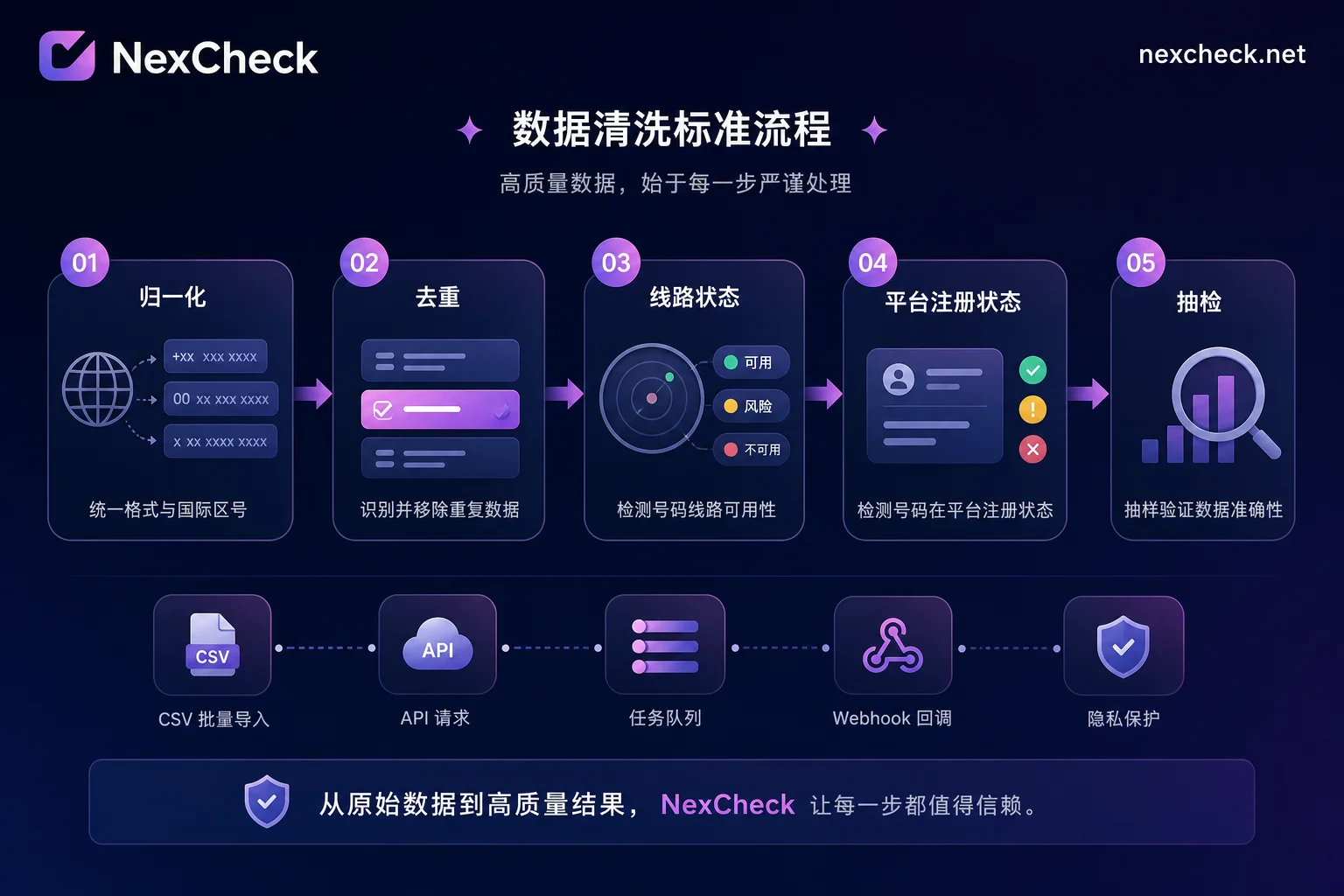
Where to Place Filtering in the Cleaning Process: Normalization → Dedup → Line Status → Platform Registration Status → Sampling
Invalid number filtering is not a standalone action; it should be embedded in the pipeline below. The complete cleaning process is recommended in the following order:
- Normalization: Standardize country codes and formats to ensure numbers comply with E.164, using Overseas Number Filtering as an aid.
- Deduplication: Remove duplicate numbers to avoid multiple contacts with the same customer.
- Line Status Check: Use carrier-level APIs to check if numbers are in service, filtering out physically invalid numbers. This step goes first because line data is relatively stable and lower cost.
- Platform Registration Check: For in-service numbers, check if they are registered on WhatsApp. This can be done using a Number Registration Status Check tool, which outputs registration status per platform.
- Sampling: Manually sample-check detection results to confirm whether miss numbers truly exist, avoiding misjudgment.
Each step has clear inputs and outputs, and the order cannot be changed. For instance, if you skip line status and go straight to platform registration, you might send many physically invalid numbers to registration checks, wasting API costs.
How to Design Result Fields: Why Not Just a Boolean
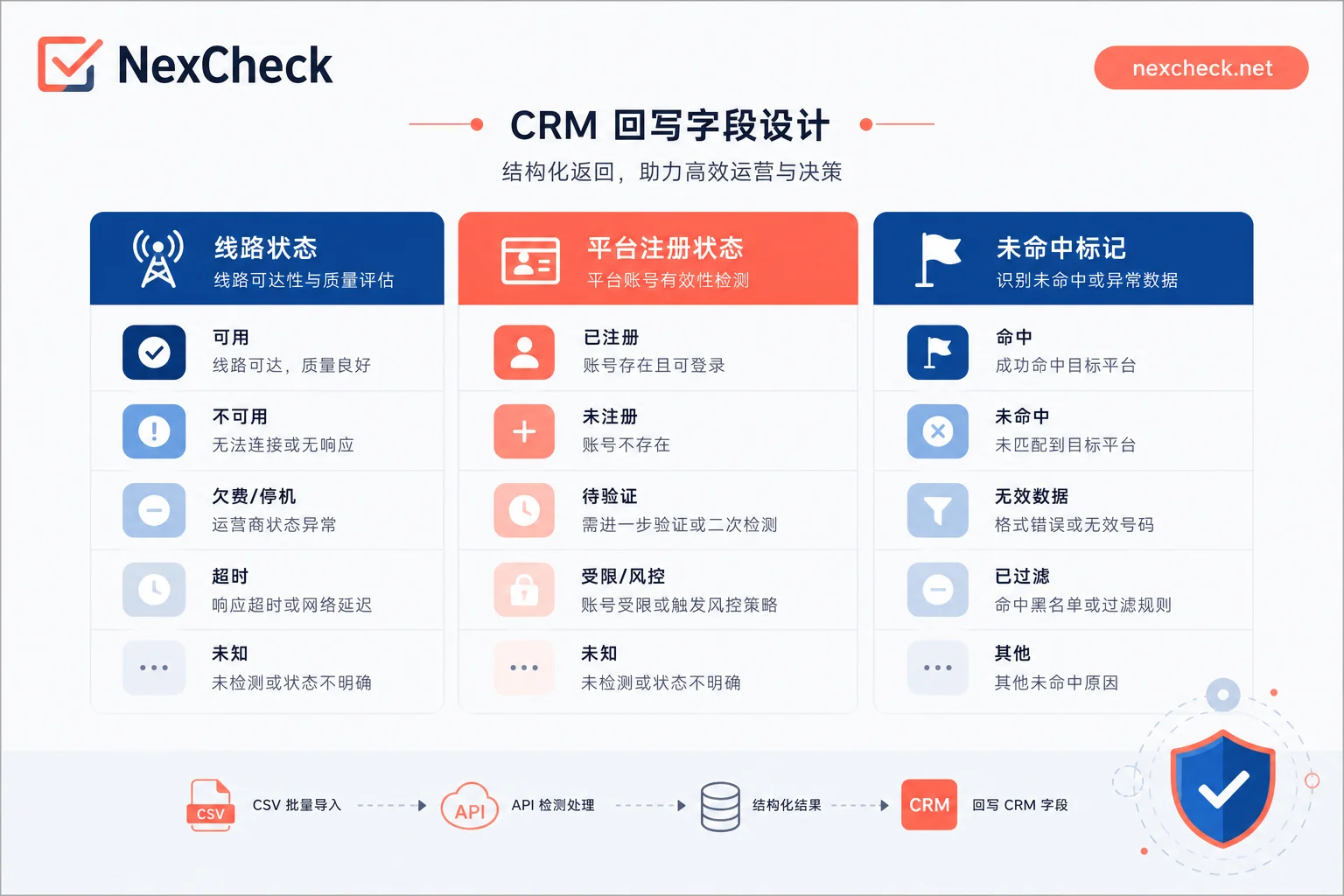
Cleaning results should not store only a "is invalid" boolean, as that loses the "miss" category. It's recommended to design three fields for each number:
- Line status column: Active / Reachable / Unreachable / Inactive / Unknown
- Platform registration status column: Registered / Not registered / Unknown
- Miss mark: Last send time, error code (e.g., 131026), re-check count
When writing back to the CRM, the three categories should be in separate columns, not merged into one "invalid" mark. This allows differentiated operations later, such as sending SMS to unregistered numbers and periodic re-checks for miss numbers.
If you need to process hundreds of thousands of records in bulk, consider platforms like NexCheck for global number filtering and platform registration status checks. It supports web-based batch filtering and RESTful API (batch submission, real-time query, webhook callback), allowing integration with existing cleaning pipelines to output line status, platform registration status, and miss marks in separate columns. Specifically, you can write the platform registration status returned by the tool directly into the "platform registration status column," and write miss/undetermined values into the "miss mark" and re-check count. This detection should be placed after deduplication and before sending. If you need unified fields across multiple platforms, evaluate NexCheck's batch filtering and API integration.
Two More Things to Confirm After Filtering: Opt-in Authorization and Template Compliance
No matter how high the number validity rate, it doesn't mean you can bulk-send freely. WhatsApp's quality score is driven by user reports and blocks. If you push marketing content to unauthorized numbers, even if all numbers are valid, you'll be downgraded. So, after cleaning numbers, confirm two things:
- Opt-in authorization records: Do you have proof that users agreed to receive messages? If not, consider pausing sends and re-obtaining consent through other channels.
- Template compliance: Does your marketing content comply with WhatsApp's template policy? Avoid misleading language or false promises.
Manage these along with list status to maintain a high-quality rating long-term.
Actionable Advice: Re-run Your List with the Three-Column Structure
We recommend re-running your own list with the three-column field structure described above, storing miss numbers in a separate re-check pool, and then deciding whether to supplement with platform registration status checks. This way, you won't mistakenly delete potential customers and can gradually optimize your cleaning logic.
FAQ
What does invalid WhatsApp number mean?
"Invalid number" in operations usually means a number that cannot be delivered to, but strictly speaking, it includes three situations: carrier-side not in service (physical invalid), active but not registered on WhatsApp (non-platform user), and registered but sending fails due to privacy settings or terms not confirmed (miss). Only the first is a true invalid number.
How to distinguish invalid numbers from unregistered WhatsApp numbers?
An invalid number means the carrier line is unavailable, such as deactivated or unassigned; an unregistered WhatsApp number means the number is carrier-active but has no WhatsApp account. To distinguish: first use a line status check to confirm the number is in service, then use a platform registration check to confirm registration. The former is physical existence, the latter is platform registration.
What causes WhatsApp error 131026?
131026 is a message undeliverable error, with possible causes: the number is not registered on WhatsApp, the user hasn't agreed to the latest Terms of Service or Privacy Policy, the client version is outdated, or you've been blocked by the recipient. The sender cannot force delivery to such numbers. When encountering 131026, first check the number's registration status, then check user feedback; don't immediately classify it as an invalid number.
Are invalid number filtering and WhatsApp number detection the same?
Not entirely. Invalid number filtering focuses more on carrier-layer physical screening (e.g., Inactive numbers), while WhatsApp number detection determines whether a number is registered on WhatsApp. A complete cleaning should do both: first filter physical invalid numbers, then detect platform registration status.
How to batch remove invalid numbers from customer lists?
We recommend using a bulk-check API tool. First normalize numbers, then call a line status interface to filter out Inactive and Unreachable, and finally use a platform registration check interface to filter out unregistered numbers. Note that "miss" numbers should be stored separately for re-check, not directly deleted.
What to do if messages still fail after filtering invalid numbers?
If sending failures persist after filtering, first check the error code. If it's 131056 pairing rate limit, it's a sending pace issue, not a number issue. If it's 131026, it might be privacy settings or unconfirmed terms. Also, check your quality rating; if it's too low, consider a cold start or improving authorization quality.
How long should miss numbers be kept before re-checking?
We recommend keeping them for about 30 days before re-testing. Some misses might be transient, like temporary offline or rate limiting, and may recover after some time. When re-checking, combine user feedback and sending history to avoid mis-deletion.



Comments(0)