 NexCheck-筛号平台
Clarify Before International Number Screening: What Should Normalization Output Look Like?
What should you do when your contact list contains numbers with spaces, parentheses, or even notations like "+84 0 123 456 789"? The answer: before international number screening, you need to standardize all mobile numbers into international format—that is, compliant with the E.164 standard: country code + national significant number, pure digits, without international prefix or domestic trunk prefix, total length not exceeding 15 digits. If this step is not done, when submitting to Zalo, WhatsApp, and other platform APIs, the gateway will directly block the request, and you won't even get close to registration status detection.
Zalo's official developer documentation explicitly states that the Open Platform and ZBS API gateway perform format validation on submitted phone numbers. If a number contains illegal separators or non-digit characters, the API returns error code -108 (Phone number invalid). In other words, format issues are a hard threshold; they will block you at the request entry.
Why Normalization Must Precede Deduplication
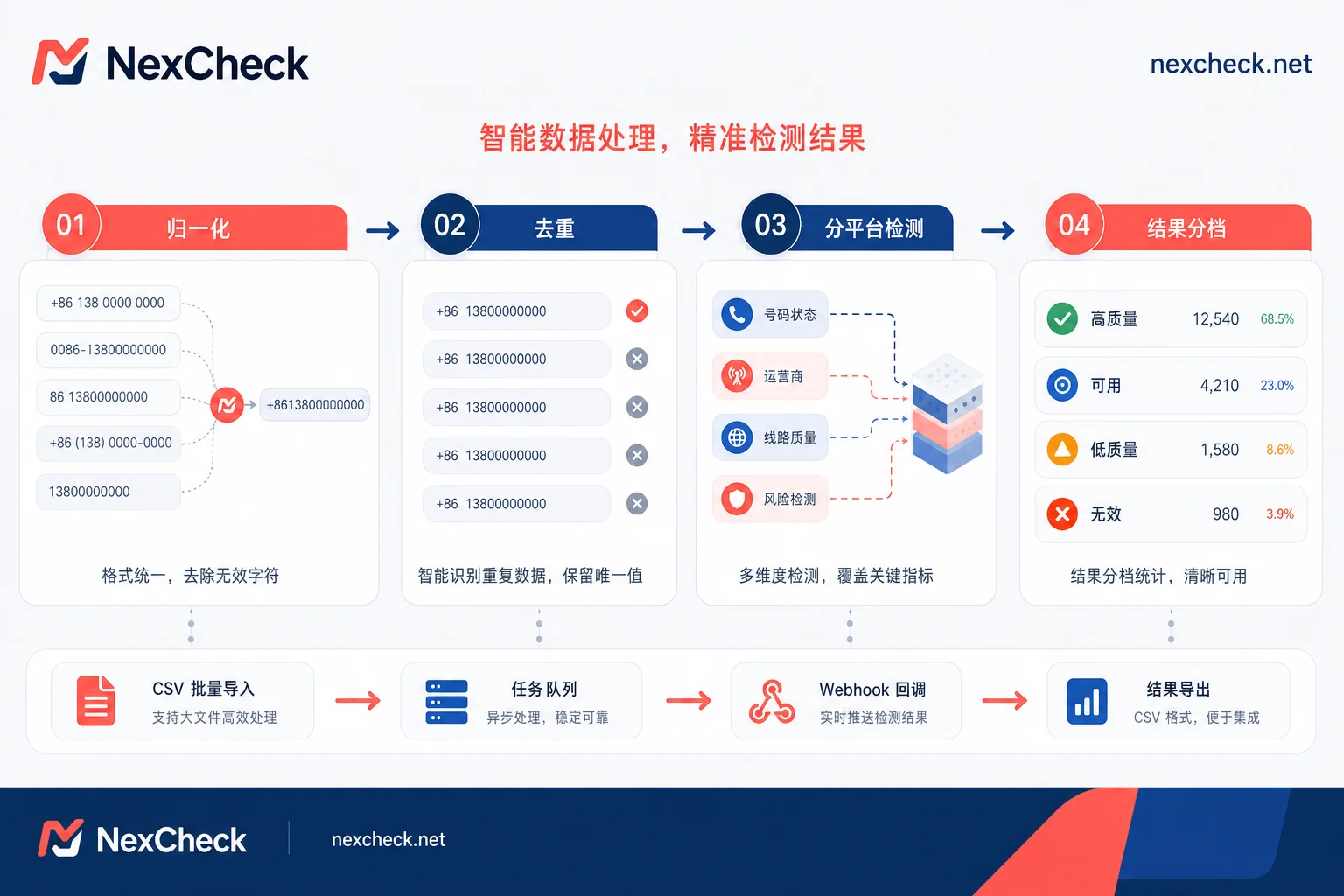
Many teams habitually run deduplication first and then clean formats. This order is a landmine. The same phone number might appear in three forms in the raw table: with a leading zero "0123456789", with spaces "+84 123 456 789", and as pure digits "84123456789". If you don't normalize first, deduplication will treat them as three different records, causing duplicate data to slip through. Duplicate numbers entering subsequent checks will waste detection quotas and potentially disturb the same user multiple times.
The correct process should be: normalization → deduplication → platform registration status detection per platform → result categorization. Normalization is the foundation. Only by cleaning formats into a unique standard form can deduplication be meaningful, and subsequent international number screening count.
First Type of Dirty Number: How to Identify and Rewrite Numbers with Local Trunk Prefix 0
"Should the leading 0 be removed from overseas mobile numbers?" is a common point of confusion. The leading 0 is the domestic trunk prefix used for local dialing; it doesn't exist after the country code. So when converting a number with a leading 0 to E.164 format, in most cases this 0 must be removed. But there's a trap: you cannot apply a global regex to "remove the first 0" from the entire number list.
The correct approach is to process grouped by country of origin. If a country doesn't require a leading 0 in international format, then strip it; but in some countries, the first digit of the national number is itself a valid digit, and blindly removing 0 will corrupt the number. The safest method: keep the original column in the number table, create another column for the normalized result, and record the country of origin. Before processing, sample check a few numbers per country to confirm the dialing rules, then batch rewrite. This way, even if you mistakenly remove a digit, you can always refer back to the original column.
Second Type of Dirty Number: How to Batch Add Missing Country Codes
How to add country codes to mobile numbers? The prerequisite for batch adding is that the list's origin country is single and traceable. For example, if you are importing numbers collected from a Vietnam marketing campaign, adding Vietnam's country code to the entire batch is feasible; but if the list contains numbers from Singapore, Malaysia, and Thailand, using a single country code will cause systematic errors.
For numbers whose country cannot be determined, don't guess. Marking them as "pending manual confirmation" is safer than incorrectly adding a code. When determining the country, besides looking at the source, you can also refer to the number of digits—if it doesn't match the typical length of mobile numbers in that country, be cautious about misjudging the origin.
Third Type of Dirty Number: Numbers Exceeding 15 Digits or Containing Extensions and Non-digit Characters
The ITU-T E.164 standard clearly states that the maximum length of an international number is 15 digits (excluding the + sign). So the answer to "is a number exceeding 15 digits invalid" is clear: if it exceeds, it likely has a problem. Numbers with extensions, e.g., "+84-123-456-789 ext 100", must not have the extension appended to the main number; otherwise, the gateway will deem the format illegal.
Handling rules: First, remove all separators such as parentheses, hyphens, and spaces, keeping only digits; then check the length of the digit string. If it exceeds 15 digits, check whether an extension is mixed in, and store the extension separately in an extension column; finally, if the pure digits are still overlong and cannot be split, treat it as an invalid number and remove it. Note: in some countries, the national number plus the country code can be exactly 15 digits; do not mistakenly delete such legitimate numbers.
Fourth Type of Dirty Number: Why Landline and VoIP Lines Should Be Routed Separately
"Can landline and VoIP numbers be screened?" depends on the purpose. If you are doing registration status detection on social platforms like WhatsApp and Zalo, usually only mobile numbers that can receive SMS verification are valuable. Landlines and VoIP often cannot receive SMS; mixing them into the submission list dilutes result quality and wastes detection quotas.
So during normalization, for known landline number ranges or VoIP characteristic numbers, it is recommended to tag them as "non-mobile line" and route them to a separate batch for processing, rather than mixing them directly. A note: line type judgment has uncertainty; for example, some virtual operator numbers and mobile number ranges cannot be distinguished at a glance, so the final status should be based on actual detection results.
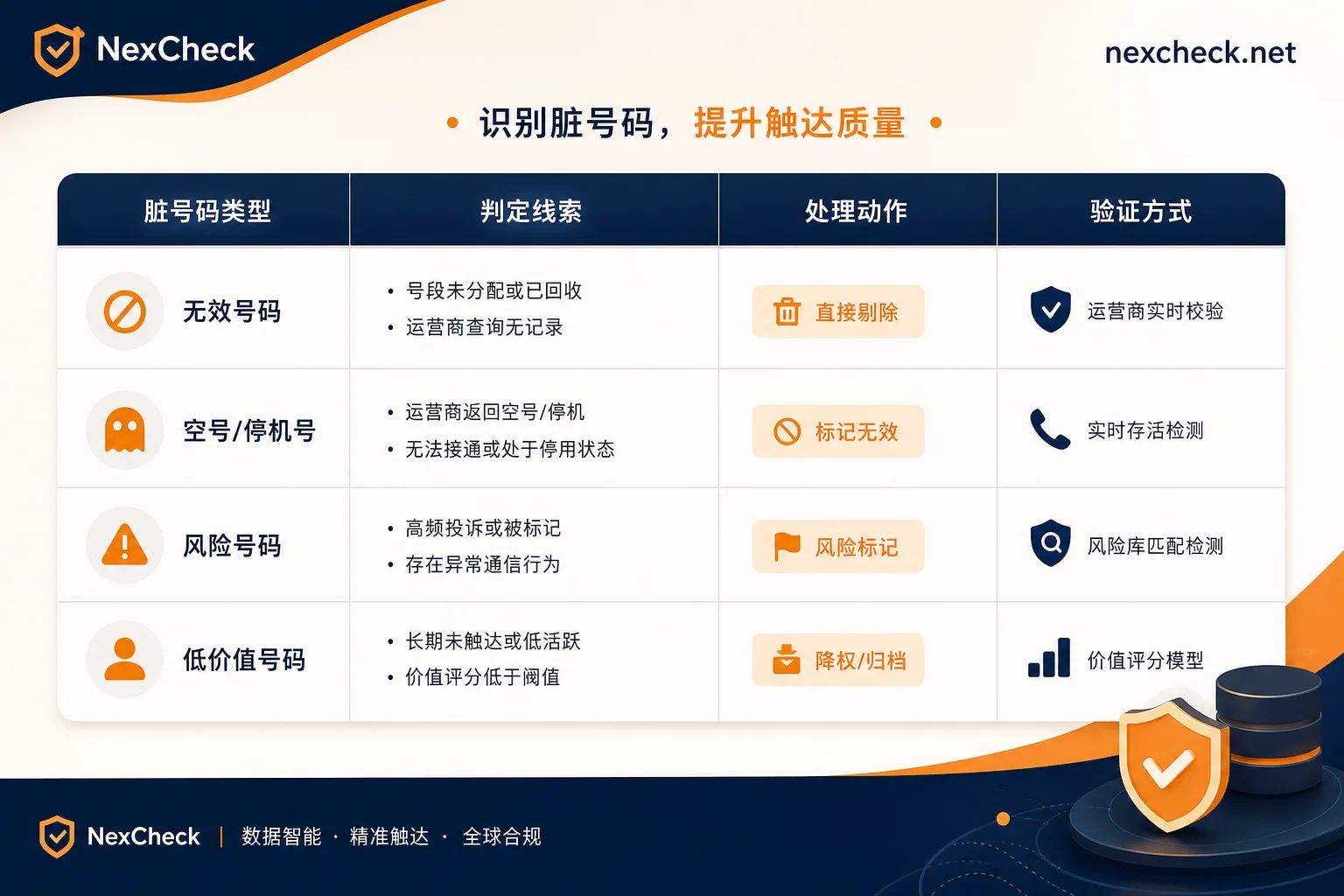
Comparison Table of Dirty Number Types, Judgment, and Treatment Actions
| Dirty Data Type | Judgment Clues | Treatment Action | Verification Method |
|---|---|---|---|
| Leading zero | Presence of local trunk prefix 0 | Strip leading zero based on country of origin | Sample check against original column |
| Missing country code | Number starts in local format | After confirming country, batch add code | If cannot confirm, mark as pending manual confirmation |
| Exceeding 15 digits / with extension | Digit string overlong or contains ext | Split extension then remove overlong numbers | Count digits of remaining numbers |
| Landline/VoIP | Number range features | Mark as non-mobile line and route separately | Based on actual detection results |
Where Does Unclean Format Cause Errors: The Example of Zalo -108
Why is format cleaning a hard requirement? Zalo's Open Platform explicitly states that when a submitted number contains illegal separators, non-digit characters, or does not conform to international/national standard formats, the interface directly returns error code -108 (Phone number invalid). This validation occurs at the request entry; meaning, if the format is wrong, the business request never reaches the registration status judgment stage.
So when troubleshooting, first check the format, then look at business results. If your Zalo template message returns -108, first check whether the number has undergone E.164 normalization and whether spaces or + signs are mixed in. Other platforms like WhatsApp and Viber are similar; format errors trigger generic error codes, and the troubleshooting order remains the same: normalize first, then talk about others.
Field Design After Normalization and Small-Batch Trial Run Verification
To make the rules practical, it's recommended to design fields in the table: original number, normalized number, country code, country of origin, treatment action (strip leading zero/add code/remove/pending). This way, every step is traceable.
The verification method is also crucial: first, run normalization rules on a small batch of 200-500 records, then manually sample check the rewritten results to confirm there is no systematic damage (e.g., zeros that shouldn't be stripped were stripped, wrong country codes added), and only after confirming correctness, submit the full batch. Small-batch trial runs are low-cost, but they can prevent the entire dataset from being corrupted.
After Cleaning Formats: Run a Cross-Platform Registration Status Check
You must distinguish three things: format validity, operator network presence, and platform registration. E.164 normalization only solves the first layer—it makes the number pass syntax validation, but it doesn't answer whether the number is dead, or whether it's already registered on WhatsApp or Zalo. It's like having the correct address, but it doesn't mean someone lives in the house.
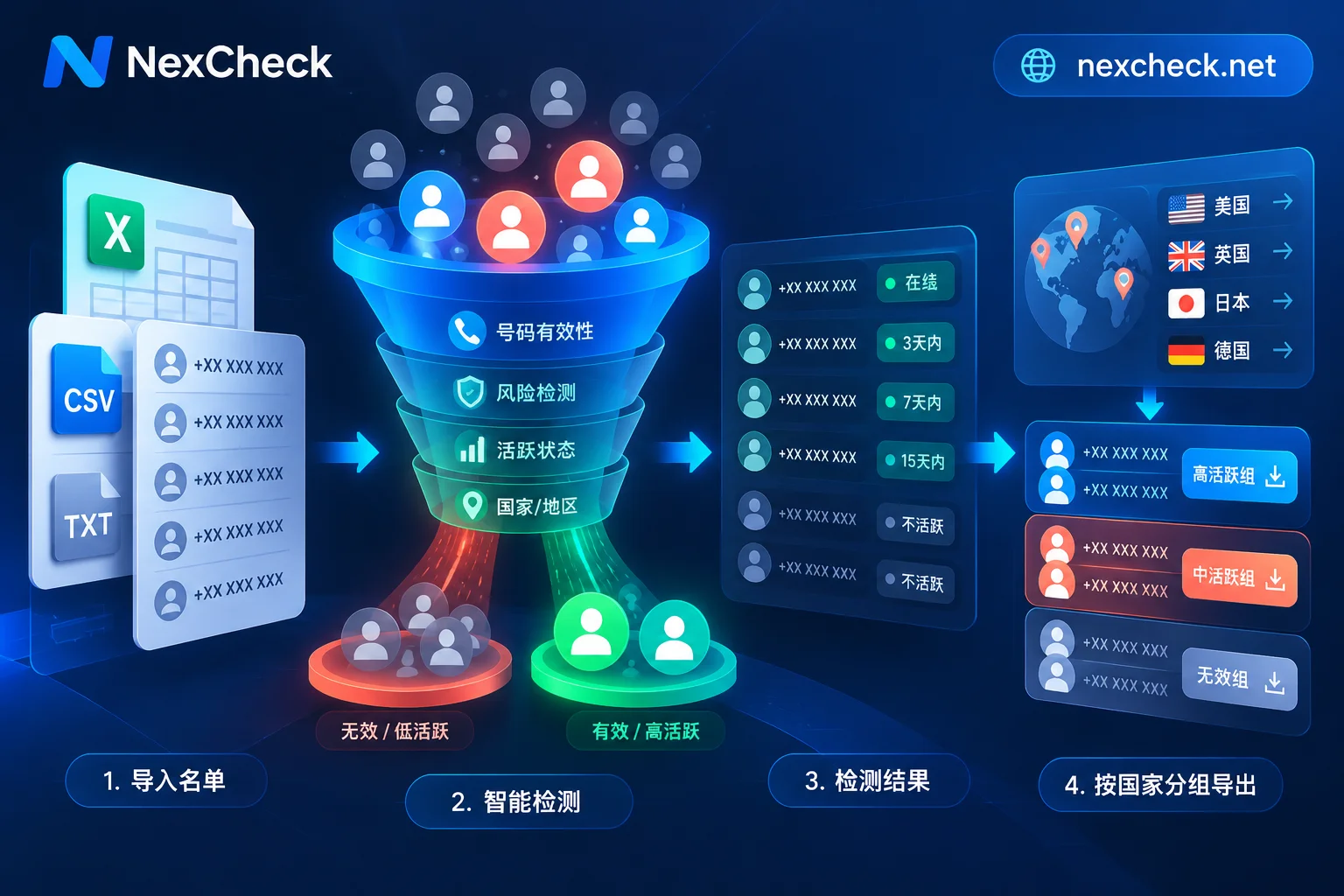
This is why after deduplication, you need to run a cross-platform registration status check. NexCheck's number registration status check can batch verify the registration status of numbers across more than 100 platforms. Combined with the batch number detection API, you only need to maintain one import format and result fields, without writing separate adapters for WhatsApp, Viber, Zalo, etc. Format cleaning ensures requests are not blocked by the gateway, but true international number screening relies on this detection step.
After cleaning, write back NexCheck's detection results to CRM after categorizing by platform, forming a complete governance chain. For more foundational validity checks, refer to mobile number validity detection and multi-platform number detection methods.
Frequently Asked Questions
Is it always necessary to remove the leading 0 from overseas mobile numbers?
Not necessarily. It depends on the country and whether the number is allowed to retain it in international format. Usually, when converting to E.164, the local trunk prefix should be deleted, but blindly removing the first 0 may cause damage. The safest approach is to keep the original column, process according to country-of-origin rules, and verify with a small batch.
How to convert to E.164 format?
Simply put, remove all spaces, parentheses, and special symbols, add the country code, and ensure the total length does not exceed 15 digits. A more accurate approach: first confirm the country of the number, then strip the leading 0 and domestic trunk prefix according to that country's rules, and finally append the country code.
How to add the country code to a mobile number?
Only when you clearly know the country of origin can you batch add codes. If the list is from a single country source, you can add to the entire batch; for a mixed multi-country table, you cannot uniformly add. Mark uncertain numbers as pending confirmation to avoid wrong additions.
Is a number exceeding 15 digits invalid?
Probably invalid, but there are exceptions. 15 is the upper limit per international standards; exceeding usually means an extension or a typo is mixed in. First check if an extension can be split out; if still overlong after splitting, it's recommended to remove.
What does Zalo error -108 mean?
-108 = Phone number invalid, format validation failed at the entry point. For more detailed trigger conditions and troubleshooting order, see the section "Where Does Unclean Format Cause Errors: The Example of Zalo -108" above.
Can landline and VoIP numbers be used for number screening?
It depends on the purpose. For social platform registration checks, landlines and VoIP usually cannot be used for registration, so it's recommended to route them separately or remove them early. The judgment is based on number range features, but there is room for error; the final result should be based on actual detection.
}



Comments(0)