 NexCheck-筛号平台
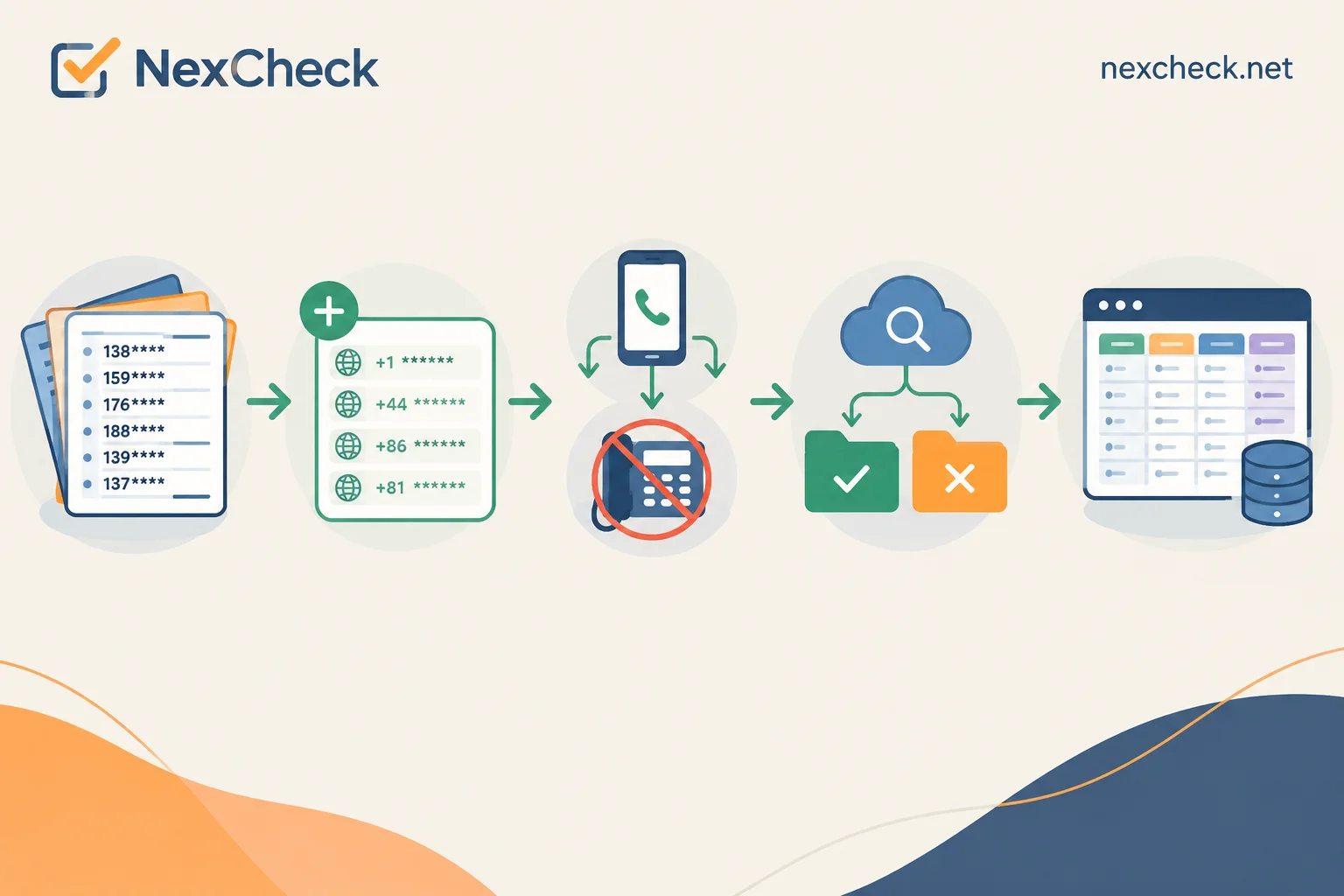
To find out which numbers in your list have WhatsApp, there is only one reliable path: first rewrite numbers into E.164 international format → remove landlines and non-mobile numbers → use a batch detection service to check platform registration status → write back to the system by fields in separate columns. The order cannot be reversed. Before the format is unified, a large portion of the "not registered" results are due to format issues, not the account actually not existing.
First, a single number: wa.me works, but only one at a time
Open wa.me/ followed by the full international number. If it says the number is invalid, it usually means that number is not registered on WhatsApp; if it enters the chat interface, the account exists. It is appropriate for sales to use it to verify a key customer before follow-up.
But it cannot support list operations: it requires manual clicks, depends on a locally logged-in account, the result is not a structured field, and there is no timestamp. More importantly, if you use scripts or emulators to run this action as high-frequency batch operations, it easily triggers Meta's risk control, resulting in the detection account being banned and the exit IP being restricted, and the list ends up not cleaned at all. When the list exceeds a few dozen entries, you should take the batch task route.
Step 1: Rewrite numbers into E.164
WhatsApp identifies users by the full international number: country code + number without local dialing prefix, without spaces, hyphens, or parentheses, remove the leading 0, and also remove international long-distance prefixes like 00, 011.
The four most common types of dirty data in actual lists:
- Local format with leading
0, e.g., UK's07911 123456, correct format is447911123456; - With separators and parentheses, e.g.,
+1 (415) 555-0132; - Retains international prefix, e.g.,
0086138...or01144...; - No country code at all, only local number range—these must first confirm the list's source country, otherwise the entire segment can only be discarded or marked separately.
Two country exceptions you must remember: Argentina (country code 54) requires adding a 9 between the country code and area code, and removing the common 15 prefix for mobile numbers; Mexico (country code 52) requires retaining the 1 after +52 in international format. Ignoring these two rules can cause an entire batch of Argentine or Mexican numbers to be judged as unregistered, and this error does not show up as abnormal in the results—they will quietly fall into the "invalid" group.
Number lengths, valid ranges, and prefix rules vary by country. When a list mixes multiple countries, it is recommended to first split into sub-files by country code and process separately, so that if problems arise, it is easier to pinpoint which market's rules were written incorrectly. For specific number formats for a country, you can check NexCheck's regional solutions page. For normalization rewriting rules, refer to this article on the site: How to do E.164 normalization before overseas number screening? 4 types of dirty number rewriting rules.
Step 2: Remove landlines and non-mobile numbers, and deduplicate
WhatsApp is primarily for mobile phone numbers. Landlines are not entirely impossible to register, but only possible via voice verification under WhatsApp Business App or Business API systems; it does not work in the regular personal account system. Therefore, landlines, switchboards, and service hotlines in the list should be picked out before sending for registration status checks.
The approach is to first run a basic number detection—basic fields such as empty numbers, device type (mobile/landline), high-risk numbers—to separate numbers that clearly should not enter the next step. For per-item priced detection, this step directly determines how much you spend later.
Deduplication also goes here, not earlier. The reason is practical: when the same number appears in three forms like 0138..., +86 138..., 86138..., only after normalization are duplicates exposed. If you deduplicate before normalization, duplicates will remain without missing any.
Step 3: Run platform registration status detection
At this point, you should have a pure E.164, country-grouped, deduplicated mobile number list. There are two submission methods:
- Console upload: Organize into txt or csv, one column of numbers, no header or standard header, upload directly to create a task. Suitable for one-time cleaning, temporary market-side lists. For details on file preparation, see WhatsApp CSV number screening: 6 file preparation points before upload.
- REST API submission: Suitable for scenarios where detection needs to be integrated into CRM and regular re-checks are needed. After submission, it executes asynchronously; task completion pushes results via Webhook, so no constant polling.
NexCheck's detection is organized by platform, with no limit per batch, and results exported grouped by valid and invalid. For what detection items are currently available for the WhatsApp platform and the unit price for each, refer to the platform page: What can be checked for WhatsApp. The field list is not hardcoded here because available items adjust with the platform's own visibility policies—an attribute available today may not be available after the platform changes its public rules. Writing hardcoded mapping relationships based on documentation from half a year ago will eventually cause errors in the write-back step.
Step 4: Understand the returned fields
The common return dimensions for number status detection are roughly these categories:
- Registered/not registered: This is the column you care about most;
- Account type: Personal or business (WhatsApp Business). This column is very useful for judging list composition—a high proportion of business accounts in a B2B list is normal; a sudden large number of business accounts in a B2C list often indicates a problem with the list source;
- Registration time, activity level: Available on some platforms, used to tier the list;
- Ban status;
- Gender, age, and other public attributes: Vary greatly by platform, not every platform has them.
Two boundaries should be written into your judgment logic. First, public attributes like avatar and signature are subject to user privacy settings. Not finding them does not mean the number is not registered; it only means the user has not made them public. Second, "not registered" has at least three causes: the number is indeed not activated, the format is still non-compliant (especially the country exceptions mentioned earlier), or platform-side visibility restrictions. Attributing all three to "this person doesn't use WhatsApp" will cause you to mistakenly delete a batch of real customers. A reasonable approach: if the non-registration rate for a country is significantly higher than other countries, first go back and check the format rules for that batch, rather than directly judging the list quality as poor.
Step 5: Don't just store a boolean value in write-back
Only adding a has_whatsapp yes/no field in CRM becomes useless after one use. It is recommended to store at least these columns:
| Column | Purpose |
|---|---|
| Original number | Trace what the customer filled in if problems arise |
| E.164 number | Unified primary key for all subsequent systems |
| Country code | Market-specific statistics, locate format issues |
| Registered | Main result |
| Account type | Personal/business account routing |
| Detection time | Determines when this result should expire |
| Task ID | Reconciliation and review |
The detection time column is especially indispensable. Number deactivation, carrier recycling, and number portability all have delays; a deactivated number may still show as registered for a period, and carrier recycling cycles vary by region. With detection time, you can set rules like "results older than N months need re-check" instead of treating a year-old conclusion as current. For field design for storing results, refer to Batch number verification: don't just look at valid/invalid, results should be stored in multiple columns.
Web or API: Choose by frequency and storage method
- One-time or low-frequency cleaning, manually download results and import—console upload is enough, no need to schedule development for it.
- CRM continuously has new numbers coming in, needs regular re-checks—use API, submit task and receive results via Webhook to write directly to database. The trade-off between polling and Webhook depends on task volume and latency tolerance; this article on the site has tiers: Polling or webhook callback for number detection; for the specific integration process, see How to integrate WhatsApp number screening API.
A compromise approach: run historical stock lists once via console, and use API for increments. The stock batch often has the messiest formats and requires human monitoring of several rounds of results before setting rules; repeatedly modifying code is not cost-effective.
Two compliance boundaries
First, the list must be your own customer or contact data, with legal source and purpose. The detection service only processes the numbers you submit within the task scope, but the legality of the data itself is on your side. For contacts in regions like the EU, first confirm you have a legal basis for processing.
Second, do not attempt to bypass platform restrictions using self-built scripts, emulators, or batch-registered probe accounts. Besides the direct consequences of account bans and IP restrictions, the results obtained this way are unstable—after risk control intervenes, a returned "not registered" may just be rate-limited, and you have no way to distinguish. Using standard batch detection channels, the results are at least explainable and reviewable.
Following the above order, what you get is not a "can send/cannot send" list, but structured data with country, account type, and detection time. To start processing your current batch of numbers, first confirm the currently available detection items on the WhatsApp platform page, then decide whether to run basic detection first or go directly to platform status detection.




Comments(0)