NexCheck-筛号平台
For the list you have on hand, the correct processing order has four steps: format cleaning and deduplication → basic number check → WhatsApp platform status check → group by status, export, and write back to your system.
The order cannot be changed. If you skip the first step and submit directly, numbers with non-standard formats will be judged as unregistered. If you skip the second step, landlines and VoIP numbers in the list will consume pay-per-item quota, even though they could never have WhatsApp anyway.
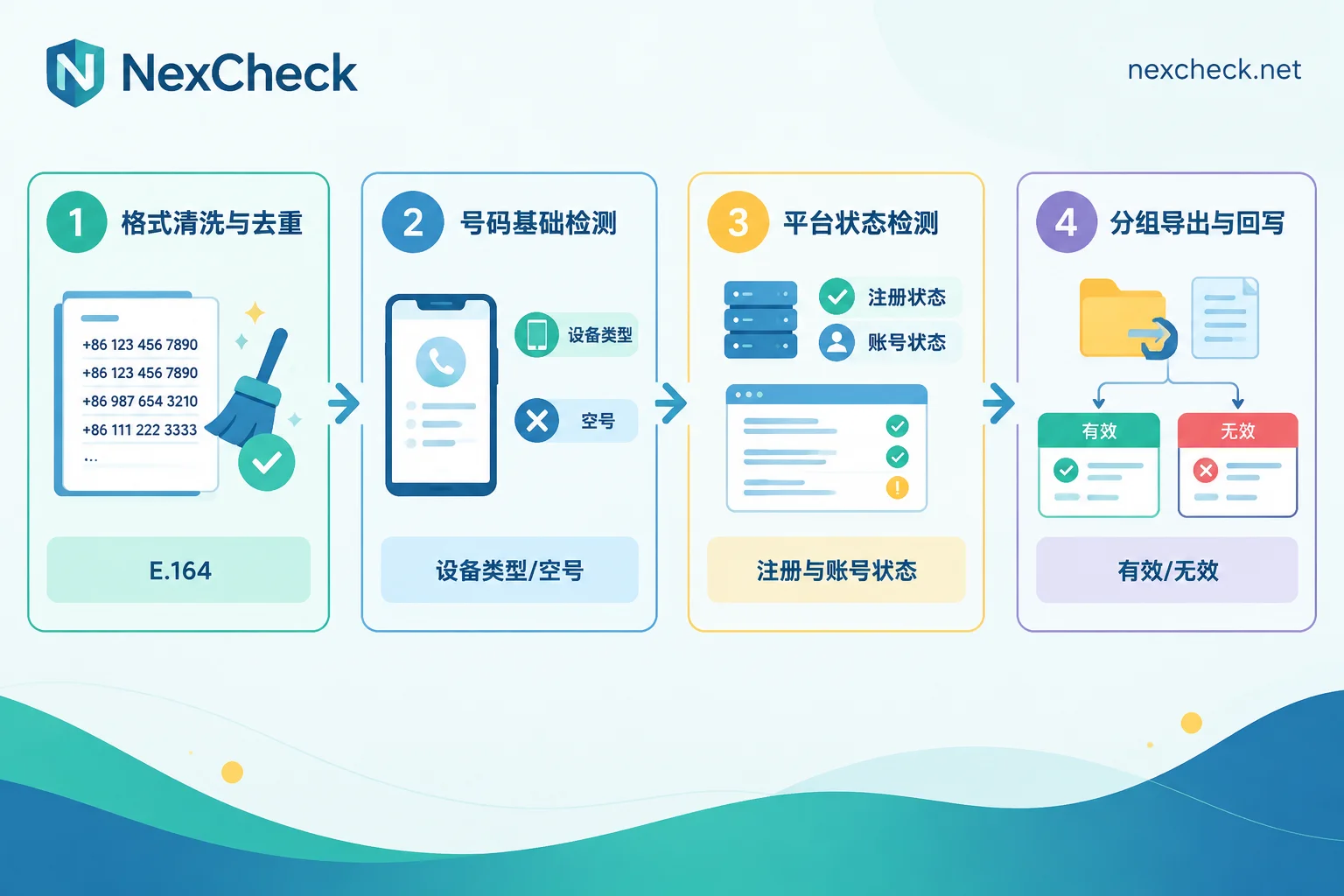
Step 1: Rewrite numbers into E.164
WhatsApp recognizes the full international format: country code + area code + local number, with hyphens, parentheses, and spaces removed, the leading 0 used only for local dialing removed, and international call prefixes like 00 or 011 removed.
Two countries have rules that often trip people up:
- Argentina: A 9 must be added between the country code 54 and the area code, and the original 15 prefix must be removed.
- Mexico: After country code 52, the 1 must be kept.
Other markets also have their own format variations. If you are unsure, check against number formats and regional notes for mainstream platforms before running anything, and do not manually edit based on local habits.
Deduplication must happen after formatting. The same number might be stored in your CRM as +86 138-xxxx, 0086138xxxx, and 138xxxx. If you deduplicate first, you will only end up with three duplicate records; if you normalize first and then deduplicate, they will naturally merge into one. Numbers exported from Excel are also often stored in scientific notation or lose leading symbols, so before uploading, it is best to set the entire column to text format. For more details on file preparation, see WhatsApp CSV Number Filtering: 6 File Preparation Points Before Upload.
Step 2: Run a basic number check first
This step asks, "What kind of number is this string of digits?" It has nothing to do with WhatsApp.
WhatsApp natively mainly supports mobile phone numbers. Regular VoIP numbers, toll-free numbers, and some dedicated line numbers are not within its supported range; landlines can only complete registration in the WhatsApp Business App by receiving a verification code via voice call. In other words, most landlines, customer service switchboards, and VoIP numbers mixed into the list do not need to enter the next layer of checking.
The basic check can identify device type (mobile / landline / VoIP), disconnected numbers, and high-risk numbers. Under a pay-per-item model, this layer effectively reduces the volume for later platform checks, so filtering first and running later is usually more cost-effective. For a more detailed breakdown of trade-offs for cross-border lists at this layer, see How to Do Overseas Mobile Number Detection?.
Step 3: Run WhatsApp status checks by platform
Only at this layer do you start asking, "What is this number's situation on WhatsApp?" Typically you can get several types of information:
- Whether it is activated/registered: Whether the number has ever been registered on WhatsApp.
- Account type: Personal account (WhatsApp Messenger) or business account (WhatsApp Business / Business Platform). Business accounts may also carry Meta's Verified Badge, which is useful for determining whether the other party is an enterprise or an individual customer.
- Account availability status: Whether it is restricted or banned.
- Other obtainable attributes: Derived fields such as registration time and activity level, with coverage depending on the platform.
In terms of actual operation, NexCheck supports directly uploading txt or csv lists in the console, or submitting tasks via REST API and pushing results back with Webhook; after running, you can export grouped by valid and invalid. Note that the fields detectable on each platform are not the same. Which detection items WhatsApp currently offers and how each is priced should be based on the list on the WhatsApp platform page — the field list and pricing will be adjusted, so do not apply another platform's fields to WhatsApp.
How to read the fields: three kinds of "not found" are not the same
This is where misjudgments are most likely.
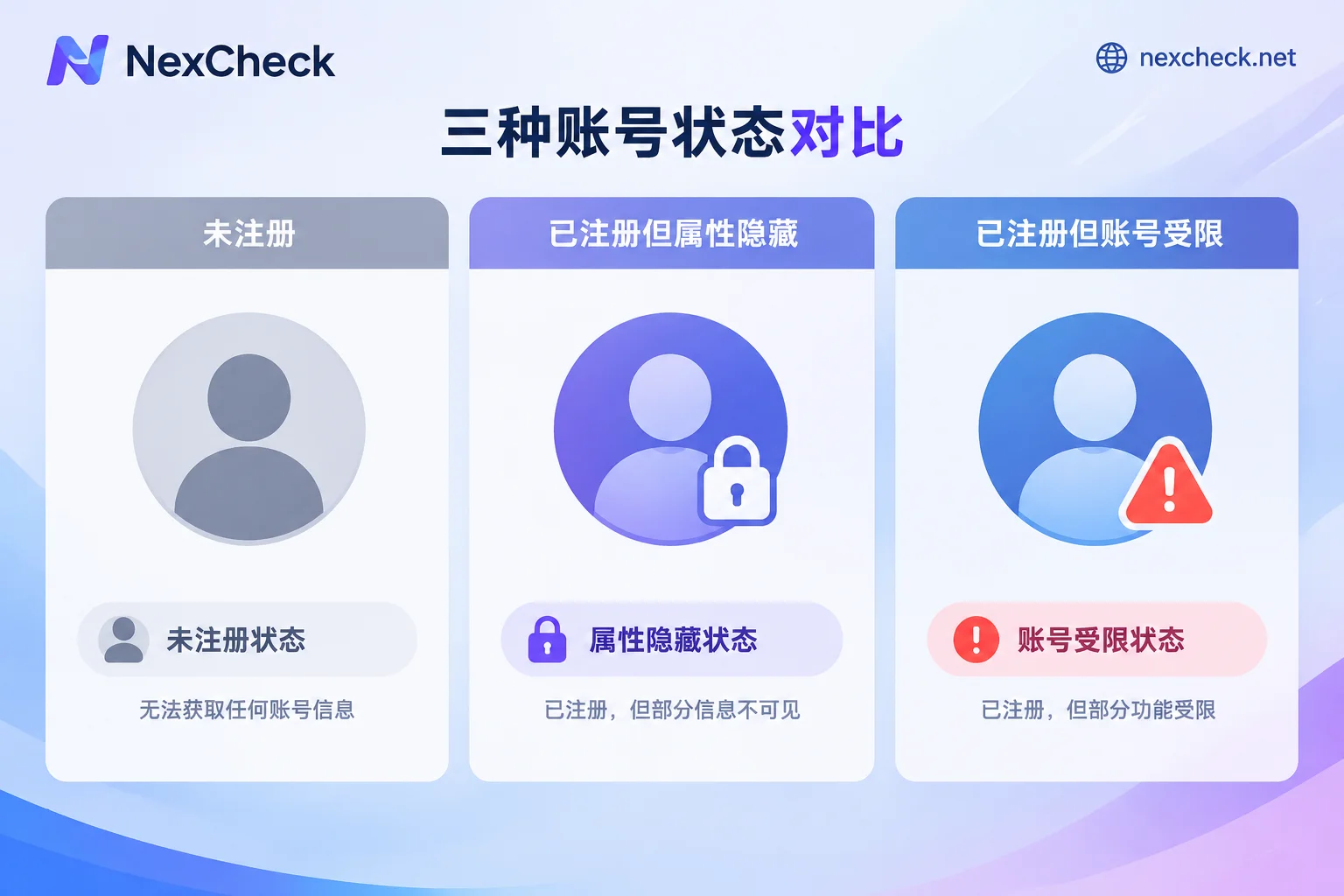
1. The number is not registered. This number does not exist on WhatsApp. It is truly invalid and can be removed from the list.
2. It is registered, but attributes are not visible. The user's profile photo, About text, and Last Seen time are all controlled by their privacy settings. Setting them to contacts-only is a very common choice. Invisible attributes do not mean the number is invalid. Treating "no profile photo" as a filtering condition will wrongly exclude a batch of real users.
3. It is registered, but the account is unavailable. Long-inactive accounts may be locked by the system; numbers that violate platform policies may be in a Restricted or Banned state. These numbers do exist technically, but from a business perspective they should no longer enter the follow-up list.
Therefore, do not store results in just two columns: valid/invalid. At minimum, store registration status, account type, availability status, and attribute visibility as separate fields. Only then will you have a basis for segmented operations later, and it will be easier to trace back which condition filtered out a given record in the first place. This is discussed in more detail in Don't Just Look at Valid/Invalid for Bulk Number Verification: Results Should Be Stored in Multiple Columns.
Multi-country lists: split batches by country code
Running them all together is not impossible, but splitting is more convenient for three reasons:
- Format standards differ by country. After splitting batches, format issues are easier to locate, and an entire batch's anomaly can be traced directly to a specific country's format.
- The mainstream communication platforms in different markets are inherently different. Some regions are worth checking on other platforms at the same time, and mixed batches make later routing more troublesome.
- Submitting in batches means that if one batch has a problem, it does not affect the results of other batches.
Console or API
The criterion is how frequently lists come in, not the size of the list:
- One-time cleaning, no automatic write-back needed: Upload csv in the console, export grouped results after running, and manually import them back into your system.
- Lists keep coming in and need to be written back to CRM: Submit tasks via REST API and configure Webhook to receive results. For the specific integration approach for asynchronous tasks and write-back, see How to Integrate the WhatsApp Number Filtering API?; as for whether to get results by polling or waiting for callbacks, the discussion on tiering by task volume and latency tolerance is here.
Detection results have a shelf life
Number statuses change: new users register at any time, old accounts may be locked due to long inactivity, and numbers may be restricted due to violations. Therefore, detection results are a snapshot at a point in time, not a permanent label.
In practice, set the recheck cadence based on the list's purpose — an old database that has been dormant for years must be fully rechecked before being reactivated; new leads that come in on a rolling basis can be checked as they arrive; for existing customer lists already confirmed active, simply refresh the status fields periodically according to your own business cycle. When storing results, remember to include a detection timestamp, otherwise half a year later no one will be able to say when a record's status was from.
One prerequisite
The list being checked is your own customer data, and its source and purpose need to be legal and compliant. Detection solves "what is this number's current status"; it does not replace obtaining contact consent — data quality and outreach authorization are two separate issues. Do not treat the former as permission for the latter.