 NexCheck-筛号平台
In the daily operations of cross-border growth, global outbound calling, and private domain outreach, many data and development teams face a common engineering pain point: front-end ads, landing page forms, and exhibition channels continuously inject new leads into the CRM every day, but the verification step still relies on a semi-manual process of "manual CSV export → upload for detection → download spreadsheet → manually import back into the system".
According to the latest industry data quality research, the recycling and reissuing cycle of idle numbers by global carriers has shortened to 6 to 12 months; meanwhile, in outbound calls and message outreach, high-frequency hits on disconnected numbers, deactivated numbers, and high-risk complaint numbers are the core triggers for carrier-level blocking (such as "Spam Likely" tags on channels like T-Mobile and AT&T) and bans on social media business accounts. When business enters a high-frequency flow stage, manually moving spreadsheets not only causes follow-up delays of hours or even days but also easily leads to field misalignment during multiple import/export cycles.
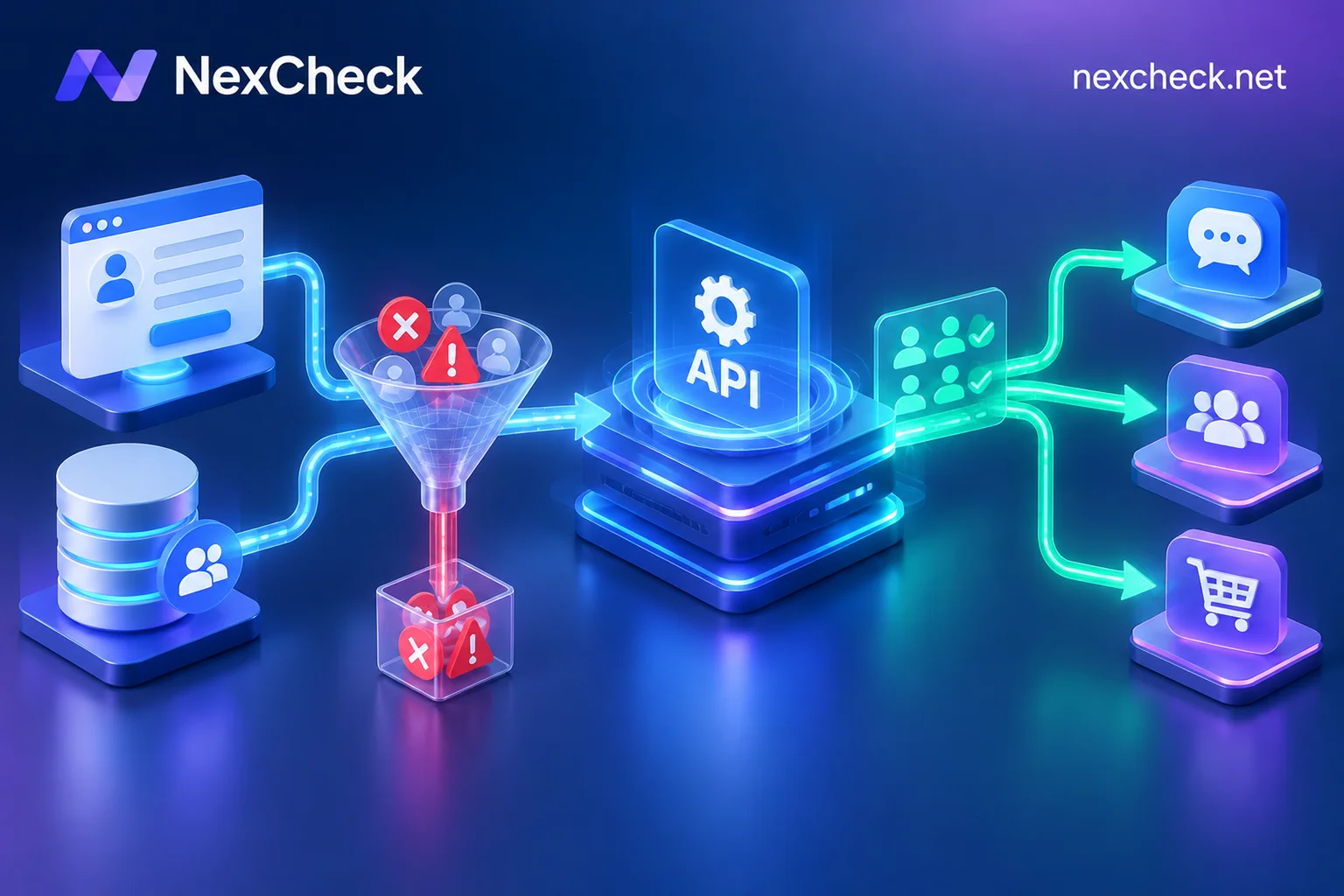
Embedding a number screening API directly into the enterprise's CRM, CDP (Customer Data Platform), or marketing automation workflow, upgrading "after-the-fact firefighting table cleaning" to a data pipeline of "verification upon ingestion, automatic status synchronization", has become a standard configuration for growth engineering teams. This article will dissect how to design a number screening API integration solution that balances cost, efficiency, and multi-dimensional ecosystem profiling from the perspective of system architecture and engineering implementation.
I. Why Can't "Manual Table Export" Support High-Frequency Business Flows?
Before evaluating whether to invest development resources in API integration, teams can usually calculate the efficiency and risk control账:
- Loss of Golden Follow-Up Window: The conversion rate of overseas form leads decays exponentially over time. If operations staff wait until every afternoon to uniformly export tables for batch screening, high-intent customers have already left the communication context.
- Dirty Data Pollutes Downstream Automation (Workflow): Modern CRMs often have automatic trigger rules configured (e.g., new lead ingestion triggers welcome SMS, assigns agents, or pushes to ad audiences). Without pre-API interception, invalid numbers, virtual numbers, and fake numbers maliciously filled by competitors will directly break through the automation process, wasting communication budgets and agent hours.
- Cross-Platform Routing Lacks Data Support: For the same overseas mobile number, should it be routed to the call center for voice calls, RCS/iMessage, or diverted to WhatsApp, Telegram, LINE, or Zalo agents? Basic syntax validation alone cannot answer this question; multi-dimensional platform ecosystem identification must be completed at the moment of ingestion.
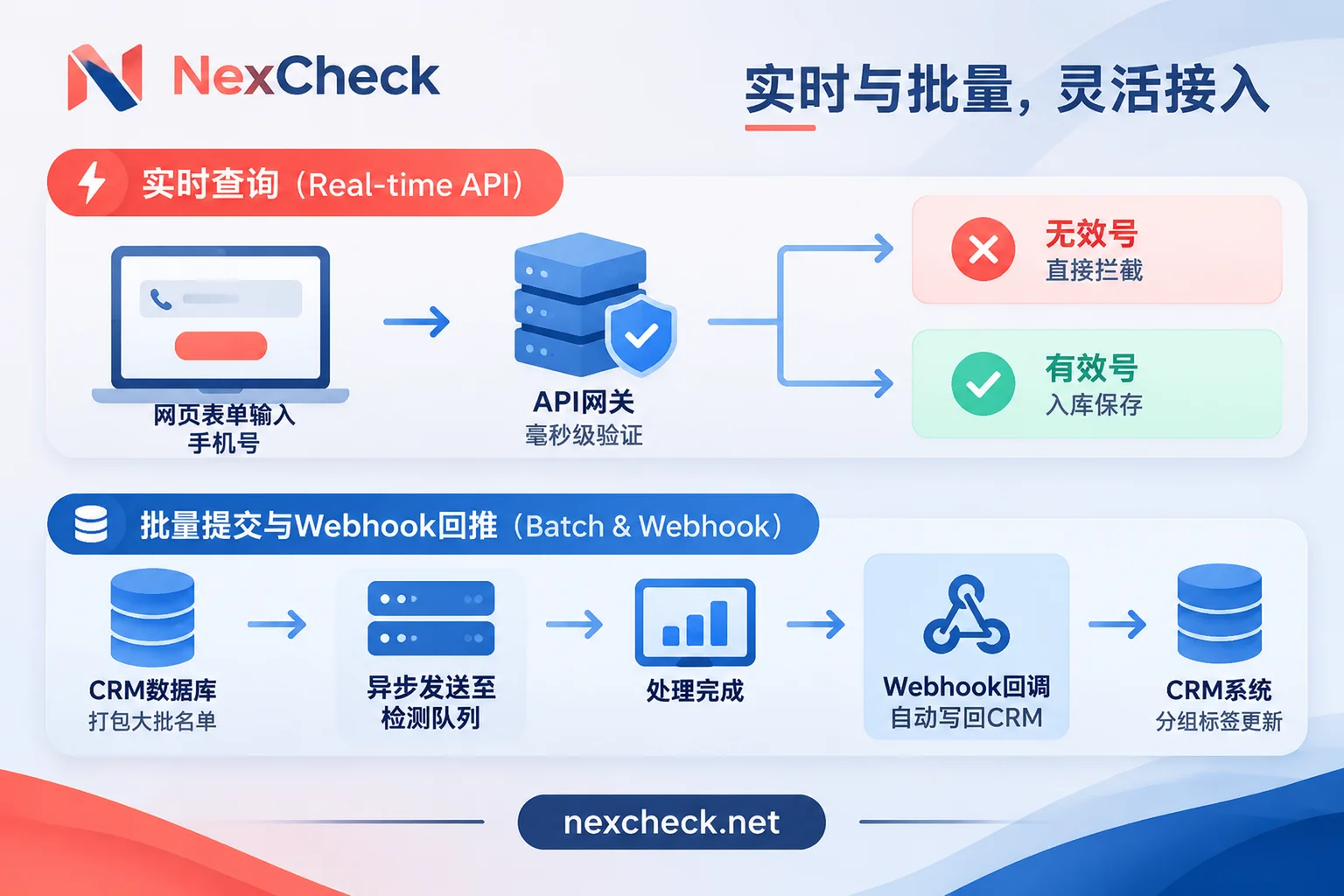
II. Two Core Calling Modes of Number Screening API: Real-Time Lookup vs. Batch Asynchronous Callback
Different business touchpoints have vastly different requirements for response latency and throughput. NexCheck provides a standard RESTful API and supports real-time lookup, batch submission, and Webhook callback mechanisms for different scenarios. Engineering teams can combine them as needed:
1. Real-Time Lookup: Guarding the First Gate of Lead Ingestion
- Applicable Scenarios: Landing page registration forms, app number binding risk control, customer service workbench single lead entry, AI SDR pre-call second-level pre-check.
- Working Logic: When a user submits a number on the front end or an agent prepares to initiate point-to-point outreach, the business backend synchronously calls the API to obtain the real-time basic status or target platform activation of the number at that moment. Once determined as a disconnected number, powered off, or high-risk number, the system can directly block ingestion within milliseconds to seconds, or prompt the user on the front end to change to a valid contact method.
2. Batch Submission + Webhook Callback: Throughput for Existing Stock and Peak Periods
- Applicable Scenarios: Periodic inspection of dormant CRM databases, batch import of exhibition/cross-industry cooperation lists, scheduled nightly cleaning tasks.
- Working Logic: For thousands of existing data entries, synchronous polling not only occupies connection pools but also easily times out due to network fluctuations. After asynchronously pushing the list into the detection queue via the batch submission interface, the business system does not need to block and wait; when the detection task is completed, NexCheck will notify the enterprise's preset callback address via Webhook callback, and the system automatically pulls the results grouped by "valid" and "invalid" and silently updates the CRM fields.
- Coordination with Console: If development scheduling is tight in the early stage of integration, or if there are temporary non-standard format external lists that need quick investigation, operations staff can first manually upload CSV, TXT, or XLSX files via the console batch task for emergency, use the "Continue Detection" function on the interface to complete multiple rounds of verification, and then solidify it into API code by development after the screening SOP is proven.
III. Engineering Implementation Pitfalls: Local Preprocessing and Billing Risk Control Before API Calls
After handing the screening action to code for automatic execution, the biggest fear is unnecessary budget consumption caused by dirty upstream data or script infinite loops. When writing API request logic, it is recommended to establish the following three lines of defense in the enterprise's own business code layer:
1. Perform Local E.164 Formatting and Strict Deduplication First
A billing rule to note: Regardless of submission via console or interface, the platform does not automatically deduplicate duplicate values in the list, and duplicate submitted numbers will be billed as usual. In addition, standard E.164 format with country code is the foundation for cross-border screening, and some specific channels have exclusive format requirements (for example, Zalo screening requires Vietnamese numbers to be in the 10-digit format after the 2018 reform; old 11-digit numbers cannot be queried).
Therefore, before calling the paid API, the engineering side should first complete deduplication and regex cleaning in the local database or memory (such as Redis); for raw tables mixed with separators and missing country codes, you can also refer to the method introduced in our article "How to Clean Phone Numbers? Complete Process from Local E.164 Formatting Deduplication, Basic Disconnected Number Risk Control to Cross-Platform Batch Screening", or first use the free browser-based number cleaning tool for pre-check, ensuring that every request sent to the API is a format-compliant unique value.
2. Follow Quantity Range and Prepaid Deduction Mechanism
NexCheck adopts a prepaid model, recharge first and deduct per item: the system directly deducts fees when creating a task, and automatically refunds in full if the task fails. Since the minimum and maximum quantity ranges per single submission vary for different detection items (specific unit prices and quantity limits are subject to the console price list), developers should reasonably chunk request packets (Chunking) according to the upper and lower limits of the target item when writing batch packaging scripts (Batching), avoiding triggering validation interception due to oversized or undersized packets.
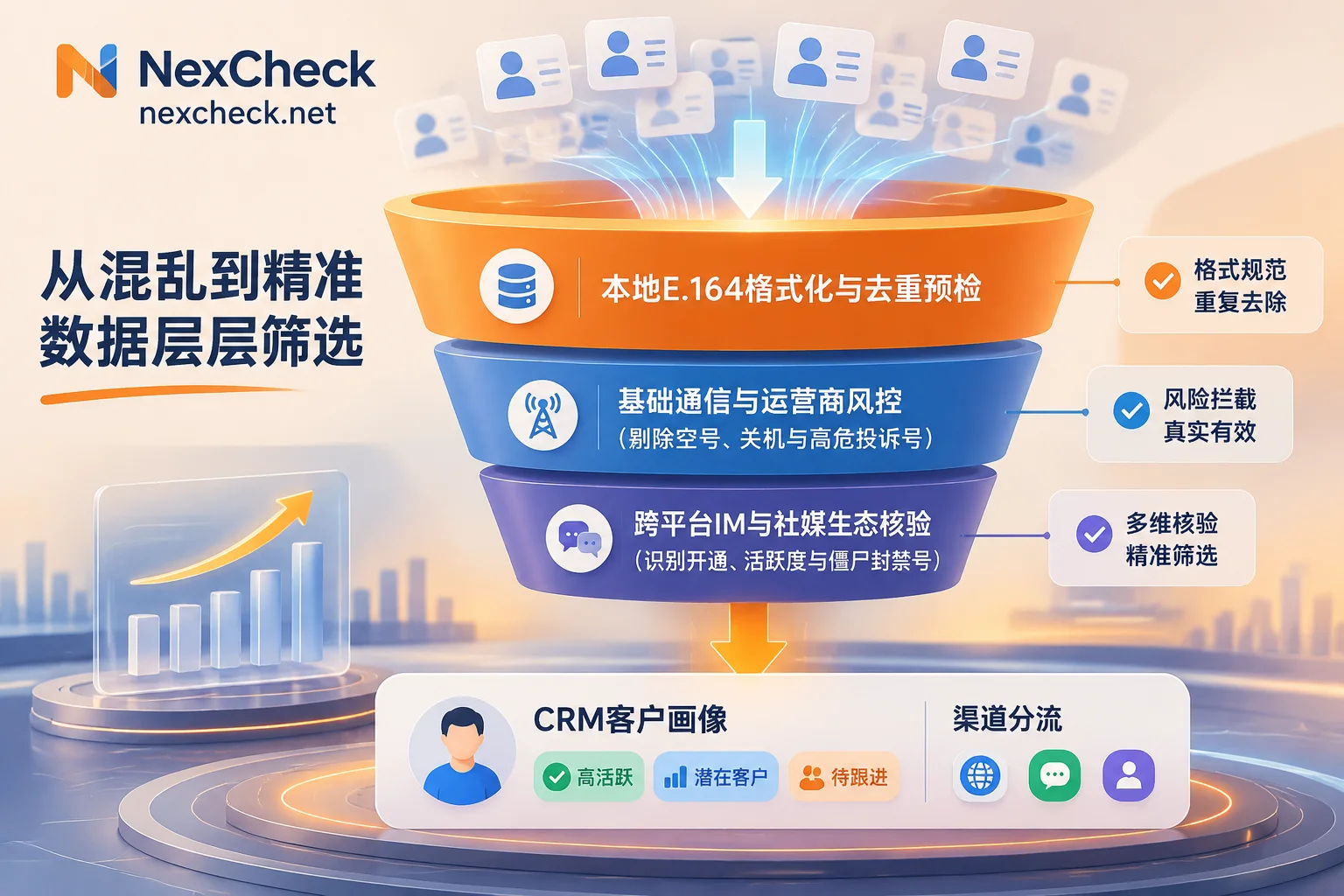
IV. Funnel-Style API Orchestration: From Communication Foundation to Cross-Platform Ecosystem Tags
Checking only "whether the number is disconnected" can no longer meet the needs of refined operations. A truly efficient API workflow should perform "waterfall-style layered verification" like a funnel—using low-cost basic detection to filter out dead numbers, then calling high-value social media and vertical platform interfaces for surviving numbers, and writing multi-dimensional attributes directly back to the CRM tag library.
You can refer to the Supported Platforms Overview and Regional Solutions to orchestrate the following three-layer verification logic in your code:
Layer 1: Basic Communication and Device Risk Control (Eliminate Dead Numbers and High-Risk Numbers)
The first step of lead ingestion is to call the Number Basic Detection capability:
- Network Status and Network Attributes: Verify disconnected numbers and power on/off status, number type, carrier identification and carrier format, T-card format. For businesses that only have number sources without exclusive platform detection items (such as Cash App, OKX, Coinbase, Discord), this layer is the core defense line.
- North American Compliance Risk Control: For the US market, be sure to pre-call "US Carrier" and "US High-Risk and Complaint Numbers" screening to directly blacklist professional complainants and high-risk numbers in the CRM, avoiding high compliance risks.
- Terminal Device Routing: Through Apple/Android Routing, device model, iOS Blue Tag (determine if it is on the Apple side, excluding model and system version), and RCS Screening (activation, system type, Android filtering), automatically route leads in the CRM to iMessage, RCS rich media channels, or traditional SMS channels.
Layer 2: Mainstream Instant Messaging and Social Media Ecosystem Layer (Identify Activity and Profile)
When the basic layer returns "valid and powered on", the workflow can automatically initiate the second-hop API request based on the dominant social apps in the target country:
- WhatsApp Deep Layering: Through the WhatsApp Screening interface, you can not only check activation (fast channel, SVIP channel) but also obtain registration time, gender and age (SVIP, Channel 1, Channel 2), ecosystem four-dimensional activity and sub-channel activity, real-time online status, and accurately identify zombie and ad accounts, banned accounts. For how to use these dimensions to reduce outreach costs, you can read further "How to Do WhatsApp Screening? From Per-Item Billing New Rules, Zombie and Banned Account Removal to Multi-Dimensional Layering Solutions".
- Telegram Number and Username Dual-Track Verification: Telegram Screening supports both activation check by number, 3/7/15-day activity tiers and gender, and direct upload of
@用户名for username detection and username gender-age detection (for specific integration details, refer to "How to Integrate Telegram Screening API: List Cleaning, Async Submission, Result Fields and CRM Write-Back"). - Regional Ace IM Precise Matching: For the Asia-Pacific market, you can call LINE Screening by region (Taiwan, Japan, Thailand, South Korea, Hong Kong, US) (Note: LINE activity detection must first screen activation; the comprehensive item can bring back UID, nickname, avatar, and age/gender); for Eastern Europe and the Middle East, you can call Viber Screening (where "account age" refers to the account registration duration, specifically used to remove newly registered short-term accounts, not the user's actual age) or Botim Screening, KakaoTalk, Band, Signal.
- Global Mainstream Social Media: Supports Facebook Screening (number activation, email activation, UID and public homepage gender/avatar), as well as number activation detection for Instagram, TikTok, Twitter/X, Snapchat, Moj, and LinkedIn activation screening for US and India numbers.
Layer 3: Crypto Finance, E-commerce, and Local Life Vertical Layer (Lock in High-Net-Worth Individuals)
If your business belongs to a specific vertical track, the API can also help you directly tag high-value industry attributes in the CRM (see details in "Beyond 'Activation': How to Build a Precise Cross-Platform Multi-Dimensional Number Insight System?"):
- Crypto and Financial Platforms: Supports Binance Screening (including registration activation, email detection, and Binance Pay transfer channel recipient verification, without logging into Binance or sending verification codes to the target number throughout the process), as well as activation or email detection for KuCoin, CoinW, HTX, MEXC, Vantage, Paytm, MoniePoint, and email detection for Robinhood and Nasdaq.
- E-commerce, Logistics, and Office Life: Covers account activation screening for Amazon Screening, Temu, Shopee, Coupang, Flipkart, Bukalapak, Noon, DHL, Microsoft, Microsoft Teams, Airbnb, Magicbricks, The Economic Times, Cian, HeadHunter.
V. Data Boundaries, Privacy Compliance, and Result Implementation Architecture
When deeply integrating external APIs into the enterprise's core databases, CTOs and data security officers are often most concerned about result reliability and data privacy boundaries. When designing the system, be sure to incorporate the following four principles:
- Local Persistent Storage, Do Not Use the Task Center as an Archive: NexCheck does not guarantee the retention period of detection results, and the console task center cannot be used as a long-term archive database for the enterprise. After the API receives results or Webhook callbacks, the enterprise should immediately persist the valid status and additional attributes to its own CRM or data warehouse.
- Set Dynamic Refresh Cycle (TTL): Detection results only reflect the platform status at the moment of query, do not determine the true identity, purchase intention, or commercial value of the number holder, and do not guarantee the absolute correctness of a single result. In addition, WhatsApp's avatar/signature/last seen, Telegram's name/avatar inference, Facebook's public profile, etc., are strictly limited by the user's own privacy settings; fields set as private by the user cannot be read. For dormant old customers in the CRM, it is recommended to set a TTL of 30-90 days to trigger re-detection periodically.
- Strict Data Controller Responsibility Boundary: According to the platform Privacy Policy, the list submitted by customers completely belongs to the customer's own data. NexCheck only processes it within the scope of executing detection tasks, never sells it, and will not use it to build a number database for external sales; customers can view, export, and delete data in the console at any time. At the same time, as the data controller, the enterprise must ensure that the source and purpose of the numbers are legal and must not submit numbers that they have no right to process.
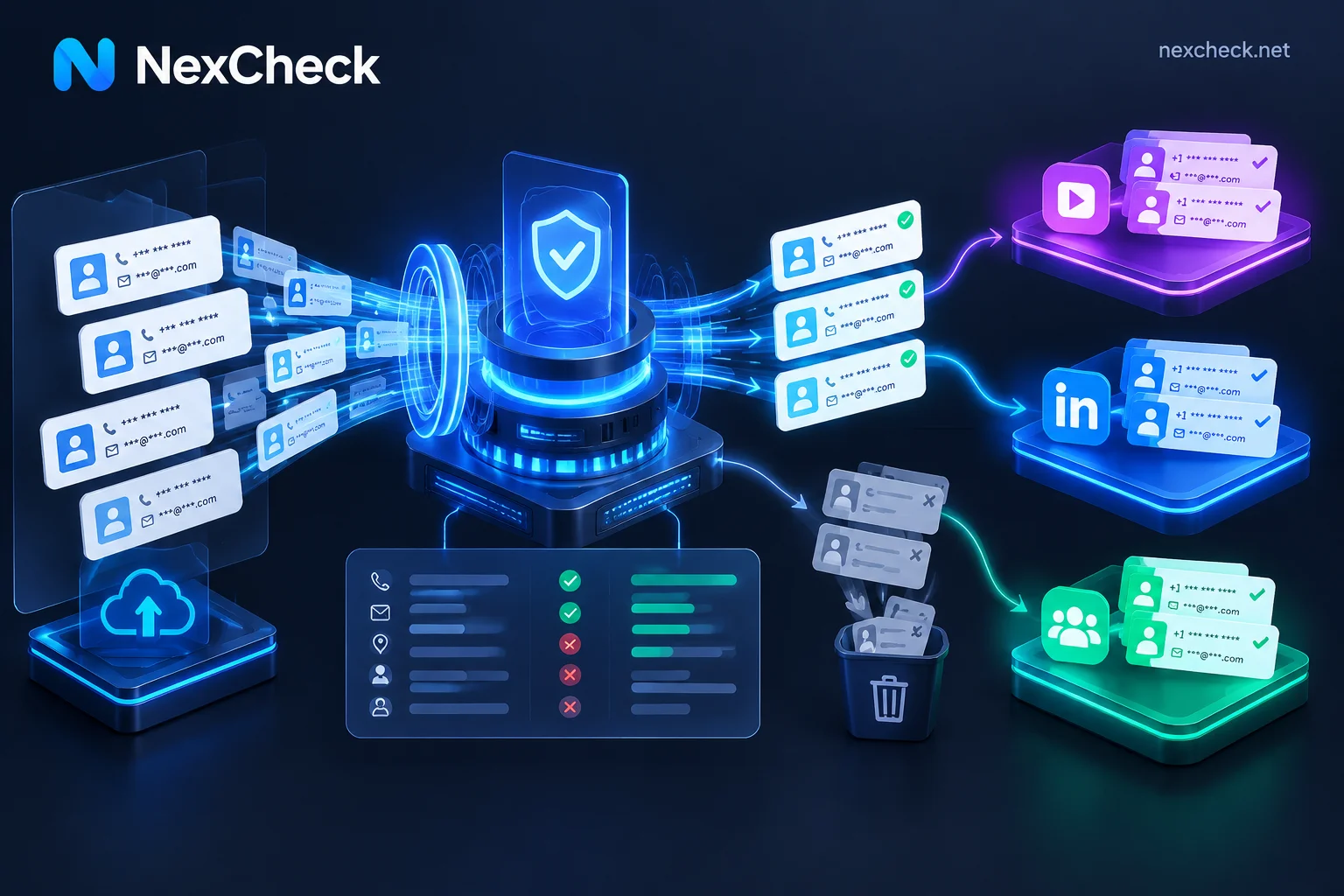
- Decouple from Downstream Outreach Systems: NexCheck focuses on providing pure data screening and insight capabilities, and does not provide message broadcasting, outbound calling, or customer follow-up functions itself. After the API writes the cleaned "valid and active" list back to the CRM, your team can safely route it to downstream SCRM or marketing automation tools for outreach.
VI. How to Obtain API Documentation and Start Integration?
One point to note: to ensure interface security and channel stability, NexCheck's public User Manual does not directly display API interface documentation (specific interface request addresses, parameter definitions, authentication methods, and Webhook callback formats are not listed on public web pages).
If you are a developer or technical team looking to integrate number and email screening capabilities into CRM, business backend, or automation workflows, you can quickly start with the following three steps:
- Register an Account and View Channel Pricing: Go to the NexCheck Registration Page to create a free account, log in to the console to learn about the coverage of target countries and platform channels, single submission quantity requirements, and real-time price list.
- Obtain Exclusive Interface Documentation and Technical Support: Directly contact the official Telegram Customer Service (@nextipkf), explain your business scenario (such as real-time single verification or large-batch asynchronous callback) and target detection platform, and obtain the complete RESTful API integration documentation and authentication configuration instructions.
- Small Traffic Joint Debugging and Launch: First use small batch test data to complete the full-chain joint debugging of local E.164 formatting deduplication, interface requests, and Webhook callback persistence. After confirming that the field mapping is correct, you can switch to full production operation.


Comments(0)