NexCheck-筛号平台
When filtering WhatsApp numbers, the most common failure isn't a bad detection tool—it's doing things in the wrong order. If you throw a list into detection before standardizing it, you'll get a large batch of "invalid" results that are actually just numbers with a leading 0.
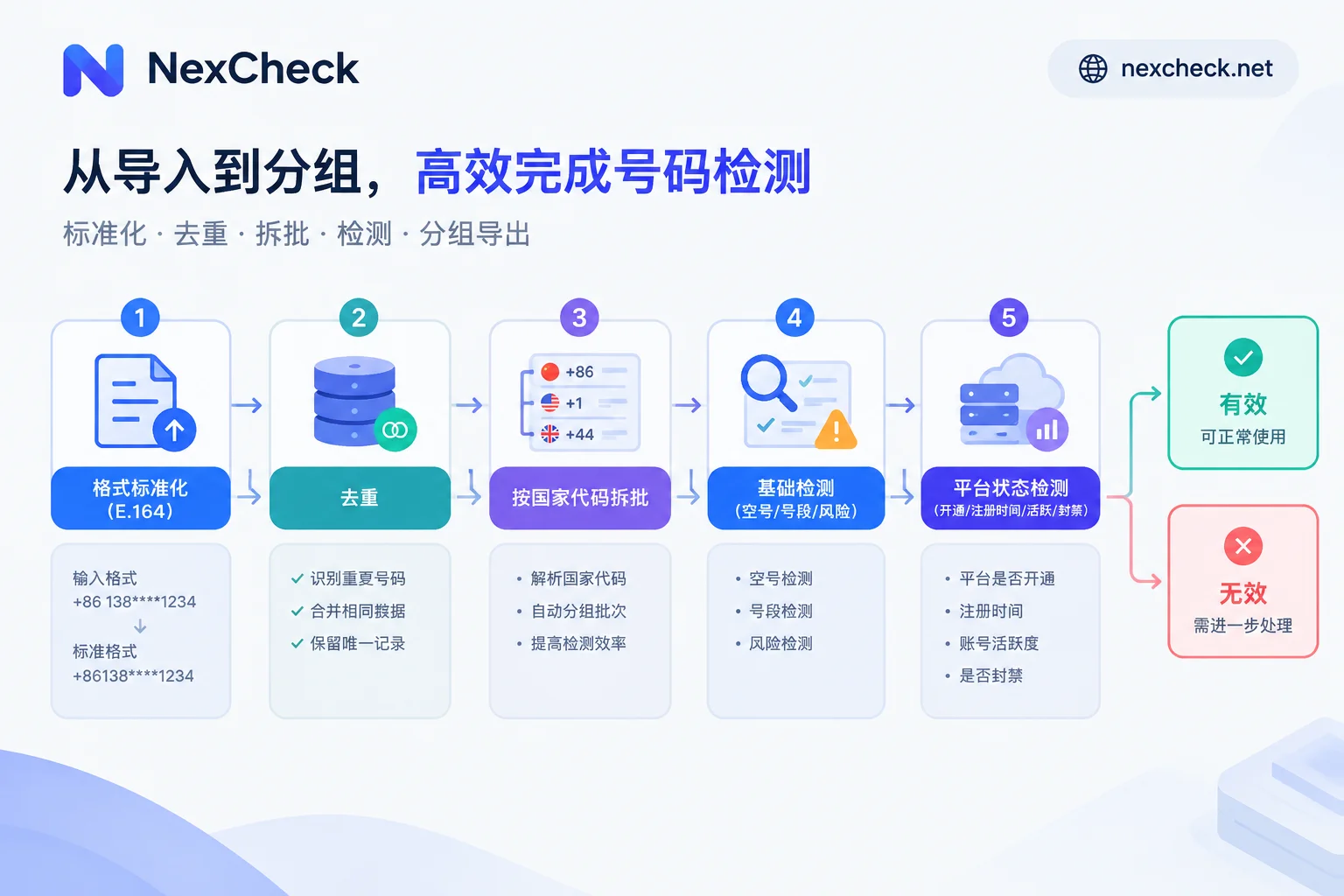
The correct sequence is fixed: format standardization → deduplication → split by country → basic detection → WhatsApp platform status detection → export or write back grouped by valid/invalid. The first three steps happen in your own spreadsheet or script; the last two are handled by the detection platform. Only when each step is done right does the final "valid list" have meaning.
Step 1: Rewrite numbers to E.164 pure digits
This step determines the credibility of all subsequent judgments, and it's also the one most easily skipped.
WhatsApp requires international numbers to follow the E.164 standard: starting with the country code, followed by the area code and local subscriber number. Two things must be strictly removed:
- Local dialing prefixes. In many countries, a "0" is added before the area code for domestic dialing; this 0 must be dropped in international format. Legacy lists from most European countries (except the UK, Germany, Italy) and many Asian countries have this issue.
- All separators. Parentheses, hyphens, spaces, dots—remove them all, leaving only digits.
As for whether to keep the leading +, it depends on your API requirements: some accept +8613800138000, others require pure digits 8613800138000. Standardize to one format before submission; don't mix both in a single list.
Countries that need special handling
Some countries aren't just about "removing the 0"—missing these rules will cause valid numbers to be flagged as invalid:
- Argentina (country code 54): Keep a 9 between the country code and area code, and remove the local 15 prefix, resulting in 13 digits. That is,
54+9+ area code + number without the 15. - Mexico (country code 52): Include a 1 after the country code.
If these special prefix conversions aren't done, the number is already wrong at the format level, and any detection platform will return "non-existent." If your list includes Latin American numbers, write these two rules into your cleaning script first.
What about old lists without country codes
Legacy CRM records often have only local numbers without country codes. The principle is to supplement based on the record's source, not guess uniformly: if the data came from a registration form for a specific country site, supplement with that country; if the source is unknown, pull them out as a separate batch to be confirmed, and don't mix them with numbers of known origin. Otherwise, you won't be able to tell whether a returned "invalid" is due to the number itself or your wrong country code.
Step 2: Deduplicate after standardization
The order cannot be reversed. +86 138-0013-8000, 008613800138000, and 13800138000 are three different records at the string level. You must unify them into the same format before deduplication; otherwise, the same person will be checked three times, tripling the cost if you pay per check.
When deduplicating, keep a primary key for the original row for each number (customer ID, order number, or auto-increment ID from the CRM). After results come back, you'll use this key to write the status back to the original table, not match by the number itself—the number has already been rewritten during standardization.
Step 3: Split batches by country code
Running multiple countries in one table is technically possible, but there are three reasons to split them:
- Format rules apply per country. After splitting, the Argentina batch can uniformly apply the 9/15 rule without affecting other countries.
- Errors are easier to locate. If an entire country batch returns anomalies, you can immediately see that the numbering rules for that country weren't handled correctly, rather than searching through tens of thousands of mixed results.
- Different markets have different dominant communication platforms. For markets like Brazil, Indonesia, India, and Mexico, WhatsApp filtering makes sense; but if the list includes numbers from Russian-speaking or East Asian markets, WhatsApp checks are of limited value—switch to the appropriate platform. You can review number formats and local platforms for each country on the regional solutions page before deciding how to batch.
Step 4: Run basic detection first, then platform detection
This step is layered, from coarse to fine:
Basic detection looks at the number's communication attributes—whether it's an empty number, line type (mobile/landline/virtual), and whether it belongs to a high-risk range. This layer removes obviously hopeless numbers.
Platform status detection is the actual WhatsApp number filtering: whether the number is activated on WhatsApp, registration time, activity, ban status, and some available profile attributes.
Running basic first then platform saves cost: in pay-per-check models, using the cheaper layer to filter out empty numbers and invalid ranges before platform checks improves the overall bottom line. If your list is already high quality or small, you can go straight to platform detection—this layer isn't mandatory.
For processing your list, both submission methods work: upload txt or csv directly in the NexCheck console (no limit per batch), or use the REST API to submit tasks and receive results via Webhook. Results are grouped by valid and invalid, and you can export two lists. For specific fields and per-field pricing, refer to the detection item list and price list on the platform page—items and prices change, so don't copy old lists from other blogs. Your list is your data; the platform only processes it within the task scope, but you must ensure the legality of the number source and usage.
How to read fields: three easily misinterpreted points
After getting results, don't treat all fields as equally strong evidence.
Profile photo, about, and last seen are controlled by user privacy settings
WhatsApp natively provides privacy controls: Profile Photo, About, and Last Seen can be set by the user to "Everyone," "My Contacts," "My Contacts Except," or "Nobody."
This means a normally active account may not return a profile photo or last seen time to external queries not in its contacts. Don't equate "no profile photo," "no about," or "no last seen" unilaterally with "not activated" or "abandoned"—this is the most common source of misjudgment for such lists. To determine activation, look at the activation field itself; profile photo and activity time are only weak signals for auxiliary sorting.
Gender and age are inferred fields
Coverage of these profile attributes varies greatly across batches, and calculation logic differs by platform. A reasonable use is to use them for priority sorting or grouping—for example, separately operating the segment with clear profiles first. An unreasonable use is hard filtering: deleting all numbers without returned profiles—what you delete is likely just "not found," not "non-compliant."
Ban status and registration time
Ban status is a clear basis for exclusion. Registration time can indicate account age and help distinguish batch-registered numbers from real long-term users, but it reflects account age, not directly activity.
For a more detailed breakdown of field meanings, see "How to Check WhatsApp Number Validity? From List Formatting to Status Field Interpretation".
Web console or API: choose by frequency and whether write-back is needed
- One-time cleaning, no automatic write-back: Uploading via console is faster. Upload txt/csv, wait for results, export valid/invalid tables, and manually import back to CRM.
- Periodic runs or system write-back: Use the API. Automatically submit checks when new lists are added, and receive results via Webhook to directly update customer table fields without manual monitoring. For integration details, see "How to Integrate WhatsApp Number Screening API? From Asynchronous Tasks to Webhook Write-Back".
- Unsure whether to use polling or Webhook: For small volumes and low latency sensitivity, polling is fine; for large batches or long tasks, Webhook saves more resources. This article provides tiers based on task volume.
Storing results: don't just save "valid/invalid"
Many teams compress results into a single Boolean field in CRM, throwing away most of the information they paid for. It's better to store multiple columns: activation status, registration time, activity signals, ban status, and detection timestamp—each in its own column.
Keeping the detection timestamp is especially important—number status changes; a number valid today may be abandoned in six months. With a timestamp, you can set a recheck cycle and only rerun records older than a certain number of days, instead of refreshing the entire database each time. For guidance on database structure, see "Batch Number Verification: Don't Just Look at Valid/Invalid, Store Results in Multiple Columns".
Common pitfalls
- Excel stores numbers in scientific notation or drops leading symbols. Set the number column to text format before exporting to csv, and spot-check a few rows afterward.
- If an entire batch returns anomalies, suspect format first. If a whole country is invalid, it's likely a numbering rule issue—go back to step 1 and recheck, rather than switching platforms.
- Detection items are not universal across platforms. Fields available for WhatsApp differ from those for other communication platforms. Don't apply one platform's field list to all tools; refer to each platform page for specifics.
- There is no public standard for detection frequency risk control. Each platform has different detection channels and processing strategies; don't copy "safe interval" numbers circulated online—base it on actual returns from your platform.
Do the first three steps solidly on your side, and the subsequent detection will answer real questions. With the right order, even a messy multi-country list can be turned into usable grouped results in one pass.