 NexCheck-筛号平台
Whenever the autumn trade show season wraps up, a major promotion is being prepared, or the annual CRM database audit comes around, marketing and operations teams inevitably have a large backlog of historical contact data: thousands of business cards just scanned at an autumn trade show, dormant inquiries in the CRM with no interaction for six months, or old customer spreadsheets exported from an independent site or historical orders. If this raw, unprocessed list is handed directly to sales for follow-up, or imported unchanged into an ad platform for audience matching, it often triggers a chain reaction: bounce rates spike, outbound agents sit idle, social media outreach accounts get restricted, and ad budget is wasted.
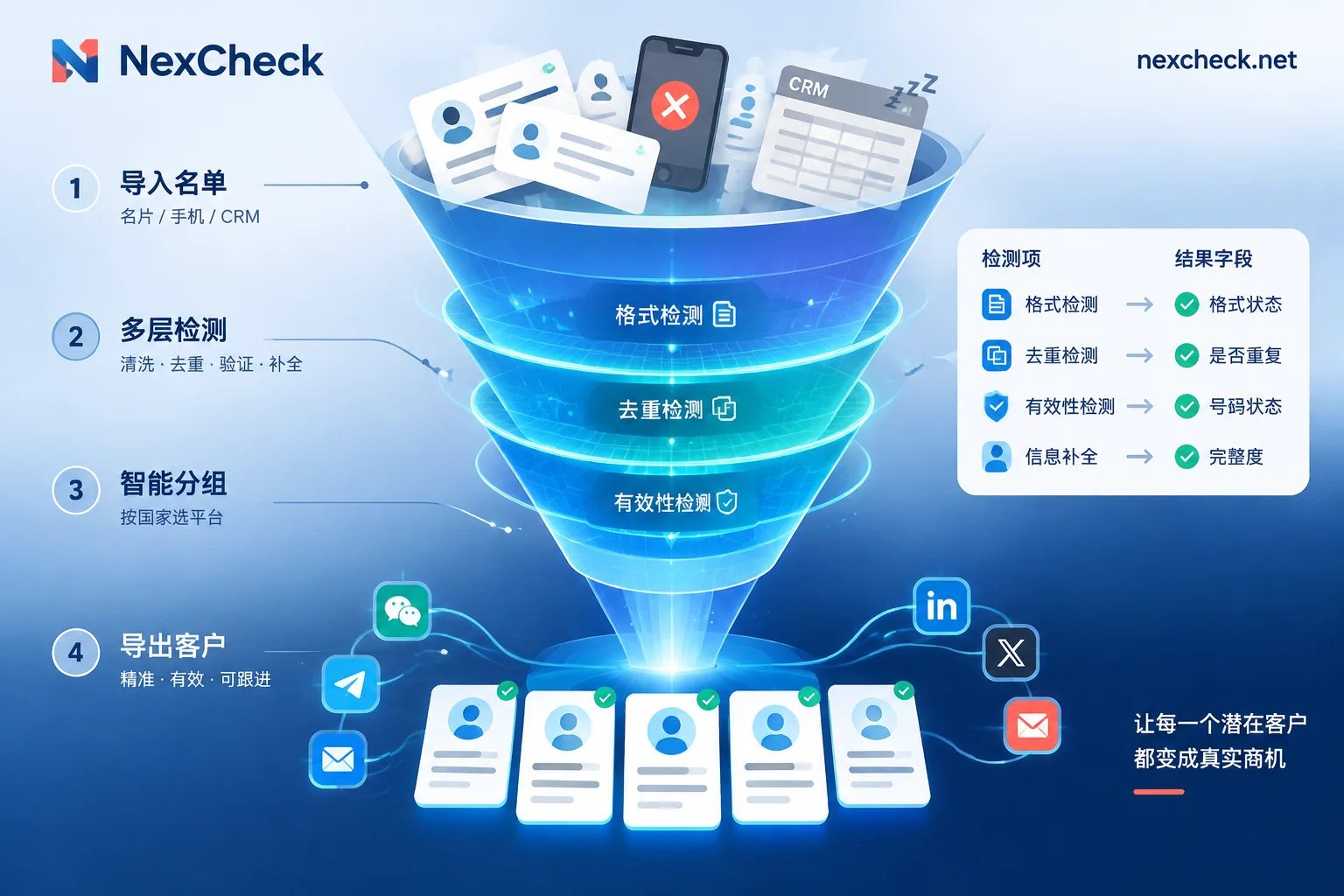
We previously broke down the standard underlying operational steps in "How to Clean Numbers? A Complete Workflow from Local E.164 Formatting and Deduplication to Basic Invalid Number Risk Control and Cross-Platform Bulk Screening". But from the perspective of business operations and marketing teams, customer lists from different sources have completely different dirty-data characteristics and cleaning goals. This article starts from three high-frequency business scenarios—rescuing trade show/offline leads, reactivating dormant CRM contacts, and purifying ad campaign seed audiences—and explains how to use NexCheck to complete targeted customer list cleaning and data tiering.
1. Why do customer lists in the hands of business teams quickly "depreciate"?
In actual business workflows, customer list deterioration mainly comes from three levels:
- Messy formats and duplicate entries at the collection stage: When handwritten registrations at trade show booths and multi-channel form submissions are consolidated, it is very easy to encounter missing international area codes, hyphens or parentheses mixed in, and the same customer leaving information through multiple channels. Some regions also have legacy issues from historical number changes (for example, Vietnam mobile numbers were changed to a 10-digit format in 2018; if an old list still contains the old 11-digit numbers, submitting them directly for screening will not return results).
- Natural data decay: B2B procurement staff change jobs and work numbers, consumer users suspend service and change numbers, or a customer's social focus shifts from one app to another—all of these can turn a number that was reachable a year ago into an invalid or zombie number today.
- Failure of a single outreach channel: The mobile number a customer left may not be registered on the instant messaging app you are primarily promoting, but the same number or email may remain highly active on other social, e-commerce, or workplace platforms. Without cross-platform status verification, many genuinely valid high-value customers are misjudged as "dead numbers."
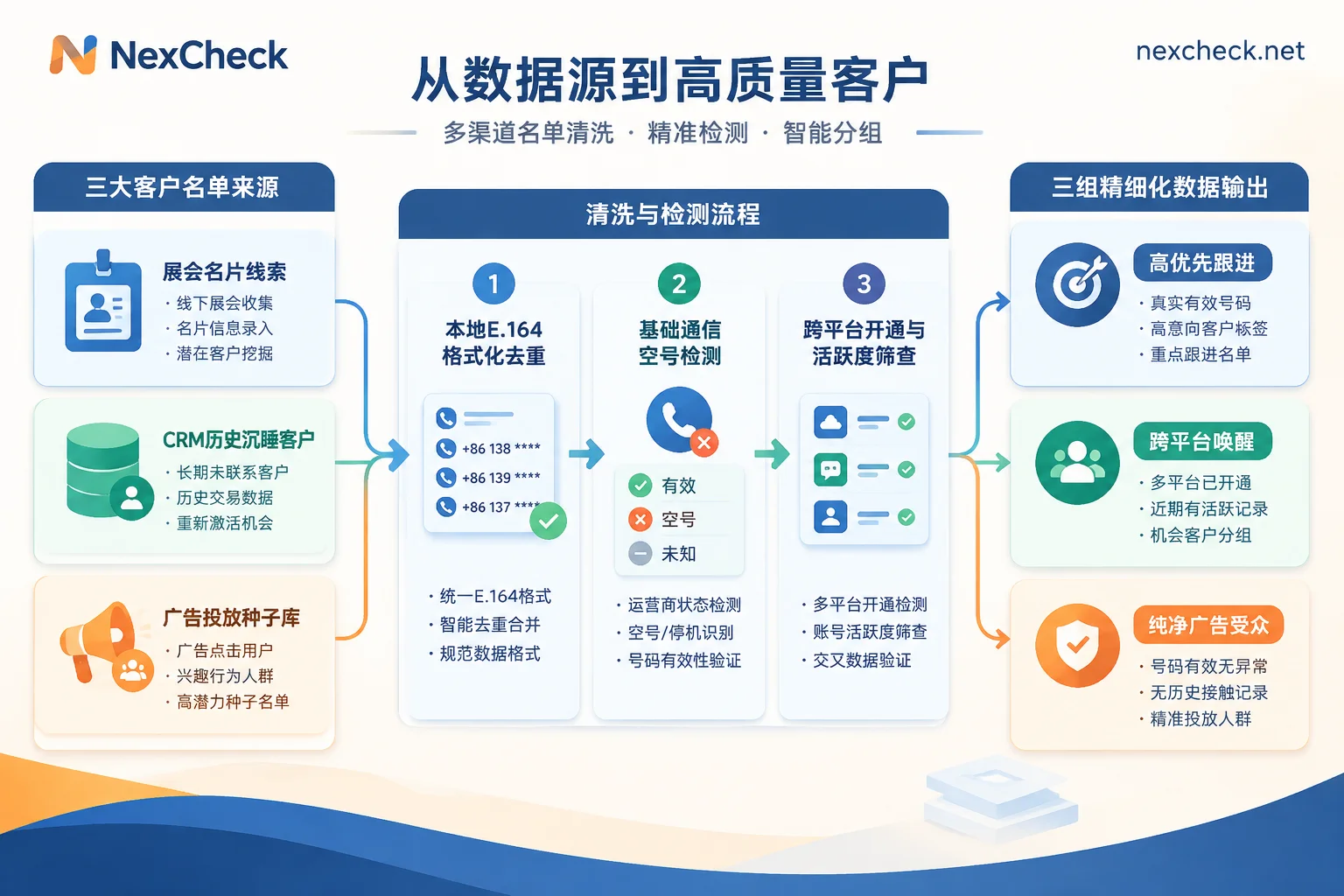
2. Customer list cleaning strategies for three typical business scenarios
When facing thousands of mixed records, the most efficient approach is not to run every number through every check, but to match the appropriate supported platforms and detection channels based on the business purpose of the list.
Scenario 1: The 72-hour golden rescue window for trade show and offline event leads
The first three days after a trade show ends are the window with the highest follow-up conversion rate. At this point, business cards and sign-in sheets have just been consolidated into Excel, and the core pain points are wildly inconsistent number formats and sales not knowing which app to prioritize for adding contacts.
- Local formatting and deduplication: Because console tasks do not automatically deduplicate duplicate values in uploaded files (duplicate rows are still billed as usual), it is recommended to first open the free browser-based number cleaning tool. Locally in the browser, identify separators, fill in country codes according to the target country, convert uniformly to standard E.164 format, and remove duplicate rows. Be especially careful not to select the wrong default country, otherwise you will generate numbers that are format-compliant but assigned to the wrong country.
- Primary instant messaging registration and quick activity screening: For audiences in Europe, the Americas, Latin America, Southeast Asia, or the Middle East, prioritize WhatsApp number screening (supporting fast channel or SVIP channel registration detection, four-dimensional ecosystem activity, real-time online status, zombie account, advertising account, and banned account checks) or Telegram number screening (supporting number registration and 3/7/15-day activity tiers; if the business card only shows
@用户名, you can also upload the username directly for detection) to confirm the primary communication channel. - Supplementary coverage for regional platforms: For Japanese, Korean, Taiwanese, and Thai audiences, you can run LINE number screening accordingly (registration screening by region for Taiwan, Japan, Thailand, South Korea, Hong Kong, and the US; registration must be screened first, then activity) or KakaoTalk number screening; for the Vietnamese market, run Zalo number screening (offering ultra-fast and stable dual channels for registration checks, activity ranges, and gender and age, see the Vietnam 10-digit number cleaning guide for details); for Middle Eastern and Eastern European markets, you can supplement with Botim or Viber number screening. If you are unsure about the habits of the target market, you can first consult the NexCheck regional solutions to learn about local major carriers and the recommended screening order.
Scenario 2: Dormant CRM contact reactivation and cross-channel re-engagement
Many foreign trade and cross-border enterprises have tens of thousands of old leads in their CRM that have not been followed up for more than six months. When activating these old customers, the biggest fear is blindly sending bulk messages right away and causing channel restrictions, or giving up on a customer simply because a single channel is unreachable.
- Layer 1: Basic communication and risk-control mine clearing: Before any business outreach, first run basic number detection to check for invalid numbers and powered-on/powered-off status, and identify number type and carrier. If the list is concentrated in the North American market, be sure to add US high-risk and complaint number detection to strip out numbers that may create compliance risks in advance; at the same time, you can use iOS blue tick detection or Apple/Android device segmentation and RCS system type detection to determine the customer's device attributes.
- Layer 2: Cross-validation with email and workplace/B2B platforms: If an old customer's mobile number is not registered on instant messaging, that does not mean the customer has churned. You can submit the mobile number or email in the list to Facebook screening (supporting number registration, email registration, and reading of publicly available UID gender and avatar; see Facebook number and email list cleaning order for details), or use Microsoft and Microsoft Teams screening to confirm whether their enterprise work account is still in normal use. For US and India B2B mobile numbers, you can also directly run LinkedIn registration screening.
- Layer 3: Vertical industry attribute verification: If your business involves cross-border e-commerce, local life services, or digital finance, you can use the vertical registration checks provided by the platform to verify the customer's true profile. For example, cross-border e-commerce can verify account registration status on Amazon, Shopee, Temu, Coupang, and Noon; Web3 and financial services teams can screen the registration status or email on platforms such as Binance, KuCoin, and HTX (Binance also supports transfer channel detection, and all queries do not log in to the platform or send verification codes to the target number, so customers are not disturbed).
Scenario 3: Purifying ad campaign seed audiences and remarketing lists
When building Custom Audiences or Lookalike expansions on overseas social media, the quality of the seed base directly determines the direction of the advertising algorithm's learning. If the exported seed list contains a large number of numbers not registered on that social platform or abandoned emails, the match rate after upload will be extremely low.
Before uploading a customer list to the ad platform, you can first run registration screening on Instagram, TikTok, Twitter/X, Snapchat, or Facebook to keep only valid numbers or emails confirmed to be registered on the corresponding platform. You can also combine publicly available gender and age fields from channels such as WhatsApp, Telegram, LINE, and Zalo to break audiences into segments, significantly improving the purity of the seed audience.
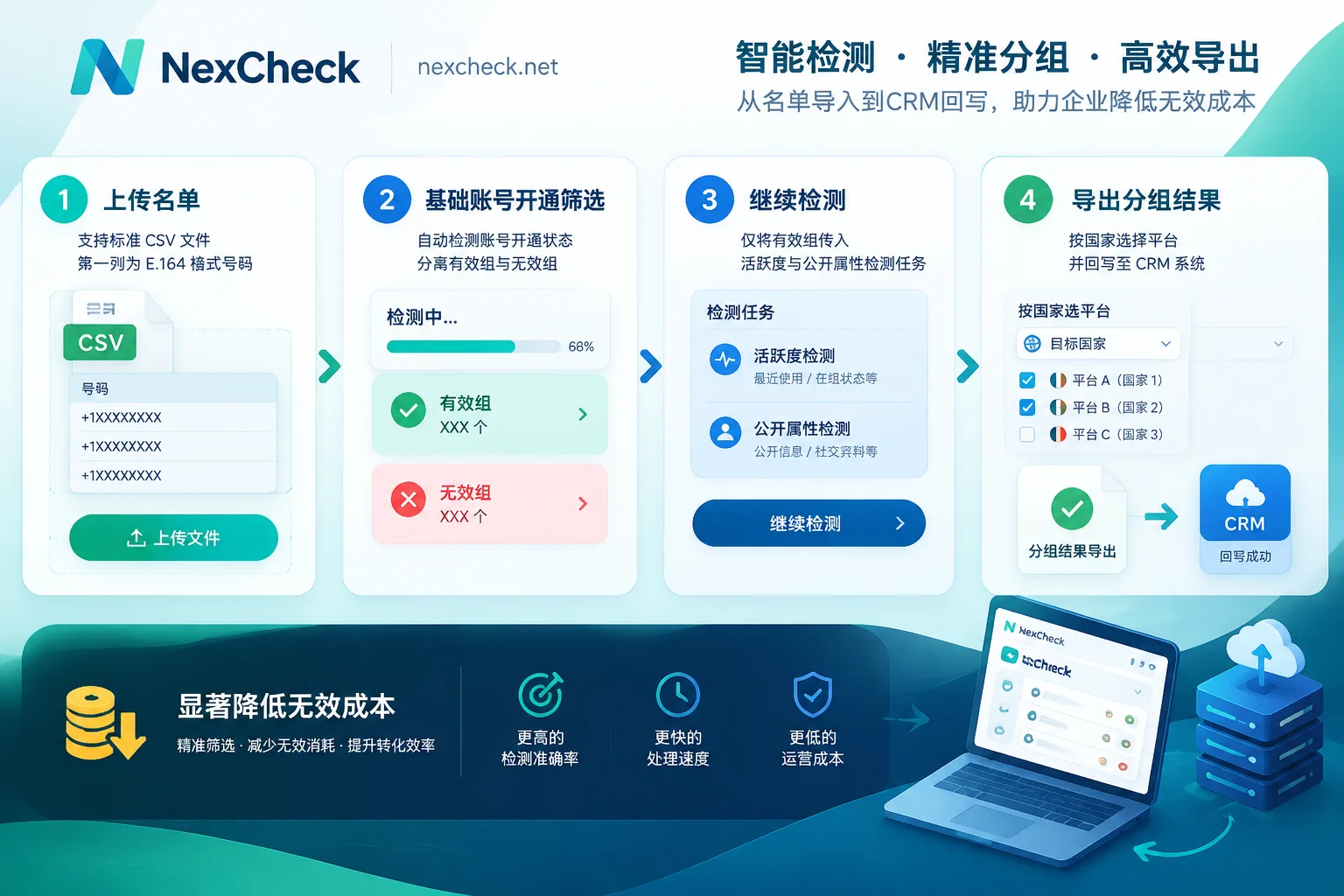
3. Practical implementation: How to save cleaning budget in the console with chained detection?
Once you understand the strategies for different lists, following the NexCheck Quick Start Guide and executing tasks in funnel order can help you save a considerable amount of unnecessary detection costs:
- Prepare files properly: CSV, TXT, or XLSX files are supported; make sure each row contains one target value in the first column. Before submitting, pay attention to the minimum and maximum row limits for the selected detection item, as well as the file size limit.
- Use "Continue Detection" for funnel filtering: NexCheck uses a prepaid pay-per-item model (charges are deducted when a task is created, and if a task fails, a full refund is automatically issued). The most cost-effective approach is: first run the lower-priced "registration detection," and after the task is complete, click "Continue Detection" directly in the console to use the results judged "valid (registered)" in the previous round as input for the next item (such as activity tiering or gender and age identification). This way, subsequent higher-tier items do not need to pay for dead numbers that were never registered at all.
- Export results promptly and write back to CRM: Detection results are clearly grouped into "valid" and "invalid" and support online preview and download. Note that the platform's task center does not guarantee how many days results will be retained, and it cannot be used as a long-term archival cloud drive for the enterprise. After a task finishes, export the spreadsheet promptly and write it back to your own CRM system. If a development team wants to embed the customer list cleaning workflow into a self-built CRM or automated workflow, the platform also provides a RESTful API supporting batch submission, real-time queries, and Webhook callbacks (specific interface parameters and authentication methods are not included in the public manual; after registering a free account, contact official Telegram customer service for integration support).
4. Objectively understand the data boundaries and compliance requirements of customer list cleaning
Before handing a cleaned list to sales or a marketing automation system, team leaders need to clarify the following objective boundaries to avoid misinterpreting detection results:
- Results represent "the technical status at the moment of query": Screening results only reflect the status returned by the target platform at the moment the query is executed. They do not represent the number holder's true identity, purchasing intent, or commercial value, nor can they guarantee that a single result will remain absolutely unchanged over the long term.
- Strictly constrained by user privacy settings: Fields such as WhatsApp avatars, signatures, and last-seen times, Facebook page gender and avatars, and Telegram gender and age inferred from public names and avatars are all strictly subject to end users' own privacy settings. Fields that users set as private cannot be read by any external tool.
- Separation of responsibilities and data security compliance: NexCheck focuses on list screening and status verification, and does not provide message bulk sending, outbound outreach, or account purchasing services. Regarding data security, customer-uploaded lists are entirely the customer's own assets; the platform processes them only within the scope of executing detection tasks, never sells them or uses them to build a number database for external sale, and customers can view, export, and permanently delete them in the console at any time (see the Privacy Policy for details). At the same time, as the data controller, the enterprise itself must ensure that the source and subsequent use of the submitted customer list are lawful and compliant.
Conclusion
Customer list cleaning is not a one-time data cleanup, but a standard pre-step that runs through every trade show lead intake and every round of old-customer win-back campaigns. First use the local number cleaning tool for free E.164 formatting and deduplication, then verify in the NexCheck console according to the funnel order of "basic mine clearing → platform registration → activity and attribute tiering" based on the business scenario. Only then can your sales and marketing teams truly focus their energy on living customers who can be reached and engaged in conversation.