 NexCheck-筛号平台
Imagine you have a 20,000-row customer list from trade show registrations, past orders, and website forms. Some people say to "validate the numbers" first; others say to "filter WhatsApp" directly. These two things answer different kinds of questions.
Number validation looks at the phone number itself: whether the format is valid, whether the number is active, and whether it is a mobile, landline, or virtual number. WhatsApp filtering looks at the number's situation on the WhatsApp platform: whether an account is registered, whether the account is active or banned, and how active it is. The former is at the telecom layer; the latter is at the application layer. They cannot replace each other. For most lists, the safer approach is to run number validation first, then run WhatsApp filtering on the mobile numbers that remain.
What each one answers
| Basic number validation | WhatsApp filtering | |
|---|---|---|
| Question answered | Whether the number works as a phone number, whether it is active, and what line type it is | Whether the number has a WhatsApp account and what state the account is in |
| Layer | Format layer and telecom network layer | Application platform layer |
| Common checks | E.164 format and country code, valid digit count; disconnected or suspended; mobile, landline, or VoIP; owning carrier | Whether activated; account valid or banned; activity level; publicly visible profile details |
| What it does for the list | Removes numbers with structural errors, numbers that no longer exist, and unsuitable line types | Determines whether the number maps to an account on WhatsApp |
| What it cannot see | Which apps are installed on the number, which platforms it has registered with | Whether the number is still active, and whether the owner has changed |
Number validation generally has two levels. The first is format validation: check the country code and digit count according to ITU-T E.164, looking only at whether the number "looks right." The second is telecom-layer lookup, commonly carrier lookup and HLR lookup. HLR lookup uses signaling to query the carrier's Home Location Register and can return whether the number is active, which carrier it currently belongs to, whether it is roaming, and the line type.
WhatsApp filtering performs platform-layer detection on standardized international numbers, checking the number's registration and account status on WhatsApp. It does not read chat history and does not involve private content. Different tools return different field depths. Within the same tool, detection items also differ by platform, so before choosing a tool, check its field list.
Why checking one layer does not eliminate the other
There is no one-to-one correspondence between the two layers.
A number valid at the telecom layer does not mean it has a WhatsApp account. A number can be active normally, but the owner may never have registered for WhatsApp. If you only run number validation, you can confirm "this is a real, usable mobile number," but you cannot know whether it has a WhatsApp account.
A WhatsApp account shown as present does not mean the number is currently active, nor that the original person is still using it. WhatsApp uses the phone number as the account identifier, and registration and login rely on SMS, voice, or automatic carrier verification. After a number is deactivated, the platform may take time to reclaim the old account, so a disconnected number may still appear activated for a period. After the carrier reassigns the number, the new owner may register a new account or may not have registered yet, and the old account record may not match the current actual owner. WhatsApp has not publicly stated a fixed period for cleaning up such accounts; the number of days circulating online is speculation and should not be used as a basis for judgment.
So each layer handles one part. Number validation confirms that the number really exists and that the line type is suitable. WhatsApp filtering confirms what state it corresponds to on this platform.
Recommended processing order
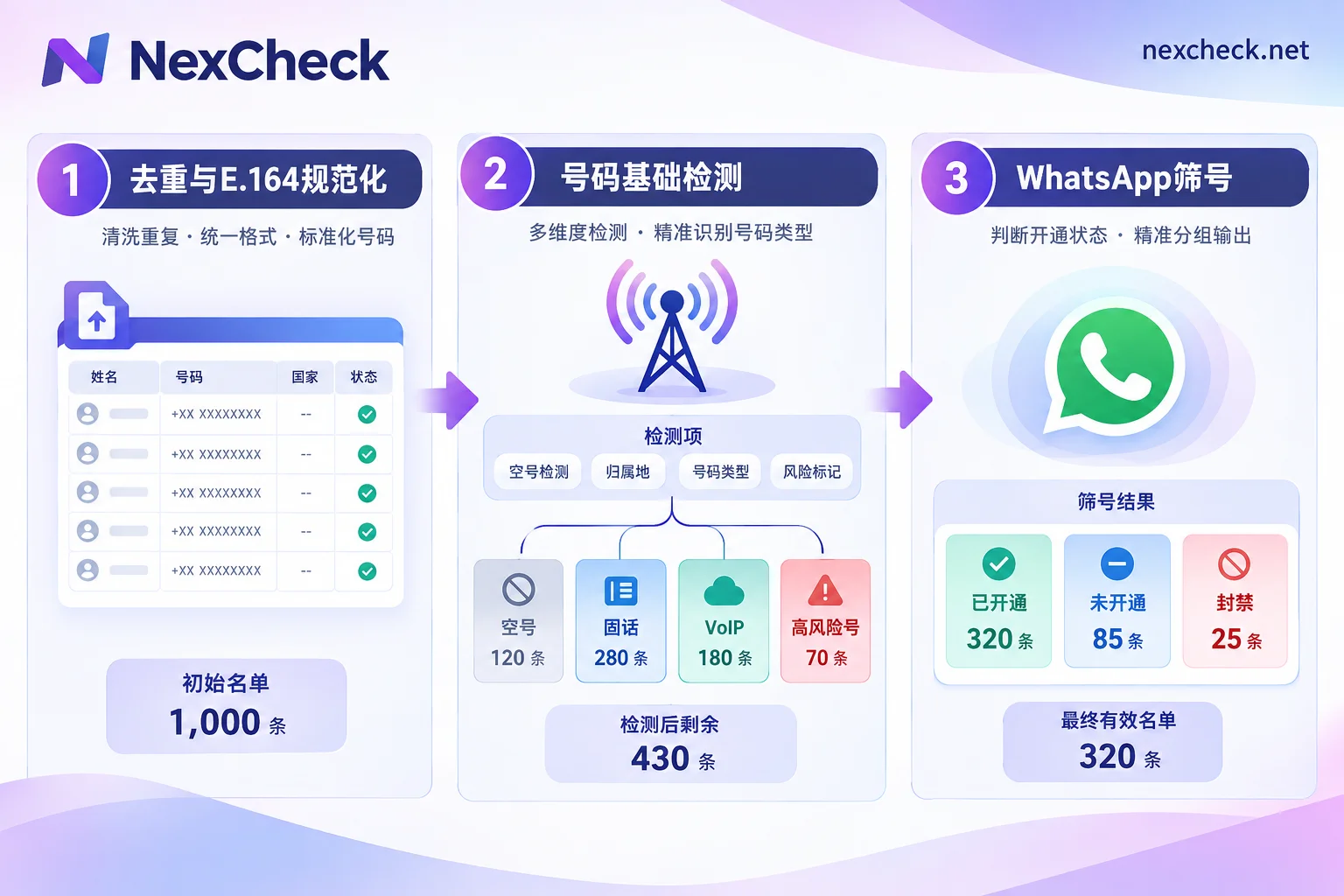
Step 1: Deduplicate and standardize to E.164 format
First remove spaces, hyphens, parentheses, and leading zeros from the list, complete the country code, standardize everything to "+country code + number" format, and then deduplicate. This step costs nothing in detection fees, but it directly affects the results of every later layer. The same number written in three formats will be detected three times and charged three times. If the country code is filled in incorrectly, the number will be looked up as a number from another country. Mobile numbers in countries such as Argentina and Mexico have special encoding rules; for processing details, see WhatsApp E.164 format conversion rules.
If the list contains numbers from multiple countries, it is advisable to split it by country at this step and process it in batches later. Digit rules differ by country, as do the dominant platforms, and splitting makes troubleshooting easier.
Step 2: Basic number detection
Run basic detection on the standardized numbers and first remove the following categories:
- Numbers with invalid format or digit count
- Disconnected or suspended numbers
- Landline numbers, and VoIP virtual numbers if your business needs require removing them
- Numbers marked as high risk
Most of these numbers do not need to go to platform-layer detection. Removing them first reduces the volume for step 3. Later, when the platform layer returns "not activated," you can also be sure the reason lies with the platform, not with the number itself not existing.
Step 3: WhatsApp filtering
Send the remaining mobile numbers for WhatsApp detection and retrieve fields such as activation status, whether the account is valid or banned, and activity level. For how to interpret each field, which fields are platform-public information, and which should not be overinterpreted, see How to read WhatsApp filtering results.
There are exceptions to this order:
- If the list has just undergone basic detection, for example if it was run last week and no new numbers were added, you can go directly to step 3.
- If the list's purpose is unrelated to WhatsApp, and you only need to confirm the numbers are real and valid, you can stop after step 2.
- If the list comes from WhatsApp-related channels, such as numbers left by users in WhatsApp conversations, the activation rate is usually high to begin with. These lists should still be format-standardized, because basic detection can reveal numbers that have already been disconnected.
How to handle conflicts between the two layers
After both layers of detection are complete, each number will generally fall into one of the following four cases. When writing back to CRM, it is advisable to store the two layers as separate fields rather than merging them into one "valid/invalid" field:
- Active at the telecom layer, activated on WhatsApp with normal status: both layers pass; it can be stored as a valid number for that platform.
- Active at the telecom layer, not activated on WhatsApp: the number itself is fine, it is just not suitable for WhatsApp. Do not delete it; keep it for later detection on other platforms or for other business uses.
- Disconnected or suspended at the telecom layer, shown as activated on WhatsApp: the category to watch most carefully. This may be due to delayed platform reclamation, or the number may have been reassigned. It is advisable to mark it separately as "pending review" rather than treating it directly as valid, and recheck both layers after a period.
- Invalid at both layers: can be grouped as invalid. Whether to delete from CRM depends on your data retention rules.
Case 3 illustrates the risk of platform filtering alone. If the list only ran WhatsApp detection, this batch of numbers would be treated as valid and mixed into the results.
Processing this list with NexCheck
In NexCheck, both layers of detection can be completed: first run basic number detection to remove disconnected numbers, mismatched device types, and high-risk numbers, then run platform-specific WhatsApp detection on the remaining numbers for fields such as activation, account status, and activity level. Results are exported grouped by valid and invalid for separate write-back.
When the list is not large, you can upload a txt or csv file in the console, with no limit per batch. When you need to connect to CRM for automated runs, you can use the REST API to submit tasks and push results back via Webhook when detection is complete. Fees are charged per item. For which fields WhatsApp can currently check and the price of each item, refer to the price list on the WhatsApp platform page. Detection items and unit prices may change, so just verify once before ordering. The list is your own data and is processed only within the scope of the detection task; you must ensure that the source and purpose are legal.
If the list spans several countries and you are not yet sure which platform to filter for each country, you can first check the regional pages for the number formats and dominant platforms of the corresponding countries, then decide how to split the batches.




Comments(0)