 NexCheck-筛号平台
Suppose you have a contact list exported from your CRM—five or six thousand phone numbers, mixed across several countries, some with a +, some with a local leading 0, and some people entered twice. The business side wants to know: which of these people use Telegram, and which ones are still active recently.
The bottom line up front: Telegram number screening can tell you whether a number corresponds to a findable Telegram account and roughly how long ago that account was online. But the activity it provides is a fuzzy range, not an exact time. Also, a number that cannot be found is not necessarily unregistered. You need to clean the list before submitting it, then group results as "valid / invalid / activity level" and write them back to CRM.
Processing order
- Normalize format: Convert all numbers to international E.164 format.
- Deduplicate: Deduplicate using normalized numbers, not raw strings.
- Split by country: Make each country or region code its own batch.
- Submit for screening: Upload via the console or submit through the API.
- Read results: First check whether registered, then check the online range.
- Group and write back: Write screening results and screening date back to CRM, keeping the original number unchanged.
Below explains what to watch for at each step in this order.
Before submission: format, deduplication, splitting
E.164 format is + plus country code plus subscriber number, with the local dialing leading 0 removed, and no spaces, hyphens, or parentheses in between. For example, the UK local format 07700 900123 becomes +447700900123 after normalization.
Deduplication must be done after format normalization. +44 7700 900123 and 07700900123 are the same number, and they can only be identified after unifying the format. If you submit with duplicates, the same number will be screened twice and charged twice. For specific deduplication rules and common pitfalls, see Number Deduplication: Normalize to E.164 First, Then Deduplicate by Canonical Number. For multi-country list format correction, see E.164 Standard Format for Number Format Errors and Normalization Order for Multi-Country Lists. Although these two articles use WhatsApp as an example, the format rules apply equally to Telegram lists.
Splitting by country has two benefits. First, different countries have different number lengths and special encoding rules, so processing them separately makes format anomalies easier to spot. Second, after results come back, you can directly compare registration rates by market without splitting afterward. You can look up number formats and major local platforms for each country on the regional pages.
During cleaning, put numbers that fail conversion into a separate file, such as numbers with the wrong digit count or missing country code. Verify the source of these numbers first; do not force them into the screening batch.
Submitting for screening: web console or API
In NexCheck, there are two ways to submit this cleaned list:
- Upload txt or csv via the console: Suitable for operations and marketing colleagues who process lists one-off or irregularly. After upload, export results grouped by valid and invalid.
- Submit via REST API: Suitable for developers who need to integrate screening into CRM or a data pipeline. There is no limit per batch, and results can be pushed back asynchronously via Webhook without polling.
Billing is per item, and screening items and unit prices are subject to the platform price list. For exactly which fields can be checked for Telegram and how each is charged, see the Telegram platform screening page. Screening items may change, so refer to the current page content. The list is your own data, and the platform processes it only within the task scope. You must ensure the source and purpose are legal.
Reading results: online status is a range, not a point in time
When judging activity, the most commonly used basis is Telegram's "Last seen" time. When a user hides the exact time, or when the viewer is not a contact of that user, Telegram only shows four fuzzy statuses:
| Status | Approximate meaning | Meaning for the list |
|---|---|---|
| Last seen recently | Online within the last 2–3 days | Recently active |
| Last seen within a week | About 2–3 days to 7 days | Used within a week |
| Last seen within a month | About 6–7 days to 30 days | Used within a month; activity is declining |
| Last seen a long time ago | More than a month; also shown when blocked by the other party | High dormant risk; handle with caution |
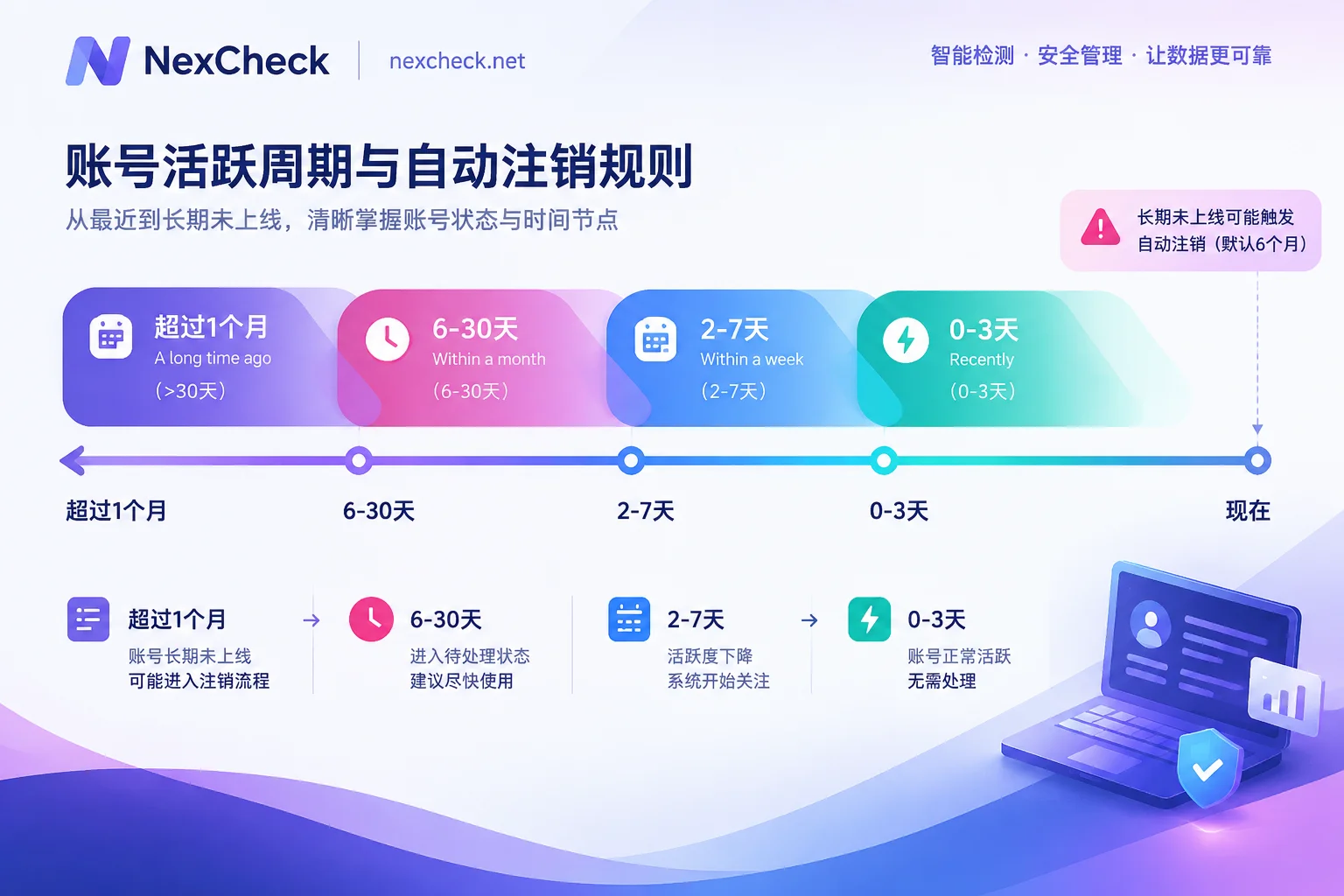
The boundaries between these ranges are intentionally overlapping and imprecise—this is Telegram's privacy protection. So when grouping, do not interpret "recently" as "online today," and do not estimate specific days from it. A safer approach is to store the four ranges directly as four labels.
The "A long time ago" range should also be considered together with Telegram's automatic account deletion mechanism. If an account has not been online at all within a set period, it will be permanently deleted by the platform. This period defaults to 6 months, and users can change it to between 1 and 24 months. Therefore, numbers that remain in this range for a long time are quite likely to be dormant accounts, and may even become unregistered in later rechecks. It is recommended to set a recheck time for such numbers rather than keeping them as valid contacts long-term.
Beyond registration status and online range, whether attributes such as registration time, gender, and age can be checked depends on the screening items currently provided by the platform and is also affected by users' public profile settings. These attributes do not have a unified basis for determination on Telegram, so refer to the platform page description. They are more suitable as reference fields and are not recommended as hard filter conditions.
Privacy boundary: "not found" does not mean "not registered"
Telegram registration requires a phone number, but users can set who can find me by phone number in "Privacy and Security." If a user restricts this to only their contacts, an external system holding the number may still fail to match the corresponding account within the platform. In screening results, such numbers may appear as no result or unregistered.
There is currently no unified standard for how different screening interfaces mark these high-privacy users. Some mark them separately; others directly classify them as unregistered. Therefore, it is recommended to handle them as follows:
- In CRM, record "unregistered" from screening results as "Telegram not found", not as "confirmed not using Telegram."
- If other channel evidence shows the number is using Telegram—for example, the customer provided a username—that evidence should take precedence and should not be overridden by the screening result.
- Do not attempt to bypass the other party's privacy settings with custom scripts or other means. Screening only reads platform-visible status.
Grouping and write-back
After export, it is recommended to write back at least these fields:
tg_status: registered / not foundtg_last_seen: recently / within_week / within_month / long_ago (only fill for registered numbers)tg_checked_at: screening date- Keep original number and E.164 number in separate columns for future traceability
The screening date is important. Telegram online status changes continuously, and combined with the automatic deletion mechanism, a number marked "within a month" a month ago may now have fallen to a lower range. You can set a recheck cycle according to business needs. For the "long ago" and "not found" groups, set a shorter recheck interval; for the "recently" group, a longer one is fine.
For teams integrating via API, Webhook-pushed results can directly trigger CRM field updates. For teams using the console, export valid and invalid files, then write back using the E.164 number as the matching key—do not match with the original number, or records with inconsistent formats before cleaning will fail to match.
After cleaning the list, check the Telegram platform screening page to confirm the current screening items and unit prices before deciding whether to use the console or API.




Comments(0)