 NexCheck-筛号平台
When performing bulk phone verification, the first step must clarify that the output structure needs to include platform dimension, three-tier status, and raw error codes, rather than simple Boolean values. Only by establishing such a multi-column mapping mechanism can you ensure that the resulting data accurately maps back to specific individuals in the customer master record, avoiding the dilemma where verification runs but data cannot be reused.
Ask the Purpose Before Asking the Identifier: Decision Path for Bulk Verification Results
Before deciding on the storage format, clarify the final destination of this batch of data. If it is only for immediate filtering before sending messages, leaving the results in a "reachable/unreachable" status column is sufficient. However, if it needs to be stored long-term in an SCRM system, you must add platform columns, precise timestamps, and batch numbers for traceability.
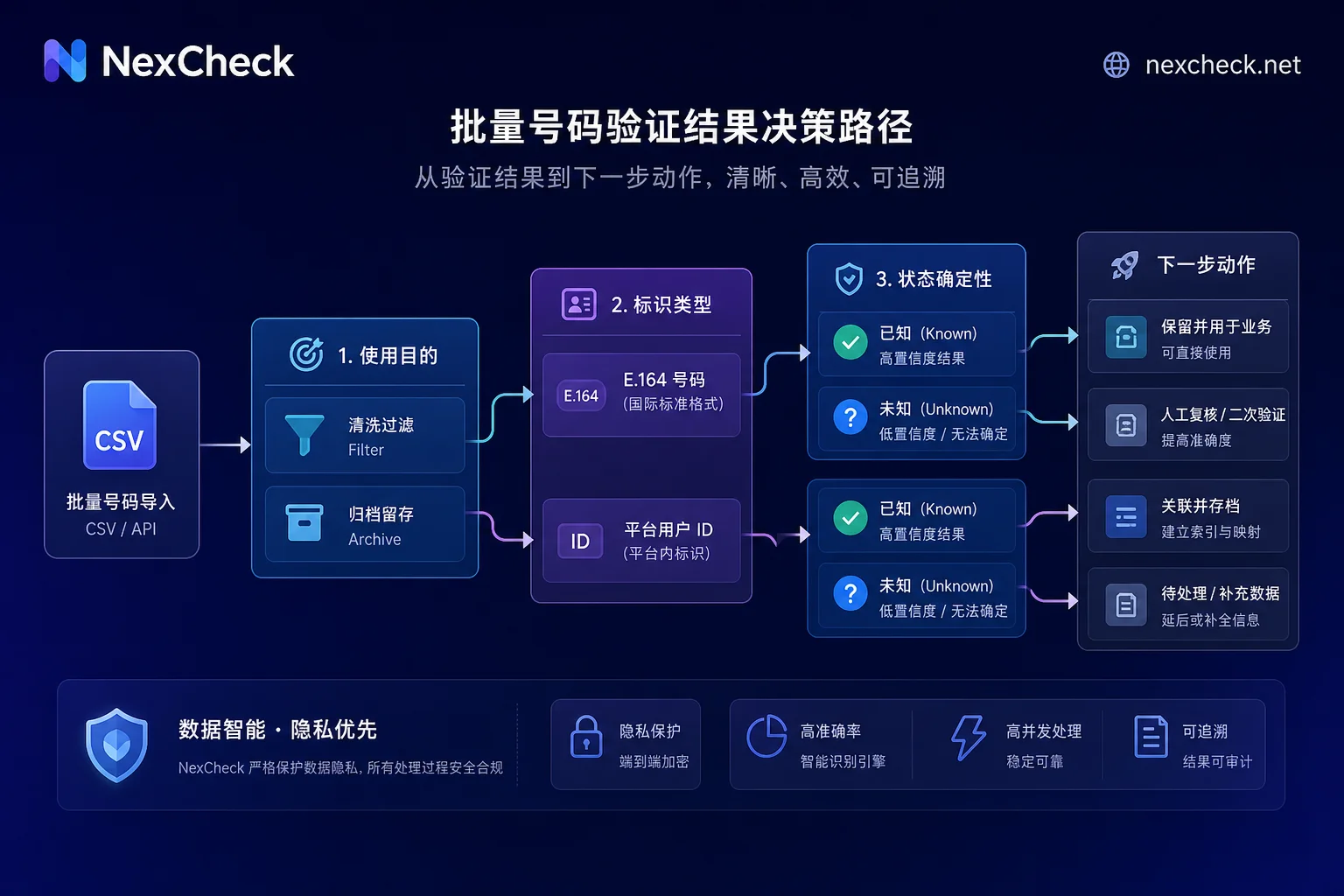
More critical is the ownership of the identifier. If you obtain a standard E.164 international phone number, it can be directly used as the primary key for matching. But if it is an anonymous identifier from platforms like WhatsApp (e.g., @lid), it must not be written directly into the phone number field; it needs to enter the reverse lookup and mapping branch. Additionally, records with ambiguous or timeout responses from the API should be marked as "unknown" and placed in a re-check queue, strictly avoiding classifying them as "invalid" and inadvertently deleting potentially valuable leads.
When Inbound Messages Only Carry @lid Without Phone Number, How to Restore Identity
WhatsApp's introduction of the @lid mechanism aims to protect user privacy, but it creates an identification gap for enterprises. When customer service or marketing systems receive a message with @lid, they cannot directly obtain the corresponding phone number, making it impossible to automatically associate this interaction record with an existing customer profile in the CRM.
To solve this identity gap, service providers offer the ability to look up phone numbers from LIDs. According to Whapi.Cloud's changelog from late August 2026, this reverse lookup operation has been officially counted towards the phone check limit. This means each attempt to resolve an anonymous ID back to a plaintext number will consume corresponding API quota.
When handling such requests, differentiate error types: if a 404 is returned, the @lid mapping has not been established yet; the system should retain the original @lid awaiting future completion rather than discarding the record. If a 502 is returned, it is usually a temporary gateway failure; retry with exponential backoff and do not modify the number's status column. In either case, both request types must be separately counted in the quota reconciliation table to prevent accidentally exhausting detection quota due to frequent retries on unmapped records.
131026 Should Not Be Compressed into One Tier: Split Causes into Independent Fields
Meta's official documentation states that error code 131026 (Message Undeliverable) does not merely indicate "number not registered." Its causes are complex, including the number not being a WhatsApp account, the user not accepting the latest terms of service and privacy policy, or the client version being too old. If these situations are all compressed into "invalid," a large number of users who could be activated through guidance to update or re-authorize would be mistakenly killed.
The correct approach for database storage is to mark the status column only as "unconfirmed reachable," while adding "error code" and "cause remark" columns in the database to fully preserve the original information returned by the API. This provides a basis for subsequent fine-grained operations, such as sending compliance reminders to users who have not accepted the terms, rather than directly blocking them.
Note the distinction with error code 131056, which represents pairing rate limit exceeded (each receiver limited to 1 message per 6 seconds, with a burst limit of 45 messages that borrows future quota). This is a contact pacing control issue, not a number status issue, and should never be mixed into the number status column to avoid interfering with the assessment of customer quality.
Unknown Tier in Its Own Column: Two Possibilities for PHONE_NOT_OCCUPIED
Telegram's privacy mechanism further proves the flaw of "binary logic." When calling the contacts.resolvePhone API, if the target number is not registered, or if the user has enabled the inputPrivacyKeyAddedByPhone restriction (prohibiting lookup by phone number) in privacy settings, the API uniformly returns PHONE_NOT_OCCUPIED.
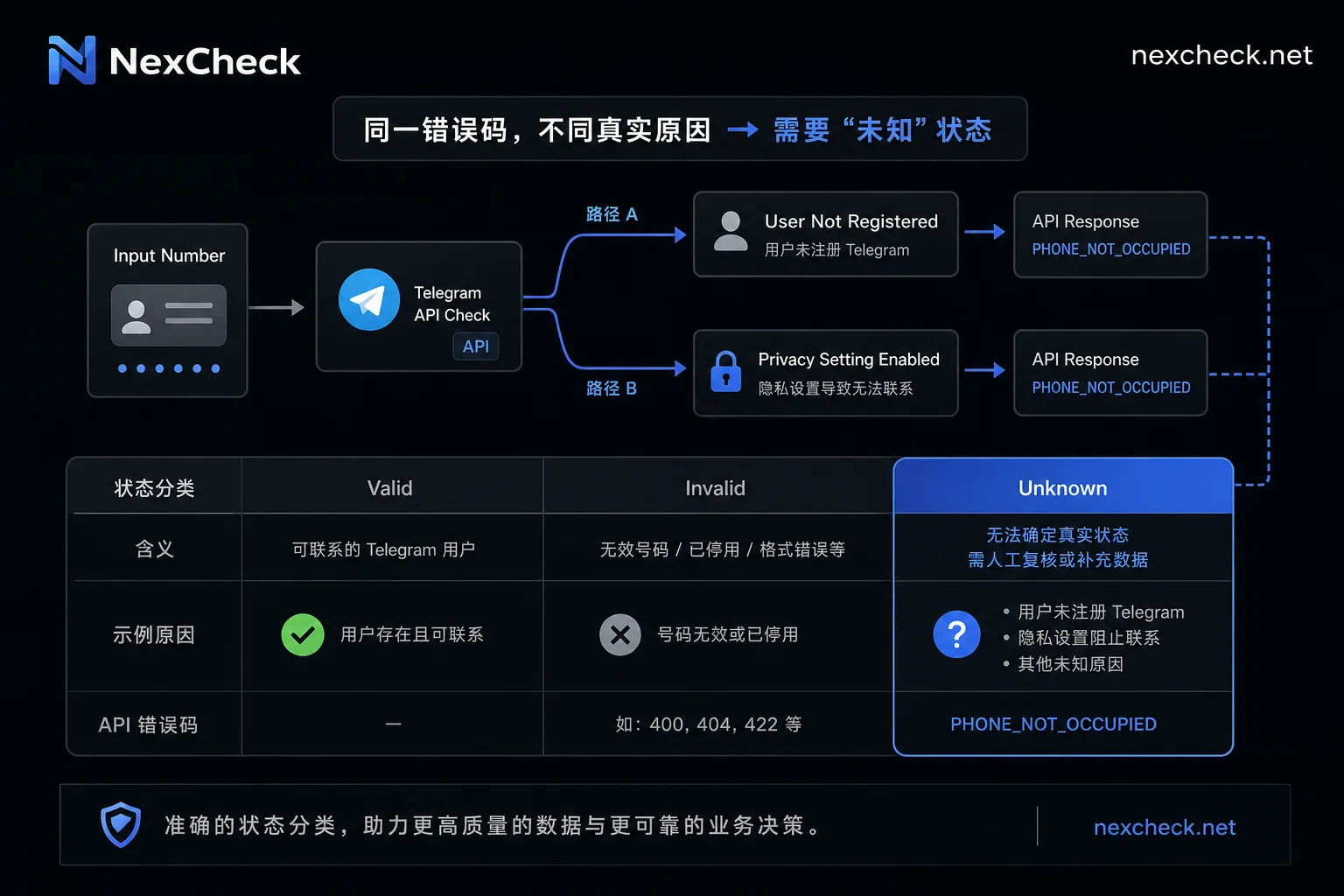
Due to Telegram's official requirement for clients to implement rate limiting, with a maximum of one call every 3 seconds, and bots not having permission to execute this method, bulk probing is costly and has blind spots. Therefore, in database design, "registered," "unregistered," and "unknown" must be three independent values in the same column.
For the "unknown" tier, it is recommended to record the returned raw message and detection time, and include it in a periodic re-check schedule. When generating CRM outreach lists, exclude "unknown" users by default, but retain their recallable status in the system for re-evaluation after privacy policy changes or technical breakthroughs, to avoid losing potential customers due to over-cleaning.
Cross-Platform Merge Primary Key: Correspondence Between E.164 and Platform IDs
In multi-platform data fusion scenarios, the normalized E.164 number is typically used as the primary key for cross-platform merging, while platform-specific internal IDs (e.g., WhatsApp @lid, Telegram UID) serve as secondary keys to maintain identity mapping for specific channels. The raw ID and batch number from import are used to trace back the data source row, ensuring data lineage clarity.
However, number normalization is not about blindly removing leading zeros. Although most countries follow the rule "remove the leading zero after the country code," geographic area codes in countries like Italy inherently start with 0, and forcibly removing them would invalidate the number. Some African countries' latest numbering plans also have exceptions. Therefore, rewriting rules must be maintained in a configuration table per country, and the "raw number" column should always be kept in the database, so that there is evidence if normalization logic goes wrong.
Decision Order When Results Conflict Between Platforms and Master Field Table
When the same person shows conflicting verification results on different platforms, a clear decision order is needed. First, compare detection timestamps and take the latest conclusion; if timestamps are close, store results in separate platform columns without forcing a single global status; if one side is "unknown" and the other is a definitive conclusion, defer to the definitive conclusion and retain the unknown record; if two definitive conclusions are mutually exclusive (e.g., A platform shows unregistered while B platform shows active), follow the principle that "this platform's result only affects outreach decisions on that platform" and do not synchronize statuses across platforms.
To achieve efficient data alignment, NexCheck supports batch filtering across 100+ platforms including WhatsApp, Telegram, LINE, Viber, and Zalo, and offers RESTful APIs for batch submission, real-time queries, and webhook callbacks. Through its standardized output, multi-platform statuses can be presented using the same set of field conventions, significantly reducing the engineering burden of developing custom field conversion scripts and primary key alignment. However, it should be clarified that verification results only address registration existence, do not replace user Opt-in authorization, and do not guarantee that platform rules will not change.
| Field Name | Data Type | Description and Example |
|---|---|---|
| normalized_phone | String | E.164 format, e.g., +8613800138000 |
| raw_phone | String | Raw format as imported, preserving leading zeros etc. |
| platform | Enum | whatsapp, telegram, line, etc. |
| status | Enum | registered, unregistered, unknown |
| internal_id | String | Platform internal identifier, e.g., @lid or Telegram UID |
| error_code | Integer | Raw API error code, e.g., 131026 |
| checked_at | Timestamp | Most recent check time |
| batch_id | String | Batch number for traceability |
Post-Write-Back Checklist for CRM: Sampling, Re-check Schedule, and Authorization Confirmation
After data write-back, perform the following verification steps to ensure quality:
- Completeness Check: Randomly sample records to confirm each has platform, status, detection timestamp, and batch number; isolate any records with missing fields immediately.
- Manual Review: Manually compare a fixed proportion (suggested team-defined, e.g., 5%) of both "registered" and "unregistered" records, recording the inconsistency rate between two rounds of detection to calibrate tool accuracy.
- Unknown Tier Management: List "unknown" records separately in a re-check queue, retrying by batch rather than one by one to avoid triggering API rate limits.
- Mapping Tracking: For unmapped @lid records, retain the original identifier and monitor the success rate of subsequent mapping, while cross-checking that reverse lookup counts match detection quota consumption.
- Authorization Confirmation: Before generating the final outreach list, re-verify that these numbers have valid Opt-in authorization sources and timestamps to ensure compliance.
Common Questions
What Columns Should the Result Table of Bulk Phone Verification Include?
Besides the base phone number, it must include platform identifier, three-tier status (registered/unregistered/unknown), raw error code, detection timestamp, and batch number. If WhatsApp is involved, also reserve an internal ID (@lid) field. Missing any item could lead to failure to trace reasons or matching issues in subsequent CRM merging.
When Receiving Messages Only with Anonymous Identifiers (No Phone Number), How to Match with Existing Customer Records?
Use the LID-to-phone number reverse lookup interface provided by the service provider. Note that this operation typically counts against detection quota. A 404 response indicates no mapping exists; keep the @lid awaiting updates. A 502 means network fluctuation; retry without changing status. Do not discard unmapped records directly.
Will Reverse Lookup of Phone Numbers Consume Extra Detection Quota?
Yes, according to industry updates from August 2026, LID-to-phone number queries are included in the phone check limit. High-frequency reverse lookup retries will accelerate quota consumption. It is recommended to implement exponential backoff retries for 502 errors at the code level, and deduplicate handling for 404 errors to avoid ineffective polling.
Should Undetectable Numbers Be Written into CRM? What Status Should They Have?
They should be written but marked as "unknown" or "pending." Do not misclassify them as "unregistered" and remove them. In CRM, such numbers are excluded from automated outreach by default but should be retained in the database with a scheduled re-check plan, as privacy settings or user behavior may change over time.
If the Same Person Has Inconsistent Statuses Across Two Platforms, Which One Prevails?
There is no absolute "correct" one; follow the principle of "platform isolation." That is, WhatsApp status only affects WhatsApp outreach, and Telegram status only affects Telegram outreach. If merging is necessary, prioritize the record with the more recent detection time. If times are close and there is a conflict, display each platform's status separately in CRM for manual judgment by operations staff.
How to Merge Multi-Platform Screening Results into One Customer?
Merge using the normalized E.164 number as the primary key. Be sure to retain each platform's original IDs and verification statuses. For heterogeneous data from different tools, first standardize field conventions (e.g., convert True/False to Registered/Unregistered), then perform an Upsert operation to avoid new data overwriting valid historical statuses.



Comments(0)