 NexCheck-筛号平台
In cross-border e-commerce, overseas private domain operations, and foreign trade customer follow-up, WhatsApp number screening is no longer as simple as "checking whether a number is registered." As Meta continues to tighten the billing model and risk control mechanisms of the WhatsApp Business Platform (API), extensive list importing is causing marketing and operations teams to pay double the price.
On one hand, since the full implementation of per-message pricing, especially after October 2026 when service messages within the 24-hour customer service window (exceeding the monthly free quota) and utility templates are also included in per-message billing, every invalid reach directly consumes budget; on the other hand, Meta's marketing message frequency capping (common error 131049) and number quality rating (Green/Yellow/Red light mechanism) are extremely sensitive to low-interaction, high-complaint lists. If the list is mixed with a large number of long-term inactive zombie numbers, peer marketing numbers, or restricted banned numbers, not only will the delivery rate plummet, but it will also quickly lower the quality rating of the sending account, and even trigger downgrade or account ban.
Previously we discussed the difference between WhatsApp number screening and number verification and the three-layer logic of WhatsApp invalid number handling. This article will skip basic concepts and directly start from the latest billing and risk control pain points, decomposing a practical WhatsApp deep screening solution covering channel selection, abnormal account mine removal (zombie/advertising/banned numbers), four-dimensional activity layering, and profile completion.
I. Why is "registration-only" WhatsApp number screening no longer sufficient?
Many teams still habitually run only the most basic "registration/activation detection" before WhatsApp bulk messaging or CRM import. However, under current ecosystem rules, the mere fact of "registered" can still lead to the following three high-frequency traps:
- Sleeping zombie numbers drag down interaction rate and frequency capping quota
Although many numbers registered WhatsApp in early years, the owners have long abandoned it or switched to other main social apps. Meta's frequency capping algorithm focuses on evaluating the recipient's recent reading and interaction performance. Sending marketing templates to a large number of "zombie numbers" that never open the app not only wastes per-message fees but also makes the system judge your marketing content as unattractive, thereby tightening subsequent sending quotas. - Advertising and peer numbers pollute the private domain pool
Leads collected from exhibitions, public yellow pages, or social media comment sections often contain a large number of peer work numbers, auto-reply bots, or advertising numbers specifically sending gray industry information. Spending sales reps' energy or automation processes on these numbers not only yields zero conversion but also easily causes reverse harassment. - Banned accounts and high-risk number sources trigger关联 risk control
Some second-hand recycled numbers or numbers that were previously abused have their WhatsApp accounts already in a banned state; and in heavily regulated markets such as the United States (since 2025, Meta has suspended sending marketing templates to+1US numbers, retaining only utility and authentication messages), if the list contains high-risk and perennial complaint numbers, blindly initiating outreach can easily lead to compliance troubles.
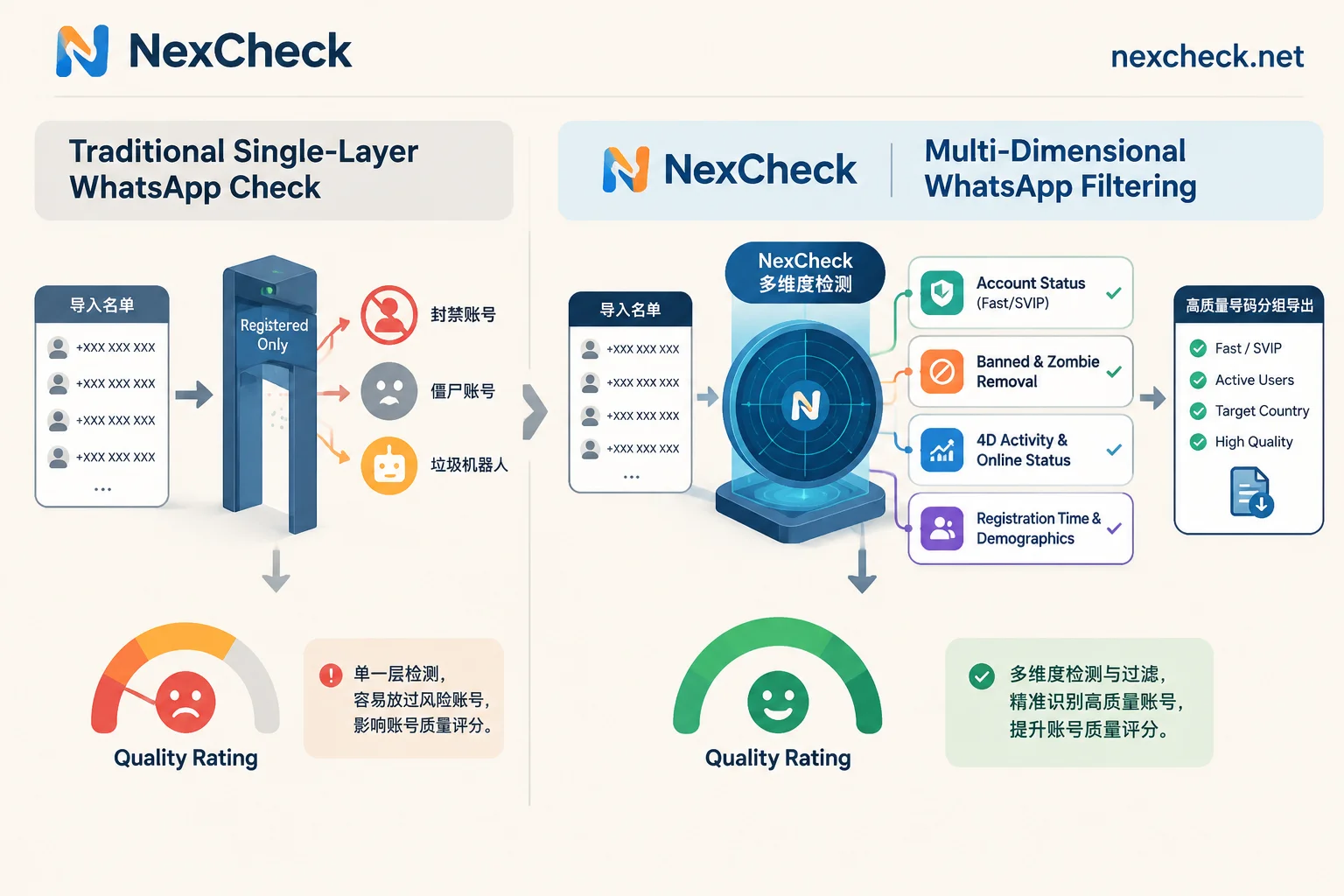
Therefore, modern WhatsApp number screening must upgrade from a single "yes/no judgment" to a combined funnel of "status mine removal + activity layering + attribute profiling."
II. Panoramic breakdown of NexCheck WhatsApp number screening core detection items
For customer lists at different stages and from different sources, NexCheck's WhatsApp number screening section provides fine-grained detection items and multiple independent channels. Before formulating a cleaning strategy, it is recommended to first understand the scope and applicable scenarios of each detection item:
| Detection Dimension | Included Items / Channel Types | Core Function and Result Scope Description |
|---|---|---|
| 1. Account Registration Detection | Fast Channel, SVIP Channel | Determine whether the target mobile number has registered and activated WhatsApp. Different channels differ in detection speed, coverage, and result scope, suitable for flexible selection based on list size and timeliness requirements. |
| 2. Risk and Anomaly Mine Removal | Banned Accounts, Zombie and Advertising Numbers | Banned Accounts: Identify numbers currently restricted or banned by WhatsApp officially; Zombie and Advertising Numbers: Strip out dead numbers with no vital signs for a long time and high-frequency marketing/bot attribute accounts. |
| 3. Multi-dimensional Activity Detection | Ecosystem Four-Dimensional Activity, Channel-Specific Activity, Instant Online | Evaluate the account's recent real usage depth and online status, helping operations teams distinguish "high-frequency main numbers" from "low-frequency marginal numbers." |
| 4. Account Seniority and Profile | Registration Time, Gender-Age (SVIP / Channel 1 / Channel 2) | Registration Time: View the account registration node, assisting in identifying newly registered numbers or old numbers accumulated over years; Gender-Age: Provide multiple channels to supplement user demographic characteristics on demand, for personalized script grouping. |
| 5. Community Resource Screening | Group Link Screening | Perform batch validity and status screening on WhatsApp group invite links collected. |
Objective boundary explanation regarding privacy fields:
Many operators ask whether they can 100% obtain the avatar, personal signature, or precise "Last Seen" of all numbers. It must be clear that under WhatsApp's privacy architecture, avatar, signature, and last seen time are directly restricted by the user's personal privacy settings. If the target user sets these fields to "Nobody" or "My Contacts Only" on the client, no external compliant detection tool can forcibly read them. This is why we recommend combining NexCheck's Ecosystem Four-Dimensional Activity, Channel-Specific Activity, and Zombie Number Identification for comprehensive judgment, rather than betting on a single field constrained by privacy switches.
III. Four steps to build a high-ROI WhatsApp batch number screening workflow
When you have a batch of tens of thousands of raw customer leads, running all advanced detection items at once is obviously not economical. Since the NexCheck console supports the "Continue Detection" function to directly use the valid results passed from the previous round as input for the next item (new task and per-item billing), the most budget-saving approach is to adopt the "layer-by-layer funnel method."
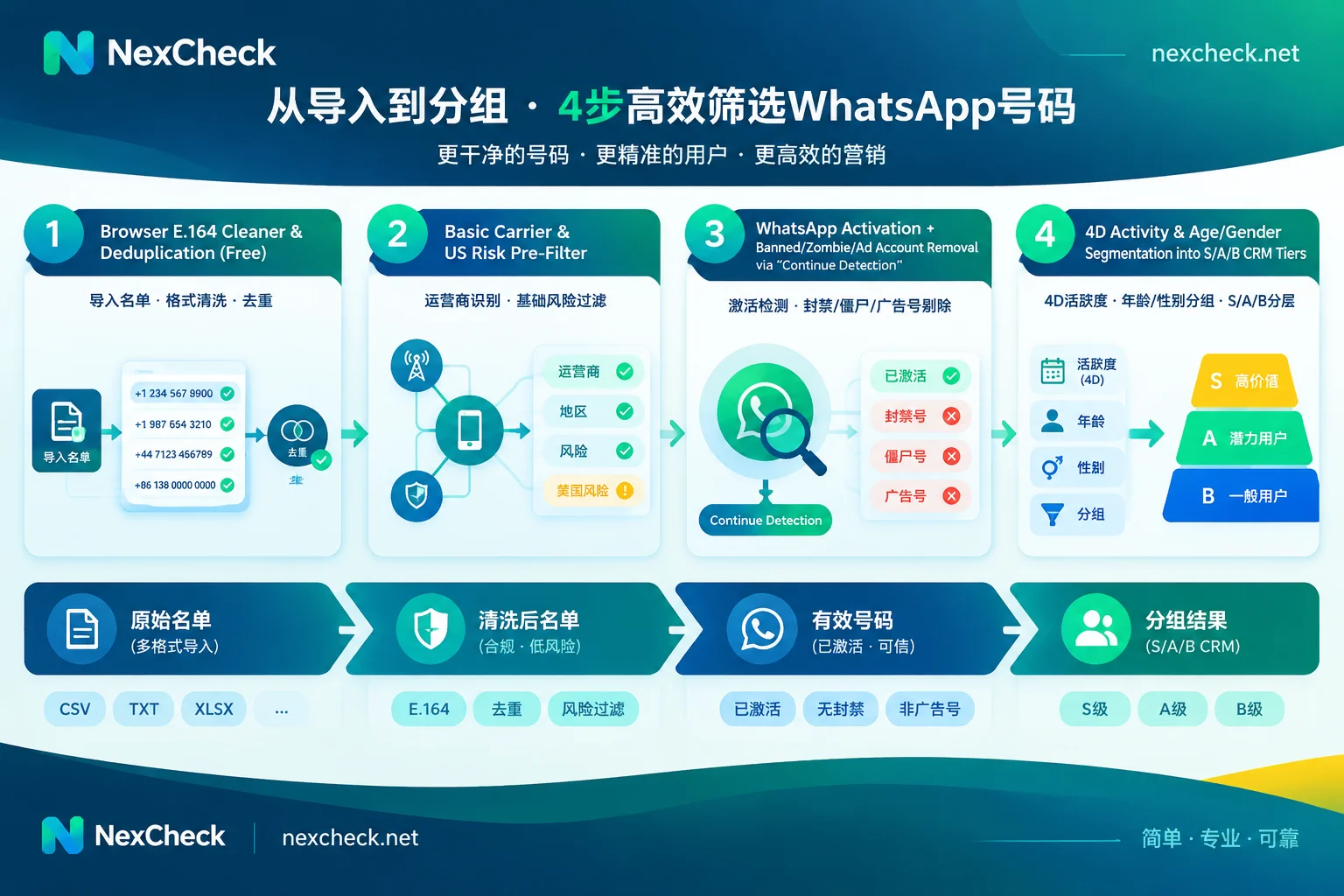
Step 1: Free local browser format cleaning and deduplication (0 cost prerequisite)
The console's paid batch tasks do not automatically deduplicate for you—if the uploaded table contains 500 duplicate numbers, the system will still detect and bill per item. In addition, mixed multi-country lists often suffer from missing + numbers, missing country codes, or residual local leading 0 (for details, refer to How to write WhatsApp international area code format and How to deduplicate WhatsApp numbers).
Before creating a formal task, open the NexCheck Number Cleaning Tool:
- Purely local processing: Data is cleaned directly in the browser, no paid task is created.
- One-click standardization: Automatically identify separators, fill in country codes according to the selected default country, uniformly convert to standard E.164 format and complete deduplication, while providing a report of valid, invalid, and duplicate counts.
- Note: Please be sure to confirm the true country of ownership of the list before selecting the default country, otherwise numbers with correct format but wrong country will be generated.
Step 2: Basic risk control fallback (for specific high-risk markets or unknown old number sources)
If your list is purchased from unknown third-party channels, or the target market is concentrated in North America, it is recommended to first perform a bottom-layer filter in the Number Basic Detection Matrix before checking WhatsApp:
- Run empty number and on/off detection to directly remove dead numbers deactivated at the carrier level;
- If it is a US (
+1) list, be sure to first screen for US high-risk and complaint numbers, removing the hard bones that easily trigger legal and channel ban risks in advance.
Step 3: WhatsApp registration preliminary screening + banned/zombie/advertising number mine removal
After obtaining a clean E.164 list, enter the console and upload the file according to the Quick Start Guide (supports CSV, TXT, or XLSX, one number per line in the first column, and select the corresponding country or region):
- First round run "Registration Detection": According to your needs for speed and coverage, choose Fast Channel or SVIP Channel. After detection, all invalid numbers not registered on WhatsApp will be directly separated.
- Click "Continue Detection" to overlay mine removal items: Only for the valid pool of "registered" numbers screened out in the first round, seamlessly connect Banned Account detection and Zombie and Advertising Number detection. This step helps you thoroughly clean out those hidden dangers that "occupy registered quotas but are actually officially banned or have no real human interaction value" before major promotions.
Step 4: Activity and profile layering to match differentiated outreach strategies
After the first three steps, what remains are real WhatsApp accounts that are registered and in normal status. At this point, according to business budget, use Ecosystem Four-Dimensional Activity / Channel-Specific Activity / Instant Online and Registration Time, Gender-Age for final layered tagging:
- S-level (high activity / instant online + matching target gender-age):
This is the golden customer pool. Prioritize assigning to human sales reps for 1-on-1 deep icebreaking, or push high-ticket key marketing templates to ensure the first wave of outreach achieves high read and reply rates, stabilizing the enterprise account's Green Quality Rating. - A-level (normal activity + stable old numbers with longer registration time):
Include in regular automated marketing sequences, control sending frequency, and avoid the131049frequency capping red line. - B-level (very short registration time new numbers / marginal low-activity numbers):
Combined with the Registration Time field, if a batch of numbers is found to be all newly registered recently, be alert to whether they are batch-generated short-term accounts, and it is recommended to downgrade processing or only test on low-cost channels.
IV. How to revitalize those "unregistered" numbers screened out by WhatsApp?
In cross-border business, a mobile number not registered on WhatsApp absolutely does not mean the customer does not exist. Mainstream communication habits vary greatly across countries and regions. If you discard leads attracted by expensive advertising simply because they "did not register WhatsApp," it will cause serious lead waste.
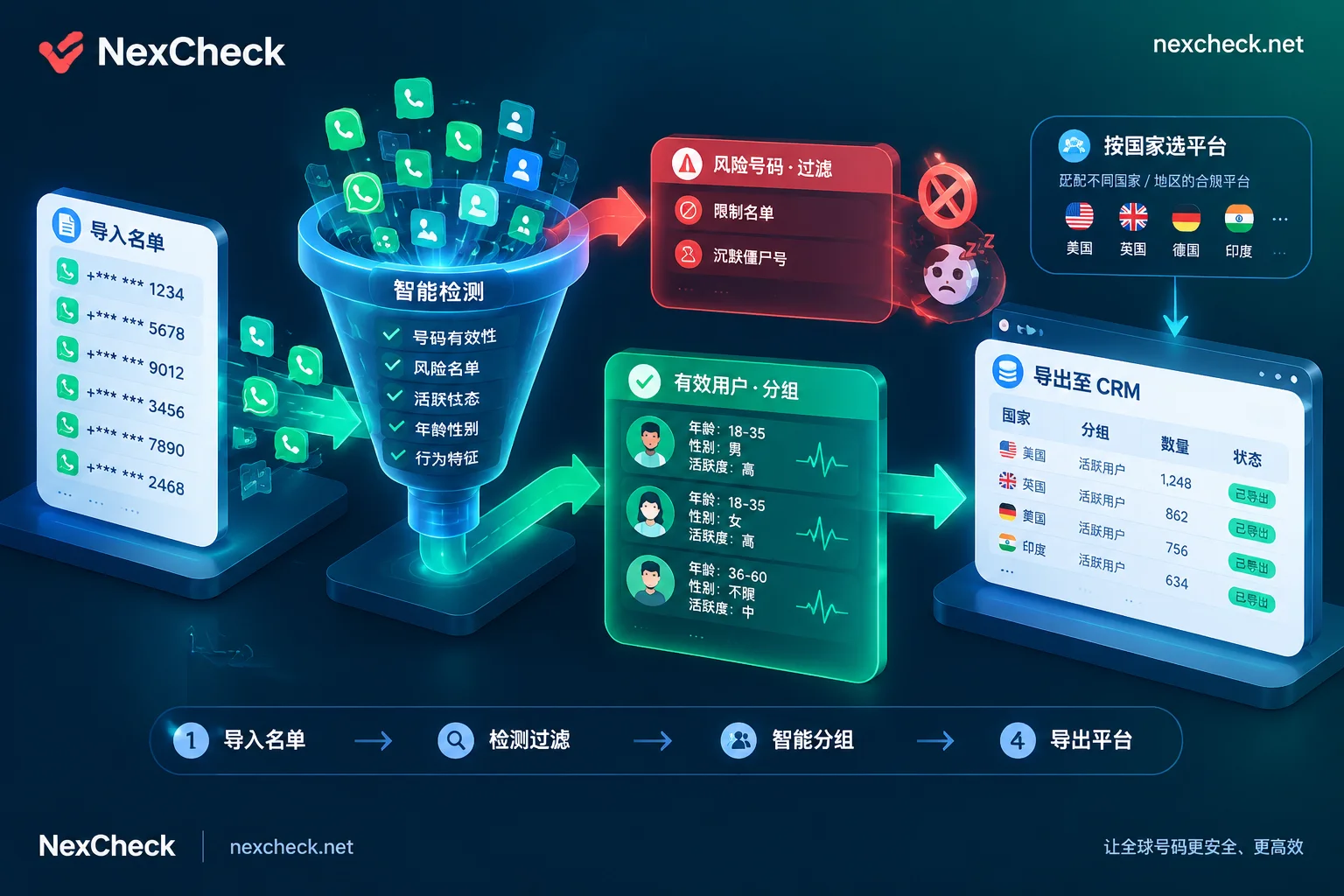
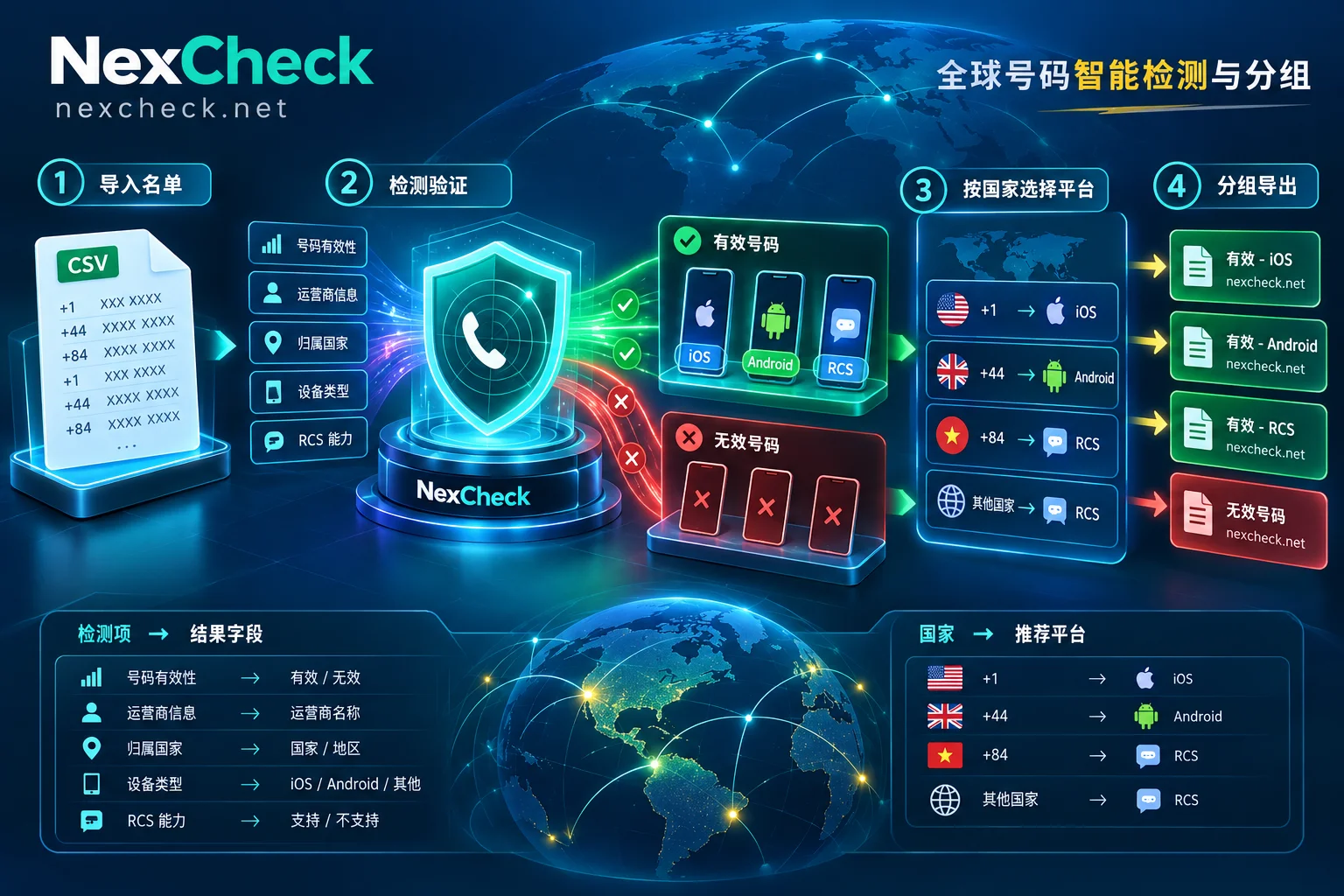
With NexCheck's Global Regional Number Screening Solutions and Supported Platforms Overview, you can transfer the real mobile numbers classified as "invalid (unregistered)" in WhatsApp screening to the local second main platform for secondary revitalization:
- Southeast Asia and Japan, South Korea, Taiwan markets: Vietnamese lists can be transferred to Zalo number screening (note that Vietnamese numbers need to be in the 10-digit new format); Japanese, Thai, and Taiwan, China lists can be connected to LINE number screening; Philippine and Eastern European markets can check Viber number screening.
- Pan-outbound, crypto finance, and tech audiences: Lists of unregistered WhatsApp numbers can be sent with one click to Telegram number screening to detect whether they have TG and view 3/7/15-day activity tiers.
- North American and European markets: Use Facebook number screening to check social media binding status, or use iOS blue label detection and RCS detection for Apple/Android native rich media message routing.
V. Operational practice: API automation integration, data retention, and compliance boundaries
When integrating WhatsApp number screening into the team's daily SOP, there are several engineering and compliance details to note:
- CRM and business system API integration
If you want to verify WhatsApp status in real time at the moment a user submits a form on the landing page, or automatically send tens of thousands of lists through an asynchronous queue for inspection and write back to CRM (for detailed process, refer to How to integrate WhatsApp batch verification API), NexCheck provides a standard RESTful API supporting batch submission, real-time query, and Webhook result pushback. Since interface addresses, authentication parameters, and callback formats are not shown in public manuals, developers can directly contact official Telegram customer service @nextipkf for integration support after completing free registration. - Timely export and archive of results
NexCheck adopts a prepaid per-item deduction model (deducted at task creation; if the task fails, automatic full refund; specific unit price and single upload quantity range for each item are subject to the console's real-time price list). Special reminder: the task center cannot be used as a long-term archive network drive, the platform does not promise permanent retention days for result files; meanwhile, screening results only reflect the platform's objective status at the moment of query. After each task, be sure to download and export the results immediately and synchronize back to your own local database or CRM. - Clear functional boundaries and data privacy
NexCheck focuses on front-end data verification and screening, and does not provide message mass sending, seat outreach, account purchase, or verification code receiving services. The customer list you upload is entirely your own asset (you as the data controller must ensure the source and purpose of the numbers are legal and compliant), the platform processes data only within the scope of executing detection tasks, and never sells or uses it to build a number database for external sales. You can view, export, or completely delete task records at any time in the console (see Privacy Policy).
Conclusion
In an era where WhatsApp per-message billing is fully implemented and frequency capping and quality ratings are increasingly stringent, screening before outreach is no longer an "option" but a necessary defense line to protect sender account security and control marketing ROI. Go to NexCheck free account registration now, and with the online user manual, conduct a deep WhatsApp health check and layered cleaning for your customer list.


Comments(0)