 NexCheck-筛号平台
The first step in number registration status detection is to unify the phone numbers in the pending list into the E.164 international format (including country and region codes), then hand them over to an independent detection service to probe. This step determines whether all subsequent detection results are comparable and usable. It is important to emphasize: this capability is not in Meta's official WhatsApp Cloud API messaging interface, but rather an independent data cleansing step in the outreach chain (see Meta official docs).
Conclusion First: Number Registration Status Detection Is Possible, But Not in the Official Messaging API
Number registration status detection is doable, but it cannot be handled by Meta's official WhatsApp Cloud API. Meta's developer documentation (updated August 2026) positions the Cloud API as an enterprise business messaging and template interaction channel; its registration and phone_numbers interfaces are only for managing your own business sender numbers (see the Business phone numbers page, updated May 2026), and do not provide a public interface to traverse or query whether any third-party number is registered. So if you are looking for an "official number lookup interface," the answer is: it doesn't exist. Solutions on the market claiming to "bulk check numbers using the Cloud API" confuse the difference between official interfaces and third-party probing.
The correct approach is to place the detection service before data ingestion and sending: first complete format cleaning and registration status detection, then combine with an authorized list for tiered outreach. This is also the standard workflow commonly used by overseas marketing data operations teams.
Five Concepts to Clarify: Format Valid, Carrier Active, Registered on Platform, Deliverable, Authorized to Contact
Before starting detection, operations and development personnel need to unify five layers of concepts to avoid equating "detected as registered" directly with "can send messages." These five layers are produced by different steps and have very different meanings.
| Concept Layer | Meaning | Produced By | What the Result Field Represents |
|---|---|---|---|
| Format Valid | The number conforms to E.164 international format, includes correct country code and number length | Normalization tool or manual check | Number can proceed to the next detection step |
| Carrier Active | The number is valid on the current carrier network, not deactivated or canceled | Carrier data or third-party detection service (partial coverage) | Number may be reachable via SMS services |
| Registered on Platform | The number has been activated on a platform (e.g., WhatsApp) | Independent number detection service | Number can receive messages on that platform |
| Deliverable in Chain | The number can be routed and messages delivered normally on the platform (not blocked or ignored by the user) | Platform-side logic, difficult to fully predict in detection | Sending may succeed or fail |
| Authorized to Contact | User has explicitly agreed to receive your business messages (Opt-in) | Business compliance records | Sending does not violate official policies |
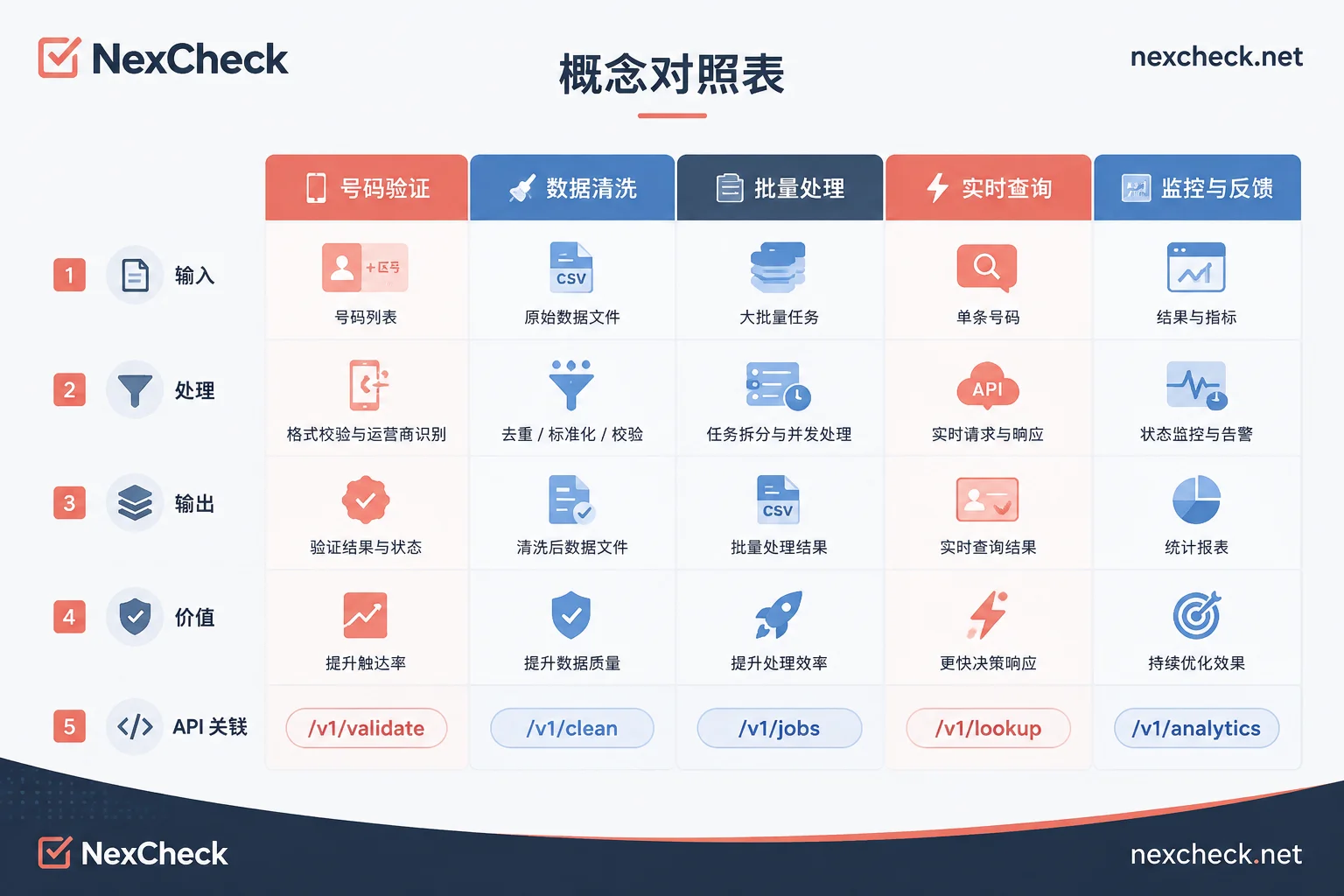
The layers of format validity and carrier activity belong to the category of phone number validity detection, which are two separate judgments from platform registration status. Many marketing incidents stem from passing the first two or three layers and then assuming the fifth layer of authorization exists. In reality, being registered on a platform only means the user once activated WhatsApp with that number, not that they are willing to receive your marketing messages.
Boundaries of Meta Official Interfaces: What Cloud API Manages, What It Doesn't Provide
Cloud API's number management interfaces are only for registering, deregistering, and migrating your own sender numbers; they do not provide status checks for any third-party number. In other words, you cannot know whether a stranger's phone number is registered on WhatsApp through official interfaces.
The fundamental difference between third-party detection services and official interfaces lies in data sources: official interfaces point to enterprise internal configuration data, while third-party services are based on public status probing on the platform side. It should be noted that the specific implementation paths of third-party detection services vary, and Meta's official documentation does not disclose how platform-side status is probed externally. Therefore, this article does not conclude on specific probing methods; readers should rely on the service provider's own API documentation. Compliant third-party services can only return "registered or valid," cannot promise 100% accuracy, and cannot provide user activity time, Last Seen, or read status (these are protected by user privacy settings).
Number Access Prerequisites: E.164 Normalization, Personal Version Number Deregistration and Migration Restrictions
According to official requirements (see Business phone numbers page, updated May 2026), sender numbers integrated with Cloud API must comply with E.164 format, and numbers already activated on WhatsApp personal or Business App cannot be used directly with Cloud API; they must first be deregistered or migrated. This restriction also applies to the pending list: if the list contains personal version numbers, detection results may be inaccurate, and subsequent integration may be blocked.
Practical advice: in the normalization step, add the correct country code for each number (e.g., China +86, US +1, Indonesia +62), and remove spaces, parentheses, and leading zeros. Numbers with invalid formats should be removed or marked directly, not entering the detection queue.
From Raw List to Usable List: Complete Order of Normalization, Dedup, Detection, and Tiering
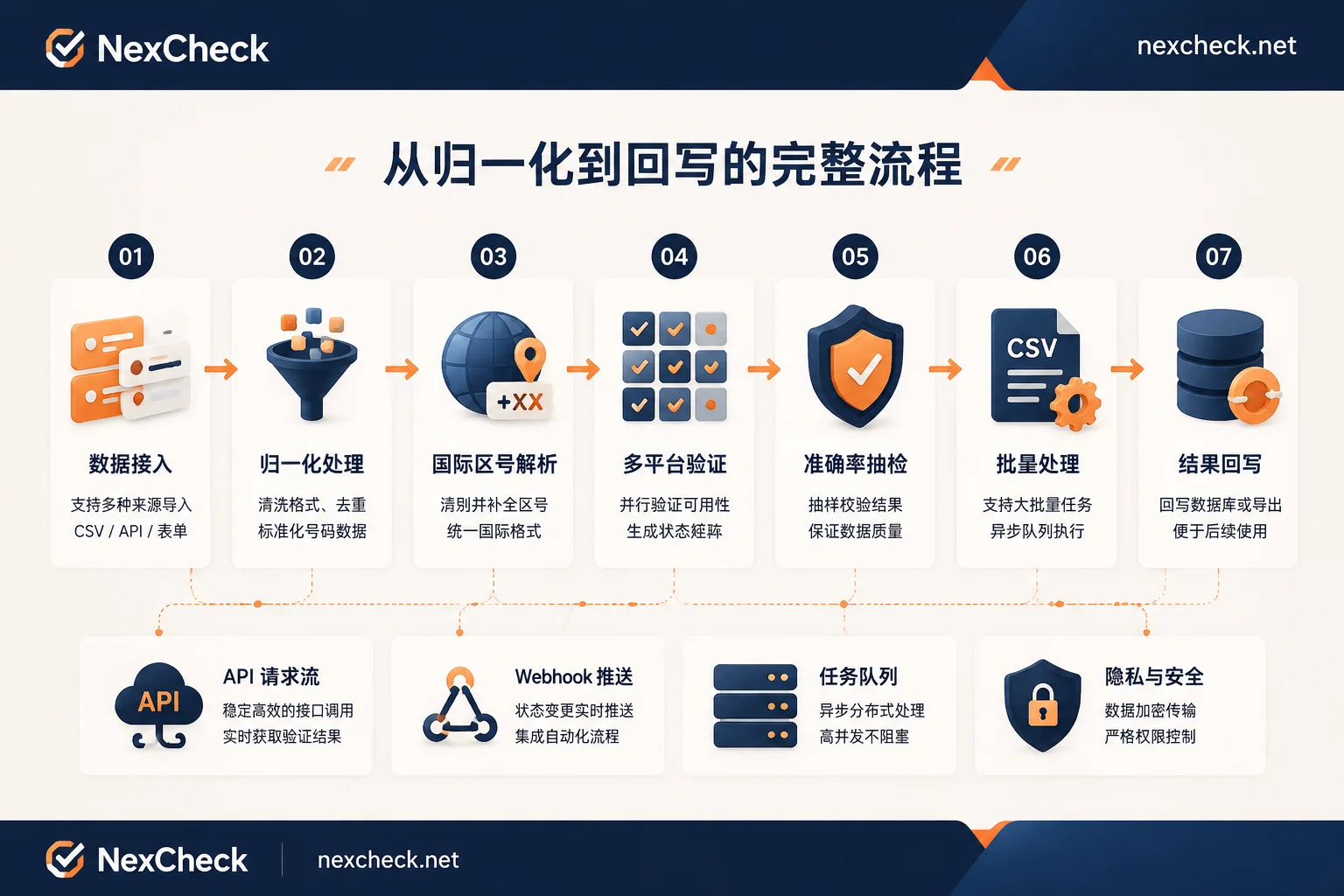
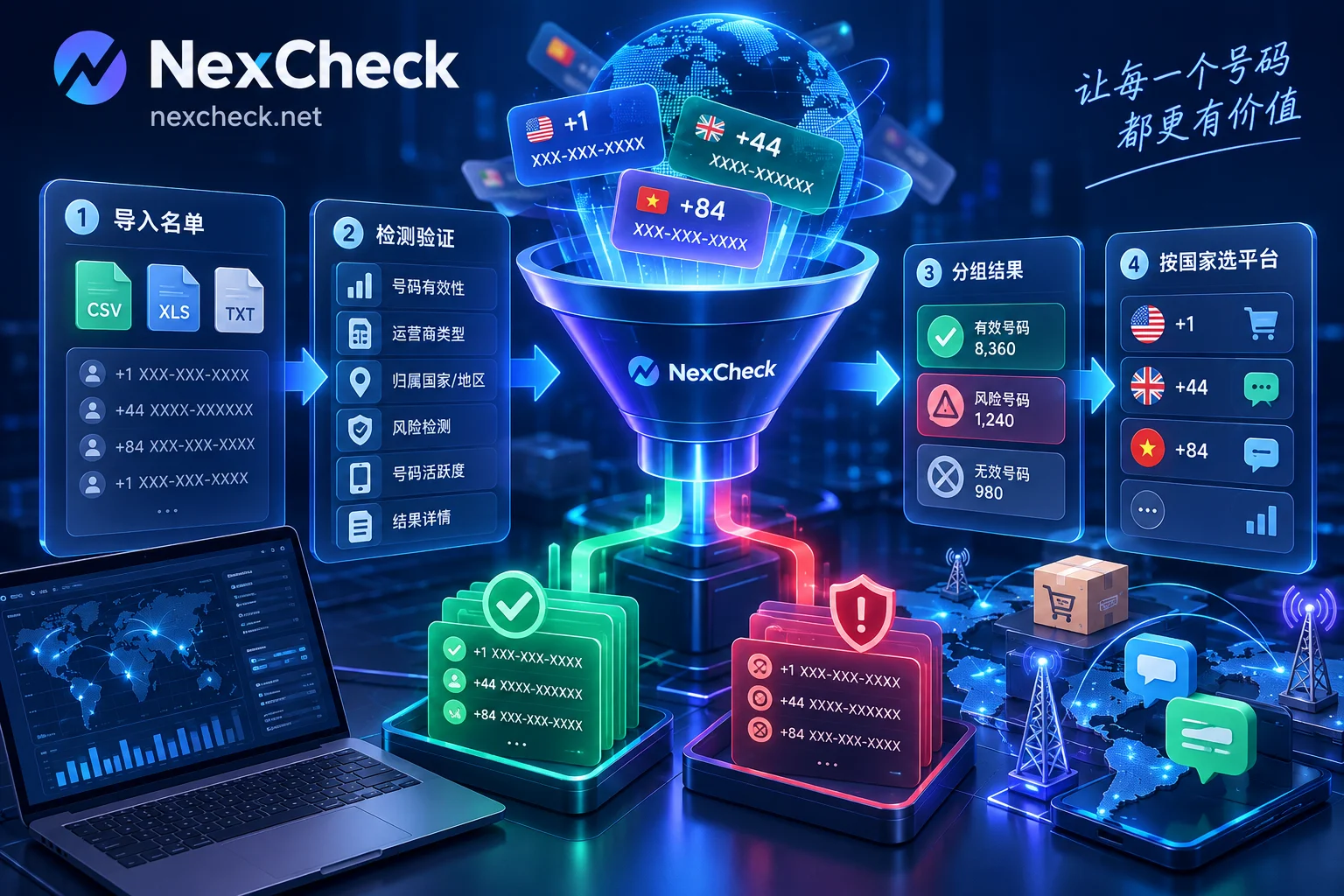
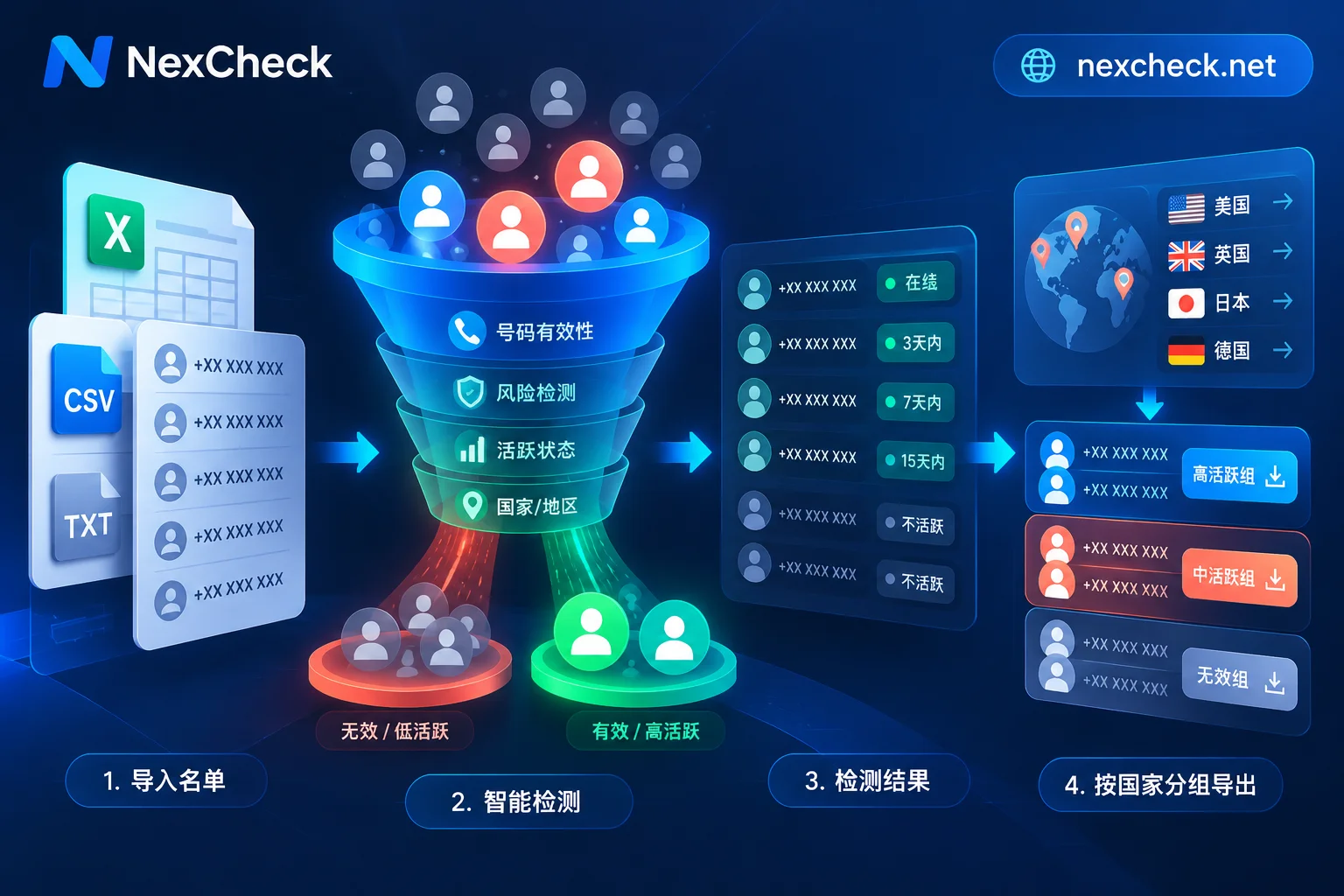
The complete implementation process is recommended to follow this order, with clear inputs and outputs at each step:
- Raw List: Usually CSV or TXT, containing a phone number column, possibly mixed formats.
- E.164 Normalization: Unify country codes, remove separators, produce a standardized number table. After normalization, first conduct phone number validity detection to confirm the number is active and correctly formatted, then proceed to platform registration status detection.
- Deduplication: Deduplicate based on the normalized numbers to avoid repeated detection and repeated outreach.
- Platform Registration Status Detection: Call an independent number detection service (e.g., NexCheck), which can cover WhatsApp, Telegram, LINE, Viber, Zalo, and 100+ platforms, supporting batch submission and webhook callbacks.
- Tiered Export: Based on detection results, export into three categories: "registered", "not registered", and "invalid format".
- CRM Write-back: Write results back to the customer management system, mark the number status for future strategies.
For automated workflows, NexCheck's RESTful API provides batch submission, real-time queries, and webhook callbacks, which can integrate with your data pipeline; the web-based batch processing is suitable for manually cleaning small batches of lists. Unified output of multi-platform results reduces field conversion costs between multiple tools. But note that detection capability only handles "existence," does not replace Opt-in authorization, and does not change the compliance requirements of the official messaging channel.
Result Spot-check and Misjudgment Handling: Why "Detected and Can Send" Is Wrong
Detection results are probabilistic snapshots, not permanent facts. Numbers may be recycled or deregistered, and platform registration status may change. Therefore, after each batch detection, it is recommended to spot-check by proportion: for example, randomly sample 5%-10% of numbers from the "registered" tier and compare with actual sending results to verify delivery success rate. Also, sample the "not registered" tier to recheck, to avoid missed detections due to normalization errors.
Common reasons for detection passing but sending still failing include: number deregistered but status lag, user blocked or ignored, platform risk control interception, template message non-compliance, etc. Therefore, "detected as registered" only means the number can be routed on the platform, not guaranteeing 100% delivery. The purpose of spot-checking is to quantify this deviation and establish a recheck mechanism.
Compliance Prerequisite Before Outreach: Opt-in Authorization Cannot Be Replaced by Detection Results
Meta's business messaging policy requires obtaining user Opt-in authorization before sending business messages, and clearly informing the business name and message type. This authorization is a business and legal credential that no technical detection can replace. Sending high-frequency template messages to unauthorized numbers can lead to a surge in delivery failure rates, user complaints, or blocking, which in turn lowers account Quality Rating, triggering rate limits or even banning.
So the correct outreach decision order should be: first detect registration status, then check the Opt-in authorization list, and only send to numbers that are "registered and authorized." Otherwise, even if detection passes all, you may be restricted due to violations.
Troubleshooting Path: If Detection Passes but Can't Send, Where Might the Problem Be?
Detection passing but sending failing is a common phenomenon. It is recommended to troubleshoot step by step from the following links, each with corresponding self-check actions:
| Link | Possible Cause | Self-check Action |
|---|---|---|
| Number Format | Normalization error, wrong country code | Recheck E.164 format, sample 10% numbers to compare with original data |
| List Timeliness | Detection result expired, number deregistered | Re-detect, or shorten the time between detection and sending |
| Template and Authorization | Template not approved, no Opt-in record | Check template status, verify user authorization records |
| Account Quality | Quality Rating dropped, rate limited | Check Quality Rating, pause sending, improve content relevance and clean invalid numbers |
| Sending Frequency | Exceeding platform frequency limits | Reduce sending frequency, send in batches |
FAQ
How to know if a phone number is registered on WhatsApp?
Currently, it is not possible to query via official APIs, but you can use a third-party compliant detection service. After E.164 normalization, submit the number and get a result indicating whether it is registered. The detection result reflects a snapshot at the time of submission and may change as numbers are recycled or deregistered; no service should promise absolute accuracy.
Can WhatsApp Cloud API check if a number is registered?
No. Cloud API's number management interfaces only cover your own sender numbers; they do not provide status checks for arbitrary numbers. Any claim that official interfaces can bulk check numbers is misleading.
Is a registered number the same as being able to send messages?
No. Being registered only means the number exists, not that the recipient is willing to receive messages. You also need: the user has not blocked, the chain is deliverable, you have obtained Opt-in authorization, and your account Quality Rating is normal.
Can personal WhatsApp numbers be integrated with Cloud API?
No, not directly. According to official requirements, numbers activated on personal or Business App must first be deregistered or migrated, and the number must comply with E.164 format before it can be configured to Cloud API.
How to spot-check the accuracy of number registration status detection?
After each batch detection, randomly sample 5%-10% of numbers from the "registered" tier and compare with actual sending results; also sample the "not registered" tier to avoid missed detections due to normalization errors. Results should be periodically rechecked because number status changes.
In practice, it is recommended to take 500–1000 numbers from your own list for a small batch trial run, perform normalization and registration status detection, compare tier results with actual delivery rates, and then decide whether to solidify this step into the data ingestion process.
The descriptions in this article about Cloud API capability scope, E.164 requirements, Opt-in, and Quality Rating are based on Meta developer documentation from the same domain (overview and phone-numbers pages), without referencing third-party data; platform interfaces and policies may change, so readers should refer to the latest Meta developer documentation before implementation.


Comments(0)