 NexCheck-筛号平台
Phone number validity checking should be done layer by layer, in four steps: whether the E.164 format is valid, whether the line type is mobile or landline/VoIP, whether the carrier network is active, and whether there is a registration identifier on the target social platform—each layer proves different things, and mixing them up can lead to "valid format but can't send." You have a batch of overseas customers' phone numbers and are preparing to import them into WhatsApp or an SMS platform for outreach, but you're not sure if these numbers actually work. Meta's WhatsApp Cloud API documentation (updated June 2026) explicitly requires obtaining user Opt-in authorization before outreach, and the sending address must be in whatsapp:<E.164> format; Twilio's E.164 guide (viewed April 2026) explains the boundaries of format validation from a telecom standard perspective—format validity does not mean the number is active, nor does it mean it is registered on any platform. Breaking down these four layers for verification is currently the more reliable approach to number cleaning. Below, we go through each layer.
First, break down "valid": four-level criteria for phone number validity checking
Many people interpret "valid" as "can be reached" or "registered." In reality, validity checking has four levels, and the conclusions are not interchangeable. The following comparison table is worth pinning next to your desk:
| Layer | What it checks | What it proves | What it does NOT prove |
|---|---|---|---|
| Layer 1: Format validity | Whether it conforms to E.164 encoding rules | The number format is standardized and can be used for subsequent processing | The number actually exists, carrier is active, platform registration |
| Layer 2: Line type | Whether the number is mobile, landline, or VoIP | Basic attributes of the number, predicting outreach methods | The number is currently active, belongs to a user |
| Layer 3: Carrier reachability | Whether the number is active on the carrier network (HLR) | The number is not empty or deactivated | The number is registered on a social platform, user will see it |
| Layer 4: Platform registration | Whether there is a registration identifier on WhatsApp/LINE etc. | The number has a registration identifier on the target platform | User activity, read receipts, Opt-in authorization, or guaranteed delivery |
Passing format verification only resolves Layer 1. There are three more hurdles before true "reachability."
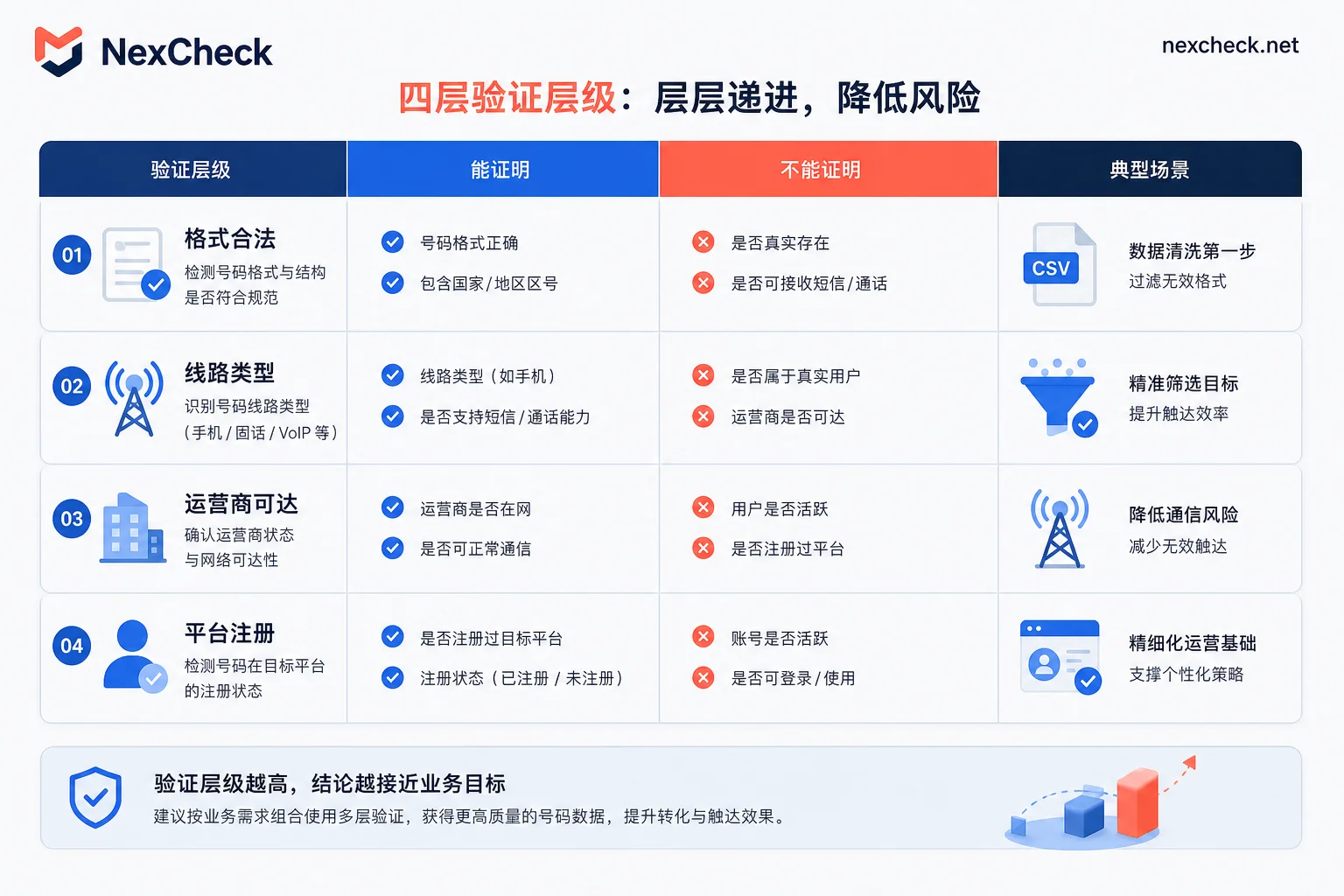
Read this table row by row—first confirm what this layer can prove, then look at the right column "does NOT prove" to avoid using the previous layer's conclusion for the next layer.
Layer 1: E.164 syntax normalization—15-digit limit, country code, and how to handle leading zeros
According to Twilio's official E.164 documentation (viewed April 30, 2026), the total length of an international number cannot exceed 15 digits, including a 1 to 3-digit country code, and the national significant number cannot retain leading zeros. For example, China Mobile's 13800138000 has the international format +8613800138000, and the leading 0 must be removed.
In practice, the numbers you receive often look like this: (415) 555-2671, 00 86 138 0013 8000, +1-123-456-7890, or even Excel scientific notation turning 13800138000 into 1.38E+10. Normalization requires four steps:
- Remove spaces, parentheses, hyphens;
- Replace leading
00with+; - Depending on the country code, remove the national trunk prefix
0; - Uniformly add
+and verify the total length does not exceed 15 digits.
If the length exceeds 15 digits after normalization, it's likely a country code misidentification or leading zeros not fully removed. It's recommended to use a libphonenumber library or write regex validation to produce the standard +国家码+号码 format. But remember: format validity is just an encoding-level conclusion, not proof that the number can be reached.
Layer 2: Line type identification—why Mobile, landline, and VoIP must be separated
Checking line type tells you whether the number is mobile, landline, or VoIP. Why distinguish? Because different line types have completely different outreach paths: SMS might directly fail on landlines, social platforms like WhatsApp basically only recognize mobile numbers, and VoIP numbers are often flagged in risk control.
How to tell if a phone number is a VoIP number? Common methods include looking up number ranges or querying carrier databases; many number cleaning APIs return line type as a basic field. If your goal is WhatsApp outreach, it's recommended to separate landline and VoIP into different buckets, and not mix them with mobile numbers when judging "valid." Dial testing can only serve as a supplementary reference, as different carriers and virtual number providers behave differently, so it shouldn't be a deciding factor.
But note that line type only describes the number's attributes; it does not mean the number is currently active, nor does it indicate registration on any platform. A VoIP number might be registered but the user stopped using it long ago; a landline might be forwarded to a mobile. So this layer's conclusion should be used cautiously.
Layer 3: Carrier reachability—what HLR queries can and cannot answer
The third layer is carrier network-level query, commonly using HLR Lookup (Home Location Register query) or similar line status checks. It answers: is this number in "active" state on the carrier network?
Using HLR-type checks helps you filter out empty numbers, deactivated numbers, and canceled numbers—this is the core step in batch cleaning. But its boundaries are also clear:
- Active ≠ User will see it: The number is on the network, but the user may have abandoned it;
- Active ≠ Registered on platform: The number may never have received a WhatsApp verification code;
- Number portability and roaming can affect conclusion stability: HLR data is delayed, and detection results are time-sensitive, requiring periodic re-checks.
So, HLR lookup and WhatsApp registration checking are two different things: the former queries the carrier network, the latter queries application-layer registration status. But the latter requires the former as a pre-filter because a non-existent number cannot be registered on any platform.
Layer 4: Social platform registration status—registration ≠ active ≠ consent
Application-layer checking answers: does this number have a registration identifier on the target platform? For example, when you import into WhatsApp, the platform returns "registered" or "not registered." This layer is the key to whether you can actually send messages.
It's crucial to emphasize here: registration, activity, and consent are three completely different concepts.
- Registration: The number once had an account on the platform, but may have been abandoned;
- Activity: The user logged in recently; this is online status, which commercial screening platforms typically cannot access;
- Consent: The user explicitly authorized you to send them messages; this is the prerequisite for outreach.
According to NexCheck's official product description (as viewed at the time of writing), its RESTful API supports batch submission, real-time query, and webhook callbacks, and can check registration status on WhatsApp, LINE, Telegram, etc. But note that it can only obtain public registration identifiers, not online status, read receipts, or chat content—those fall under platform privacy protection. Using this layer's result only tells you "this number has an account on the platform." Whether the user wants to engage depends on your content and authorization.
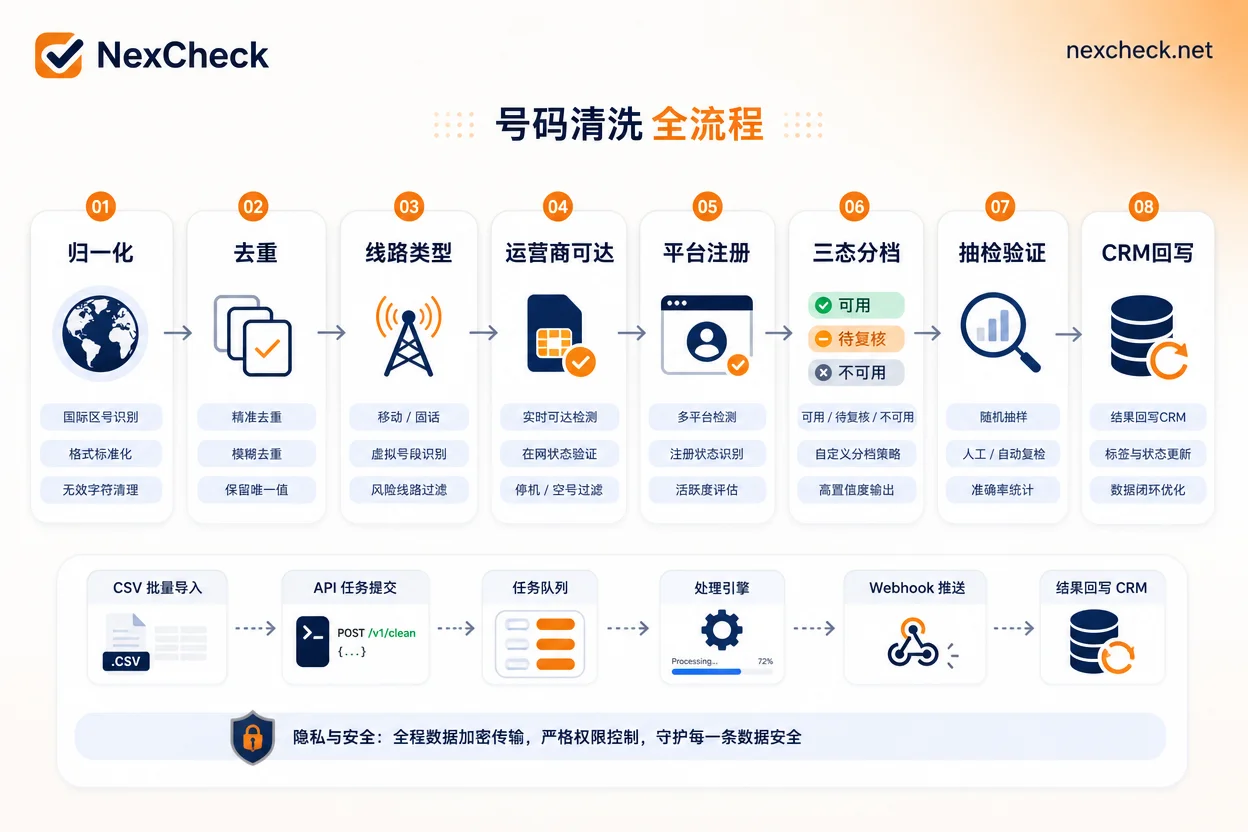
The flowchart is in mandatory order from left to right: numbers that fail a step do not proceed to the next; final output is categorized into three states.
Stringing the four layers into a cleaning process: deduplication, categorized output, and spot-check ratios
In a production pipeline, the ideal process for phone number validity checking is:
- Format validation and normalization (produce
+E.164); - Deduplication: use the normalized number as a unique key;
- Line type identification, separating mobile/landline/VoIP;
- Carrier reachability check (HLR-type), removing empty and deactivated numbers;
- Platform registration status check (e.g., WhatsApp), which can be run in batch using tools like NexCheck, but it only resolves application-layer registration identifiers, not the third layer's carrier reachability conclusion;
- Three-state output:
valid(registered),inactive(not registered),risk-review(requires manual review); - Spot-check: manually verify a random sample from each category;
- CRM write-back: record detection time, layer, and conclusion.
Categorization instead of binary judgment is because risky number ranges (like newly released or ported numbers) need separate handling. For spot-checks, start with an experience-based ratio: randomly sample 100-200 records per category, record the number range distribution; if a category's rejection ratio is abnormally high, go back and check whether normalization is correct.
Compliance and quality prerequisites before outreach: Opt-in authorization and account quality rating risks
Meta official documentation (viewed June 2026) explicitly requires: before outreach via WhatsApp Cloud API, you must obtain explicit user Opt-in, and the sending address must be in whatsapp:<E.164> format. If your list hasn't been authorized, even if all numbers pass checks, don't send—otherwise, not only will you face fees and delivery failures, but you'll also quickly lower your WABA quality rating. With a low rating, your account may be throttled or even banned.
Therefore, the cleaning process described here applies to scenarios where you already have authorization or own the data, not for blind sending to unknown numbers. The proper operation is: clean first, then market to valid numbers, and ensure Opt-in records are auditable before each outreach.
Troubleshooting checklist when results don't match actual delivery: which layer to check first
When a phone number validity check shows valid but sending still fails, use the table below to locate the issue layer:
| Symptom | Suspected layer | Validation action |
|---|---|---|
| Format correct but can't send (error code not "not registered") | Layer 2: line type | Confirm it's a mobile number; for landline/VoIP, use SMS verification |
| Number shows active, but WhatsApp says unknown | Layer 4: platform registration | Re-check with a WhatsApp detection API |
| Detection result invalid after a week | Layer 3: carrier reachability | Set up periodic re-checks, e.g., monthly |
| High false-positive rate after batch cleaning | Layer 1: normalization | Spot-check country code and leading zero handling consistency |
Remember, results are time-sensitive. HLR data and platform registration can change, so you need periodic re-checks.
FAQ
E.164 format correct but can't send—why?
It's likely a line type or platform registration issue. Format correctness only means encoding is compliant. If the number is VoIP or landline, WhatsApp may reject it outright; if the number is active on the carrier network but not registered on WhatsApp, delivery will also fail. Check the last two layers first.
What's the difference between HLR lookup and WhatsApp registration check?
HLR lookup is carrier network-level, answering "is the number active"; WhatsApp registration check is application-layer, answering "is the number registered on WhatsApp." They operate at different layers and cannot replace each other. Typically, HLR filtering for empty numbers comes first, then registration check.
How to tell if a phone number is a VoIP number?
Use line type lookup. Number cleaning APIs generally return Mobile/Landline/VoIP. If unsure, you can also do a test call; VoIP numbers often have specific ringback tones or can't connect, but dial testing should only be auxiliary, as different carriers and virtual providers behave differently—so it shouldn't be a deciding factor.
Are empty number checks and number activity checks the same?
No. Empty number checks are HLR-type, checking carrier active status; activity checks are application-layer, checking if the user is recently using the number. HLR returning active doesn't mean the user is active, and user activity doesn't mean you have authorization—don't mix the three layers.
How to spot-check accuracy after batch number cleaning?
Randomly sample 100-200 records per category, re-verify with independent tools, and do manual dial tests or send test messages. Calculate the consistency rate. If it's significantly below your historical baseline (e.g., 95%), check your normalization rules or switch detection APIs.



Comments(0)