 NexCheck-筛号平台
You have a list of customer phone numbers and want to know which ones have WhatsApp and which are business accounts. Don't rush to throw the whole file into a filtering tool. Follow this order, and the same list will yield far more usable results:
- Deduplicate and clean empty values
- Group by country code and normalize to E.164
- Basic number validation to remove invalid, landline, and abnormal numbers
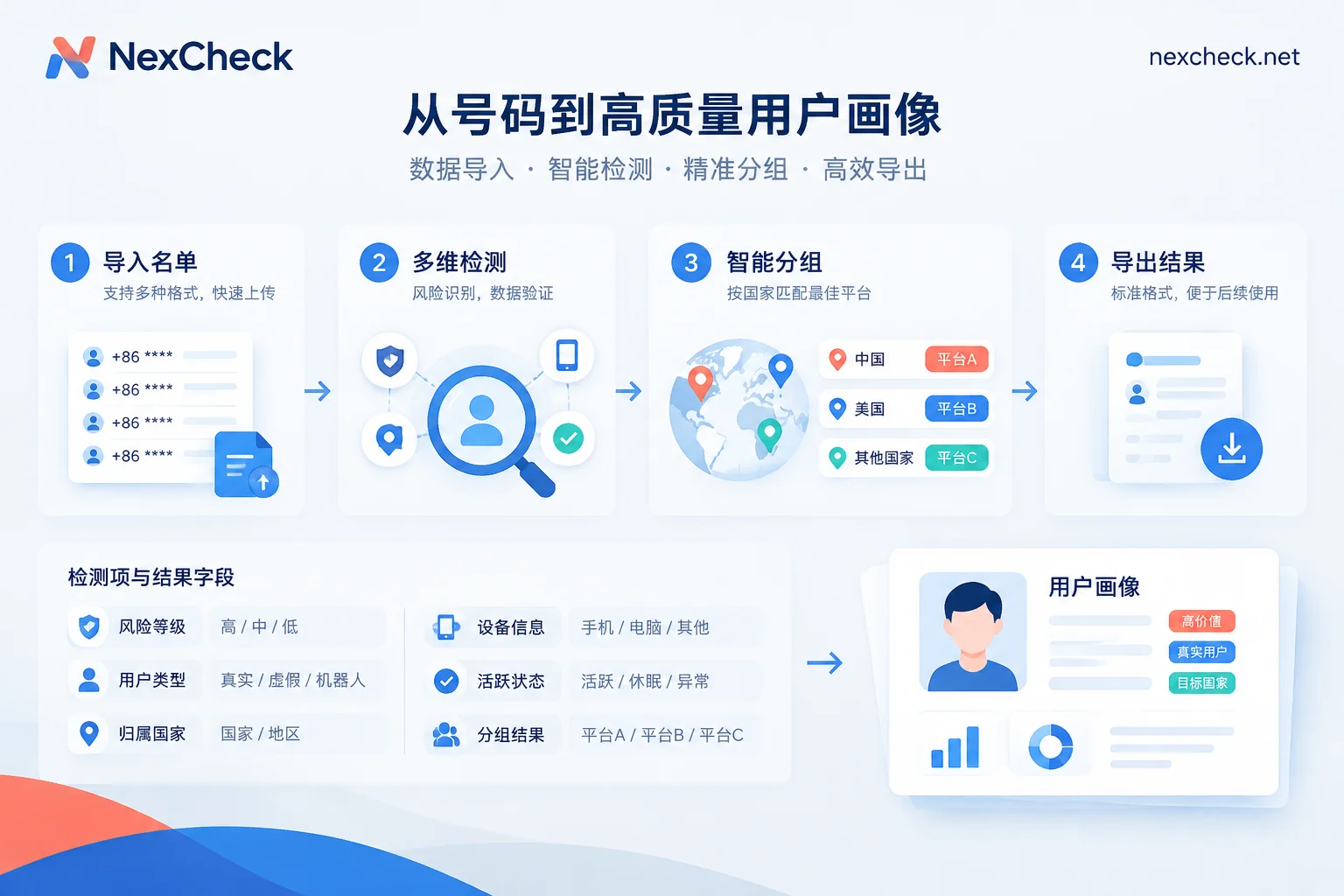
- Submit for WhatsApp platform check (console upload or API)
- Store results in multiple columns rather than just one “valid/invalid”
- Write back to CRM and record the check timestamp
Below, we explain what each step actually involves and how to interpret the fields—what you shouldn't conclude even if you have the data. The interpretation rules in step 4 are the most error-prone and have the biggest impact on downstream decisions.
Clean the list first, then talk about detection
Duplicates are the first thing to handle. The same customer might have left their number once on a website form, once at an offline event, and once in a support ticket—three records after merging. Filtering is priced per record, so duplicates mean paying twice. Deduplicate before submitting, not after getting results.
Deduplicate on normalized numbers. +86 138 0013 8000, 008613800138000, and 13800138000 are three different strings; you need to normalize first to truly merge them—so in practice, this step and the next are often done together.
Also clean these dirty data types: Chinese notes mixed into the number column (e.g., “13800138000 (Mr. Wang)”), two numbers in one cell, obviously incomplete numbers, and pure placeholders (eleven 1s, sequential digits). Pay special attention to Excel: if the number column is stored as numeric, leading zeros are dropped and long numbers become scientific notation. Set the entire column to text format before exporting to CSV—this is the most common cause of format errors after upload. For file preparation details, see WhatsApp CSV Filtering: 6 File Preparation Tips Before Upload.
E.164 is not just “add a plus sign”
WhatsApp's requirements for international number format are straightforward: start with a plus sign, followed by country code, area code, and local number, total length no more than 15 digits, remove all spaces, dashes, and parentheses, and remove leading zeros and trunk prefixes that are only needed for local dialing.
Common pitfalls:
- Leading zeros: UK's
07911 123456should be written as+447911123456; that 0 is for local dialing and doesn't belong in international format. Same for most European countries except Germany and Italy. - International prefix: Numbers starting with
00or011should have that entire prefix removed; it cannot coexist with a plus sign. - Argentina: After country code
+54, you need to add9, and remove the15from the local mobile number. - Mexico: After country code
+52, you need to add1. - China: After
+86, do not keep0.
The consequence of non-compliant format is not “inaccurate detection” but the platform directly marking it invalid or failing the task. That “invalid” is caused by your own mistake, not because the number truly doesn't have WhatsApp—if you don't double-check, you're discarding real customers for no reason.
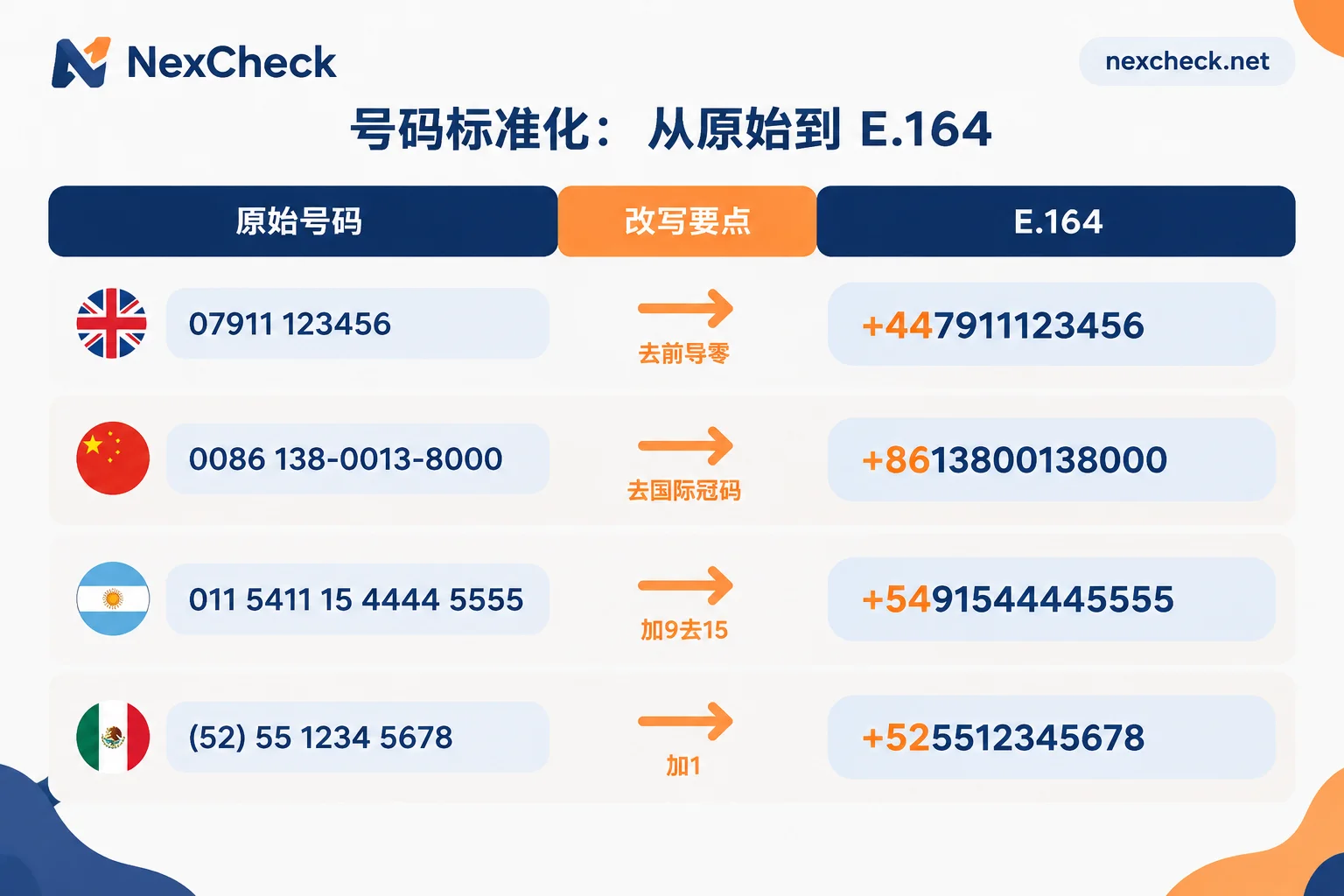
So for a mixed-country list, don't apply one rule across the board. Split by country code first, apply the appropriate rewriting rules to each group, then merge before submitting. If some numbers lack country codes entirely, fill them in using the customer's location field; if you can't, put them in a separate group—don't guess. For specific rewriting rules for various dirty numbers, see How to Normalize to E.164 Before Filtering Overseas Numbers? 4 Types of Dirty Number Rewriting Rules. If you're unsure about a country's number length and local prefix rules, the page Country Number Formats and Major Platforms Comparison is more convenient.
Run basic validation before platform checks
If your list comes from offline QR scans, paper forms, or an old database from years ago, it's wise to insert a basic number validation step: invalid, disconnected, landline, device type, high-risk numbers. The value here is cost savings—eliminate numbers that will never yield results before running the more expensive platform status check.
When you can skip it: if the list consists of numbers that have placed orders with you in the last three months or have passed SMS verification, their telecom-level validity is already confirmed, so you can go straight to platform detection.
What WhatsApp detection can and cannot provide
This section determines how you use the results. Fields fall into two categories.
Deterministic fields:
- Whether WhatsApp is active. This is the main criterion for the entire round of detection and the only field suitable for hard filtering.
- Account type: personal (WhatsApp Messenger) or business (WhatsApp Business). Their registration requirements differ—business accounts can use landlines or fixed phones, while personal accounts only support mobile numbers that can receive SMS or voice. So if a landline in your list is marked as “active,” it's not contradictory; it's likely a business and can be tagged as B2B and routed accordingly.
- Registration time and other platform-available attributes. Exactly which are returned varies by platform.
Fields limited by privacy settings: last seen, online status, profile photo, about (status). These four are controlled by the user's visibility settings, which can be “everyone,” “my contacts,” or “nobody.” No filtering software can bypass content the user has set as private.
Hence a crucial interpretation rule: missing profile photo or no last seen record does not mean the number isn't registered or the user is inactive—it could simply be that they enabled privacy protection. Treating such empty values as “zombie accounts” and bulk-deleting them will harm real customers, and those harmed are often the more privacy-conscious—and typically more valuable—users.
The correct approach: use “whether active” for filtering, account type for routing, and available activity fields for ranking weights. Ranking those with recent activity higher is reasonable; downgrading those without is also fine; but don't use it as a reason for deletion.
Another point: attributes like gender and age are not available from every platform, and the list of detectable items varies by platform, as does the price. Before ordering, confirm which fields are currently available on the specific platform page—the NexCheck WhatsApp detection items and description page lists exactly that. After uploading your list, export grouped by valid and invalid; specific fields are subject to the current list on the page.
Web console or API
Choose based on how often your list appears—no need to overthink:
- One-time or quarterly cleaning: Upload txt/csv via the console, then export grouped by valid and invalid. There's no batch size limit; no need to split files yourself—tens of thousands and hundreds are the same operation.
- Need ongoing CRM integration: Submit via REST API and configure Webhook for result push. Automatically trigger a check and tag new leads when they enter the database—far more reliable than manual periodic export/import.
Developers also need to decide between polling and callback for results. Polling is sufficient for small tasks with acceptable latency; Webhook is better for batch tasks or near-real-time database writes. For trade-offs, see Polling vs. Webhook Callback for Number Detection.
Store results in multiple columns, not a single boolean
Many teams compress detection results into a single is_valid = true/false and write it back to CRM, only to find nothing can be reviewed three months later. We recommend keeping at least these columns:
Original number, E.164 number, country code, whether active, account type, available attribute fields, detection timestamp, task batch ID.
Keep the original number for troubleshooting which rewriting step went wrong. The detection timestamp is especially important—number status changes: users deactivate accounts, change numbers, numbers are recycled by carriers and reassigned, all of which invalidate old results. With timestamps, you can set a rerun schedule. For specific invalidation signals, see How Often to Rerun Batch Number Filtering Results. For multi-column storage design, see Batch Number Validation: Don't Just Look at Valid/Invalid.
When writing back to CRM, use the E.164 number as the matching key, not the original number, otherwise the same customer will be duplicated due to format differences.
A few boundaries not to ignore
The list must be your own customer data; you are responsible for the legality of its source and use. Different jurisdictions have varying interpretations of compliance for “bulk checking and storing platform attributes of unauthorized contacts.” Lists within GDPR scope especially need legal review first—don't assume one process works globally.
“Not active” does not equal customer churn. There is no public threshold for account deactivation or long-term dormancy; after a number is recycled and reassigned, the original customer and the current owner are different people. “Not active” in an old list is better treated as a verification signal before re-engagement, not a conclusive customer status.
Detection items and prices are subject to change; refer to the platform's current price list and don't budget based on records from six months ago.
Following the six steps above, you'll have a list with unified format, clear grouping, and timestamps—not a mix of true and false “valid numbers.” If it's your first time, start with two to three thousand representative numbers to confirm that field meanings match your understanding, then submit the full list. The page What Each Platform Can Check can help you first confirm which platform to filter for your target market.



Comments(0)