 NexCheck-筛号平台
How to batch WhatsApp number checks depends on the queue throughput and retry allowance on the detection side, not the sending quota. The sending rhythm has a separate pairing rate limit budget, and the two must be calculated separately. In Meta's official WhatsApp Business Platform documentation from 2026-08-04, the pairing rate limit is specified as 1 message per 6 seconds per user (about 10 messages per minute), with a burst of up to 45 messages but borrowing from future quota.
Two Rate Lines Must Be Separated: Detection Batch Throttling and Sending Batch Pairing Rate Limits
The most common scheduling mistake is treating detection concurrency as the sending budget. The detection side is constrained by the task concurrency and backoff strategy of the detection service you use, while the sending side is constrained by the platform's official pairing rate limit for the "business number—individual user" relationship. The units, triggering targets, and penalties are completely different: Multi-platform number detection rate limit comparison can be used as a reference:
| Dimension | Detection Batch | Sending Batch |
|---|---|---|
| Unit | Task concurrency, single-batch completion time | Per-message interval, burst limit |
| Trigger Target | The API limit of the detection service | The pairing relationship between the same business number and the same user |
| Penalty | Detection API returns rate-limit response, requiring backoff and retry | Directly triggers error code 131056, persistent violations lead to downgrade |
| Budget Source | The task queue throughput of the chosen service | Platform pairing rate limit (1 per 6 seconds, burst 45) |
Concurrency refers to the number of tasks in flight, while throughput refers to the actual completion rate per second. Use throughput for batching calculations and concurrency for backoff control. Keeping this distinction clear makes the three calculations below solid.
Calculation 1: How to Batch WhatsApp Number Checks—Batch Size, Concurrency Limit, and Retry Allowance
The batching criteria for WhatsApp number checks is not "the more the better," but rather derive the batch size from "acceptable single-batch completion time × stable throughput," while mandatorily reserving a retry allowance for failures. It is recommended to reserve 5%–10% of the batch size for retries rather than running the quota to the max.
- Batch size = (stable throughput × desired single-batch completion time) × (1 − retry allowance ratio)
- For example: stable throughput is 10 tasks/second, desired completion time is 10 minutes, retry allowance is 10%, then the batch size is about 10 × 600 × 0.9 = 5,400 records. The remaining 10% capacity is reserved for retries after failures, to avoid retries blowing through the batch quota.
Avoid making batches too large, as the combined load of callback aggregation and database writes can stress the processing pipeline. Avoid making them too small, as scheduling overhead may dominate and reduce overall throughput. The specific concurrency and throughput limits depend on the actual rate-limit responses from the detection service you use; this article does not provide unverified fixed values.
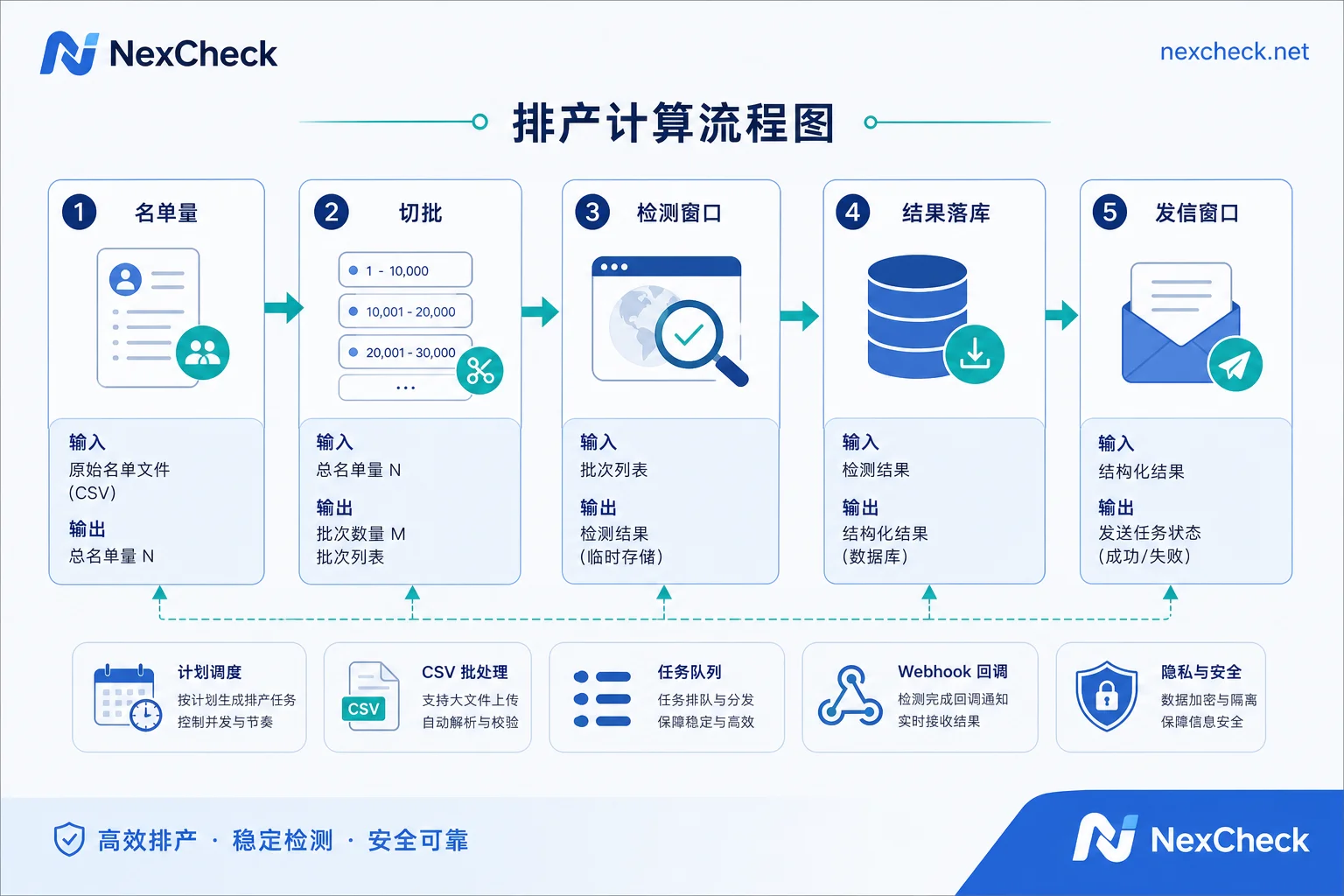
Calculation 2 (Key Section): Pairing Rate of 1 per 6 Seconds and Burst of 45 Borrowing Future Quota
This is the most commonly miscalculated item. The official Meta documentation from 2026-08-04 states that the pairing rate limit for a business number sending messages to the same WhatsApp user is 1 message per 6 seconds (about 10 per minute), with a burst of up to 45 messages but borrowing from future quota. Exceeding the limit triggers error code 131056.
"Borrowing from future quota" means that after using the burst, the available rate for that user is overdrawn in advance. In other words, the burst cannot be planned as normal throughput; the faster you send within that window, the longer you must wait afterward. The formula for the sending window is:
- Per-user sending window = (planned number of messages ÷ 10 messages/min) × 60 seconds
- If you plan to send 3 messages to a single user, you need at least an 18-second window, and you cannot send all 3 messages consecutively immediately after the first (the burst includes these 3 messages, but after using it, you must wait for future quota to recover).
Remember, the pairing rate limit applies to the "business number—individual user" relationship, which is different from the total list size. So even if your list has 50,000 users, the sending rhythm for each user is independent and does not accelerate overall just because of the total volume.
Calculation 3: What 131026, 131056, and 131048 Penalize and Which Parameter to Change
Three error codes correspond to three different parameter adjustments; do not mix them up:
| Error Code | Trigger Scenario | Parameter to Change |
|---|---|---|
| 131026 | Sending to non-WhatsApp users or users who have not accepted the privacy policy | List quality and front-end detection coverage |
| 131056 | Pairing rate exceeded | Sending pace and burst usage |
| 131048 | Account sending behavior is generally restricted by the platform (officially classified as a restriction, with no public detailed criteria) | Overall sending volume pace, template compliance, and opt-in coverage; need to investigate with the WABA backend status |
Meta explicitly states that frequent invalid sending directly downgrades the WABA Quality Rating. This is the starting point for troubleshooting "detection passed but quality rating dropped": detection only solves the 131026 category, not the rate and compliance categories.
Compile a Production Schedule: How to Derive List Size, Detection Window, and Sending Window
Combine the three calculations into a practical production schedule: the window for WhatsApp number batch checking can be computed directly. The derivation order is to set the sending window first, then the detection deadline, rather than starting to think about sending rhythm after detection is complete.
| Input | Example Value | Output | Calculated Value |
|---|---|---|---|
| Total list size | 50,000 records | Batch size | 5,400 records/batch |
| Batch size | 5,400 records | Number of batches | 10 batches (rounded up) |
| Stable throughput | 10 tasks/sec | Detection window | 10 batches × 10 minutes = 100 minutes |
| Retry allowance | 10% | Time to start sending | 100 minutes after detection starts |
| Planned messages per user | 3 messages | Per-user sending window | 18 seconds (3 messages ÷ 10 messages/min) |
| Valid users (assume 80% pass) | 40,000 | Full sending window | Valid users ÷ actual parallel sending capacity × per-user window |
The full window depends on parallel sending capacity, not simply adding per-user windows; the pairing rate limit does not tighten with a larger list. If your sending window is only 2 hours, you need to reduce the planned messages per user to 1 or extend the overall sending period, rather than increasing detection concurrency.
Result Storage: Why the "Unknown" Category Must Be Kept and Retries Go to the Next Batch, Not Immediate Retry
Batch detection results cannot be treated as a binary boolean. The article Three-tier results for social account registration detection explains that registration detection results should be divided into "registered," "not registered," and "unknown." The Telegram official protocol (2026-05-15) provides cross-platform corroboration: contacts.resolvePhone requires a debounce of at least 1 request every 3 seconds, and unregistered users and those with inputPrivacyKeyAddedByPhone privacy protection enabled return exactly the same PHONE_NOT_OCCUPIED, making them indistinguishable.
The resulting general engineering conclusion is that uncertainties due to rate limiting and privacy must be stored as an independent "unknown" category; immediate retries within the same batch will just hit backoff again, so they should be scheduled into the next batch window. Also remember that "number is registered" does not mean "reachable," let alone "authorized."
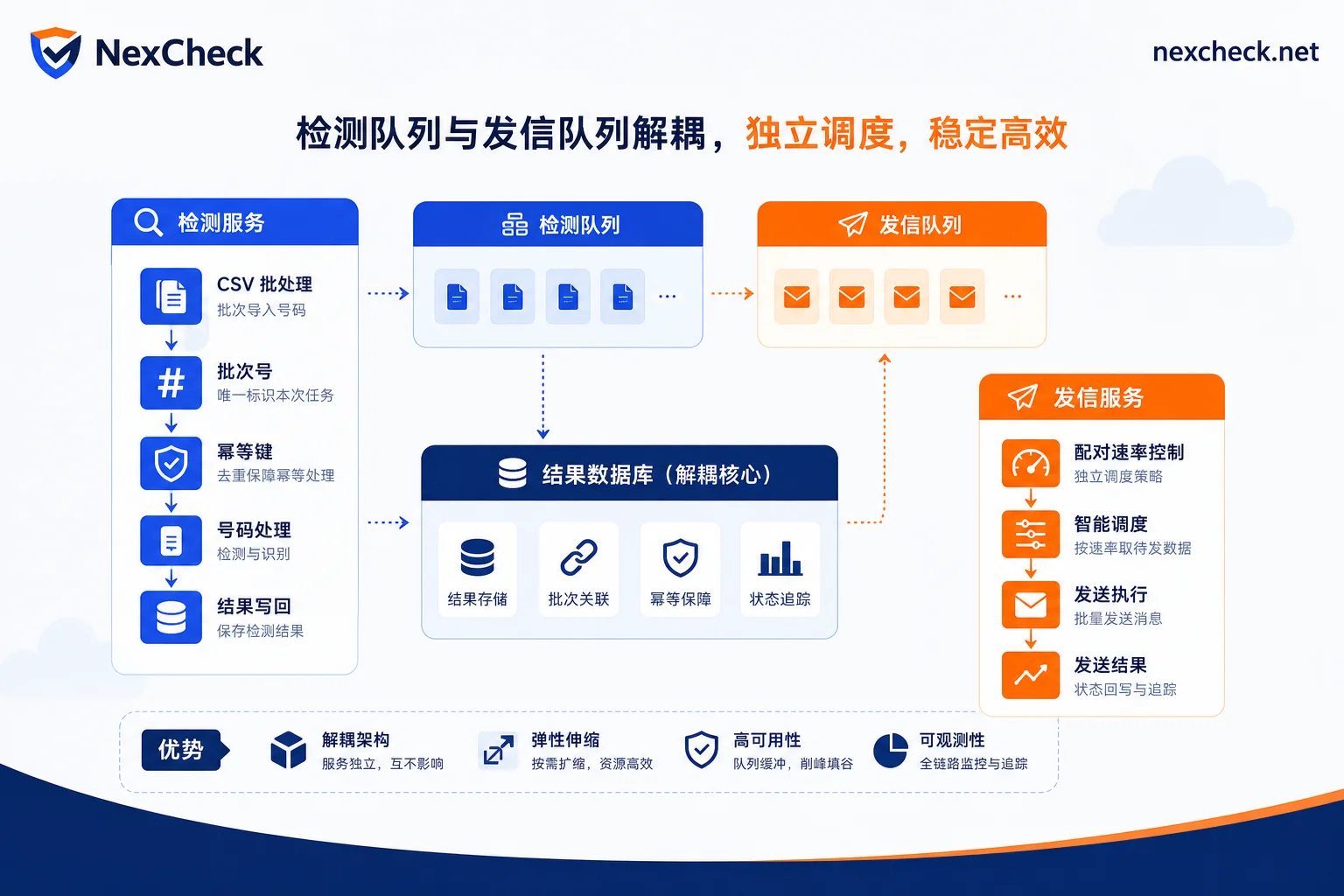
Implementing Decoupled Detection and Sending Batches: Queues, Batch IDs, Timestamps, and Idempotency Keys
In engineering implementation, it is recommended to use an asynchronous queue for detection tasks, form an idempotency key from the batch ID plus the normalized number, and record submission and callback timestamps to recalculate actual throughput. This way, detection throughput and sending-side pairing rate are two independent budgets that do not interfere.
The detection queue can be built in-house or you can use a detection API that supports batch submission and webhook callbacks, such as NexCheck's RESTful API. The specific steps are:
- Submit the number list by batch ID and record the submission timestamp.
- Receive each result via webhook, and write to the result table using the batch ID plus the normalized number as the idempotency key.
- After callbacks complete, write back to the CRM by batch ID, marking the batch status (completed / partially unknown). After NexCheck's callback results are written back to the CRM by batch ID, detection throughput and sending pairing rate are two separate budgets.
This way, the concurrency pressure from detection is not mistakenly included in the sending budget. For choosing a detection service, see How to choose a WhatsApp number screening platform, and the integration for batch number detection API is similar; the core is decoupling.
Two Prerequisites Before Running: Opt-in Authorization and Template Compliance Cannot Be Replaced by Detection Results
Sending success rate and anti-blocking depend on opt-in authorization, template compliance, pairing rate limits, and user block rate. Registration detection only confirms the number's status on the platform and cannot replace authorization and quality rating control. So the claim that "passing screening allows unlimited mass sending with anti-blocking" is not valid.
FAQ
How many numbers can be batch checked at once?
It depends on the task concurrency and single-batch completion time of the detection service you use. Derive the batch size using "stable throughput × expected time," and it is recommended to reserve a 5%–10% retry allowance. For example, with a throughput of 10 tasks/second, expected time of 10 minutes, and 10% retry allowance, the batch size is about 5,400 records. There is no fixed limit; it depends on the service's actual rate-limit responses.
How to fix WhatsApp Cloud API 131056?
131056 is a pairing rate limit exceeded, meaning you are sending to the same user too quickly. Immediately stop sending to that user and wait for the rate to recover at 1 per 6 seconds. If you triggered the burst of 45, you need to wait for future quota to recover, usually by increasing the interval, and check if you were treating burst as normal.
What is error 131026?
131026 means you sent to a non-WhatsApp user or a user who has not accepted the privacy policy. The solution is to improve the list quality and increase front-end detection coverage, filtering out such numbers from the sending list. This is the main error code that detection can solve.
What is the interval between messages to the same person on WhatsApp to avoid rate limiting?
The official rule is 1 message per 6 seconds, i.e., about 10 per minute. For sending to the same person, it is recommended to interval at least 6 seconds, with a maximum burst of 45, but borrowing future quota, so you cannot sustain burst frequency.
How long after batch detection can I start mass sending?
After detection is complete, first confirm the results are stored and filter for "registered and authorized" numbers, then derive the sending window based on the pairing rate. If you plan 3 messages per user, you need at least 18 seconds per person, so the actual wait time depends on your planned reach rhythm, not the detection completion itself.
What happens when the WhatsApp burst of 45 is used up?
Using up the burst of 45 does not mean the daily quota is exhausted; instead, it borrows from future quota, which reduces the sending rate for that user afterward and may trigger 131056. It is recommended to treat burst as an emergency measure, not as normal throughput.
How to troubleshoot if detection passes but quality rating drops?
First, look at the distribution of recent error codes: if 131026 is high, detection coverage is insufficient; if 131056 is high, sending pace is too fast; if 131048 is high, overall behavior is restricted. Detection only solves the 131026 category; rate and compliance need to be adjusted through sending strategy and opt-in management.



Comments(0)