 NexCheck-筛号平台
People who just search for "number filtering API" are usually stuck on three things: interfaces with the same name "number detection" have quotes ranging from a few mills to a few dimes—what's the difference? The API returns "valid," but why do SMS or WhatsApp campaigns still fail massively? After integrating into the system, why is the bill higher than estimated?
Conclusion first: When choosing a number filtering API, you can't just look at unit price and claimed accuracy. The first step must be to map the API capabilities to your actual reach channels—separate "format validation," "carrier on-network/HLR query," and "application platform account screening." The second step is to verify four hard indicators: whether it's direct connection or real-time detection (avoid expired cache libraries), billing granularity (whether there are multi-package surcharges, duplicate charges, and failure refunds), the privacy boundaries of returned fields, and the architectural match between synchronous low-latency and asynchronous batch Webhook.
Below, we clarify the most confusing interface layers on the market, four high-frequency pitfalls, and the testing and finalization process.
I. Why Do Quotes Differ by More Than Ten Times? First Distinguish the Three Layers of Number Filtering API Capabilities
Many teams compare interfaces from different layers as if they were the same thing, only to find out after purchase that they can't solve their problems. The common number filtering capabilities in the industry are actually divided into three layers:
- First layer: Format and number segment rule validation (cheapest, but shallowest)
Relies on regular expressions or open-source number libraries to check whether the area code, digit count, and country code conform to the E.164 standard. It can intercept low-level errors like missing a digit or typing letters, but it completely cannot determine whether the number is suspended, whether the owner has changed, let alone whether the recipient has installed a social app. Moreover, once a country's numbering plan changes (e.g., Vietnam changed 11-digit old numbers to 10-digit new numbers in 2018), old prefix rules hardcoded locally will mistakenly kill real users. - Second layer: Carrier and basic line detection (empty number, HLR, and device type)
This layer checks the status on the communication network side, commonly returning "real number, empty number, suspended, silent number, risky number," as well as carrier attribution and line type (mobile, landline, or VoIP virtual number). But note that this layer is also divided into "static cache libraries" and "real-time queries (Live HLR)": cache libraries are extremely cheap (domestic channels can be as low as about 0.001 yuan per record), but due to update cycles, there is about a 5% status lag error; real-time HLR or multi-dimensional line interfaces typically cost around 0.004–0.04 USD per query, suitable for risk control and outbound call scenarios sensitive to number recycling. - Third layer: Application platform ecosystem screening (IM, social media, finance, and e-commerce account status)
The carrier showing "on-network normal" only means the SIM card can receive SMS, not that the owner has registered WhatsApp, Telegram, LINE, Zalo, or has Amazon, Binance accounts. What cross-border private domain and overseas growth teams really need is often, after confirming the basic number segment is available, to further determine the activation status, activity level, and whether banned of the target account on specific apps.
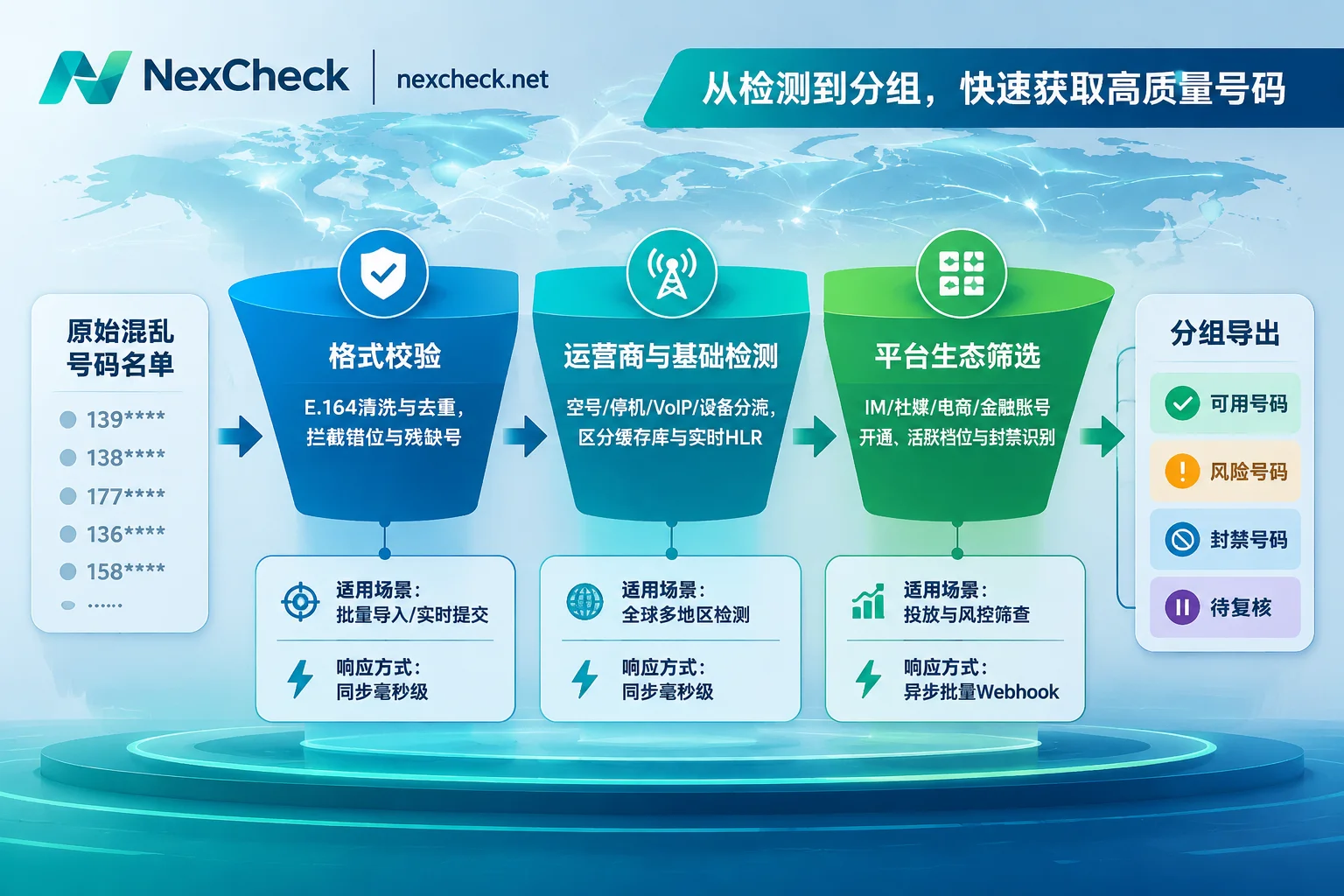
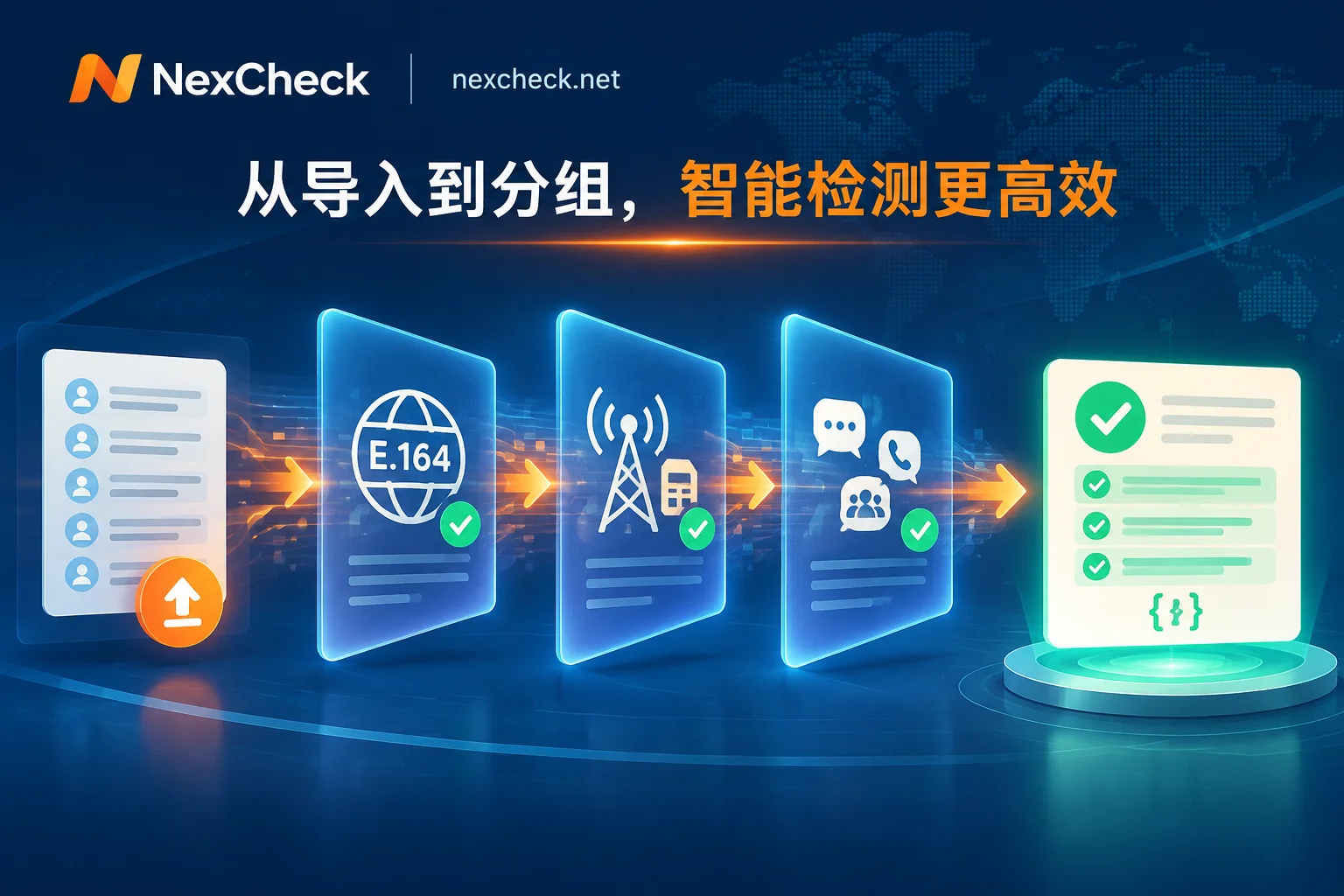
In actual selection, if the business spans SMS outbound, IM reach, and overseas social media/e-commerce, integrating with three or four single-point suppliers will skyrocket maintenance costs. For example, number filtering API covers a comprehensive prepaid platform NexCheck, which clearly splits capabilities into two layers: it provides a basic detection matrix covering empty number and on/off status, number type, carrier, device model, iOS blue label, Apple/Android分流, and US high-risk complaint numbers (for number sources without dedicated detection items such as Cash App, OKX, Discord, you can run this layer first), and also offers dedicated detection for each platform grouped into five categories: instant messaging, social media, crypto and finance, e-commerce logistics, and local life (some items also support email or @用户名 input). The speed, coverage areas, and result criteria of each platform channel can be matched on demand during selection, avoiding paying extra for unused fields.
II. Four Most Common Pitfalls When Evaluating a Number Filtering API
After distinguishing the interface layers, what really determines whether integration is hassle-free or requires rework are the following four details.
Pitfall 1: Blindly Trusting "99% Accuracy," Ignoring Number Decay and Cache Lag
Overseas carriers typically recycle and reassign idle numbers every 6–12 months. A customer list that was 92% accurate a year ago may only be 65%–75% actually usable a year later. If the API you integrate reads a cache library from weeks ago by default, it may appear fast and cheap, but you'll still hit many empty or reassigned numbers when calling or pushing.
On the other hand, be wary of suppliers exaggerating "100% penetration of all fields." Any compliant platform detection only reflects the platform status at the moment of query; it cannot guarantee absolute non-miss for a single result, nor can it read privacy data that users have actively hidden—for example, WhatsApp users' hidden avatars, signatures, and last seen times, or Facebook's undisclosed gender and avatar fields; Telegram profiles themselves have no gender or age fields, so related judgments can only rely on the user's public name and avatar for identification. When selecting, asking clearly about "the boundaries of what the API can query" and "data decay cycles" is more useful than listening to a salesperson recite a vague percentage.
Pitfall 2: Hidden Bill Assassins—Multi-Package Surcharges, Duplicate Charges, and No Refund on Failure
The "minimum starting price" on an API quote often hides three surcharge methods:
- Data package split billing (Pricing Creep): For example, some international interfaces set basic line type at $0.008 per query, but once you add owner name, SIM card change detection, or risk score, each item costs extra.
- Monthly package expires and becomes void: If a monthly subscription quota package isn't fully used in the month, it resets to zero the next month, effectively raising the unit price for teams with obvious peaks and troughs.
- Duplicate values and failed tasks are charged anyway: When repeatedly importing and exporting the same customer database, if the API doesn't automatically deduplicate or doesn't refund on failure, a large amount of dirty data directly becomes sunk cost.
Before testing any prepaid or pay-per-use API, be sure to confirm: whether failed tasks are refunded, whether duplicate numbers are charged, and whether prices for different channels are transparent. For example, NexCheck uses a prepaid model where you recharge first and then pay per record; charges are deducted when a task is created, failed tasks are automatically fully refunded, and unit prices are transparently listed in the console price list; at the same time, NexCheck also explicitly states that after submitting a task, it does not automatically deduplicate, and duplicate values are charged as usual. Therefore, a safer engineering habit is: before calling a paid API or uploading a batch task, first use a local script or the browser-based free number cleaning tool to complete separator recognition, complete E.164 format by country, and deduplicate (note: don't choose the wrong default country, otherwise you'll get numbers with correct format but wrong attribution), then send to paid detection, which can directly save a lot of unnecessary costs.
Pitfall 3: Confusing "Synchronous Real-time API" with "Batch Asynchronous API"
Different businesses have completely different tolerance for latency:
- Real-time interception in registration forms/landing pages: Requires p50 latency in the 50–150 millisecond range (preferably not exceeding 200 milliseconds), otherwise user form submission will noticeably lag or even cause churn. Such scenarios require lightweight synchronous APIs that only validate format, VoIP/risky numbers, or basic activation status.
- CRM historical database cleaning / multi-dimensional platform deep screening: Running tens of thousands to hundreds of thousands at once, and also checking multiple activity levels, account age, or cross-platform status, forcing into synchronous HTTP requests will inevitably trigger timeouts or rate-limiting packet loss. The correct approach is to use batch submission + Webhook asynchronous callback (or reasonable batch polling).
If you're still unsure how to design the pull mechanism for your task volume, you can first read this tiered explanation on polling vs. Webhook callback; if you want to integrate detection directly into your existing business database, you can also refer to the CRM real-time interception and asynchronous write-back architecture in how to integrate number filtering API to design your pipeline.
Pitfall 4: Ignoring Data Ownership, Retention Period, and Local Compliance
After researching many low-price "number scanning APIs," you'll find that the real risk often lies not in the technical documentation but in the data flow—some low-price APIs of unknown origin secretly retain and resell the customer number pools uploaded. When selecting, you must check the privacy policy to confirm that the service provider treats you only as the data controller, processes data only within the scope of executing tasks, and does not use it to build a number database for external sale (this can be verified in the NexCheck Privacy Policy).
At the same time, pay attention to result storage and compliance responsibility: no detection platform should be treated as your permanent database (for example, NexCheck's task center does not promise permanent retention days, and is not recommended for long-term archiving); results should be returned to your own CRM as soon as possible; more importantly, enterprises themselves must ensure that the source and use of submitted numbers are legal, and should not overwrite all subdivided statuses returned by the backend (such as silent, risky, suspended) as "invalid" in one stroke—retaining the original status fields facilitates subsequent strategy adjustments.
III. How to Choose for Different Business Scenarios? A Comparison Table for Finalization
| Business Scenario | Core Requirements | Priority API Dimensions | Dimensions Not Necessary | Recommended Integration Method |
|---|---|---|---|---|
| Form/registration real-time anti-fraud | Low latency, prevent fake/verification code numbers | Format validation, VoIP and high-risk number identification, millisecond response | Complex social profiles or cross-day activity | Synchronous real-time request |
| SMS/voice outbound cleaning | Reduce bounce rate, improve connect rate | Empty/suspended/off identification, carrier and device分流 (e.g., iOS blue label, RCS system type) | Social platform UID or gender/age | Batch upload or asynchronous API |
| IM refined private domain reach | Improve first-contact pass rate and prevent bans | WhatsApp/Telegram/LINE/Zalo activation, activity tiers, ban/zombie filtering | Only format validation (almost ineffective for reach) | Batch asynchronous submission + Webhook write-back |
| Cross-border high-ticket/financial risk control | Identify high-value and trustworthy users | Account registration time/account age (e.g., Viber account age to exclude new numbers), public profiles and multi-platform cross-verification | Cache libraries solely pursuing lowest unit price | Layered pipeline (basic screening first, then deep screening after passing) |
If your team is debating whether to build a system from scratch by buying number segments and protocol libraries or to purchase an existing service, it's advisable to first calculate the costs of proxies, account loss, and maintenance manpower; you can refer to the 6 cost comparisons in self-build or purchase global number screening system; if you haven't finalized the specific cleaning order, you can also follow the complete number cleaning process to string together steps from local deduplication to cross-platform screening.
IV. 3-Step Practical Checklist Before Going Live
Don't just look at official promotional images or a single demo. Before formally writing into production code, run a small-scale verification according to the following three steps:
- Prepare a "mixed test set" rather than only testing good numbers
Sample 200–500 real historical records, deliberately mixing in: known active normal numbers, deactivated/empty numbers, special number segments before and after numbering plan changes (e.g., Vietnam 10-digit numbers), VoIP virtual numbers, and dirty data with spaces or missing country codes. Run the same test set through different channels, compare detection rates and actual outbound/reach feedback. - Use a layered pipeline to control costs, don't run the most expensive channel on everything
First pass the entire list through basic empty number/format cleaning (or low-cost activation channels) to filter out obviously invalid data, then only run high-level activity, device, or profile detection on the subset of "activated and valid" numbers. In the NexCheck console, you can also use "Continue Detection" to directly send the results that passed screening to the next task (note: this creates a new task and incurs separate charges); first get the data criteria working, then solidify the rules into API code. - Verify API documentation acquisition and integration path
Before integrating the API into your CRM, confirm the authentication method, batch limits, error codes, and Webhook callback fields. It should be noted that NexCheck provides a RESTful API supporting batch submission, real-time queries, and Webhook pushback, but its public user manual mainly introduces console operations and cleaning tools, and does not directly disclose API endpoint addresses, parameters, and authentication details; developers who need to integrate the API are advised to first register a NexCheck account for free to view the platform detection items and real-time price list in the console, and directly contact Telegram technical integration support to obtain interface documentation and channel selection advice.
Once you've passed the four gates of API capabilities, cache errors, billing rules, and data security, and then write the first line of integration code, you can basically avoid 90% of the rework pitfalls of a number filtering API.