 NexCheck-筛号平台
Direct conclusion: Using a cloud platform that does not log into your own account and does not send test messages for Viber number screening will neither ban your own Viber number nor alert customers through messages, calls, or verification codes. What truly triggers bans is using a personal account or a newly registered small account to bulk import phone contacts, frequently initiate chats with strangers, or send "Are you there?/Test" messages for manual verification.
If you are preparing to clean a customer list for the Philippines, Greece, Ukraine, Moldova, or Myanmar before sending, the following clarifies the three most common pitfalls: where the security boundaries lie, why sometimes "screened as registered but online status not visible," and a practical sequence that does not harm your main account.
1. Why does self-testing numbers easily get banned, while cloud screening does not alert customers?
When many people first encounter the Viber market, they habitually treat it like adding WeChat friends: bulk save phone numbers from a CSV into a backup phone's contacts, open Viber to see who has a profile picture, or directly pick a few numbers and send a greeting to test.
Under Viber's risk control logic, this approach is very dangerous and mainly crosses two red lines:
- Cold-starting陌生 conversations triggers anti-spam bans: Viber's anti-spam system focuses on monitoring behavior of "establishing contact with many strangers in a short time without prior history." Especially for newly registered or low-trust accounts, bulk messaging陌生 numbers in a short period is highly likely to be judged as a spam sender—the first trigger usually restricts sending functions (e.g., can only receive messages within 24 hours, cannot send), and a second trigger leads to a permanent ban.
- Local sync and test sends leave direct traces: Viber uses phone numbers as the core account identifier and does not have a mechanism like some social platforms to "contact by searching username only." Once you initiate a conversation, dial, or mistakenly create a group with target numbers on a local device, the customer's phone will immediately receive a notification, and they may even tap "Report Spam," directly lowering the reputation score of your main account or brand sending channel.
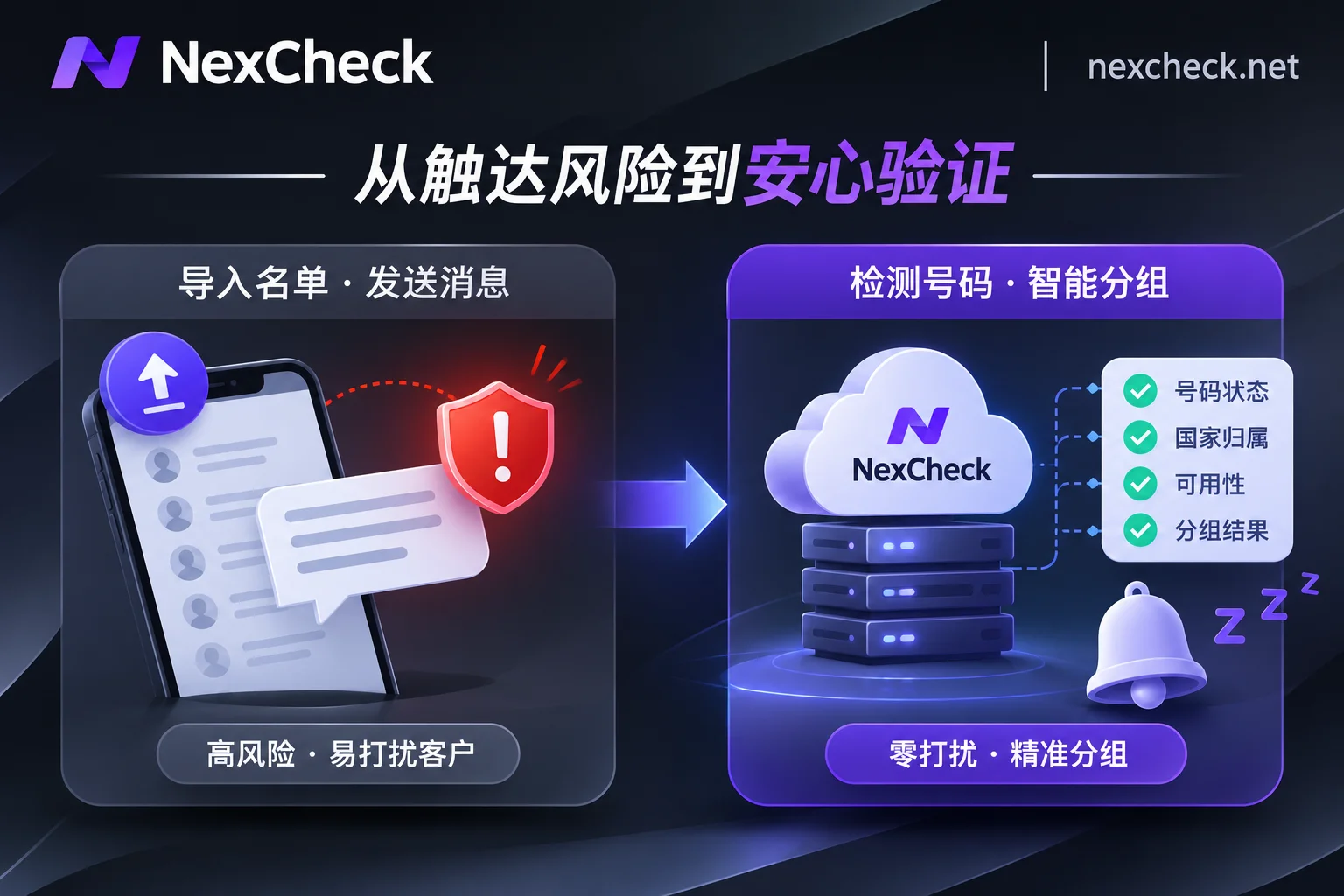
Compliant cloud detection and local test sends are two completely different chains.
Taking NexCheck's cloud detection as an example, after a task is submitted, status verification is entirely completed on the server side: it does not require you to scan a QR code or log into your own Viber account, nor does it send any chat messages, verification SMS, or friend requests to the numbers in the list. Customers will not see any pop-up, and your own business number will not be exposed to risk control radar.
2. Still inaccurate after screening? You must first understand Viber's 4 mechanisms and privacy boundaries
Many teams have two doubts after using number screening tools: "Why do some numbers screened as registered not show active status?" and "Why is there still no response after sending?" This is usually not a tool error, but a failure to distinguish Viber's four-layer rule limitations:
1. Users disable "online status" and Viber Plus invisible mode
Viber allows users to manually turn off "Share 'online' status" in "Settings → Privacy." Once off, contacts cannot see whether the person is online or their last seen time (and this toggle can only be switched once every 24 hours). In addition, paid subscribers to Viber Plus can enable "Invisible mode" to hide their online traces. Therefore, interval activity screening judges whether an account has had usage behavior within a set time window based on available signals, rather than penetrating all users' privacy settings, and it does not mean "the person is staring at the screen right now."
2. "Account age" is not the user's real age
Viber's profile page itself does not provide reliable public age or gender fields like some social platforms. In NexCheck's Viber detection system, "account age comprehensive screening" refers to how long this Viber account has been registered, not how old the owner is. Its practical value lies in helping you eliminate temporary numbers registered just a few days ago, code-receiving numbers, or bulk marketing small accounts, and focus budget on real users who have used the number stably for a long time.
3. "Registered" does not equal "commercial messages will definitely be delivered"
In high-penetration countries such as the Philippines, Ukraine, and Myanmar, it is very common for users to change SIM cards without canceling, or for original phone numbers to be suspended and recycled by operators, leaving accounts in the platform database but long unused. Meanwhile, Rakuten Viber's Fair Usage Policy explicitly prohibits unauthorized spam commercial messages, and official Viber Business Messages also have strict requirements for sending permissions, user opt-in, and transactional template approval. If you only do a "registered" layer and then mass send to all, you will often hit many dormant numbers and high rejection rates.
4. Detection results only reflect "the moment of query"
Number suspension, rebinding, cancellation, or ban are all dynamically changing. For old lists run a few months ago, it is recommended to re-screen before preparing a new round of promotions or recalls, to avoid making decisions based on expired status.
3. The four-step Viber number screening order that avoids bans and saves money
To minimize both risk control and cost, the safest approach is to completely separate "format cleaning," "cloud layered detection," "data export and cleanup," and "subsequent outreach":
Step 1: First clean format and duplicates locally in the browser
Customer tables exported across countries often lack country codes, carry local leading 0, contain spaces and hyphens, or have the same customer repeatedly entered from different channels. Special note: when uploading bulk tasks on the detection platform console, the system usually does not automatically deduplicate; duplicate submitted numbers will be charged as usual.
Before creating a paid task, it is recommended to first use the free browser-based number cleaning tool provided by NexCheck. It processes entirely in the local browser, does not create a paid task, can automatically recognize common separators, complete country codes based on the selected default country, uniformly convert to standard E.164 format, and output deduplicated valid/invalid/duplicate statistics. The only thing to note is do not select the wrong default country, otherwise you will get hidden errors where "the format is fully compliant but the area code attribution is all wrong."
Step 2: Use a funnel progression of "registered → interval active → account age"
Do not run the deepest detection on the entire raw list right away. Organize CSV, TXT, or XLSX files according to the console quick start guide (one number per line in the first column, and select the corresponding country or region when submitting). It is recommended to refer to our previously organized article "How to Do Viber Number Screening: List Cleaning Order for Registration, Activity Interval, and 'Account Age' Detection" and execute a three-layer funnel:
- First run "registration screening": eliminate empty numbers, wrong numbers, and SMS-only numbers not registered on Viber at the lowest unit price.
- Then run "interval activity screening" via "Continue Detection": after the task ends, directly use the "Continue Detection" function in the console to send only the "registered valid" group of numbers to interval activity screening (note this operation creates a new task and is charged separately), filtering out long-abandoned zombie numbers.
- For high-ticket or risk-sensitive businesses, add "account age": when you need to filter short-lived small accounts and code-receiving users, add another layer of account age screening to the active list.
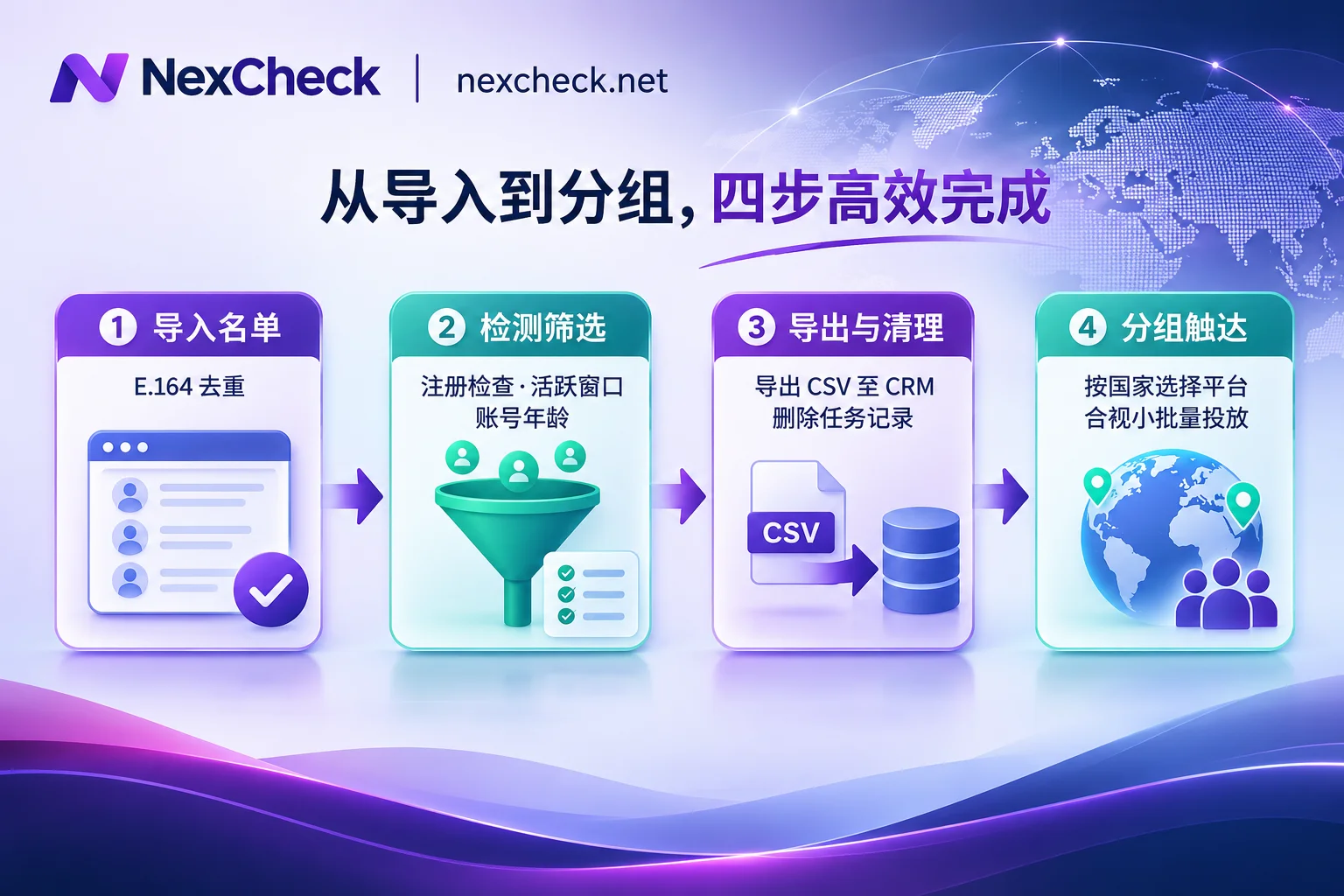
Step 3: Manage data retention and budget boundaries
NexCheck uses a prepaid pay-per-item model, charging when a task is created, and automatically refunding in full if the task fails. The specific supported countries and unit prices for each item are subject to the real-time price list in the console. Also, from a data compliance perspective, the platform processes lists only within the scope of executing detection tasks and does not sell customer data or use it to build number databases for external sales; however, since the task center does not promise permanent archiving, after detection is complete, you should download the result files grouped by valid/invalid as soon as possible and write them back to your own CRM, then you can actively delete task records in the console. As the data controller, customers should also ensure that uploaded numbers have legal sources and processing authorization (see NexCheck Privacy Policy).
Step 4: Separate outreach channels, test with small samples before scaling
Number screening platforms only help you see list quality and do not intervene in message mass sending. After obtaining a cleaned high-activity list:
- If using the Viber Business Messages official channel, be sure to confirm that there are clear opt-in authorization records at the collection stage, and complete template reporting and SMS fallback threshold control in advance (for practical tips, you can read further "How to Do Viber Number Screening? From Mandatory New Rules for Commercial Templates, SMS Fallback Billing Pitfalls to Cross-Ecosystem Precise Routing Solutions").
- If manual customer service or private domain teams follow up one-on-one, first extract a few hundred entries for small-sample test sends, closely monitor delivery rate, reply rate, and sporadic complaint signals, and gradually scale up after confirming the script and frequency are safe.
If your list mixes different countries, or you want to first check whether the target market is more suitable for screening Viber first or WhatsApp and Telegram first, you can view NexCheck's regional solutions for each country, or directly register a free account to view real-time supported platform detection items and price lists in the console.
4. Quick answers to common questions
1. For Viber number screening, must I provide my own Viber account or log in with a code?
No. When using a cloud detection platform like NexCheck, you only need to upload a number file organized in E.164 format; your any Viber personal or business account is not bound or logged in throughout the process.
2. Why do a small number of customers still cannot be contacted even though I only selected "registration screening"?
"Registered" only means that the number had a registration record at the time of query; it does not mean the owner has recently opened Viber, nor that they are willing to receive陌生 commercial messages. To truly improve actual reach rate, add "interval activity" after screening to filter abandoned numbers, and do small-sample tests before sending.
3. Can I directly upload @用户名 to screen Viber?
No. Viber does not have a publicly searchable username system; accounts are bound to phone numbers, so when uploading, you need to prepare a list of phone numbers with country codes.