 NexCheck-筛号平台
Direct conclusion: Using an external bulk detection platform for LINE number screening will not cause your own LINE account to be banned, nor will it send friend requests or any notifications to customers. What easily triggers account bans, friend-adding restrictions, or even alerts customers is using your daily or business account to bulk import contacts into your phone, enabling "Auto-add friends" to probe numbers, or using cracked scripts to simulate high-frequency friend adding, as well as mass-sending messages to many dead numbers without any screening.
Many operations and marketing teams searching for "LINE number screening" are actually worried about two things: first, if they throw tens of thousands of customer phone numbers into detection, will it implicate their official account (OA) or personal main account and get it "suspended"; second, will the detection process show up in the other party's LINE "Friend Recommendations" or cause subsequent reports by customers.
The following explains LINE platform underlying mechanisms, the real operational mistakes that cause bans, and the standardized order for safe screening in one go.
Why does DIY "backyard" screening easily cause bans and alert customers?
Before接触 professional screening tools, many teams习惯用 "save customer phone numbers into phone contacts → log into LINE and sync" or "run scripts to simulate friend adding" to test numbers. These two methods almost step on all the red lines of LINE's risk control and privacy mechanisms:
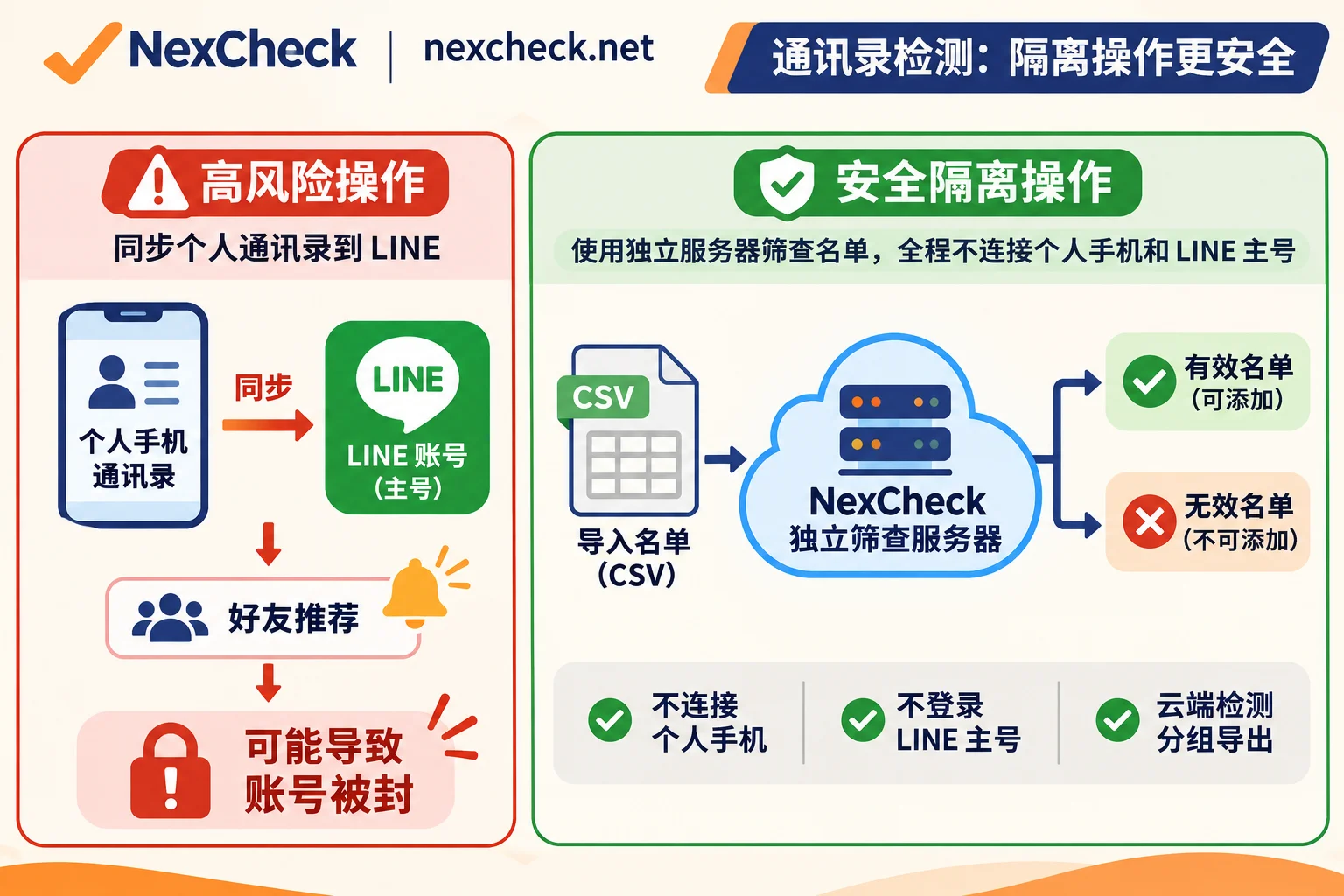
1. Importing contacts with "Auto-add friends": directly disturbing customers
According to LINE's official privacy and friend-adding rules, when you enable "Auto-add friends" on your main device and sync contacts, LINE will encrypt and upload the numbers in your phone to its server for matching, and directly add registered numbers that allow matching as your friends.
This means two things:
- You are not silently checking: while the other party is written into your friend list, your account will also appear in their "People You May Know / Friend Recommendations", or even directly prompt that it was added via phone number.
- Easily triggers friend-adding risk control: new accounts or regular personal accounts importing and adding a large number of陌生 numbers in a short time will be judged by the system as abnormal automated behavior, at best restricting the "add friends" function for 24–72 hours, at worst triggering account function abnormalities.
2. High-frequency probing with scripts or abnormal device environments: directly triggering "suspension"
Some local cracked scripts or群控 software on the market require you to log into your own LINE account, or even switch accounts at high frequency on the same device under high-risk shared IPs to bulk check numbers. LINE's risk control system not only monitors behavior frequency but also comprehensively detects whether the login region matches the number's归属, and whether device sessions are continuous. Once judged as violating terms of service, the account may be directly "suspended" (common manifestations: unable to send text messages, unable to create groups, or unable to log in on mobile), and you must manually appeal through the official customer service form, which is a lengthy process.
3. Mass-sending without screening: dragging down main account weight with high rejection rates
Even if you use a legitimate LINE Official Account (OA) or customer service system for outreach, if the list contains many unregistered numbers, deactivated phone numbers, or long-term silent zombie numbers, mass-sending will easily result in a high proportion of undelivered, blocked, or reported by users long-pressing "Report". Moreover, with the November 2026 increase in monthly fees for LINE Official Accounts in Taiwan for medium and high usage plans, burning paid push quotas on invalid numbers means bearing both ban risks and wasted bills.
Two key boundaries for safe LINE number screening: no connection to main account, and understanding privacy limits
To achieve "no ban on your own account, no alerting customers", the core principle is only one: completely physically isolate "number status screening" from "your own LINE business account".
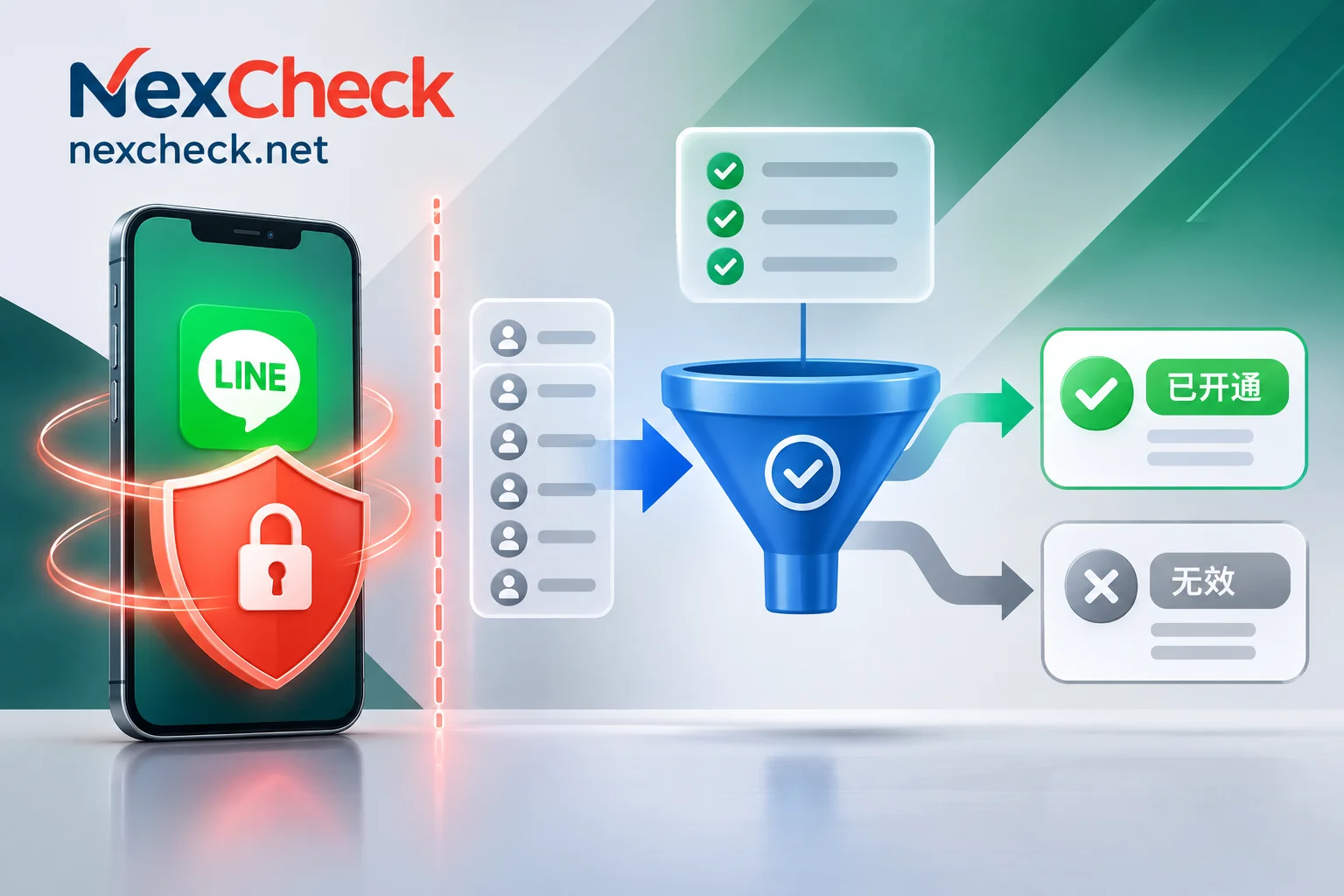
Take the prepaid bulk screening platform NexCheck as an example. When you do LINE number screening, you only need to upload the organized list file on the console (or submit via API). The entire detection task is completed on the platform side, neither requiring you to log into your own LINE account nor sending verification codes, messages, or friend requests to the phone numbers in the list, so naturally there is no issue of implicating the main account or alerting customers.
However, safety isolation does not mean "everything can be checked". Before spending budget, you must recognize the three objective boundaries of the LINE platform itself:
- Must screen separately by region: LINE's account system and phone number rules vary greatly across markets. On NexCheck, LINE registration screening is processed separately by region (Taiwan, Japan, Thailand, South Korea, Hong Kong, United States); meanwhile, according to LINE official rules, outside the five core regions of Hong Kong, Japan, South Korea, Taiwan, and Thailand, currently only accounts registered with early versions before 13.11.0 and retaining phone numbers support phone number friend matching. Therefore, cross-country mixed input not only easily reports format errors but also significantly lowers hit rates.
- User privacy switches limit readable fields: LINE allows users to turn off "Allow others to add me" on the main device. Once the other party turns this off, matching by phone number dimension may fail to find or return complete status. In addition, fields set as private by users cannot be forcibly read. NexCheck's LINE screening can bring back UID, nickname, avatar, and comprehensive items can also return available age and gender, but these fields are also limited by the account's public status at the time, and can only serve as grouping reference, not 100% full coverage.
- Activity detection must first screen registration: Do not skip registration verification and directly check activity. In NexCheck's mechanism, LINE activity detection must first go through registration screening—first pick out numbers that are truly registered with LINE, then further check activity for this batch of valid accounts. This way the result caliber is clearer and avoids paying an extra round for unregistered numbers.
Practical order for LINE number screening without bans or wasted budget (4 steps)
To minimize costs and ensure subsequent outreach is not banned, it is recommended to strictly follow these four steps:
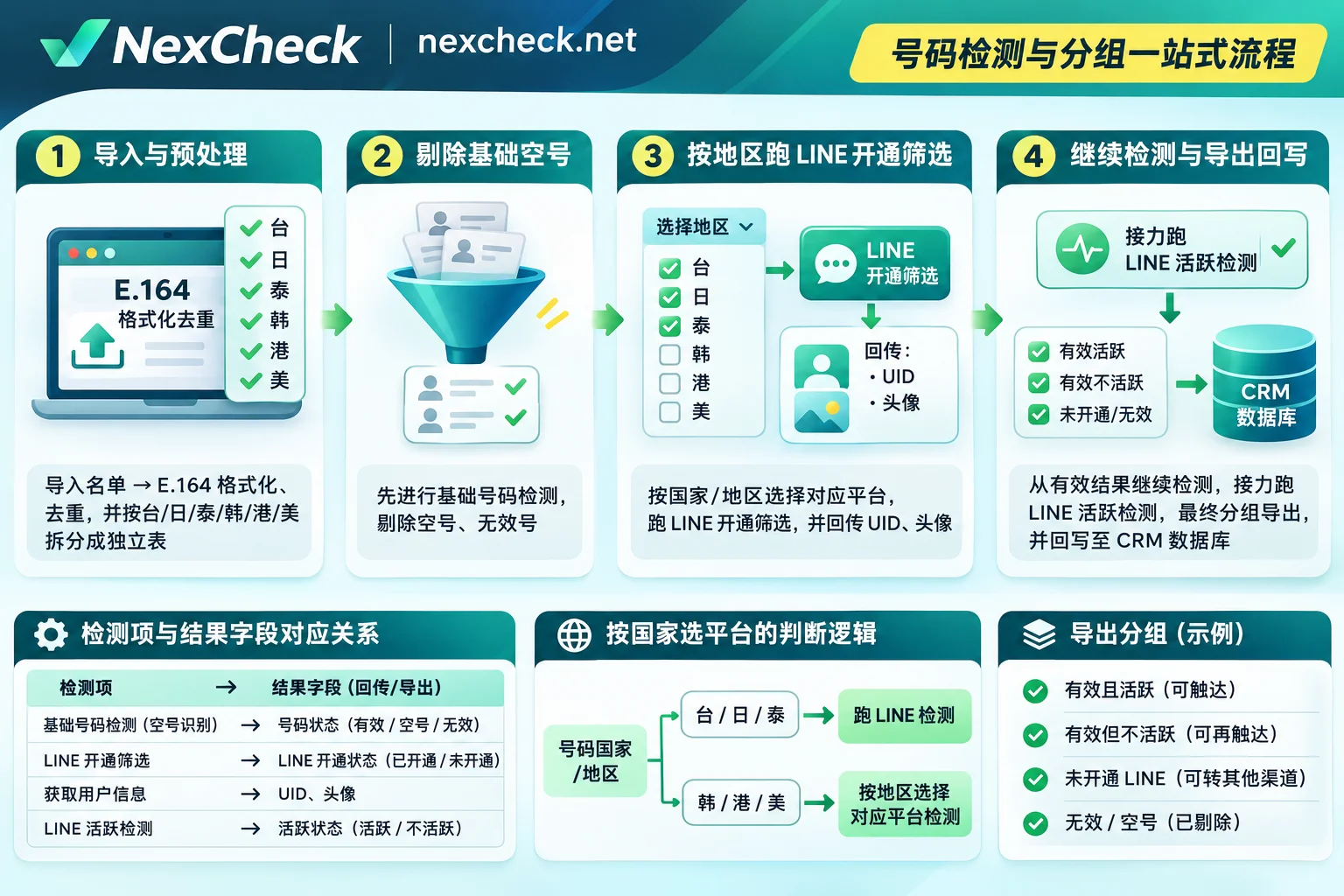
Step 1: First clean formats, deduplicate, and split tables by region in the browser
Do not directly upload the raw Excel exported from CRM into a paid detection task—NexCheck console does not automatically deduplicate after uploading bulk files; duplicate numbers will be charged as usual.
It is recommended to first open the free number cleaning tool. The entire process is completed locally in the browser and will not create any paid task. It can help you:
- Automatically identify separators, remove spaces and dashes;
- Complete international area codes based on the selected default country and convert to standard E.164 format (e.g., Japan
+81, Taiwan+886, Thailand+66, remove local leading0); - One-click deduplication, and count valid formats, invalid formats, and duplicate entries.
Avoidance reminder: If the list contains multiple countries, be sure to first split by country/region in the table, then clean each with the corresponding country—if the default country is wrong, the cleaning tool can still produce "format-correct" E.164 numbers, but the country attribution will be wrong. After completion, keep a base table containing original numbers and customer IDs for later CRM write-back.
Step 2: For old lists from mixed sources, run a basic invalid number detection first
If your list is old customers saved from years ago, exhibition business cards, or historical campaign leads, the numbers themselves may have been disconnected or recycled. In this case, you can first run NexCheck's basic number detection (such as invalid number and on/off status) to remove numbers that are already invalid at the telecom operator level, then proceed to LINE screening, which is much more cost-effective.
Step 3: Screen registration by region, then use "Continue Detection" to screen activity
Prepare the list as CSV, TXT, or XLSX file (one target value per line in the first column), and refer to the Quick Start Guide to create a task in the NexCheck console:
- Select the correct region and detection items: Under the LINE platform, select the corresponding region (Taiwan, Japan, Thailand, South Korea, Hong Kong, US), and decide whether to only screen registration or also retrieve UID, nickname, avatar, or comprehensive items including age and gender (specific supported regions, unit prices, and minimum/maximum row limits per task are subject to the real-time price list in the console).
- Billing and fault tolerance mechanism: NexCheck uses a prepaid model, charging per item when creating a task; if task execution fails, the system will automatically refund in full.
- Use "Continue Detection" to relay activity screening: After the task is completed, results are grouped by valid and invalid. At this point, directly click "Continue Detection" in the console to use the filtered valid registered list as input in one click and create a new LINE activity detection task (charged separately), thereby filtering out zombie numbers that "registered but have long abandoned the account".
If a technical team needs to integrate number screening into CRM or lead storage processes, NexCheck also provides a RESTful API supporting bulk submission, real-time queries, and Webhook callbacks (since the public manual does not show interface addresses, parameters, authentication, and callback formats, you need to first register with NexCheck and then contact Telegram customer service to obtain integration documentation).
Step 4: Export and write back promptly, delete, and use "layered outreach" to protect subsequent accounts
After obtaining the final active valid list, download it immediately and write it back to CRM by customer ID: NexCheck task center does not promise a fixed number of days to retain results; do not treat the backend as a long-term archive library; after export, you can directly delete the task data in the console (the list you submit belongs to you, and NexCheck only processes it within the scope of executing detection tasks, and will not use it to build a number database for external sale).
The last step also determines whether you will be banned later—"number valid and active" only reflects the platform status at the moment of query, and does not mean the user is willing to receive promotional messages. When subsequently reaching out via LINE Official Account or customer service tools, you must still:
- Combine UID, gender, age, and source scenario for segmented pushes, avoiding one-size-fits-all mass sending;
- Control daily adding and push frequency, and leave an unsubscribe entry;
- Strictly comply with message sending and privacy compliance requirements of the target market.
If you want to further understand multi-country format details, message cost control strategies after official account price adjustments, or compliance boundaries of overseas social media screening, you can continue reading these practical guides:
- How to do LINE bulk screening: number format cleaning, country-specific detection, result interpretation, and CRM write-back
- How to do LINE number screening? From new pricing rules for Japan and Taiwan official accounts, PNP phone number mismatch avoidance, to UID profile layering solutions
- Is social platform number screening legal? Will it alert customers or violate privacy regulations?
Quick answers to common questions
1. Using a third-party platform for LINE number screening, can the results be 100% guaranteed accurate for every entry?
Cannot promise absolute 100% accuracy per entry. On one hand, detection results only reflect the LINE server status at the moment of query; on the other hand, if the target user has turned off phone number search permission, or has recently changed binding or cancelled the account, it will affect hit results. The core value of number screening is to cut out definitely invalid dead numbers and low-value entries before large-scale outreach, not to replace subsequent business review.
2. After screening numbers on NexCheck, can I directly use it to mass-send LINE messages or add friends?
No. NexCheck only handles bulk screening of number and account status (registration, activity, UID, available gender and age, etc.), and does not provide message mass-sending, automatic friend adding, customer service follow-up, proxy IP, fingerprint browser, or verification code/account trading services. The screened valid list needs to be exported and handed over to your own compliant business system or LINE Official Account for follow-up.
3. After registering with NexCheck, can I directly run bulk tasks for free?
Registering an account is free, but creating bulk detection tasks in the console requires the account to have available balance first (recharge first, charged per item when creating tasks). If you just want to organize and deduplicate your numbers first, you can use the browser-based number cleaning tool for free, get a clear picture of valid counts and regional distribution, and then recharge and create tasks as actually needed (specific recharge limits and free trial rules are subject to the real-time instructions on the official website and console).